Cannot restore Aero

usernamecr

New member
Local time
11:48 PM
Messages
4
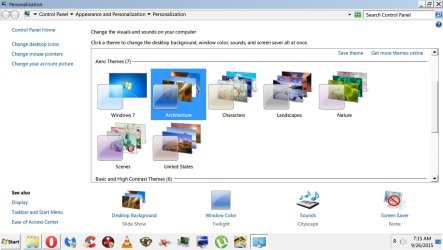
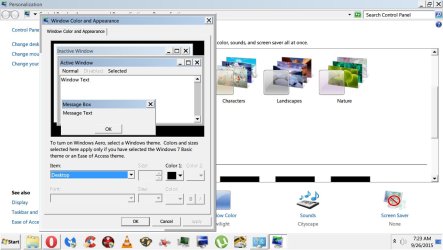
My aero theme completely disappeared a couple days ago and I cant figure out why. Im currently stuck in windows basic theme. When I go into the personalize menu all themes are there. Nothing is greyed out however when I choose any of the Aero themes I see the screen darken for a sec as if its going to change and makes the sound usually accompanied with it but no change actually happens. When I access the window color menu, its loads the windows xp looking version instead of the Win7 menu with the glass colors and transparency slider (I hope this makes sense) My taskbar is bright white with no transparency. Pretty much all visual enhancements are off including Aero peek (which is actually greyed out in the taskbar properties menu) Windows classic and contrast themes work just not Aero.

Ive read pretty much every thread I could in the last 48 hours and tried every single suggestion posted online. NONE seem to work.

So far ive tried..

SFC
Stopping and start uxtheme in CMD as admin
Stopping and starting DWM and Themes services and ensuring they're set to automatic.
Checked the registry values making sure they're correct
Tried the Aero trouble shooter (originally detected an issue stating my Video card couldnt handle it, now it just detects no issues at all)
disabling and enabling my VGA
Microsoft FIXIT patch for Aero
Uninstalling my VGA and re-installing with latest drivers
Made sure the performance settings are set best quality
Tweaking Windows Repair
Ran malware and virus scans to make sure theres no infection
cleaned registry issues

Not in that order lol

Ive tried a ton of other things that arent coming to me but I still cant get it work.

My last resort is running a repair install (ive been reading about this online but I have no idea what it is) I bought a workstation from a computer shop but wasnt given any cds with it.

Any help is GREATLY appreciated!
 

My Computer

Computer type
PC/Desktop
Computer Manufacturer/Model Number
HP Z400
OS
Windows 7 Professional 64bit
CPU
Xeon(R) W3520
Graphics Card(s)
ATI Radeon 5400
Hard Drives
600GB
Antivirus
Eset NOD32
Browser
Opera
Hi usernamecr, welcome to 7F! :)

You mentioned aero peek, try going over the steps in this tutorial: http://www.sevenforums.com/tutorials/838-aero-peek-turn-off.html Start with the last three bullets in the warning box, then work your way down through the options to make sure your settings are set to enable, remember you want to either turn on or enable.

If you want to use option four (reg file), follow the steps in option three to again, make sure your settings are set to enable.
 

My Computer

Computer type
PC/Desktop
Computer Manufacturer/Model Number
Gateway DX4831-01e (Mid-Tower Desktop)
OS
Originally Win 7 Hm Prem x64 Ver 6.1.7600 Build 7601-SP1 | Upgraded to Windows 10 December 14, 2019
CPU
Intel i3 530 2.93GHz, 2933MHz 2 Cores 4 Logical Processors
Motherboard
Gateway H57M01 133 megahertz
Memory
6GB of 1,333MHz DDR3 SDRAM
Graphics Card(s)
32MB Intel Graphics Media Accelerator HD IGChip
Sound Card
Realtek High Definition Audio
Monitor(s) Displays
Gateway HX2000 20inch TFT active matrix TN
Screen Resolution
1600 x 900 x 59 hertz
Hard Drives
WDC WD10EADS-00M2B0 [HDD] (1000.20 GB) -- drive 0,
HL-DT-ST DVDRAM GH41N [CD-ROM dr]
Four card readers, and Four USB 2.0
PSU
300watts.
Case
Mid-Tower Desktop
Cooling
Stock from Gateway
Keyboard
Natural Ergonomic Keyboard 4000, see Other Info
Mouse
Orig. Gateway wore out now using Insignia USB wired optical
Internet Speed
Vz FIOS 10ms png 57.64Mbps down 65.53Mbps up Speedtest.org
Antivirus
Zamana Anti-logger with Anti-malware, MSE, Windows Firewall,
Browser
IE11.0.9600.19399-Upd ver11.0.135, Firefox 68.0.1 x64
Other Info
System Specs by Belarc.

BIOS: American Megatrends Inc. P01-A0 11/17/2009

Replaced the MS 'Natural' Standard PS/2 Enhanced 101-102 Keyboard with a new Natural Ergonomic Keyboard 4000 on August 1st 2014.

Canon Pixma MG3222 Printer.

Updated to IE11 on 12102015 | Fios Quantum Router g1100

Additional AV: SpywareBlaster, manual Mbam, SAS
Anak,

Thank you for the speedy response.:)

I tried most of the suggestions on that page including the registry entry listed but to no avail.

I'm running out of options here.

Does anyone have any ideas? Much appreciated!
 

My Computer

Computer type
PC/Desktop
Computer Manufacturer/Model Number
HP Z400
OS
Windows 7 Professional 64bit
CPU
Xeon(R) W3520
Graphics Card(s)
ATI Radeon 5400
Hard Drives
600GB
Antivirus
Eset NOD32
Browser
Opera
When I access the window color menu, its loads the windows xp looking version instead of the Win7 menu with the glass colors and transparency slider
Could you please give us a screenshot of that?

Have you used any custom themes in the past?

Is a graphics driver installed? You could try updating it.
 

My Computer

Computer type
PC/Desktop
Computer Manufacturer/Model Number
Custom Built PC
OS
Windows 7 Ultimate 64 bit SP1
CPU
Intel(R) Core(TM) i5-2500K
Motherboard
Gigabyte Technology Co., Ltd. Z68X-UD3-B3
Memory
12GB Kingston Hyperx 1600MHz
Graphics Card(s)
Asus GTS 450
PSU
500W Coolink
Other Info
Genius G-Pen F610 (PenPad)
Speedgamer,

I have no custom themes installed nor any software to do that(if you even need software for it, I dont know)

You can see in the first screen shot i'm currently trying to use the "Architecture" theme. When I switch different Aero themes I get the accompanied sound. They all make different sounds and the wallpaper changes accordingly so I know that aspect is working (if that helps)

In the second screen shot, it gives me the windows classic menu instead of giving me the Win7 style with the transparency slider when I choose "Window Color"

And in the third screen shot you can see that Aero Peek is greyed out from the properties menu off the taskbar.

Im wondering if anyone thinks its my graphics card? To the best of my ability I uninstalled the VGA adapter from Device manager, restarted and downloaded whatever I could corresponding to my video card (AMD Radeon 5400 HD) It just came as one large exe file from AMD's site. Are those typically all in one? Or do I need something else ontop of that? Is the graphics driver, firmware, software etc...all different things that need to be installed separately? Should I have deleted the any old folders before reinstalling the package?

On a side note I did the WEI and my graphics card rated 4.6. Are those ratings based on comparisons to what is available now or is it a rating based on how well the card itself is running?

I have a 6 month warranty on the computer so if he sold me bad hardware I wont hesistate to march back in there. lol


Help is much appreciated!
 

Attachments

  • Untitled.jpg
    Untitled.jpg
    193.9 KB · Views: 2
  • Untitled1.jpg
    Untitled1.jpg
    200.9 KB · Views: 1
  • Untitled2.jpg
    Untitled2.jpg
    251.7 KB · Views: 3

My Computer

Computer type
PC/Desktop
Computer Manufacturer/Model Number
HP Z400
OS
Windows 7 Professional 64bit
CPU
Xeon(R) W3520
Graphics Card(s)
ATI Radeon 5400
Hard Drives
600GB
Antivirus
Eset NOD32
Browser
Opera

My Computer

Computer type
PC/Desktop
Computer Manufacturer/Model Number
Custom Built PC
OS
Windows 7 Ultimate 64 bit SP1
CPU
Intel(R) Core(TM) i5-2500K
Motherboard
Gigabyte Technology Co., Ltd. Z68X-UD3-B3
Memory
12GB Kingston Hyperx 1600MHz
Graphics Card(s)
Asus GTS 450
PSU
500W Coolink
Other Info
Genius G-Pen F610 (PenPad)
Speedgamer,

I just tried some of the options on that page including the registry edit but to no avail.:(
 

My Computer

Computer type
PC/Desktop
Computer Manufacturer/Model Number
HP Z400
OS
Windows 7 Professional 64bit
CPU
Xeon(R) W3520
Graphics Card(s)
ATI Radeon 5400
Hard Drives
600GB
Antivirus
Eset NOD32
Browser
Opera
Did you have any hardware or software changes when this happened?
 

My Computer

Computer type
PC/Desktop
Computer Manufacturer/Model Number
Custom Built PC
OS
Windows 7 Ultimate 64 bit SP1
CPU
Intel(R) Core(TM) i5-2500K
Motherboard
Gigabyte Technology Co., Ltd. Z68X-UD3-B3
Memory
12GB Kingston Hyperx 1600MHz
Graphics Card(s)
Asus GTS 450
PSU
500W Coolink
Other Info
Genius G-Pen F610 (PenPad)

My Computer

Computer type
PC/Desktop
Computer Manufacturer/Model Number
Gateway DX4831-01e (Mid-Tower Desktop)
OS
Originally Win 7 Hm Prem x64 Ver 6.1.7600 Build 7601-SP1 | Upgraded to Windows 10 December 14, 2019
CPU
Intel i3 530 2.93GHz, 2933MHz 2 Cores 4 Logical Processors
Motherboard
Gateway H57M01 133 megahertz
Memory
6GB of 1,333MHz DDR3 SDRAM
Graphics Card(s)
32MB Intel Graphics Media Accelerator HD IGChip
Sound Card
Realtek High Definition Audio
Monitor(s) Displays
Gateway HX2000 20inch TFT active matrix TN
Screen Resolution
1600 x 900 x 59 hertz
Hard Drives
WDC WD10EADS-00M2B0 [HDD] (1000.20 GB) -- drive 0,
HL-DT-ST DVDRAM GH41N [CD-ROM dr]
Four card readers, and Four USB 2.0
PSU
300watts.
Case
Mid-Tower Desktop
Cooling
Stock from Gateway
Keyboard
Natural Ergonomic Keyboard 4000, see Other Info
Mouse
Orig. Gateway wore out now using Insignia USB wired optical
Internet Speed
Vz FIOS 10ms png 57.64Mbps down 65.53Mbps up Speedtest.org
Antivirus
Zamana Anti-logger with Anti-malware, MSE, Windows Firewall,
Browser
IE11.0.9600.19399-Upd ver11.0.135, Firefox 68.0.1 x64
Other Info
System Specs by Belarc.

BIOS: American Megatrends Inc. P01-A0 11/17/2009

Replaced the MS 'Natural' Standard PS/2 Enhanced 101-102 Keyboard with a new Natural Ergonomic Keyboard 4000 on August 1st 2014.

Canon Pixma MG3222 Printer.

Updated to IE11 on 12102015 | Fios Quantum Router g1100

Additional AV: SpywareBlaster, manual Mbam, SAS
Back
Top