
kvanderstarren
New member
- Local time
- 12:35 PM
- Messages
- 5
I cannot seem to unpin a particular folder from the "Pinned" list for Windows Explorer on the taskbar. The folder refers to a network location that is no longer valid (i.e. \\192.168.1.4\foldername).
Is there anywhere I can manually delete these entries? I've Googled and looked in a number of places that were suggested but don't seem to see the list of folders anywhere. I've checked:
HKEY_CURRENT_USER\Software\Microsoft\Windows\CurrentVersion\Explorer\StartPage
and
C:\Users\<user name>\Appdata\roaming\Microsoft\Internet Explorer\Quick Launch\User Pinned\TaskBar
Is there anywhere I can manually delete these entries? I've Googled and looked in a number of places that were suggested but don't seem to see the list of folders anywhere. I've checked:
HKEY_CURRENT_USER\Software\Microsoft\Windows\CurrentVersion\Explorer\StartPage
and
C:\Users\<user name>\Appdata\roaming\Microsoft\Internet Explorer\Quick Launch\User Pinned\TaskBar
My Computer
- OS
- Windows 7 32 bit
- CPU
- Intel Core2 Duo 2.4GHz
- Memory
- 4GB
- Graphics Card(s)
- ATI Mobility Radeon HD 3400
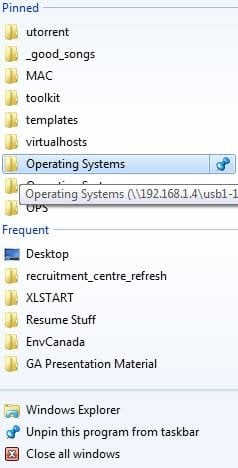
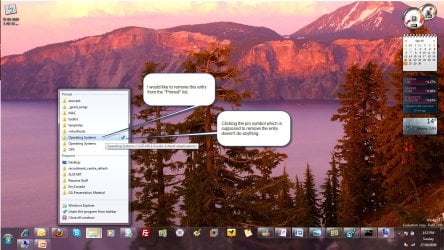
 Just to let you know, I never did find a resolution to this issue. I would be very interested if anyone else has found a workaround.

