cannot update, error 80072EFE , 80072EE2

That error code is typically caused by problems with a proxy server - the problem may be because your ISP is using a transparent proxy (but that's unlikely since you say your other machine gets updates OK - presumably it connection is the same

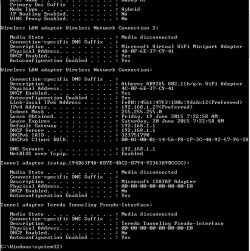
Perhaps a IPCONFIG result from the fully-functioning machine would make interesting reading. - can you do that please?
 

My Computer

Computer type
Laptop
Computer Manufacturer/Model Number
Asus K52F or Lenovo B51-80
OS
Win 7 x64 Home Premium (and x86 VirtualBox VM)/Win10
CPU
i3 370M/i7 6500U
Motherboard
Asus/Lenovo
Memory
8GB - finally :)/8GB
Graphics Card(s)
it's an i3, dude!/dual Intel&nVidia
Sound Card
onboard
Monitor(s) Displays
15.6" built-in
Screen Resolution
1366x768/1920x1080
Hard Drives
750GB Seagate internal
Sundry external drives attached to other computers on the local network
1TB SSD on the Lenovo
PSU
n/a
Internet Speed
as much as I can get - usually on a dongle/phone, so <1MB/s
Antivirus
MSE/Defender
Browser
IE11/12/Edge/Chrome/FF(if I must)
Yes the laptop is using the same internet connection, via wifi router. Here's its IPCONFIG, sorry had to paste in two parts.
I ended up downloading and running the Fixit - it said it didn't find any problems though under details it said it hadn't been able to find updates.
 

Attachments

  • laptopA.png
    laptopA.png
    16 KB · Views: 36
  • laptopB.png
    laptopB.png
    10.1 KB · Views: 36

My Computer

Computer type
Laptop
Computer Manufacturer/Model Number
HP
OS
64 bit, Windows 7 Home Premium SP1
CPU
Intel (R) Core (TM) i3 CPU M370 @ 2.40GHz
Memory
4.0GB (3.8GB usable)
Internet Speed
rural = satellite = woefully slow
Antivirus
MSE, free Malwarebytes
My internet connection has resumed :) I just checked for Updates and got error 80072EFE once again :(
 

My Computer

Computer type
Laptop
Computer Manufacturer/Model Number
HP
OS
64 bit, Windows 7 Home Premium SP1
CPU
Intel (R) Core (TM) i3 CPU M370 @ 2.40GHz
Memory
4.0GB (3.8GB usable)
Internet Speed
rural = satellite = woefully slow
Antivirus
MSE, free Malwarebytes
I spoke to my internet provider tonight, explained my problem with the updates and how the error codes point to connectivity issues and was told they don't offer support for Windows Updates problems. They told me to contact Microsoft Support.

So I contacted Microsoft Support. They wanted to remotely access my computer but I got a bit antsy about that (is that just me being overly cautious???). They did say my problem certainly could be caused by slow internet service (or anti virus or other conflicting programmes, or corrupted files - but I understand that's what you've been kindly checking for me Noel).

Anyway I've scheduled the automatic update for midnight (when the speed is a bit quicker) and will leave the computer on tonight to see how that goes. Will report back with anything new.

cheers :)
 

My Computer

Computer type
Laptop
Computer Manufacturer/Model Number
HP
OS
64 bit, Windows 7 Home Premium SP1
CPU
Intel (R) Core (TM) i3 CPU M370 @ 2.40GHz
Memory
4.0GB (3.8GB usable)
Internet Speed
rural = satellite = woefully slow
Antivirus
MSE, free Malwarebytes
Good luck!
MS wanting to do a remote session is common enough - it gives them the chance to diagnose problems and possibly begin to solve it (and can sometimes lead to creation of an update, if the cause is identified to be a bug of some kind).
So long as you initiate the conversation - or MS call you back by a prearrangement - then it is OK to let them do it, but I do recommend backing up the machine first!
 

My Computer

Computer type
Laptop
Computer Manufacturer/Model Number
Asus K52F or Lenovo B51-80
OS
Win 7 x64 Home Premium (and x86 VirtualBox VM)/Win10
CPU
i3 370M/i7 6500U
Motherboard
Asus/Lenovo
Memory
8GB - finally :)/8GB
Graphics Card(s)
it's an i3, dude!/dual Intel&nVidia
Sound Card
onboard
Monitor(s) Displays
15.6" built-in
Screen Resolution
1366x768/1920x1080
Hard Drives
750GB Seagate internal
Sundry external drives attached to other computers on the local network
1TB SSD on the Lenovo
PSU
n/a
Internet Speed
as much as I can get - usually on a dongle/phone, so <1MB/s
Antivirus
MSE/Defender
Browser
IE11/12/Edge/Chrome/FF(if I must)
ajaye: I don't want to hijack this thread but wonder if you ever resolved this problem? I'm interested because I too have a slow broadband connection via Europasat's SES Broadband solution and suffer a lot of problems with 80072EE2 errors when trying to run Windows Update. I usually manage to download the updates eventually by running them at 3 am but I'm frequently plagued with stalled updates that eventually fail with 80072EE2 or other errors that seem to be related to connectivity issues. I'm convinced that it's something to do with the satellite broadband as I've pretty well exhausted other options, so am keen to know if you managed to find a solution.
 

My Computer

Computer Manufacturer/Model Number
Lenovo G560 Notebook
OS
Windows 7 Home Premium x64
CPU
Intel P6100 2.00 GHz
Motherboard
Lenovo
Memory
4 GB
Graphics Card(s)
Intel Integrated
Sound Card
Conexant Integrated
Monitor(s) Displays
Integrated
Hard Drives
250 GB WD
PSU
Lenovo
Case
N/A
Cooling
Integrated
Hi frogman,

I'm afraid I haven't found a solution yet. I've been using my laptop rather than the desktop, and I take that into town periodically to use the public library's speedy internet for updates. I intend to one day cart the desktop in as well, and will then know if it was indeed the slow internet that was the problem. I will come back and post my results, but it may be some time before I get around to it :/

cheers
 

My Computer

Computer type
Laptop
Computer Manufacturer/Model Number
HP
OS
64 bit, Windows 7 Home Premium SP1
CPU
Intel (R) Core (TM) i3 CPU M370 @ 2.40GHz
Memory
4.0GB (3.8GB usable)
Internet Speed
rural = satellite = woefully slow
Antivirus
MSE, free Malwarebytes
Hi frogman,

I'm afraid I haven't found a solution yet. I've been using my laptop rather than the desktop, and I take that into town periodically to use the public library's speedy internet for updates. I intend to one day cart the desktop in as well, and will then know if it was indeed the slow internet that was the problem. I will come back and post my results, but it may be some time before I get around to it :/

cheers

Thanks ajaye. Sorry you've not found a solution yet. If you do ever find out what's going on, I'd love you to post back. Likewise, if I resolve the problem or get a hint of where the problem may lie, I'll post a reply here. My problem's intermittent so I really think my ISP is at the back of it. I've also had some occasional difficulty updating Malwarebytes in the past where I think the update fails because something in the process times out when demand on the satellite is high. Good luck!

Iain
 

My Computer

Computer Manufacturer/Model Number
Lenovo G560 Notebook
OS
Windows 7 Home Premium x64
CPU
Intel P6100 2.00 GHz
Motherboard
Lenovo
Memory
4 GB
Graphics Card(s)
Intel Integrated
Sound Card
Conexant Integrated
Monitor(s) Displays
Integrated
Hard Drives
250 GB WD
PSU
Lenovo
Case
N/A
Cooling
Integrated
Back
Top