

- Local time
- 9:01 AM
- Messages
- 2,751
I'm sick and tired of this. Ever since i got my SSD i haven't been able to install any OS on it because my computer won't simply boot to my USB. It's till today i took this problem seriously and was tired of my 7-minute long bootup time on my HDD. I've tried everything to make it boot, everything! I've installed many different flavours of Linux on my USB, and those who worked only got me into the selection of 64-bit, memtest etc then crashes when i choose to boot and install. Windows dosen't even work to boot from, it just gives me the little white line in an infinite loop. So I'm begging you guys on SF to help me as this is extremely frustrating and i just want a 30-second bootup time. I'm desperate.
Last edited:
My Computer
At a glance
Windows 10 Pro x64AMD Ryzen 5 1600 @ [email protected]G.Skill Flare X 16GB (2x8GB) DDR4-2400 @ 2666MHzSapphire Radeon Vega 56 NITRO+
- Computer type
- PC/Desktop
- Computer Manufacturer/Model Number
- me!
- OS
- Windows 10 Pro x64
- CPU
- AMD Ryzen 5 1600 @ [email protected]
- Motherboard
- ASUS B350 PRIME-PLUS
- Memory
- G.Skill Flare X 16GB (2x8GB) DDR4-2400 @ 2666MHz
- Graphics Card(s)
- Sapphire Radeon Vega 56 NITRO+
- Sound Card
- None
- Monitor(s) Displays
- ASUS VG248QZ
- Screen Resolution
- 1920x1080
- Hard Drives
- Samsung 850 EVO 250GB*, 1TB Seagate Constellation ES, 2x Samsung 840 250GB in RAID0*
*Thanks ICIT2LOL for supplying me with all of these drives!
- PSU
- Corsair VS550
- Case
- Corsair Crystal 460X
- Cooling
- AMD Wraith Spire
- Keyboard
- Ducky Shine 6 w/ MX Browns and PBT keycaps
- Mouse
- Xtrfy M1-Ice
- Internet Speed
- 100MBit/s down, 20MBit/s up
- Antivirus
- Bitdefender
- Browser
- Google Chrome


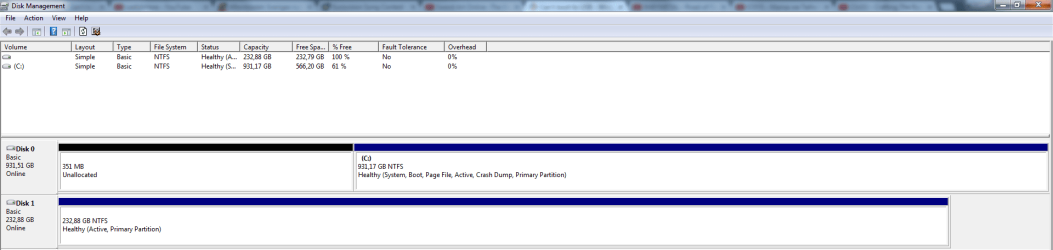

 No, there's not anything on Disk #1 and yes again, I want to install to Disk #1. Although when I install Windows I don't plug out Disk #0, it has worked in the past before to not plug it out with my old 840 EVO, but when I got my 850 EVO it wouldn't want to boot from USB which is quite odd.


