Can't Connect to the Internet at all.

XxCovertAcexX

New member
Local time
1:51 AM
Messages
7
After installing the Windows 7 Beta version I tried to connect to the internet. I hooked my high speed modem up to my computer and it could not detect a connection. I then reinstalled the software for the modem and half way through that process it still could not detect my modem so i could not even finish installing the software. I have tried everything that i know to do. Can someone please help me.
 

My Computer My Computer

At a glance

Windows 7 beta
OS
Windows 7 beta
Is there any way you can get hold of the RC, build 7100? This is currently the most stable and has a much larger device database so it could solve your issue.

The other option is to check device manager and see if anything is labeled as 'Unknown Device'.
 

My Computer My Computer

At a glance

Windows 7 Ultimate x64AMD Sempron Dual Core3GBNVIDIA GeForce 6150SE nForce 430
Computer Manufacturer/Model Number
Compaq Desktop
OS
Windows 7 Ultimate x64
CPU
AMD Sempron Dual Core
Memory
3GB
Graphics Card(s)
NVIDIA GeForce 6150SE nForce 430
Screen Resolution
1024x768
Hard Drives
150GB Sata
Sorry. I actually have that version. I keep calling it the beta for some reason. I downloaded the most recent one from the Microsoft website.
 

My Computer My Computer

At a glance

Windows 7 beta
OS
Windows 7 beta
Ok, my bad :o

What about the device manager option?
 

My Computer My Computer

At a glance

Windows 7 Ultimate x64AMD Sempron Dual Core3GBNVIDIA GeForce 6150SE nForce 430
Computer Manufacturer/Model Number
Compaq Desktop
OS
Windows 7 Ultimate x64
CPU
AMD Sempron Dual Core
Memory
3GB
Graphics Card(s)
NVIDIA GeForce 6150SE nForce 430
Screen Resolution
1024x768
Hard Drives
150GB Sata
Im sorry. I really don't know a whole lot about it, I'm not much of a computer wizz:D. Could you be a little more specific.
 

My Computer My Computer

At a glance

Windows 7 beta
OS
Windows 7 beta
No problem :)

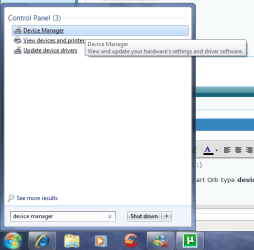
Click the Start Orb type device manager in the search box.
Untitled.png

And look for anything that's showing as expanded & with a Yellow exclemation mark.
Capture.PNG
Example of expanded device

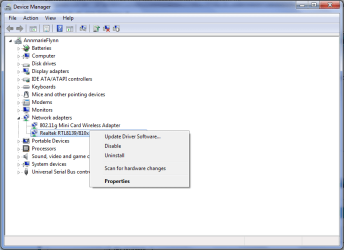
You can choose to Uninstall the device by right-clicking the offending device.
Untitled1.png

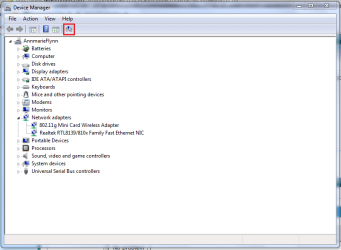
This will completely uninstall the device. You can now click the 'Search' icon for hardware changes.
Capture1.PNG

If you have any installation disks for your motherboard then they would come in handy. You can, if you wish, install the modem device driver with compatability for XP/Vista depending on your previous OS.
 

My Computer My Computer

At a glance

Windows 7 Ultimate x64AMD Sempron Dual Core3GBNVIDIA GeForce 6150SE nForce 430
Computer Manufacturer/Model Number
Compaq Desktop
OS
Windows 7 Ultimate x64
CPU
AMD Sempron Dual Core
Memory
3GB
Graphics Card(s)
NVIDIA GeForce 6150SE nForce 430
Screen Resolution
1024x768
Hard Drives
150GB Sata
device manager

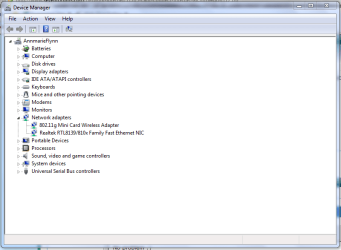
If you go start>computer and right click ou will see device manager. Run it and look under network adapters and see if your modem (cable?) is listed or if instead there is an unknown item. If listed check the properties for the driver, if unknown you need to re-install the device driver for it. Hope I have helped somewhat. Here is a pic of it
 
Last edited:

My Computer My Computer

At a glance

Win 8 Release candidate 8400[email protected]4 gigsNvidia 9600M
Computer Manufacturer/Model Number
HP Pavillion dv-7 1005 Tx
OS
Win 8 Release candidate 8400
CPU
[email protected]
Memory
4 gigs
Graphics Card(s)
Nvidia 9600M
Sound Card
HD built-in
Monitor(s) Displays
17" Wxga
Screen Resolution
1440x900
Cooling
none
Internet Speed
45Mb down 5Mb up
Click Start, type cmd and press Enter.
In the Command Prompt window, type ipconfig /all.
After typing the above command, could you please post a screenshot of your command prompt window using snipping tool?
 

My Computer My Computer

At a glance

Windows® 8 Pro (64-bit)Intel® Core™ i5 Processor 2467M (1.60GHz, 3MB...6GB DDR3 System Memory at 1,333MHz (on BD 4GB...AMD Radeon™ HD7550M 1GB DDR3 (Ext. Graphic)
Computer Manufacturer/Model Number
Samsung NP530U4B-S02IN
OS
Windows® 8 Pro (64-bit)
CPU
Intel® Core™ i5 Processor 2467M (1.60GHz, 3MB L3 Cache)
Motherboard
Samsung Electronics
Memory
6GB DDR3 System Memory at 1,333MHz (on BD 4GB + 2GB x 1)
Graphics Card(s)
AMD Radeon™ HD7550M 1GB DDR3 (Ext. Graphic)
Sound Card
Realtek High Definition Audio
Monitor(s) Displays
35.56cm (14.0) SuperBright 300nit HD LED Display
Screen Resolution
1366x768
Hard Drives
1TB S-ATA II Hard Drive (5400RPM) with ExpressCache 16GB SSD
Internet Speed
sucks
Antivirus
Microsoft Security Essentials
Browser
Google Chrome (Sync enabled)

My Computer My Computer

At a glance

Windows 7 build 72003 Ghz512 MB
Computer Manufacturer/Model Number
Microsoft
OS
Windows 7 build 7200
CPU
3 Ghz
Motherboard
Intel
Memory
512 MB
Monitor(s) Displays
Acer 17"
Screen Resolution
1280X1024
Back
Top