Can't Create a Primary Partition

TheTechRishab

New member
Local time
7:27 AM
Messages
37
Location
Toronto, Canada
Hi guys, I want to install a OS in my Samsung Laptop. I have made 5 partition, C: (default) D:, E: F: and I: and they are all logical Drive. I would like to install my OS in I: or E: drive. But he problem is I really need to have Primary Partition. I tried download and installing every partition software. Eg. EaseUS Partition Master, MiniTool Partition Wizard, Acronis Disk Director. I tried making them to Primary Partition but different software gives me different (or may be same but different words) errors.

For example:
Acronis Disk Director:
"Cannot perform the operation. A disk cannot contain more than four primary volumes. And, if a disk contains a logical volume, it can contain no more than 3 primary volumes."


EaseUs Partition Master: "The operation could not be completed. There is no empty slot in MBR partition table."

Please help me guys. Oh yes, And if you guys would like a image of my disk management , it is below:


Please help me guys. I would like to create a Primary Partition, not Logical partition. If I have to delete any partitions, those are E: and I: if they are something else, please tell me.

Please help me. I will really appreciate it. Thank you guys! Please. :(
-Rishab
 
Last edited:

My Computer

OS
Windows 7 Home Premium 64bit
It would eliminate a lot of problems if you would put your OS on the C: partition. That is the default location of a Windows 7 install, the size of the partition is about right and C: partition is primary as is H. What is on C: now? It has about 60 GB on it. Is there anything you could move?
 

My Computer

Computer type
PC/Desktop
Computer Manufacturer/Model Number
Custom Build
OS
Windows 7 Home Premium 32-Bit - Build 7600 SP1
CPU
Intel Core i3-2120 3.30Ghz
Motherboard
Asus P8Z68-V LX Intel Z68 Socket H2 ATX
Memory
Kingston 4 GB DDR3 1333 mhz
Graphics Card(s)
AMD Radeon HD6670
Sound Card
Sound Blaster Audigy SE 24-Bit
Monitor(s) Displays
Asus VE228
Screen Resolution
1440 X 900
Hard Drives
OCZ Vertex 3 120 GB Sata 3 SSD ==
Kingston SH103/S3 120 G Hyper X 120 GB SSD ==
Western Digital 500 GB Caviar Green 7200 RPM ==
PSU
Corsair CX600M == 600 Watt
Case
NZXT Apollo - Silver with Clear Side Panel
Cooling
Three 120 mm Fans
Keyboard
Microsoft Natural 4000
Mouse
Microsoft Custom Optical 3000
Internet Speed
AT&T Fiber Optic Wireless Network
Antivirus
Microsoft Security Essentials
Browser
Chrome
Other Info
120 mm Blue LED Fan -- Three Blue LED Lazer Light Sticks
It would eliminate a lot of problems if you would put your OS on the C: partition. That is the default location of a Windows 7 install, the size of the partition is about right and C: partition is primary as is H. What is on C: now? It has about 60 GB on it. Is there anything you could move?

MY H: is my DVD drive. My c: has all the windows 7 information like program files and all that. So, C: is the default partition of a windows 7 install.

H: drive just has a CD inside it. PLease help me
 

My Computer

OS
Windows 7 Home Premium 64bit
Are you trying to install another OS besides Win 7 on a different partition than C:? If so what OS?
 

My Computer

Computer type
PC/Desktop
Computer Manufacturer/Model Number
Custom Build
OS
Windows 7 Home Premium 32-Bit - Build 7600 SP1
CPU
Intel Core i3-2120 3.30Ghz
Motherboard
Asus P8Z68-V LX Intel Z68 Socket H2 ATX
Memory
Kingston 4 GB DDR3 1333 mhz
Graphics Card(s)
AMD Radeon HD6670
Sound Card
Sound Blaster Audigy SE 24-Bit
Monitor(s) Displays
Asus VE228
Screen Resolution
1440 X 900
Hard Drives
OCZ Vertex 3 120 GB Sata 3 SSD ==
Kingston SH103/S3 120 G Hyper X 120 GB SSD ==
Western Digital 500 GB Caviar Green 7200 RPM ==
PSU
Corsair CX600M == 600 Watt
Case
NZXT Apollo - Silver with Clear Side Panel
Cooling
Three 120 mm Fans
Keyboard
Microsoft Natural 4000
Mouse
Microsoft Custom Optical 3000
Internet Speed
AT&T Fiber Optic Wireless Network
Antivirus
Microsoft Security Essentials
Browser
Chrome
Other Info
120 mm Blue LED Fan -- Three Blue LED Lazer Light Sticks
You already answered your own question -

Acronis Disk Director: "Cannot perform the operation. A disk cannot contain more than four primary volumes. And, if a disk contains a logical volume, it can contain no more than 3 primary volumes."

Lets see, basing off the pic you provided. You have 3 Primary partitions, and 4 logical drive's. Now, as you can see, which Acronis tells you, you can't have more than 4 primary, unless you have logical one's, which brings it down to 3. You reach the limit. So what you should do is clean up and consolidate some partitions. Such as the recovery partition, it is empty and contains nothing, so delete it.
 

My Computer

Computer Manufacturer/Model Number
HP Pavilion dv6-2020ev
OS
Ubuntu 12.10
CPU
Intel Core i7 720QM
Motherboard
Its a HP secret...
Memory
4GB RAM
Graphics Card(s)
NVIDIA GeForce 230M
Sound Card
IDT
Screen Resolution
1366x768
Hard Drives
500 GB
Mouse
HP
Internet Speed
4 Mbps
You already answered your own question -

Acronis Disk Director: "Cannot perform the operation. A disk cannot contain more than four primary volumes. And, if a disk contains a logical volume, it can contain no more than 3 primary volumes."

Lets see, basing off the pic you provided. You have 3 Primary partitions, and 4 logical drive's. Now, as you can see, which Acronis tells you, you can't have more than 4 primary, unless you have logical one's, which brings it down to 3. You reach the limit. So what you should do is clean up and consolidate some partitions. Such as the recovery partition, it is empty and contains nothing, so delete it.

Yes, you can't have 4 primary partitions.

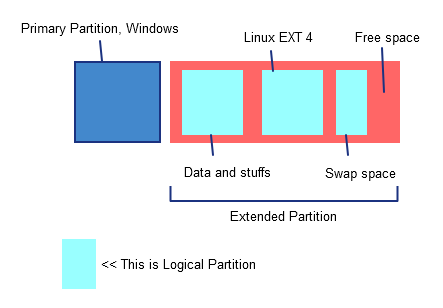
My way :

I create 1 primary partition for the Windows installation file. And then, I create the extended partition, as a "housing" for my 4 logical partition.

This is the ilustration, for your better understanding

hO1vN.png


Btw, correct me if I'm mistaken :)
 

My Computer

Computer Manufacturer/Model Number
Samsung
OS
Windows 7 Professional 32-bit
Memory
Kingston
Graphics Card(s)
Intel GMA 3150
Hard Drives
250GB
Mouse
Rapoo Wireless Mouse
Internet Speed
4Mbps
Yes, I already understand how partitions work, and that you have an extended partition that houses the 4 logical partitions. But you have other partitions than those, and you will need to do something about them. As I said in my previous post, consider deleting the recovery partition as it is empty.
 

My Computer

Computer Manufacturer/Model Number
HP Pavilion dv6-2020ev
OS
Ubuntu 12.10
CPU
Intel Core i7 720QM
Motherboard
Its a HP secret...
Memory
4GB RAM
Graphics Card(s)
NVIDIA GeForce 230M
Sound Card
IDT
Screen Resolution
1366x768
Hard Drives
500 GB
Mouse
HP
Internet Speed
4 Mbps
Yes, I already understand how partitions work, and that you have an extended partition that houses the 4 logical partitions. But you have other partitions than those, and you will need to do something about them. As I said in my previous post, consider deleting the recovery partition as it is empty.

oops, sorry. I quoted your comment because I want to support it with my ilustration. Sorry for the misunderstanding. Peace ~
 

My Computer

Computer Manufacturer/Model Number
Samsung
OS
Windows 7 Professional 32-bit
Memory
Kingston
Graphics Card(s)
Intel GMA 3150
Hard Drives
250GB
Mouse
Rapoo Wireless Mouse
Internet Speed
4Mbps
Would you please answer the question if you're trying to install another OS besides WIn7? We need to know this at the minimum.

If so then you can install Windows to any of the logicals as the boot files will go onto the System partition.

If you want to reinstall Win7 then move the data off of C, boot the installer to install to C.
http://www.sevenforums.com/tutorials/219487-clean-reinstall-factory-oem-windows-7-a.html#post1839164

If you want to install Linux I believe you can install to a Logical but this is not a Linux forum.

Hey gregrocker :).

OP already said that he wants to install another OS, meaning an OS other than W7.

Linux can be installed on a logical partition btw. :)
 

My Computer

Computer Manufacturer/Model Number
HP Pavilion dv6-2020ev
OS
Ubuntu 12.10
CPU
Intel Core i7 720QM
Motherboard
Its a HP secret...
Memory
4GB RAM
Graphics Card(s)
NVIDIA GeForce 230M
Sound Card
IDT
Screen Resolution
1366x768
Hard Drives
500 GB
Mouse
HP
Internet Speed
4 Mbps
I am sorry for being away guys. Yes, I want to create this another primary partition to install another OS. If you'd like to know what, I can't post it here because I am not sure if I am going to get banned or not. But Mac OS X Lion. I know it can be installed in logical partition but I am installing it through VMware workstation in my physical drive (partition) so I need physical partition. If I must delete some partition, please tell me which ones. Thank you for your help. Please.
 

My Computer

OS
Windows 7 Home Premium 64bit
If you are running it in a VM, you don't need to do any partitioning to install it.
 

My Computer

Computer Manufacturer/Model Number
HP Pavilion dv6-2020ev
OS
Ubuntu 12.10
CPU
Intel Core i7 720QM
Motherboard
Its a HP secret...
Memory
4GB RAM
Graphics Card(s)
NVIDIA GeForce 230M
Sound Card
IDT
Screen Resolution
1366x768
Hard Drives
500 GB
Mouse
HP
Internet Speed
4 Mbps
I know but I want to install Mac in my partition through VMware cuz my other way doesn't work. So I need to install it that way. Please help me thanks
 

My Computer

OS
Windows 7 Home Premium 64bit
If you are installing an OS through VMWare, you don't need partitions created. It runs from a file on an existing partition.
 

My Computer

OS
Windows 7 Ultimate x64 SP1
CPU
Intel Core i7-2600
Motherboard
Gigabyte GA-P67A-UD3P-B3
Memory
12 GB Patriot Extreme DDR3-1333
Graphics Card(s)
Nvidia GTX 470
Monitor(s) Displays
Dell UltraSharp 2209WA
Hard Drives
OCZ Agility3 240 GB, WD5001AALS, WD7501AALS
PSU
OCZ ModStream 700W
Case
CoolerMaster HAF 912 Advanced
Cooling
CoolerMaster Hyper 212 Plus
TheTechRashib, I have something to say to you.

First of all, iATKOS is not a legal mac distribution.

Second, for installing Mac os, you are to format your partition as Mac OS X Extended Journaled. on any other type of partitions it is not possible. I would request you to please not try making a such Journaled partition in your only one HDD. It might result in a huge loss for you.

Third, Mac does not support visualization, legally.
 

My Computer

Computer type
PC/Desktop
Computer Manufacturer/Model Number
Self Assembled
OS
Microsoft Windows 10 Pro Insider Preview 64-bit
CPU
Intel(R) Core(TM) i3-4130 CPU @ 3.40GHz
Motherboard
Gigabyte Technology Co., Ltd. B85M-D3H
Memory
Corsair Vengence 4GB x2 (8.00GB Dual-Channel DDR3 @ 798MHz)
Graphics Card(s)
2047MB GeForce GTS 450 (ZOTAC International)
Sound Card
Onboard (Realtek High Definition Audio)
Monitor(s) Displays
LG Flatron E2040T
Screen Resolution
1600x900
Hard Drives
Western Digital 1 TB
Seagate 500 GB
PSU
Corsair VS550
Case
Cooler Master K380
Cooling
Cooler Master Seidon 120V Plus
Keyboard
Logitech MK260r
Mouse
Logitech MK260r
Internet Speed
PMPL Broadband
Antivirus
Windows Defender + MBAM
Browser
Firefox
Other Info
Dell Studio 15" Laptop
You are making partitions , want to install Mac OS , with iATKOS disk placed in the drive . Your screenshot :
www.imagesup.net.png

Mac OS..... vanilla or hackintosh, needs a journaled partition to be installed. Journaled partitions need GUID Partition Table, whereas yours is MBR. That's why I told you to not proceed.
 

My Computer

Computer type
PC/Desktop
Computer Manufacturer/Model Number
Self Assembled
OS
Microsoft Windows 10 Pro Insider Preview 64-bit
CPU
Intel(R) Core(TM) i3-4130 CPU @ 3.40GHz
Motherboard
Gigabyte Technology Co., Ltd. B85M-D3H
Memory
Corsair Vengence 4GB x2 (8.00GB Dual-Channel DDR3 @ 798MHz)
Graphics Card(s)
2047MB GeForce GTS 450 (ZOTAC International)
Sound Card
Onboard (Realtek High Definition Audio)
Monitor(s) Displays
LG Flatron E2040T
Screen Resolution
1600x900
Hard Drives
Western Digital 1 TB
Seagate 500 GB
PSU
Corsair VS550
Case
Cooler Master K380
Cooling
Cooler Master Seidon 120V Plus
Keyboard
Logitech MK260r
Mouse
Logitech MK260r
Internet Speed
PMPL Broadband
Antivirus
Windows Defender + MBAM
Browser
Firefox
Other Info
Dell Studio 15" Laptop
LOL you're funny. I instered iATKOS to make partitions. you're funny :P but how do i get GUID partitoin table. i dont know what you mean..
 

My Computer

OS
Windows 7 Home Premium 64bit
LOL you're funny. I instered iATKOS to make partitions. you're funny :P but how do i get GUID partitoin table. i dont know what you mean..
Keep a cool head and answer me ....

Who is Funny ? He who is using iATKOS disk only for creating partitions, or he who who founds it is not true ?

And, you can use iATKOS disk to make partitions, but dont know where you can get GUID partition table ? Still it is me who is funny ? :D

OK . I am funny . :)
 

My Computer

Computer type
PC/Desktop
Computer Manufacturer/Model Number
Self Assembled
OS
Microsoft Windows 10 Pro Insider Preview 64-bit
CPU
Intel(R) Core(TM) i3-4130 CPU @ 3.40GHz
Motherboard
Gigabyte Technology Co., Ltd. B85M-D3H
Memory
Corsair Vengence 4GB x2 (8.00GB Dual-Channel DDR3 @ 798MHz)
Graphics Card(s)
2047MB GeForce GTS 450 (ZOTAC International)
Sound Card
Onboard (Realtek High Definition Audio)
Monitor(s) Displays
LG Flatron E2040T
Screen Resolution
1600x900
Hard Drives
Western Digital 1 TB
Seagate 500 GB
PSU
Corsair VS550
Case
Cooler Master K380
Cooling
Cooler Master Seidon 120V Plus
Keyboard
Logitech MK260r
Mouse
Logitech MK260r
Internet Speed
PMPL Broadband
Antivirus
Windows Defender + MBAM
Browser
Firefox
Other Info
Dell Studio 15" Laptop
Back
Top