Can't delete free space partition

jeniuskid

New member
Member
Local time
10:40 AM
Messages
46
Location
Vancouver, BC
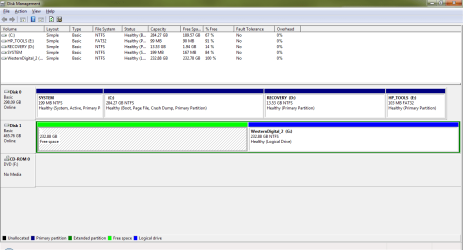
As said in the title, I can not delete the free space partition on my external hard drive after deleting the partition. Currently, I'm using Disk Management and I haven't tried other programs. Any ideas? Would a different program do the job?

And to be specific, when I right-click on the free space, "Delete Partition" is grayed out.
 

Attachments
  • Disk Management.png
    Disk Management.png
    23.9 KB · Views: 729

My Computer My Computer

At a glance

Windows 7 Home Premium 64 bitIntel Core i5-2557M4GB DDR3Intel HD 3000
Computer Manufacturer/Model Number
ASUS Zenbook UX31E
OS
Windows 7 Home Premium 64 bit
CPU
Intel Core i5-2557M
Memory
4GB DDR3
Graphics Card(s)
Intel HD 3000
Screen Resolution
1600x900
Hard Drives
128GB SSD
Other Info
Non removable battery

My Computer My Computer

At a glance

Vista, Windows7, Mint Mate, Zorin, Windows 8from 1.6GHz Duo to i7
Computer Manufacturer/Model Number
HP, Dell, Gateway, Toshiba - 4 laptops and 2 desktops
OS
Vista, Windows7, Mint Mate, Zorin, Windows 8
CPU
from 1.6GHz Duo to i7
Monitor(s) Displays
2x HP w2207
Hard Drives
5x HDD, 7x SSD, 12x Externals
Keyboard
with trackball - no mices
Mouse
Trackball mice
Internet Speed
DSL 6000
I ran into that problem once myself. The way I solved it is to define a new partition in that free space and start anew with the deletion process. Else you can also try BEST FREE Partition Manager Software for Windows supports all 32-bit & 64 bit Windows No-server OS.. It will probably do it wiith no sweat.

If by "define a new partition" you meant creating a new simple volume then it doesn't work for me. Each time I right-click and select "New simple volume" the wizard pops up and I go through it, but when I click finish an error occurs saying "There is not enough space available on the disk(s) to complete this operation. Could my disk be physically damaged?

Also, I'll try the program u suggested as well as a few others such as Paragon Partition Manager and Easeus partition master home edition. Hopefully i strike some luck
 

My Computer My Computer

At a glance

Windows 7 Home Premium 64 bitIntel Core i5-2557M4GB DDR3Intel HD 3000
Computer Manufacturer/Model Number
ASUS Zenbook UX31E
OS
Windows 7 Home Premium 64 bit
CPU
Intel Core i5-2557M
Memory
4GB DDR3
Graphics Card(s)
Intel HD 3000
Screen Resolution
1600x900
Hard Drives
128GB SSD
Other Info
Non removable battery
Let's see what Partition Wizard can do for you. It is, of course, possible that the MFT (master file table) is corrupted. I would run a chkdsk /F in elevated cmd.
 

My Computer My Computer

At a glance

Vista, Windows7, Mint Mate, Zorin, Windows 8from 1.6GHz Duo to i7
Computer Manufacturer/Model Number
HP, Dell, Gateway, Toshiba - 4 laptops and 2 desktops
OS
Vista, Windows7, Mint Mate, Zorin, Windows 8
CPU
from 1.6GHz Duo to i7
Monitor(s) Displays
2x HP w2207
Hard Drives
5x HDD, 7x SSD, 12x Externals
Keyboard
with trackball - no mices
Mouse
Trackball mice
Internet Speed
DSL 6000
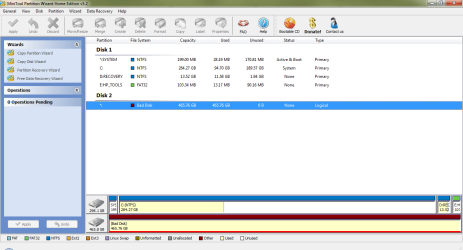
Here's the result of Partition Wizard after I attempted resize the healthy parition (there were two partitions on the HDD as seen on my first post's screen shot) :cry:

I will run a chkdsk /F now
 

Attachments

  • Bad Disk.png
    Bad Disk.png
    37.5 KB · Views: 799
Last edited:

My Computer My Computer

At a glance

Windows 7 Home Premium 64 bitIntel Core i5-2557M4GB DDR3Intel HD 3000
Computer Manufacturer/Model Number
ASUS Zenbook UX31E
OS
Windows 7 Home Premium 64 bit
CPU
Intel Core i5-2557M
Memory
4GB DDR3
Graphics Card(s)
Intel HD 3000
Screen Resolution
1600x900
Hard Drives
128GB SSD
Other Info
Non removable battery
There is obviously a problem with your disk2. Next step would be to run the checkdsk /F. As a last resort you may have to reformat the disk. If that also fails, it is ready for the dump.
 

My Computer My Computer

At a glance

Vista, Windows7, Mint Mate, Zorin, Windows 8from 1.6GHz Duo to i7
Computer Manufacturer/Model Number
HP, Dell, Gateway, Toshiba - 4 laptops and 2 desktops
OS
Vista, Windows7, Mint Mate, Zorin, Windows 8
CPU
from 1.6GHz Duo to i7
Monitor(s) Displays
2x HP w2207
Hard Drives
5x HDD, 7x SSD, 12x Externals
Keyboard
with trackball - no mices
Mouse
Trackball mice
Internet Speed
DSL 6000
I think I may have fixed it. After getting that "bad disk" reading from Partition Wizard I tried formatting it with windows disk management and for some reason it could finally finish the job! So after 5 hours of formatting it seems to be usable now. I have copied over some movies and music to test the drive and it seems to be in stable order, though it only has one partition right now.

Thanks for all your help whs! rep for you :)
 

My Computer My Computer

At a glance

Windows 7 Home Premium 64 bitIntel Core i5-2557M4GB DDR3Intel HD 3000
Computer Manufacturer/Model Number
ASUS Zenbook UX31E
OS
Windows 7 Home Premium 64 bit
CPU
Intel Core i5-2557M
Memory
4GB DDR3
Graphics Card(s)
Intel HD 3000
Screen Resolution
1600x900
Hard Drives
128GB SSD
Other Info
Non removable battery

My Computer My Computer

At a glance

Vista, Windows7, Mint Mate, Zorin, Windows 8from 1.6GHz Duo to i7
Computer Manufacturer/Model Number
HP, Dell, Gateway, Toshiba - 4 laptops and 2 desktops
OS
Vista, Windows7, Mint Mate, Zorin, Windows 8
CPU
from 1.6GHz Duo to i7
Monitor(s) Displays
2x HP w2207
Hard Drives
5x HDD, 7x SSD, 12x Externals
Keyboard
with trackball - no mices
Mouse
Trackball mice
Internet Speed
DSL 6000
Back
Top