
Can't edit and resave a .txt file??

RPmtl

New member
Member
Local time
9:01 PM
Messages
23
Location
Montreal
I'm obviously not used to all this new permission stuff.

I have files on external drives that I need to access and update. So I opened a 'txt' file I had created with Notepad (with XP or Vista64), made a small change and then I was not allowed to re-save to the same folder with the same name. Ctrl+S popped up a 'file save' dialogue box and when I navigated to the folder on the external drive and tried to overwrite the original I got Permission Denied.

What's going on?

I will also access this same drive with other computers running XP or Vista64 so I don't want to do anything that will make it impossible to share the data.

This is not a public computer, I'm the only user, I have a hardware firewall, I have never ever had a single virus in 20 years of computing (old 8088 days..), I image my hard disks regularly .. so I don't need a super security system preventing me from opening and saving my own files.

I'm just afraid to poke at it for fear of rendering these files inaccessible on my other systems.

Thanks for any advice :-)
 

My Computer My Computer

Computer type
PC/Desktop
Computer Manufacturer/Model Number
Custom build
OS
Win 10 Pro
CPU
Intel Core i7-6900K
Motherboard
Asus X99-DELUXE II
Memory
32GB DDR4-2133
Graphics Card(s)
Gforce GTX 750 Ti
Monitor(s) Displays
2x Dell U2413
Screen Resolution
1920 x 1200
Hard Drives
Samsung 850 Pro 256 GB SSD
WD600GLFS
WD300GLFS
PSU
Corsair AX750
Case
Lian Li PC-B10
Cooling
Nochua N1
Keyboard
Das Keyboard Pro (Cherry MX blue w/O-Ring Mod)
Mouse
Logitech MX-610 Laser w/Teflon pads
Can you right click on the file and 'Run as Administrator'?
 

My Computer My Computer

Computer type
PC/Desktop
Computer Manufacturer/Model Number
Bruce ... somewhere in his 40's
OS
Windows 7 Ultimate 32bit SP1
CPU
Intel(R) Core(TM)2 Quad CPU @ 2.40GHz, 2400 MHz
Motherboard
INTEL/D975XBX2
Memory
4 GB
Graphics Card(s)
ATI Radeon HD 2600 Pro
Monitor(s) Displays
Samsung SyncMaster 914v
Screen Resolution
1280 x 1024
Hard Drives
2/500GB each ... ST3500630AS ATA Device.
One is not connected
PSU
Rocketfish 700 W
Case
G.Skill Gigabyte Chassis
Keyboard
Standard PS/2 Keyboard
Mouse
Microsoft PS/2 Mouse
Internet Speed
DSL
Antivirus
Avira Internet Security
Browser
IE 11
Other Info
ATI HDMI Audio
Edit to the above .... 'take ownership' is what you want to click on.

BTW, I've opened many .txt files and edit them. I click the X and it asks if I want to save, don't save or cancel ... I click on save and it stays in the same folder with the same name.
 

My Computer My Computer

Computer type
PC/Desktop
Computer Manufacturer/Model Number
Bruce ... somewhere in his 40's
OS
Windows 7 Ultimate 32bit SP1
CPU
Intel(R) Core(TM)2 Quad CPU @ 2.40GHz, 2400 MHz
Motherboard
INTEL/D975XBX2
Memory
4 GB
Graphics Card(s)
ATI Radeon HD 2600 Pro
Monitor(s) Displays
Samsung SyncMaster 914v
Screen Resolution
1280 x 1024
Hard Drives
2/500GB each ... ST3500630AS ATA Device.
One is not connected
PSU
Rocketfish 700 W
Case
G.Skill Gigabyte Chassis
Keyboard
Standard PS/2 Keyboard
Mouse
Microsoft PS/2 Mouse
Internet Speed
DSL
Antivirus
Avira Internet Security
Browser
IE 11
Other Info
ATI HDMI Audio
This may be a permissions folder, but it also depends upon where you are trying to write to, and especially if you upgraded / clean installed Windows 7 while carrying over folders from a previous operating system.

If you try to write to System Protected areas, like %systemroot% (aka \Windows\System32\) or %ProgramFiles% (aka \Program Files\) you'll get an error - this is by design.

If you are trying to write to a folder you definitely have access to write in (My Documents, etc) then check to see if the file is read only.

If you are trying to write to a folder that you created using an older operating system after having clean installed Windows 7, it can definitely be a permission issue. The easiest thing to do is to go folder by folder and take ownership of the folders that belong to you (meaning leave out \Recycler, and the hidden \System Restore folders, and other similar system created folders if they exist), but this can be a daunting task, as you'll then need to also add yourself to the permission list to allow yourself to read, write, etc. to those folders.

There is an easier way to fix it depending upon your scenario from the three I have listed, so please post back on which scenario fits you....
 

My Computers My Computers

System One System Two

  • Computer type
    PC/Desktop
    Computer Manufacturer/Model Number
    The Beast Model A (homebrew)
    OS
    Windows 11 21H2 Current build
    CPU
    AMD Ryzen 9 3950X
    Motherboard
    MSI MEG X570 GODLIKE
    Memory
    4 * 32 GB - Corsair Vengeance 3600 MHz
    Graphics Card(s)
    EVGA GeForce RTX 3080 Ti XC3 ULTRA GAMING (12G-P5-3955-KR)
    Sound Card
    Realtek® ALC1220 Codec
    Monitor(s) Displays
    2x Eve Spectrum ES07D03 4K Gaming Monitor (Matte) | Eve Spec
    Screen Resolution
    3x 3840 x 2160
    Hard Drives
    3x Samsung 980 Pro NVMe PCIe 4 M.2 2 TB SSD (MZ-V8P2T0B/AM) } 3x Sabrent Rocket NVMe 4.0 1 TB SSD
    PSU
    PC Power & Cooling’s Silencer Series 1050 Watt, 80 Plus Plat
    Case
    Fractal Design Define 7 XL Dark ATX Full Tower Case
    Cooling
    SteelSeries Apex Pro Wired Gaming Keyboard
    Keyboard
    SteelSeries Apex Pro
    Mouse
    Logitech MX Master 3S | MX Master 3 for business
    Internet Speed
    AT&T LightSpeed Gigabit Duplex Ftth
    Antivirus
    Windows Defender + MB 3
    Browser
    Nightly (default) + Firefox (stable),Chrome, Edge
  • Computer type
    PC/Desktop
    System Manufacturer/Model Number
    Dell Latitude E5470
    OS
    ChromeOS Flex Dev Channel (current)
    CPU
    Intel(R) Core(TM) i5-6300U CPU @ 2.40GHz, 2501 Mhz, 2 Core(s), 4 Logical Processor(s)
    Motherboard
    Dell
    Memory
    16 GB
    Graphics Card(s)
    Intel(R) HD Graphics 520
    Sound Card
    Intel(R) HD Graphics 520 + RealTek Audio
    Monitor(s) Displays
    Dell laptop display 15"
    Screen Resolution
    1920 * 1080
    Hard Drives
    Toshiba 128GB M.2 22300 drive
    INTEL Cherryville 520 Series SSDSC2CW180A 180 GB SATA III SSD
    PSU
    Dell
    Case
    Dell
    Cooling
    Dell
    Keyboard
    Dell
    Mouse
    Logitech MX Master 3S (shared w. Sys 1) | Dell TouchPad
    Internet Speed
    AT&T LightSpeed Gigabit Duplex Ftth
I cannot find any sign of a Right-click "take ownership' option.

As a commercial photographer I have over 20 external hard disks of archived jobs (everything dublicated on 2 drives) and need to be able to start up a drive, access the files and make modifications as needed.

What I have found is a 'Security' tab that allows me to set permissions for the whole drive.

I just inserted an external SATA drive and the displayed permissions are:

Everyone: Nothing ticked except Special permissions which has a gray checkmark

Creator Owner: Nothing ticked except Special permissions which has a gray checkmark

System: All choices ticked EXCEPT Special permissions

Administrators: All choices ticked EXCEPT Special permissions

Users: Full control, Modify, Write NOT ticked (Special permissions has gray checkmark)

Is this what it should be set to? Or is there something wonky which explains why I was unable to do a simple update to a .txt file?

As a test I set access permissions for Everyone to everything Allowed and that solved it. Though it took a few minutes for all the permissions to be modified on that drive and that scared me, because I still need to access these files with the other systems in my office. And I feared what that all that whirring on the hard drive would do to my ability to access those files from my other systems.

Is there a simple 'global setting' solution?

Thanks for any help :-)

Russell
 

My Computer My Computer

Computer type
PC/Desktop
Computer Manufacturer/Model Number
Custom build
OS
Win 10 Pro
CPU
Intel Core i7-6900K
Motherboard
Asus X99-DELUXE II
Memory
32GB DDR4-2133
Graphics Card(s)
Gforce GTX 750 Ti
Monitor(s) Displays
2x Dell U2413
Screen Resolution
1920 x 1200
Hard Drives
Samsung 850 Pro 256 GB SSD
WD600GLFS
WD300GLFS
PSU
Corsair AX750
Case
Lian Li PC-B10
Cooling
Nochua N1
Keyboard
Das Keyboard Pro (Cherry MX blue w/O-Ring Mod)
Mouse
Logitech MX-610 Laser w/Teflon pads
I think you already found it. :)

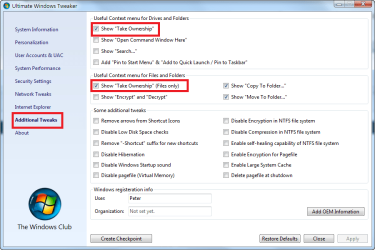
But there is a simple way to add the 'take ownership' for drives, folders and files menu items to your explorer right click context menu which would make solving this problem a little easier in the future.

To do this you can use a free portable (does not need to be installed) app called 'Ultimate Windows Tweaker" to add the take ownership items to the context menu. Below is a screen shot of the part of the app that allows adding these items. As you can see, it's just a simple check box and then you'll have the take ownership entries on the right click context menu. (You can also subsequently remove them from the menu with the app by unchecking the same boxes.)
 

Attachments

  • UWT-TO.png
    UWT-TO.png
    29.7 KB · Views: 2,199

My Computer My Computer

Computer Manufacturer/Model Number
HP DV8t quad
OS
Windows 7 Ultimate x64 (Retail)
CPU
i7-Q 720
Motherboard
Motherboard Chipset Intel Ibex Peak-M PM55, Intel Lynnfield
Memory
6 GB
Graphics Card(s)
nVidia GeForce GT 230M (1GB)
Sound Card
IDT High Definition Audio CODEC
Monitor(s) Displays
18.4 inch HP Infinity FHD (Samsung 184HT03-001)
Screen Resolution
1920 x 1080
Hard Drives
Hitachi 500GB 7200 rpm (x2)
Seagate FreeAgent 1.5 TB External USB (x2)
Thermaltake BlacX eSATA/USB 2.0 3.5/2.5 HD dock
Cooling
Zalman NC-2000 notebook cooling pad
Keyboard
laptop
Mouse
Logitech VX Revolution
Other Info
Backup Unit: Lenovo T61p
In the meantime I found and installed the 'take ownership' registry tweak posted at: http://www.sevenforums.com/tutorials/1911-take-ownership-shortcut.html

Should I uninstall that before installing the 'Ultimate Windows Tweaker' which looks a lot like the old XP Powertools. (thanks for that btw!)

I'm really surprised Microsoft did not predict that a lot of mom&pop computer users will want to access their files stored on removable media. And how are they supposed to deal with stuff like this? They're barely techno savvy enough to just write email. I find it hard to believe there would not be a simple pop-up warning "Security Alert! You are trying to access files on a new media volume. Do you wish to enable full read-write access?" Or something like that. Just making it impossible to open a file and re-save it (after added another cookie recipe, or an entry into a family tree) doesn't make a whole lot of sense. Why don't I see this behaviour with Vista?

Russell
 

My Computer My Computer

Computer type
PC/Desktop
Computer Manufacturer/Model Number
Custom build
OS
Win 10 Pro
CPU
Intel Core i7-6900K
Motherboard
Asus X99-DELUXE II
Memory
32GB DDR4-2133
Graphics Card(s)
Gforce GTX 750 Ti
Monitor(s) Displays
2x Dell U2413
Screen Resolution
1920 x 1200
Hard Drives
Samsung 850 Pro 256 GB SSD
WD600GLFS
WD300GLFS
PSU
Corsair AX750
Case
Lian Li PC-B10
Cooling
Nochua N1
Keyboard
Das Keyboard Pro (Cherry MX blue w/O-Ring Mod)
Mouse
Logitech MX-610 Laser w/Teflon pads
Are you kidding me. Microsoft never figured that people would need to edit files in their Windows 7 PC?
Are you kidding me! This is the most stupid things I have ever seen or heard of from Microsoft. WTF!

I have to go and get some kind of tweaker to edit a simple .TXT or .CFG file. You are kidding, right?
 

My Computer My Computer

OS
Windows 7
Permissions etc: what a cock-up

Yes I agree, having spent a couple of hours to research how to change the read only status of my documents, which I find Win 7 changed without my permission.
You would expect that effecting changes would be easy but forget that, MS has other ideas. I had to mess about for ages & read various posts (many unresolved) before accidentally correcting the problem. I also had to dwnld a tweak & install (against a MS warning that the provider could not be checked & I was about to make a registry change - not mentioned in the tutorial).
This is unforgiveable, MS you should be ashamed of poor implementation of whatever it was you were supposedly providing.
peterlonz
 

My Computer My Computer

OS
win 7
CPU
Intel Core i7-860 2.8GHz
Motherboard
Gigabyte GA-P55-UD3P P55 1156pin DDR3 MoBrd
Memory
4 Gb
Graphics Card(s)
Gigabyte PCI-E 1Gb 9600GT
Sound Card
On board
Monitor(s) Displays
17" LG Flatron L1730S
Hard Drives
Seagate 1 Tb x 2
PSU
460 watts
Case
Coolmaster Centurion 05
Cooling
120mm + 80mm fans
If you open your texteditor (e.g. notepad) "As Administrator", then open the file you want to edit from the file menu. You are then able to edit and save the file.

The suggestion earlier to "Run as Administrator" would not work as you are not trying to run the file, but edit it. What you are trying to "run" is your text editor.

I believe this is the way Microsoft intended for you to be able to edit these files. :-)
 

My Computer My Computer

OS
Windows 7
Right click Notepad->Run as Administrator->Open File

This is the only way that worked for me. Thanks tomgard!
 

My Computer My Computer

OS
Windows 7 Home Premium 32bit
MS stupidity

It should be pretty clear to everyone, that despite some notable worthy features in Win7; MS has managed again, to make enough unwarranted changes (from XP), to cause confusion & time wasting by many customers.
I don't intend to list them all.
The permissions problem is amongst the biggest PITA problem & seems to catch everyone eventually.
It would not be so bad if the whole setting permissions routine was easy, or logically accessible. But No!
MS seems incapable of thinking as it's customers must. How else can the hopless drop down menus supposed to allow user control of permissions be explained?
And look at the "Libraries" disaster.
WTF who wants libraries saving info on C drive. Most users will long ago have figured how & where they choose to store data.

Unfortunately on this site, too often folks wishing to help, post work-arounds that are neither easy to follow, nor guaranteed to work.
And sometimes they have the gall to suggest "that was what MS intended" as an explanation for some more MS garbage.
What I wonder about is, what are the OS beta testers doing, or is that another MS bit of BS.
 

My Computer My Computer

OS
win 7
CPU
Intel Core i7-860 2.8GHz
Motherboard
Gigabyte GA-P55-UD3P P55 1156pin DDR3 MoBrd
Memory
4 Gb
Graphics Card(s)
Gigabyte PCI-E 1Gb 9600GT
Sound Card
On board
Monitor(s) Displays
17" LG Flatron L1730S
Hard Drives
Seagate 1 Tb x 2
PSU
460 watts
Case
Coolmaster Centurion 05
Cooling
120mm + 80mm fans
Too right

Peter. The access rights "feature" has cost me most of my Sunday afternoon. Whilst trying to find a (quick and guaranteed) solution to the problem I stumbled across your post and can only echo your sentiments; incredible that MS can still make such a balls up of an OS - and the BETA Testers should be the second lot lined up against the wall, as soon as the WIN7 developers bodies have been carried off. I have TB's of data on various external drives and other computers - I thought 64bit usage would be my major issue, but apparently it's going to be working around MS imbicility ...
 

My Computer My Computer

OS
Windows 7 Ultimate x64
Back
Top