Hi all
Please bear with me I'm new at this and a little unsure as to exactly what I'm doing.
A few months ago I was having trouble with an incredibly slow system running Vista 32 bit. I run some RAM hungry programs so decided I'd try a Win 7 64 bit system, and if it was stable I would then look to increase my RAM beyond 3GB (Apparently my motherboard will take 8GB of RAM)
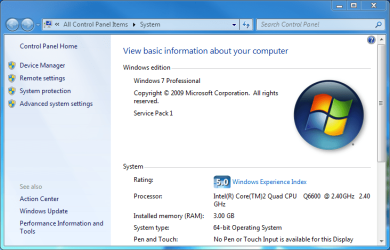
A screen shot of my basic system info is here...

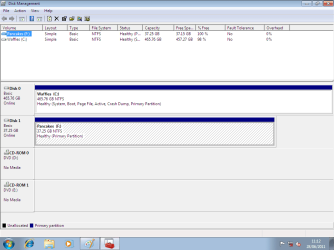
I obviously now want to stay with Win 7 64bit and format the Vista drive for the storage space but have no idea how to make my Win 7 drive the system drive and then format the old Vista drive.
I hope I've given enough info, and my request makes sense.
I'd be really grateful of a fairly straight forward "how to". I'm reasonably savvy and can follow instruction but certainly no expert.
Many thanks in advance
Chris
Please bear with me I'm new at this and a little unsure as to exactly what I'm doing.
A few months ago I was having trouble with an incredibly slow system running Vista 32 bit. I run some RAM hungry programs so decided I'd try a Win 7 64 bit system, and if it was stable I would then look to increase my RAM beyond 3GB (Apparently my motherboard will take 8GB of RAM)
A screen shot of my basic system info is here...
I obviously now want to stay with Win 7 64bit and format the Vista drive for the storage space but have no idea how to make my Win 7 drive the system drive and then format the old Vista drive.
I hope I've given enough info, and my request makes sense.
I'd be really grateful of a fairly straight forward "how to". I'm reasonably savvy and can follow instruction but certainly no expert.
Many thanks in advance
Chris
Attachments
My Computer
- Computer Manufacturer/Model Number
- Medion
- OS
- Windows 7 Professional 64 bit
- CPU
- Intel Core2 Quad CPU Q6600 @ 2.40GHz 2.40 GHz
- Motherboard
- Not sure
- Memory
- 3.0GB
- Graphics Card(s)
- NVidea GeForce 8600GT
- Sound Card
- Not sure
- Monitor(s) Displays
- LG Flatron x2...W2234S & W2246
- Hard Drives
- Not exactly sure of makes...
2 x SATA 500GB internal
1 x eSATA 1000GB External
1 x USB 500GB External
- PSU
- Not Sure
- Case
- Not Sure
- Cooling
- Not Sure