
Can't Install Adobe AIR

strtcrchrn

New member
Local time
4:48 PM
Messages
5
Location
Ontario, Canada
Hi Everyone,

I'm having some trouble with Adobe AIR and am hoping someone has had a similar experience and found a working solution.

I use Tweetdeck and have had both it and Air installed for quite some time. A few weeks ago, I started getting a message that I needed a more current version of Air for Tweetdeck to work. I uninstalled both Tweetdeck and tried to uninstall Air; that turned into a series of headahces. I finally had to use Windows Install clean-up to completely remove it.

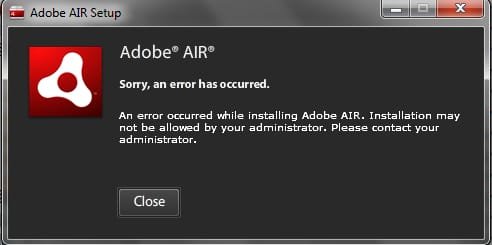
With it removed, I'm trying to run the exe file and I keep getting a message that an error has occurred and I should contact my admin. I've run the exe as an admin and still get the error.

I've looked online but most solutions appear to be for Linux and those for Windows haven't worked.

Any thoughts?
 

Attachments
  • airadmin.jpg
    airadmin.jpg
    12.9 KB · Views: 86

My Computer

Computer Manufacturer/Model Number
Dell Inspiron
OS
Windows 7
- running a Registry cleaner may help, as memory "stubs" are often left behind when you uninstall software..

- CCleaner is free.. (- and effective)
 

My Computer

Computer type
PC/Desktop
Computer Manufacturer/Model Number
benchtec, built to personal specs
OS
Windows10 Pro - 64Bit vs.10547
CPU
i7-965 Extreme Edition (8 Cores) at 3.3GHz (no OC)
Motherboard
BloodRageX58 (Socket1366)
Memory
12G Corsair Dominator DDR3 - tripled
Graphics Card(s)
2xAMD SapphireNITRO R9 380(4G) crossfire
Sound Card
Sonar(SB)X-Fi onboard
Monitor(s) Displays
SyncMaster P2050 20"
Screen Resolution
1600x900 (widescreen)
Hard Drives
480G\OCZSolid3SSD, 64G\OCZVertex3SSD,60G\OCZVertex2SSD, 1TB\spinpointF1SATAHDD
PSU
1200w Power Station Gold
Case
ANTEC 900/2 all blue lights, etc..
Cooling
Noctua SE1366 NH-U12P - a tight fit, but a monster cooler!!
Keyboard
Logitech G19 (wired)
Mouse
Logitech G9 Laser (wired)
Internet Speed
150mb unlimited
Browser
IE11(RP)
Other Info
Xbox One, Nokia735 Windows10 mobile, LG HD/DVD/Blu-Ray r/w, CyberlinkPowerDVD15, LogitechZ5500-SS(5.1), LogitechG35Phones-SS(7.1),MSOffice 2007,CorelDrawX7,Painter2016, Wacom Intuos Pro-SE
I thought that might be the answer.

I'm not comfortable enough looking into the registry or cleaning it.

Thanks for the quick reply. :)
 

My Computer

Computer Manufacturer/Model Number
Dell Inspiron
OS
Windows 7
Same problem here

I am having the same problem - completely unable to install Adobe Air, no matter what I try.

I have run CCleaner to clean up my registry, used Windows installer cleanup utility, run the program as administrator, etc.

Anyone have any more ideas?
 

My Computer

OS
Windows 7 64-bit Home
CPU
C2D 8400
Motherboard
ASUS P2B Deluxe
Memory
Crucial PC-8500 8GB
Graphics Card(s)
Nvidia GTX285
Sound Card
SB X-Fi Audio Extreme
Monitor(s) Displays
LG 227WTG
Hard Drives
Velociraptor
WD (2)
PSU
Corsair 850TX
Case
Antec
Me Too.

Yes, HELP.

You`re not alone. I`m having the same problem. When trying to setup a pdf file was
told that my Adobe AIR needed updating and off it went, downloaded the setup for
AIR 2 and then ground to a halt with the same error message. CCleaner`s uninstall comes up with the same error too. I think it possible that it hasn`t been properly removed, but it runs its own uninstall software and so CCleaner gets no farther than anything else. Sigh.

Done it now tho`.

Goto Microsoft Help and Support at http://support.microsoft.com/kb/290301 and download and run the Windows Installer CleanUp. Remove Adobe AIR. Get CCleaner from http://download.cnet.com/ccleaner/ . From here AIR needs to be REMOVED. Once you`ve done this run the CClean Registry Scan and fix any leftover issues. You will now find that you`ll be able to install the latest version or AIR.

If this works for you please do click on the scales and give me a bit of rep.
Good luck all.


Last edited:

My Computer

Computer Manufacturer/Model Number
acer aspire 7535g
OS
Windows 7 32 bit Home Premium
CPU
AMD Turion X2 Ultra ZM-82
Motherboard
AMD 780G Rev 0
Memory
4GB
Graphics Card(s)
ATI Mobility Radeon HD4570 and Radoen HD3200 switchable.
Monitor(s) Displays
17"" flatscreen
Screen Resolution
1600 * 900 * High (32Bit)
Hard Drives
500gb hdd
No luck, but thanks

No luck.

Here is more information on the issue:

1) I used to have Adobe Air installed fine, but when I uninstalled it something must have broken because I cannot now reinstall.
2) I am running Windows 7.

Here is the output of the airinstall.log file that is created when I try to install. I think making sense of this is the key:

"Performing runtime install
UI SWF load is complete
UI initialized
starting user confirmation
Version of this installer: 1.5.3.9130
Installation type: new
starting elevated install
subinstaller: starting install
subinstaller: Scheduling runtime installation operations
subinstaller: uninstall scheduled for 1.0.4, 1.0.6, 1.0.5
subinstaller: Installed Product GUID: is same:false
subinstaller: Beginning runtime installation
subinstaller: Beginning install
subinstaller: Installing c:\users\buta\appdata\local\temp\air68cc.tmp\setup.msi
subinstaller: Error occurred; beginning rollback: [ErrorEvent type="error" bubbles=false cancelable=false eventPhase=2 text="1603" errorID=0]
subinstaller: Rolling back install of c:\users\buta\appdata\local\temp\air68cc.tmp\setup.msi
subinstaller: Rollback due to error complete
subinstaller: error during install: [ErrorEvent type="error" bubbles=false cancelable=false eventPhase=2 text="1603" errorID=0]
Failed during elevated install: error 0 1603
runtime install entering error state: [ErrorEvent type="error" bubbles=false cancelable=false eventPhase=2 text="1603" errorID=0]
begin quitting"


Here are things I have done to try to fix the problem, to no avail:

1) Uninstalled
2) Used Windows Installer Cleanup
3) Used CCleaner registry cleaner to remove all traces of Adobe AIR
4) Tried installing in safe mode
5) Installed with administrator privileges
6) Scoured the internet for advice


Anyone who solves this is a genius, because I've been battling with this for almost a week now.
 

My Computer

OS
Windows 7 64-bit Home
CPU
C2D 8400
Motherboard
ASUS P2B Deluxe
Memory
Crucial PC-8500 8GB
Graphics Card(s)
Nvidia GTX285
Sound Card
SB X-Fi Audio Extreme
Monitor(s) Displays
LG 227WTG
Hard Drives
Velociraptor
WD (2)
PSU
Corsair 850TX
Case
Antec
Still having trouble...

I'm still not able to fix this issue, and am unable to install AIR. Does anyone have any ideas?
 

My Computer

OS
Windows 7 64-bit Home
CPU
C2D 8400
Motherboard
ASUS P2B Deluxe
Memory
Crucial PC-8500 8GB
Graphics Card(s)
Nvidia GTX285
Sound Card
SB X-Fi Audio Extreme
Monitor(s) Displays
LG 227WTG
Hard Drives
Velociraptor
WD (2)
PSU
Corsair 850TX
Case
Antec
Google "adobe Clean Script" The cs4 script should remove any leftovers from uninstalls... when running script read careful there are a few options and levels of cleanup.
It works for all Adobe Programs
 

Attachments

Last edited:

My Computer

Computer type
PC/Desktop
Computer Manufacturer/Model Number
Jeepmann/Custom Built
OS
Windows 7 Ultimate 64bit
CPU
Intel Core i7-2600K Sandy Bridge 3.4GHz (@[email protected])
Motherboard
Asus Maximus IV Extreme LGA 1155 Intel P67
Memory
G.SKILL Ripjaws X Series 16GB 1600Mhz (4 x 4GB) (Stock)
Graphics Card(s)
x2 EVGA GeForce GTX 760's w/ACXCoolers in SLI Surround
Sound Card
On-Board
Monitor(s) Displays
3x Acer 24" HDMI Widescreen LCD Monitor
Screen Resolution
3@ 1920x1080 (5760x1080 In Surround)
Hard Drives
Samsung 830 128gb ssd
Western Digital Caviar Black 640GB 7200 RPM
Western Digital Caviar Black 500GB 7200 RPM
Seagate 2tb 7200 RPM
PSU
COOLER MASTER Silent Pro 1000W
Case
COOLER MASTER HAF X Black
Cooling
CORSAIR Hydro H70
Keyboard
Logitech G510
Mouse
Zalman M300
Internet Speed
100mbps-ish Down & 5mbps-ish Up
Other Info
I installed the stock 140mm case fan outside of case then installed the H70+ 1 of its 120mm fans inside case. Used the 2nd 120mm from the H70 to go in the Gpu tunnel.
230mm Front,200mm side,200mm top,120mm Gpu tunnel,120mm&140mm on H70.
Damn !!!!!!!!!!!

I hang my head in shame. Really thought I`d got it, but no.

Following my earlier attempt does get rid of air and allow you to install the new version but all to no avail. The reader still says that it needs to update AIR even tho` the latest version just has been.

I think all of the necessary info to solve this can be found on this thread. It just needs someone who knows what they`re doing to get their hands dirty and resolve it for us lesser mortals.

Sigh ...

I still haven`t been able to get it done. I`m at my wits end. HELP US SOMEBODY PLEASE..
 
Last edited:

My Computer

Computer Manufacturer/Model Number
acer aspire 7535g
OS
Windows 7 32 bit Home Premium
CPU
AMD Turion X2 Ultra ZM-82
Motherboard
AMD 780G Rev 0
Memory
4GB
Graphics Card(s)
ATI Mobility Radeon HD4570 and Radoen HD3200 switchable.
Monitor(s) Displays
17"" flatscreen
Screen Resolution
1600 * 900 * High (32Bit)
Hard Drives
500gb hdd
Tried the adobe clean script prog and still not able to install Adobe Air (getting the same log file output as posted above). Now, thanks to this issue, there are two programs that I can't install because I can't install Adobe Air.

Someone, please help!!
 

My Computer

OS
Windows 7 64-bit Home
CPU
C2D 8400
Motherboard
ASUS P2B Deluxe
Memory
Crucial PC-8500 8GB
Graphics Card(s)
Nvidia GTX285
Sound Card
SB X-Fi Audio Extreme
Monitor(s) Displays
LG 227WTG
Hard Drives
Velociraptor
WD (2)
PSU
Corsair 850TX
Case
Antec
to uninstall by force

go to run>regedit

go to HKEY_LOCAL_MACHINE/SOFTWARE/Microsoft/Windows/Current Version/Uninstall

it consist of several key consist of alphabet and numbers,just scroll down until you found the one that you want to delete in this case adobe air

have you guys run as admin btw? the adobe air installer

try offline installer
 

My Computer

OS
window's 7
CPU
core 2 quad
Motherboard
gigabyte
Memory
2gb corsair
Graphics Card(s)
ati hd4850
Monitor(s) Displays
lg
Screen Resolution
1600 X 900
Case
power logic
Other Info
none of the spec above is accurate
Thanks Kucing, 13, but all traces of adobe air are wiped from my computer, to no avail. I even removed every trace of EVERY Adobe product, and I still can't install. I'm pretty much at my wit's end.

I guess it must be conflicting with something else that I have installed, but the adobe air install log file gives no useful information about why the error is occurring so I'm stuck.

I will seriously paypal someone money if they can fix this issue for me.
 

My Computer

OS
Windows 7 64-bit Home
CPU
C2D 8400
Motherboard
ASUS P2B Deluxe
Memory
Crucial PC-8500 8GB
Graphics Card(s)
Nvidia GTX285
Sound Card
SB X-Fi Audio Extreme
Monitor(s) Displays
LG 227WTG
Hard Drives
Velociraptor
WD (2)
PSU
Corsair 850TX
Case
Antec
does the error you face was the same like strtcrchrn
 

My Computer

OS
window's 7
CPU
core 2 quad
Motherboard
gigabyte
Memory
2gb corsair
Graphics Card(s)
ati hd4850
Monitor(s) Displays
lg
Screen Resolution
1600 X 900
Case
power logic
Other Info
none of the spec above is accurate
Yeah, I'm getting the same error message as the OP. I wish there was a little more specificity in the error messages, because the reason I'm getting the error message is probably different from the reason the OP was getting the message. Though who knows.
 

My Computer

OS
Windows 7 64-bit Home
CPU
C2D 8400
Motherboard
ASUS P2B Deluxe
Memory
Crucial PC-8500 8GB
Graphics Card(s)
Nvidia GTX285
Sound Card
SB X-Fi Audio Extreme
Monitor(s) Displays
LG 227WTG
Hard Drives
Velociraptor
WD (2)
PSU
Corsair 850TX
Case
Antec
Ok I finally figured out what the problem was, and now I can install Adobe AIR without issue.

It seems that I needed to run the .exe file with the "-uninstall" parameter once before trying to install again. Even though I had uninstalled through Windows 7 uninstaller, Revo uninstaller, and Microsoft Installer Cleanup, as well as cleaning out the registry thoroughly, it seems it wasn't getting uninstalled.

So, for anyone else with the same problem, try this:

1) Make a shortcut of the Adobe AIR installer executable.
2) Right-click the executable, go to properties, click on the "shortcut" tab.
3) In the "Target" field, add "-uninstall" (minus quotes) to the end of the existing text.
4) Run the file, and Adobe AIR will truly be uninstalled this time.
5) Now run the original installer file to install the program.
 

My Computer

OS
Windows 7 64-bit Home
CPU
C2D 8400
Motherboard
ASUS P2B Deluxe
Memory
Crucial PC-8500 8GB
Graphics Card(s)
Nvidia GTX285
Sound Card
SB X-Fi Audio Extreme
Monitor(s) Displays
LG 227WTG
Hard Drives
Velociraptor
WD (2)
PSU
Corsair 850TX
Case
Antec
glad you solved the issues and sharing the solution with us mate . cheers :D
 

My Computer

OS
window's 7
CPU
core 2 quad
Motherboard
gigabyte
Memory
2gb corsair
Graphics Card(s)
ati hd4850
Monitor(s) Displays
lg
Screen Resolution
1600 X 900
Case
power logic
Other Info
none of the spec above is accurate
So far so good...

Well done!! Finally the old version of Air can be removed and the new one replace it.
:D Now when I run Adobe Reader 9 instead od asking me for the new version of Air it....Oh NO! It`s still asking me for the new version. How depressed am I. I should have known better. Once I vaguely remember getting a clean install and it still not being happy but I thought this time would be different. Not so.
I`m gonna give you some rep for getting us this far tho.

So I say again. SOMEBODY HELP THESE POOR FOOLS.

There`s gottta be somebody out there who has managed to get it working.

Surely..????
 

My Computer

Computer Manufacturer/Model Number
acer aspire 7535g
OS
Windows 7 32 bit Home Premium
CPU
AMD Turion X2 Ultra ZM-82
Motherboard
AMD 780G Rev 0
Memory
4GB
Graphics Card(s)
ATI Mobility Radeon HD4570 and Radoen HD3200 switchable.
Monitor(s) Displays
17"" flatscreen
Screen Resolution
1600 * 900 * High (32Bit)
Hard Drives
500gb hdd
do you still encounters a problem with adobe air Stoo? enlighten me a bit:)
 

My Computer

OS
window's 7
CPU
core 2 quad
Motherboard
gigabyte
Memory
2gb corsair
Graphics Card(s)
ati hd4850
Monitor(s) Displays
lg
Screen Resolution
1600 X 900
Case
power logic
Other Info
none of the spec above is accurate
do you still encounters a problem with adobe air Stoo? enlighten me a bit:)

Yup probelms still.

As mentioned I can now uninstall and successfully update AIR but the reason for doing this was to get the Adobe Reader 9 working. It was Reader 9 that originated the problem by requesting AIR be updated.
Now if I uninstall AIR and use Reader says to "This app requires Adobe AIR. Please download the latest version of runtime from..., then launch the app again."
So I install AIR 1.5.3.9130 which I think is the latest version and rerun Reader 9 and try again. This time is pops up with the message "Please take a few seconds to update Adobe AIR. Acrobat.com cannot continue until you update Adobe AIR." and gives me the option to automatically update or quit. If I hit quit it just ignores me and if I update it comes up with "Sorry an error has occurred updating the application. Contact the app author."

And round we go again....

I think maybe I should just uninstall all Adobe software and pretent like it never happenned.

Any thoughts?
 

My Computer

Computer Manufacturer/Model Number
acer aspire 7535g
OS
Windows 7 32 bit Home Premium
CPU
AMD Turion X2 Ultra ZM-82
Motherboard
AMD 780G Rev 0
Memory
4GB
Graphics Card(s)
ATI Mobility Radeon HD4570 and Radoen HD3200 switchable.
Monitor(s) Displays
17"" flatscreen
Screen Resolution
1600 * 900 * High (32Bit)
Hard Drives
500gb hdd

My Computer

OS
window's 7
CPU
core 2 quad
Motherboard
gigabyte
Memory
2gb corsair
Graphics Card(s)
ati hd4850
Monitor(s) Displays
lg
Screen Resolution
1600 X 900
Case
power logic
Other Info
none of the spec above is accurate
Back
Top