
Can't join Homegroup

Check that your computer names are unique! And not just case-different, but unique.

I battled this problem on my dad's desktop / laptop for 4 hours and tried the IPV6 and the reboot sequence tips and they didn't work. Then I noticed the computer names were identical, and thinking that might confuse Win 7 I changed one and poof! It worked! (You are forced to reboot after you rename a computer so it could have been that, but I rebooted 10 times before with no success).

I didn't confirm the problem since my dad was getting irritated and I figured Microsoft had stolen enough of my life at that point. But give it a try. Unique computer names are needed. Can anyone else confirm?

PS - Hey Microsoft, if unique names are required for Homegroup to work, could you TELL US THAT! Dang.
 

My Computer

OS
Windows 7
Both do have different and unique names. I've given up at this point. Thanks for all the help.
 

My Computer

OS
windows 7
For the posts about homegroup problems. Make sure that the 2 pc's you are trying to use on the homegroup have different pc names. ie; you cannot connect to the workgroup if both pc's have the same name "john-pc" for example. win 7 will think that this is the same workgroup thus you cannot join only create. To change the name of one of your pc's go to control panel> system and security> system, next to computer name go to change settings, when the system properties box opens click "change to rename this computer" Make sure it is different from your other pc. You will the be able to JOIN the homegroup. Hope this helps.
 

My Computer

OS
win7 64bit
guys i am in a real trouble ........

both pc connected via wifi to my adsl router .......


but unable to see home group created in pc over other pc or vice versa

in network only one pc is visible ...

while in full network map i can see my other pc but its not accessible ...

but i can ping my both pcs eitherway ....

os is win7 ultimate
router is d link 2640t
 

Attachments

  • network.png
    network.png
    63.8 KB · Views: 20

My Computer

OS
Windows 7
Hi commando :) your problem there is both PC's have the same name. change one of them by clicking Start then right clicking Computer and click properies, click Change Settings next to the PC name, give it a different name, (even just putting a 2 on the end will work) at the moment Homegroup is getting confused and thinking they are the same PC
 

My Computer

Computer type
PC/Desktop
Computer Manufacturer/Model Number
Medion Erazer (note to self: insert model number) - with custom additions
OS
Windows 10 Pro x64
CPU
Intel Core i5 7400 @ 3.00GHz
Motherboard
OEM supllied with PC
Memory
8GB 2133Mhz DDR4 (OEM supplied)
Graphics Card(s)
Gygabyte Windforce GTX 1050Ti (Factory Overclocked)
Sound Card
Realtek
Monitor(s) Displays
Acer Al1980 + HKC
Screen Resolution
1360*768(HKC) / 1280*1024(Acer)
Hard Drives
1TB Toshiba
1TB WD Caviar Green
120GB Samsung Evo 840
PSU
OEM supplied (no power rating on case)
Case
OEM Supplied
Cooling
Stock
Keyboard
Logitech Wireless
Mouse
Logitect Wireless
Internet Speed
40Mb/s Down 10Mb/s Up
Antivirus
Defender
Browser
Firefox
no names are different for both pc one is drbilalmuhammad151 and other is drbilalmuhammad
 

My Computer

OS
Windows 7
Check the clock settings

I had this same problem, network was fine.

My issue was the clocks - they were about a minute off (desktop said 8:27; laptop said 8:26. Why won't WIndows allow you to display seconds in the taskbar clock???)

Anyway - laptop was set to sync to a NIST server for time, and hadn't manaaged to connect. Desktop was syncing to time.windows.com. Set the laptop to sync to the same server as the desktop, forced a time sync on both machines - and suddenly I could see my homegroup on the laptop!

Thanks all for the suggestions - the troubleshooter did highlight the problem, but it's easy to assume the clocks are in sync if they LOOK the same ...
 

My Computer

OS
win7
Interesting :) thank you mheney, I didn't realise that the clocks needed to be exactly the same as well. I'll add that to my list of troubleshooting tips :)
 

My Computer

Computer type
PC/Desktop
Computer Manufacturer/Model Number
Medion Erazer (note to self: insert model number) - with custom additions
OS
Windows 10 Pro x64
CPU
Intel Core i5 7400 @ 3.00GHz
Motherboard
OEM supllied with PC
Memory
8GB 2133Mhz DDR4 (OEM supplied)
Graphics Card(s)
Gygabyte Windforce GTX 1050Ti (Factory Overclocked)
Sound Card
Realtek
Monitor(s) Displays
Acer Al1980 + HKC
Screen Resolution
1360*768(HKC) / 1280*1024(Acer)
Hard Drives
1TB Toshiba
1TB WD Caviar Green
120GB Samsung Evo 840
PSU
OEM supplied (no power rating on case)
Case
OEM Supplied
Cooling
Stock
Keyboard
Logitech Wireless
Mouse
Logitect Wireless
Internet Speed
40Mb/s Down 10Mb/s Up
Antivirus
Defender
Browser
Firefox
1. If your can't set up a Homegroup or if file sharing with Homegroups is inconsistant follow these instructions. First you will need to uninstall completely which ever A/V software or third party firewall you have installed. Or you can try going to your A/V's software forum and attempt to configure your A/V's for sharing with Homegroups. This problem is listed first for a good reason simply because it's the most likely cause of set up or sharig problems with Homegroups.

It might also be helpful to reset your router. Be sure that IPv6 is enabled in your network connections properties window "picture below". Enable DHCP in your routers set up page and make sure that all your machines are using the same default gateway and subnet mask and that all the intended Homegroup machines can sucessfully connect to the internet.

2. After sucessfully completing those tasks use the link below to help you fix the most likely problems encounted when setting up a Homegroup network. Pay close attention that the Time/Date settings are in sync on all machines and also that the bios clock is in sync. Also notice the registry adjustment which is sometimes required to fix certain Homegroup set up problems.

Homegroup trouble shooter walkthrough in the link below.
http://helpdeskgeek.com/windows-7/wi...-to-homegroup/

Other relivant links below about Homegroup connection problems.

Windows 7 Homegroup Invalid Passwords Because of Date and Time Settings - Resolve the issue with a simple workaround - Softpedia

Cannot leave Homegroup

Windows 7 HomeGroup: Walkthrough

Homegroup Password is incorrect?

Cannot change active network from public to home in Windows 7

HomeGroup get an error of must have IPv6 enabled

Set Network Location to Home

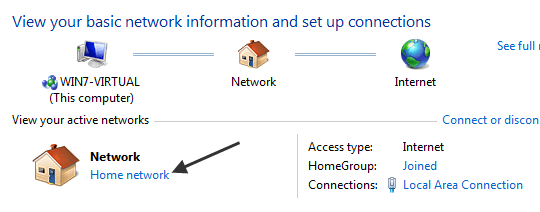
Another reason why you can’t access your HomeGroup is because it only works for home networks where you trust all the computers. If, for some reason, you chose Work, Public, or Domain, then HomeGroups will not work.
Click this bar to view the full image.


3. There are several reasons why you can’t access your HomeGroup. Here are the most popular reasons for not being able to connect to your HomeGroup.
If none of these troubleshooting tips work, try restarting your computer, or leave and then re-join the HomeGroup.


4. Other times there is a rogue file causing problems with Homegroups.

Open Windows explorer and navigate to the following file.

C:\Windows\ServiceProfiles\LocalService\AppData\Roaming\PeerNetworking and delete all of the files in this folder. Now restart the computer.

Go to Services again and you should be able to start 'Peer Networking Grouping' and 'Peer Name Resolution Protocol'. Restart the computer again.

When you log on this time, check the event log again, to ensure no errors concerning the two services are present and also check Services to ensure the two services concerned are running.

You should now have full functionality restored to your homegroup.


5. There are a few more things you can do if it's still not working.

Open up a command prompt and type "regedit" without the quotes then hit enter. Navigate to the following key.
[HKEY_LOCAL_MACHINE\SYSTEM\CurrentControlSet\Services\Tcpip6\Parameters]

You have to set the DisabledComponents Dword to 0

Very important> If there isn't a disabled components dword you have to create one and then set it to zero. To do this follow the next step while you are still at the same spot in the registry.

In the right pane, right-click and select New – DWORD (32-bit value) and type in it's name as> “DisabledComponents” and set its value to 0.
“0″ = Enable All IPv6 Interfaces (Default)
After that reboot your machine and see if the problem is fixed.

6. The following services need to be started for Homegroup networking to function properly. It sometimes helps to change them from Manual to Automatic.

First open a command prompt and type in services.msc then hit enter. Scroll down the list and locate the following services. Make sure that the service is started then right click on the service and choose properties, set the service to Automatic rather than Manual.

Right click the sevice, go to properties, make sure that all these services are started then Set to Automatic> DNS Client, Function Discovery Resource Publication, SSDP Discovery, Peer Networking Grouping,Peer Name Resolution Protocol, UPnP Device Host services, Homegroup listener, Homegroup provider.

For wireless connectivity with Windows 7, you need to run the network setup wizard for everything to work correctly.

You should also make sure that your Advanced sharing settings are set like the pictures below. The public sharing window may not matter with Homegroups but it sometimes helps to set them up accordingly.

Here are a few tutorials from Brink to help you navigate though the Homegroup set up procedure.
http://www.sevenforums.com/tutorials/43961-homegroup-create.html?filter
http://www.sevenforums.com/tutorials/43972-homegroup-add-computer-join.html?filter
http://www.sevenforums.com/tutorials/43980-homegroup-leave.html?filter


My Computer

Computer type
PC/Desktop
Computer Manufacturer/Model Number
Home built
OS
Windows 7 Ult, Windows 8.1 Pro,
CPU
Q9650-4.275GHz, E8600 4.5GHz, E6750-3.8GHz
Motherboard
Evga 780i FTW
Memory
G.Skill PC2 9600 1200Mhz 5 5 5 15 2T
Graphics Card(s)
GTX480
Sound Card
Asus Xonar D2
Monitor(s) Displays
HannsG
Screen Resolution
1680X1050
Hard Drives
GSkill Phoenix Pro 120GB SSD
PSU
ThermalTake Toughpower 1000Watt modular
Case
ThermalTake XaserV
Cooling
Xigmatek S1283
Keyboard
Logitech G15
Mouse
Logitech G9
Internet Speed
T1
Joining homegroup trouble

I can join homegroup when both computers are connected. But Iwant my desktop set up through ethernet and my labtop wireless. Thats when I can't join them. Any solutions anybody.
 

My Computer

Computer Manufacturer/Model Number
Hewlett-packard company-p6203w
OS
windows 7 home premium 64-bit
CPU
amd athlon IIx2 215 processor 2.70 ghz
Memory
4.00 gb
Graphics Card(s)
nvidia geforce 6150sne nforce430
Sound Card
realtek high definition audio
Monitor(s) Displays
hp w2007
Hard Drives
not sure
PSU
not sure
Case
tower
Cooling
not sure
As long as both connections are using the same default gateway "same router" you should be having no problems with Homegroup sharing. It's when people start adding a second router for wireless or some other reason is where the problems start.
 

My Computer

Computer type
PC/Desktop
Computer Manufacturer/Model Number
Home built
OS
Windows 7 Ult, Windows 8.1 Pro,
CPU
Q9650-4.275GHz, E8600 4.5GHz, E6750-3.8GHz
Motherboard
Evga 780i FTW
Memory
G.Skill PC2 9600 1200Mhz 5 5 5 15 2T
Graphics Card(s)
GTX480
Sound Card
Asus Xonar D2
Monitor(s) Displays
HannsG
Screen Resolution
1680X1050
Hard Drives
GSkill Phoenix Pro 120GB SSD
PSU
ThermalTake Toughpower 1000Watt modular
Case
ThermalTake XaserV
Cooling
Xigmatek S1283
Keyboard
Logitech G15
Mouse
Logitech G9
Internet Speed
T1

My Computer

Computer type
PC/Desktop
Computer Manufacturer/Model Number
Built them myself, Science Experiments !
OS
Win7 Enterprise, Win7 x86 (Ult 7600), Win7 x64 Ult 7600, TechNet RTM on AMD x64 (2.8Ghz)
CPU
AMD fx8350 4ghz, AMD-32 2400mhz, AMD-64 3200mhz, AMDx64 2.8G
Motherboard
SIS 755, ECS-K8M890M-M (Ult 7600), GigaByte & others
Memory
2gb, 4gb on the Ult 7600, 4gb on Technet RTM, 32gb on FX8350
Graphics Card(s)
Draw my own Graphics, several nVidia cards
Sound Card
on motherboard
Monitor(s) Displays
19" flat scr, 28" I-Inc widescr,22" Emprex Widescr, 23" Acer
Screen Resolution
1280 x 1024, 1440 x 900, 1920 x 1080
Hard Drives
6 pata Ide HD's & 2 Sata HD's
added 80gb external on Ult 7600 computer,
numerous extra 1tb, 2TB, 3Tb SATA HD's
A collection of ext HD Docks w/ HDs
PSU
430w, 550w, 600w, 700, 800, etc
Case
All Generic Full Towers
Cooling
Open Air & a few fans, some w/ colored LEDs
Keyboard
Compaq & Dell recycled from GoodWill
Mouse
Made in China Optical Wired Mouse
Internet Speed
Fast Cable InterNet
Antivirus
AVG Free on 24 different Desktops, NO Problems!
Browser
IE 8 is preferred, but use FireFox sometimes
Other Info
Linksys Routers, switches, & Hubs
Too Many USB Flash Drives to count, Biggest is 64GB !
Eight computers in my home network.
Sixteen computers at my business network.
Linked via TeamViewer !
Lots of old used spare computer parts everywhere!

My Computer

Computer type
PC/Desktop
Computer Manufacturer/Model Number
Home built
OS
Windows 7 Ult, Windows 8.1 Pro,
CPU
Q9650-4.275GHz, E8600 4.5GHz, E6750-3.8GHz
Motherboard
Evga 780i FTW
Memory
G.Skill PC2 9600 1200Mhz 5 5 5 15 2T
Graphics Card(s)
GTX480
Sound Card
Asus Xonar D2
Monitor(s) Displays
HannsG
Screen Resolution
1680X1050
Hard Drives
GSkill Phoenix Pro 120GB SSD
PSU
ThermalTake Toughpower 1000Watt modular
Case
ThermalTake XaserV
Cooling
Xigmatek S1283
Keyboard
Logitech G15
Mouse
Logitech G9
Internet Speed
T1
Hello,

I just got a problem with my homegroup. Everything was fine until batch of updates today.

I ended up quitting every computers (3 + mine) from the homegroup and creating a new group. That's when the problem started to really annoy me. I was able to create the group and the other computers were able to see that mine had created a group. After entering the password, it would wait for 1 minute then it would says "Windows is unable to join the Homegroup on this computer".

I've tried everything I've found, no success. I tried to create the group on other computers, same issue. I ended up plugging an ethernet cable between 2 computers and then it was possible to join the group!! After that, I went back to the old connection (using a router) and it would be all right. This gave me the idea to try my old linksys router. With this router, there was no problem joining the homegroup!!!

I joined every computer and put back my newest router (DIR-601). Everything is fine now, but this is not a permanent solution. I don't want the dlink router to prevent me from joining any homegroup!

From there, I know I could test all the different options in the router and see if it's possible to join a homegroup, but that takes a long time. Is there any hint you could give me? A port to open?? An IP configuration to change?

Thanks a lot!
 

My Computer

OS
Win7 64 bits FR
CPU
2500K @ 4.5 GHz
Motherboard
Asrock Z68 Gen3 Extreme3
Memory
4x4GB 1600MHz GSkill CL9.
Graphics Card(s)
HD6850 Powercolor stock
Sound Card
Integrated
Monitor(s) Displays
Samsung 2343 + Dell 20in 4/3
Screen Resolution
2048x1152, 1600x1200
Hard Drives
OCZ Vertex LE SSD, 50GB
OCZ Solid 3 120GB
OCZ Vertex 2 240GB
Western Digital Scorpio 320GB 5400 rpm
PSU
KingWin Lazer Platinum (90+) 550Watts
Case
HAF912
Cooling
CPU: OCZ Vendetta 2
Keyboard
MX5500 revolution bluetooth
Mouse
MX5500 revolution bluetooth
Internet Speed
Cable 7 Mbps
I am using the same router. But when use a ethernet on my desktop and wireless on my labtop. I cant join. I can join if use a wirless adapter plugged in my desktop.
 

My Computer

Computer Manufacturer/Model Number
Hewlett-packard company-p6203w
OS
windows 7 home premium 64-bit
CPU
amd athlon IIx2 215 processor 2.70 ghz
Memory
4.00 gb
Graphics Card(s)
nvidia geforce 6150sne nforce430
Sound Card
realtek high definition audio
Monitor(s) Displays
hp w2007
Hard Drives
not sure
PSU
not sure
Case
tower
Cooling
not sure
Another reason why can't join homegroup

one more consideration:

double check if all computer wireless detected SSID are the same.

For example: if 3 computers' wireless network name are
"belkinwireless","belkinwireless","belkinwireless 2",
the one with differ wireless network name will not be able to join the homegroup.

Hence there is a previous post suggested that not to broadcast the ssid name, I think because of this reason.

maybe someone doubt why a differ SSID could be used if all computer connect to the same wireless router. This could be considered a bug in windows system, i believe.

Given the following senario that, computer A connected with a wireless router, and the SSID is "belkinwireless". Then he bought another new wireless router and name it "belkinwireless" too, then the computer A will be detected the ssid as "belkinwireless 2".
Afterward, if he bought another 2 new computers, and connect to the wireless network, the 2 computers will detect the ssid as "belkinwireless".

This is how a same wireless router's SSID be detected differently in different computers.

Bug?
 

My Computer

OS
windows7
Ok, so could there be a bug with my router? Anyway I'll try disabling the SSID when I'll have the time to test joining a homegroup.
 

My Computer

OS
Win7 64 bits FR
CPU
2500K @ 4.5 GHz
Motherboard
Asrock Z68 Gen3 Extreme3
Memory
4x4GB 1600MHz GSkill CL9.
Graphics Card(s)
HD6850 Powercolor stock
Sound Card
Integrated
Monitor(s) Displays
Samsung 2343 + Dell 20in 4/3
Screen Resolution
2048x1152, 1600x1200
Hard Drives
OCZ Vertex LE SSD, 50GB
OCZ Solid 3 120GB
OCZ Vertex 2 240GB
Western Digital Scorpio 320GB 5400 rpm
PSU
KingWin Lazer Platinum (90+) 550Watts
Case
HAF912
Cooling
CPU: OCZ Vendetta 2
Keyboard
MX5500 revolution bluetooth
Mouse
MX5500 revolution bluetooth
Internet Speed
Cable 7 Mbps
Problem Solved

Hi guys,

Just to share, I had the same problem of not being able to join. I realized that my laptop and PC had the same computer name, and changed it to make both unique.

Solved! from "Create..." to "Join..".

Regards

I was having the same probem. No matter what I tried the computer on the wireless network could not see the homegroup. I saw this post and remembered that the wireless computer used to be the main system. I since built another and named it the same thing. As soon as I changed the name on the wireless system, it worked great! Duh. Why doesn't Win7 let you know two computers on the same network have the same name?
 

My Computer

Computer Manufacturer/Model Number
Home Built
OS
Windows 7 Professional 64bit
CPU
Q6600 overclocked to 3.8GHz @ 1.35v
Motherboard
GA-EP45-UD3P
Memory
4GB G.Skill (2 x 2Gb 6-6-6-18)
Graphics Card(s)
2 x Sapphire 4830 512Mb CrossfireX
Sound Card
Onboard
Monitor(s) Displays
Hanns-G 28" LCD
Hard Drives
2x Patriot WARP SSD in RAID 0
Seagate 1.5 Tb
WD 2.0Tb
PSU
COOLMAX CUG-950B 950W
Case
Rosewill CHALLENGER Black Gaming ATX Mid
Cooling
CoolIT SYSTEMS ECO-R120 (plus 4 case fans)
I had the same problem and followed almost every tip I could find. In the end, disabling my Symantec endpoint protection before joining my Homegroup did the trick. I re-enabled it afterwards. If this helps anyone...
 

My Computer

Computer Manufacturer/Model Number
Lenovo T410s
OS
Winfows 7 Professional 32 bit
CPU
Core i5
Memory
4gb
Graphics Card(s)
Nvidia
Sound Card
Soundmax
Monitor(s) Displays
Samsung
Hard Drives
SSD 128 GB
Similar "Cannot Join Home Group" Problem

I have two new Dell Studio Laptops with Windows 7 Home Premium all with the latest updates. At one point early on, home group worked between these computers but recently, Computer A can create a home group (after rebooting both), Computer B does not have the "Join" options and even if I try to create the home group on B after leaving home groups and rebooting both. Windows error message says "Windows cannot setup a homegroup on this computer." They do see each other if I use the "Windows XP"-like Network connection in Windows Explorer. Any ideas? I am new to this forum and was not sure if a new separate thread was the correct direction or just adding on to an existing one.
Colonel,

Leave the homegroup using Network and Sharing Center. Do it for both computers. Reboot both computers. Return to Network and Sharing and make sure they both want you to create a homegroup. Do so on only one computer. Reboot it. Check to make sure the homegroup is still there in Network and Sharing Center.

Go to the other computer. Check to make sure the new homegroup is visible in Networking and Sharing Center. If not report back here.

If it is just join it and report the exact error message if any.

Homegroups are not completely plug and play yet -- reboots are required to stabilize the network.
 

My Computer

Computer Manufacturer/Model Number
Dell Studio 1749
OS
Windows 7 Home Premium 64-bit
CPU
Intel Core i5 M520
Memory
6 GB
Graphics Card(s)
Intel HD Graphics
Sound Card
Intel Display Audio
Monitor(s) Displays
Generic PnP
Hard Drives
Hitachi 250GB ATA
Back
Top