Can't open .avi file

hackprevent

New member
Local time
11:59 AM
Messages
11
Tried to open this file (942mb) but received the msg "Wmp can't play...the player might not support file type/codec blabla"

It doesn't have media information so I checked the codec info via VLC.

It runs with MPEG Audio layer 1/2/3 and MPEG 1/2 video but I'm not sure which codec I've left out.
Are there any more reasons why it doesn't play? :sarc: Need a solution to this. Thanks.
 

My Computer

Computer type
Laptop
Computer Manufacturer/Model Number
Acer Aspire 5820TG
OS
64 bit
CPU
Intel(R) Core(TM) i5 [email protected]
Motherboard
no idea...Intel maybe
Memory
2.00GB
Graphics Card(s)
Ati Radeon HD 5650
Hard Drives
Hitachi HTS545050B9A300
Antivirus
Spyhunter
Browser
Chrome
I see the problem.... WMP doesn't have codec blabla
All you need to do is install the blabla codec

Seriously though, what codec was reported?

Try this utiltiy to identify the codec required to play the file: GSpot Free Download

Thanks for filling in your system specs.
 

My Computer

Computer type
Laptop
Computer Manufacturer/Model Number
HP Pavilion dv6-6c10us
OS
x64 (6.3.9600) Win8.1 Pro & soon dual boot x64 (6.1.7601) Win7_SP1 HomePrem
CPU
AMD A6-3420M APU with Radeon(tm) HD Graphics
Motherboard
Hewlett-Packard 1805
Memory
6.00 GB
Graphics Card(s)
AMD Radeon(TM) HD 6520G
Sound Card
(1) AMD High Definition Audio Device (2) IDT High Definiti
Monitor(s) Displays
HP W2072a 20" LCD (1600 x 900) @ 60 Hz
Screen Resolution
1366 x 768 x 32 bits (4294967296 colors) @ 60 Hz
Hard Drives
ST640LM0 00 HM641JI SATA Disk Device
Keyboard
Logitech k520 wireless KB
Mouse
Logitech m320 wireless mouse (bundled with KB)
Internet Speed
15/5 | 54 MB Wireless 'n'
Antivirus
Realtime: Defender or Avast | On-demand: Malwarebytes, ESET
Browser
IE 11 on Win8, IE 10 on win 7
Other Info
Media: [Gimp, Audacity, VLC] || Comm: [WEmail 2012, Skype] || Productivity: [OpenOffice,| Textpad] || Utils: [Sysinternals, cCleaner, Speccy, Defraggler]
I see the problem.... WMP doesn't have codec blabla
All you need to do is install the blabla codec

Seriously though, what codec was reported?

No lol I was just lazy to type the whole msg:
"Windows Media Player cannot play the file. The Player might not support the file type or might not support the codec that was used to compress the file"

I tried the program but the rendering failed (0x80040265:unknown) :confused:
 

My Computer

Computer type
Laptop
Computer Manufacturer/Model Number
Acer Aspire 5820TG
OS
64 bit
CPU
Intel(R) Core(TM) i5 [email protected]
Motherboard
no idea...Intel maybe
Memory
2.00GB
Graphics Card(s)
Ati Radeon HD 5650
Hard Drives
Hitachi HTS545050B9A300
Antivirus
Spyhunter
Browser
Chrome
Ok, I thought maybe the error msg actually told you something about the codec.

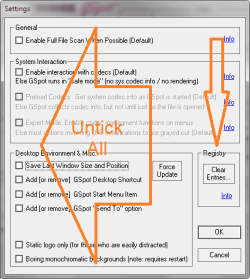
Gspot doesn't help - remove it from your system
System->Settings
untick everything, then click the Clear Entries... box under Registry
UnGspot.png

Fianally, remove the Gspot downloaded zip folder and the extracted folder.


What does vlc tell you abot the codec?

Tools->Codec information

You could also try copying the file as another type
Try .mpg

--OR--

see if vlc can convert it to an avi that WMP understands (does it have to be an avi file?)
 

My Computer

Computer type
Laptop
Computer Manufacturer/Model Number
HP Pavilion dv6-6c10us
OS
x64 (6.3.9600) Win8.1 Pro & soon dual boot x64 (6.1.7601) Win7_SP1 HomePrem
CPU
AMD A6-3420M APU with Radeon(tm) HD Graphics
Motherboard
Hewlett-Packard 1805
Memory
6.00 GB
Graphics Card(s)
AMD Radeon(TM) HD 6520G
Sound Card
(1) AMD High Definition Audio Device (2) IDT High Definiti
Monitor(s) Displays
HP W2072a 20" LCD (1600 x 900) @ 60 Hz
Screen Resolution
1366 x 768 x 32 bits (4294967296 colors) @ 60 Hz
Hard Drives
ST640LM0 00 HM641JI SATA Disk Device
Keyboard
Logitech k520 wireless KB
Mouse
Logitech m320 wireless mouse (bundled with KB)
Internet Speed
15/5 | 54 MB Wireless 'n'
Antivirus
Realtime: Defender or Avast | On-demand: Malwarebytes, ESET
Browser
IE 11 on Win8, IE 10 on win 7
Other Info
Media: [Gimp, Audacity, VLC] || Comm: [WEmail 2012, Skype] || Productivity: [OpenOffice,| Textpad] || Utils: [Sysinternals, cCleaner, Speccy, Defraggler]
codec info:
Stream0: MPEG 1/2 video(mpgv)
Stream 1~7: MPEG Audio layer 1/2/3 (mpga)

It still fails to play after changing filename to .mpg or .wmv
 

My Computer

Computer type
Laptop
Computer Manufacturer/Model Number
Acer Aspire 5820TG
OS
64 bit
CPU
Intel(R) Core(TM) i5 [email protected]
Motherboard
no idea...Intel maybe
Memory
2.00GB
Graphics Card(s)
Ati Radeon HD 5650
Hard Drives
Hitachi HTS545050B9A300
Antivirus
Spyhunter
Browser
Chrome
see if vlc can convert it to an avi that WMP understands (does it have to be an avi file?)

hmmm..which .ext do i convert it into? Do i try all the available options?
also, is there a way to check the converting ETA?
Either it's not converting or I did smthing wrong
sry for double posting:zip:
 

My Computer

Computer type
Laptop
Computer Manufacturer/Model Number
Acer Aspire 5820TG
OS
64 bit
CPU
Intel(R) Core(TM) i5 [email protected]
Motherboard
no idea...Intel maybe
Memory
2.00GB
Graphics Card(s)
Ati Radeon HD 5650
Hard Drives
Hitachi HTS545050B9A300
Antivirus
Spyhunter
Browser
Chrome
ok, delete those copies (mpg, wmv)


Any luck converting the file in vlc?


vlc conversion is tricky... I always have to fool around with it until I figure it out.

Any chance you have Audacity installed? I'm not sure if mpgv is supported, but try it, it's a good program to have on your system.
Audacity makes it easy to convert - open the file, export it to the desired format.
Direct download links below - You'll need the application and two support libraries

Audacity 2.0.5 installer
LAME MP3 encoder
FFmpeg import/export library
 

My Computer

Computer type
Laptop
Computer Manufacturer/Model Number
HP Pavilion dv6-6c10us
OS
x64 (6.3.9600) Win8.1 Pro & soon dual boot x64 (6.1.7601) Win7_SP1 HomePrem
CPU
AMD A6-3420M APU with Radeon(tm) HD Graphics
Motherboard
Hewlett-Packard 1805
Memory
6.00 GB
Graphics Card(s)
AMD Radeon(TM) HD 6520G
Sound Card
(1) AMD High Definition Audio Device (2) IDT High Definiti
Monitor(s) Displays
HP W2072a 20" LCD (1600 x 900) @ 60 Hz
Screen Resolution
1366 x 768 x 32 bits (4294967296 colors) @ 60 Hz
Hard Drives
ST640LM0 00 HM641JI SATA Disk Device
Keyboard
Logitech k520 wireless KB
Mouse
Logitech m320 wireless mouse (bundled with KB)
Internet Speed
15/5 | 54 MB Wireless 'n'
Antivirus
Realtime: Defender or Avast | On-demand: Malwarebytes, ESET
Browser
IE 11 on Win8, IE 10 on win 7
Other Info
Media: [Gimp, Audacity, VLC] || Comm: [WEmail 2012, Skype] || Productivity: [OpenOffice,| Textpad] || Utils: [Sysinternals, cCleaner, Speccy, Defraggler]
ok I'll try them and let you know the results in half a day or so soon...:sleepy:
thx for your great assistance so far:geek:
 
Last edited:

My Computer

Computer type
Laptop
Computer Manufacturer/Model Number
Acer Aspire 5820TG
OS
64 bit
CPU
Intel(R) Core(TM) i5 [email protected]
Motherboard
no idea...Intel maybe
Memory
2.00GB
Graphics Card(s)
Ati Radeon HD 5650
Hard Drives
Hitachi HTS545050B9A300
Antivirus
Spyhunter
Browser
Chrome
Your welcome, hopefully Audacity will read that format(mpgv) - as I said, I not certain.
 

My Computer

Computer type
Laptop
Computer Manufacturer/Model Number
HP Pavilion dv6-6c10us
OS
x64 (6.3.9600) Win8.1 Pro & soon dual boot x64 (6.1.7601) Win7_SP1 HomePrem
CPU
AMD A6-3420M APU with Radeon(tm) HD Graphics
Motherboard
Hewlett-Packard 1805
Memory
6.00 GB
Graphics Card(s)
AMD Radeon(TM) HD 6520G
Sound Card
(1) AMD High Definition Audio Device (2) IDT High Definiti
Monitor(s) Displays
HP W2072a 20" LCD (1600 x 900) @ 60 Hz
Screen Resolution
1366 x 768 x 32 bits (4294967296 colors) @ 60 Hz
Hard Drives
ST640LM0 00 HM641JI SATA Disk Device
Keyboard
Logitech k520 wireless KB
Mouse
Logitech m320 wireless mouse (bundled with KB)
Internet Speed
15/5 | 54 MB Wireless 'n'
Antivirus
Realtime: Defender or Avast | On-demand: Malwarebytes, ESET
Browser
IE 11 on Win8, IE 10 on win 7
Other Info
Media: [Gimp, Audacity, VLC] || Comm: [WEmail 2012, Skype] || Productivity: [OpenOffice,| Textpad] || Utils: [Sysinternals, cCleaner, Speccy, Defraggler]
I've downloaded the files...sadly Audacity don't support video formats.
The file seems to be .avi however when I tried repairing with DivFix v0.34, it says the file isn't .avi format
That's weird....
 

My Computer

Computer type
Laptop
Computer Manufacturer/Model Number
Acer Aspire 5820TG
OS
64 bit
CPU
Intel(R) Core(TM) i5 [email protected]
Motherboard
no idea...Intel maybe
Memory
2.00GB
Graphics Card(s)
Ati Radeon HD 5650
Hard Drives
Hitachi HTS545050B9A300
Antivirus
Spyhunter
Browser
Chrome

My Computer

Computer type
Laptop
Computer Manufacturer/Model Number
ASUS N45SF
OS
Windows 7 Professional SP1 x64 (OEM)
CPU
Intel® Core™ i5 2430M/2410M Processor
Motherboard
Intel® HM65 Express Chipset
Memory
DDR3 1333 SODIMM (8GB)
Graphics Card(s)
NVIDIA® GeForce® GT 555M (2GB)
Sound Card
Realtek High Definition Audio
Monitor(s) Displays
14.0" LED Backlight
Screen Resolution
16:9 HD (1366x768)
Hard Drives
640GB Seagate (internal), 1TB Toshiba Canvio Portable, 2TB x 2 WD My Book Essential (external)
Antivirus
Malwarebytes Anti-Malware Home (Premium)
Browser
Waterfox
Other Info
Optical Drive: Slimtype DVD A DS8A5SH (Super-Multi DVD);
Audio: Bang & Olufsen ICEpower®, SonicMaster
Try another player?

Hi,

Just thought that you might like to try playing the video using S-Player portable version.

http://file.splayer.org/splayer.7z (English version).

It's played .avi videos for me when VLC and WMP both failed to play them even after repairing with DIVFX++

It might be worth a look!
 

My Computer

Computer type
Laptop
Computer Manufacturer/Model Number
ASUS
OS
Microsoft Windows 7 Home Premium 64-bit 7601 Multiprocessor Free Service Pack 1
CPU
AMD C-60 APU with Radeon(tm) HD Graphics
Motherboard
ASUSTeK COMPUTER INC. X501U
Memory
4.00 GB
Graphics Card(s)
AMD Radeon HD 6290 Graphics
Sound Card
(1) AMD High Definition Audio Device (2) Realtek High Defi
Screen Resolution
1366 x 768 x 32 bits (4294967296 colors) @ 60 Hz
Hard Drives
Hitachi HTS545050A7E380 SATA Disk Device
Antivirus
Comodo CIS & FW, SecureAplus App Whitelisting, Threatfire
Browser
Cyberfox 64bit, Opera 64bit, Airfox
Other Info
Spy-The-Spy, HitmanPro.Alert, Norton Connect Safe, MJRegWatcher, BitDefender TrafficLight, Voodoo Shield, Zemana AntiMalware
My apologies re: Audacity... what was I thinking!!!!! It's an audio editor!!!!!

Is it only this one video causing problems? Are you really attached to it and playing it in WMP?

I thnk you said it plays in vlc - maybe not, maybe you only said you checked the codec in vlc.
Try using vlc to convert it again- this time

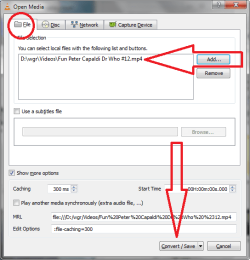
Media menu -> Convert / Save
Click the Add... button in the Open Media dialog
(show more options is only shown to let you see what's there)
Click the Convert / Save button

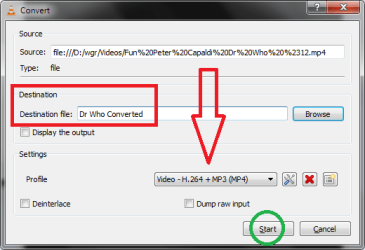
Type a new name and ext for the destination file.
The profile shown in the image worked fine for me, there are others.
:note: I forgot to include the extension when I grabbed the screen shot thinking vlc would supply one.
.mp4 seemed to work when I renamed it in the folder.

In other words my example should be: Dr Who Coverted.mp4 (2nd screenshot)

I've downloaded the files...sadly Audacity don't support video formats.
The file seems to be .avi however when I tried repairing with DivFix v0.34, it says the file isn't .avi format
That's weird....
 

Attachments

  • vlc-a.png
    vlc-a.png
    19.1 KB · Views: 25
  • vlc-b.png
    vlc-b.png
    11.5 KB · Views: 23
Last edited:

My Computer

Computer type
Laptop
Computer Manufacturer/Model Number
HP Pavilion dv6-6c10us
OS
x64 (6.3.9600) Win8.1 Pro & soon dual boot x64 (6.1.7601) Win7_SP1 HomePrem
CPU
AMD A6-3420M APU with Radeon(tm) HD Graphics
Motherboard
Hewlett-Packard 1805
Memory
6.00 GB
Graphics Card(s)
AMD Radeon(TM) HD 6520G
Sound Card
(1) AMD High Definition Audio Device (2) IDT High Definiti
Monitor(s) Displays
HP W2072a 20" LCD (1600 x 900) @ 60 Hz
Screen Resolution
1366 x 768 x 32 bits (4294967296 colors) @ 60 Hz
Hard Drives
ST640LM0 00 HM641JI SATA Disk Device
Keyboard
Logitech k520 wireless KB
Mouse
Logitech m320 wireless mouse (bundled with KB)
Internet Speed
15/5 | 54 MB Wireless 'n'
Antivirus
Realtime: Defender or Avast | On-demand: Malwarebytes, ESET
Browser
IE 11 on Win8, IE 10 on win 7
Other Info
Media: [Gimp, Audacity, VLC] || Comm: [WEmail 2012, Skype] || Productivity: [OpenOffice,| Textpad] || Utils: [Sysinternals, cCleaner, Speccy, Defraggler]
Try installing a codec pack - Download Windows 7 Codecs Advanced 4.4.2 - FileHippo.com.

That one claims help you play AVIs. I use CCCP/MPC-HC myself for all playback needs.

sry I'm not a computer pro, I have no idea how to configure the settings


Callendar :Try another player?
sry it didn't work :huh:

Slartybart:Is it only this one video causing problems? Are you really attached to it and playing it in WMP?
I thnk you said it plays in vlc - maybe not, maybe you only said you checked the codec in vlc.
Try using vlc to convert it again

yes, and it seems VLC or WMP are the viable options since I don't know what the file's true format is :confused:
It keeps converting into 1kb file despite numerous tries using vlc .
 

My Computer

Computer type
Laptop
Computer Manufacturer/Model Number
Acer Aspire 5820TG
OS
64 bit
CPU
Intel(R) Core(TM) i5 [email protected]
Motherboard
no idea...Intel maybe
Memory
2.00GB
Graphics Card(s)
Ati Radeon HD 5650
Hard Drives
Hitachi HTS545050B9A300
Antivirus
Spyhunter
Browser
Chrome
I hate to ask this but where did this file come from ?
What program or site was used to retrieve it or create the file ?
Cheers,
1 or 2 kb would point to it being a shortcut to a file not an actual file,
Cheers.
 

My Computer

Computer type
PC/Desktop
Computer Manufacturer/Model Number
Custom assembled by me :}
OS
Win-7-Pro64bit 7-H-Prem-64bit
CPU
i7-5930K 2nd i9-9940x both water blocked VRM's too
Motherboard
ASUS SABERTOOTH X99 2nd ASUS x299 Apex
Memory
Trident-z 3200C14 2nd Trident-z 3600C16
Graphics Card(s)
EVGA 1080ti ftw3 2nd Titan Xp both water blocked
Sound Card
Built-in Realtek
Monitor(s) Displays
1-AOC G2460PG 24"G-Sync 144Hz/ 2nd 1-ASUS VG248QE 24" 144Hz
Screen Resolution
1920 x 1080 144Hz
Hard Drives
2-Samsung M.2 Evo & Evo Plus
2-Samsung 850 EVO 500GB SSD's/ 3-2.5 W.D. Black 1tb-&3-1tb/3-3.5 WD Black 1tb hdd's
PSU
EVGA SuperNOVA 1000-P2 2nd 1200-P2
Case
2-Corsair Obsidian Series 450D Black ATX Mid Tower
Cooling
Custom water loops
Keyboard
Logitech G710+/ 2nd Logitech G910
Mouse
2-RedDragon M901 Perdition 16400 dpi Gaming mouse = wired
Internet Speed
Comcast Ping 19ms 89.31mbps download speed 6.12mbps upload
Antivirus
Malwarebytes Pro/ Superantispyware Pro
Browser
FireFox & Pale moon
Other Info
2nd ASUS X299 Apex/Intel i9-9940x with Custom water loop/7H-Prem-x64/Corsair 450D case/Ram Trident-z 3600C16 4x8gb / Samsung970Evo plus 500gb SSD/Dual ssd EZ swap evo/PSU EVGA SuperNova 1200w-P2 80+Platinum/GPU Titan Xp /8-ML-140 on push-pull on 2-280GTX rads
Try installing a codec pack - Download Windows 7 Codecs Advanced 4.4.2 - FileHippo.com.

That one claims help you play AVIs. I use CCCP/MPC-HC myself for all playback needs.

sry I'm not a computer pro, I have no idea how to configure the settings
Hey bud, no need to configure anything. Usually, codec packs would just install themselves and default settings would work.

If the Win7 Codec Pack overwhelms you, try Codec-Pack-All-In-1.

Note that you must not install codec packs on top of each other (unless it's an update). Always uninstall your current pack before installing a different one. Some codec packs tend to clash, so sticking to a single pack is advised.
 

My Computer

Computer type
Laptop
Computer Manufacturer/Model Number
ASUS N45SF
OS
Windows 7 Professional SP1 x64 (OEM)
CPU
Intel® Core™ i5 2430M/2410M Processor
Motherboard
Intel® HM65 Express Chipset
Memory
DDR3 1333 SODIMM (8GB)
Graphics Card(s)
NVIDIA® GeForce® GT 555M (2GB)
Sound Card
Realtek High Definition Audio
Monitor(s) Displays
14.0" LED Backlight
Screen Resolution
16:9 HD (1366x768)
Hard Drives
640GB Seagate (internal), 1TB Toshiba Canvio Portable, 2TB x 2 WD My Book Essential (external)
Antivirus
Malwarebytes Anti-Malware Home (Premium)
Browser
Waterfox
Other Info
Optical Drive: Slimtype DVD A DS8A5SH (Super-Multi DVD);
Audio: Bang & Olufsen ICEpower®, SonicMaster
I hate to ask this but where did this file come from ?
What program or site was used to retrieve it or create the file ?
Cheers,
1 or 2 kb would point to it being a shortcut to a file not an actual file,
Cheers.
I think it was downloaded from bearfiles.in through my browser.
So the downloaded file (942mb) could just be a shortcut file?
 

My Computer

Computer type
Laptop
Computer Manufacturer/Model Number
Acer Aspire 5820TG
OS
64 bit
CPU
Intel(R) Core(TM) i5 [email protected]
Motherboard
no idea...Intel maybe
Memory
2.00GB
Graphics Card(s)
Ati Radeon HD 5650
Hard Drives
Hitachi HTS545050B9A300
Antivirus
Spyhunter
Browser
Chrome
File corruption

It's possible that the file was corrupted either on upload or download. If the uploaded file was corrupted it won't ever play back.

It's possible that the uploader uploaded a file with an incorrect file extension.

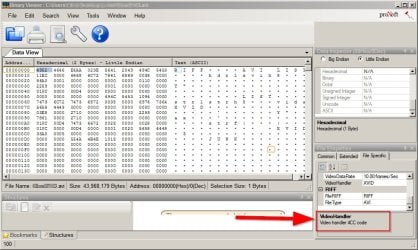
You might want to try Binary Viewer Page and see if it reports the required codec:

If it reports the correct codec needed maybe another member could point you in the right direction

Another long shot:

http://www.pcfreetime.com/

Format Factory has managed to convert and repair broken video files for me in the past. Currently I don't have it installed. Good luck!
 

Attachments

  • Binary Viewer.jpg
    Binary Viewer.jpg
    109.3 KB · Views: 1
Last edited:

My Computer

Computer type
Laptop
Computer Manufacturer/Model Number
ASUS
OS
Microsoft Windows 7 Home Premium 64-bit 7601 Multiprocessor Free Service Pack 1
CPU
AMD C-60 APU with Radeon(tm) HD Graphics
Motherboard
ASUSTeK COMPUTER INC. X501U
Memory
4.00 GB
Graphics Card(s)
AMD Radeon HD 6290 Graphics
Sound Card
(1) AMD High Definition Audio Device (2) Realtek High Defi
Screen Resolution
1366 x 768 x 32 bits (4294967296 colors) @ 60 Hz
Hard Drives
Hitachi HTS545050A7E380 SATA Disk Device
Antivirus
Comodo CIS & FW, SecureAplus App Whitelisting, Threatfire
Browser
Cyberfox 64bit, Opera 64bit, Airfox
Other Info
Spy-The-Spy, HitmanPro.Alert, Norton Connect Safe, MJRegWatcher, BitDefender TrafficLight, Voodoo Shield, Zemana AntiMalware
Try installing a codec pack - Download Windows 7 Codecs Advanced 4.4.2 - FileHippo.com.

That one claims help you play AVIs. I use CCCP/MPC-HC myself for all playback needs.
Stay away from those damn Codec packs. They are nothing but trouble. I have seen many cases where they bricked the OS.

The problem here is that there are many flavors of .avi and since Windows is historically poor in codecs, I recommend to convert this .avi to another .avi. The Freemake converter is able to do that.
 

My Computer

Computer Manufacturer/Model Number
HP, Dell, Gateway, Toshiba - 4 laptops and 2 desktops
OS
Vista, Windows7, Mint Mate, Zorin, Windows 8
CPU
from 1.6GHz Duo to i7
Monitor(s) Displays
2x HP w2207
Hard Drives
5x HDD, 7x SSD, 12x Externals
Keyboard
with trackball - no mices
Mouse
Trackball mice
Internet Speed
DSL 6000
I just identified the file via format factory !! Didn't expect it to be .rar
Now the problem is I don't have the password to extract it :huh:
 

My Computer

Computer type
Laptop
Computer Manufacturer/Model Number
Acer Aspire 5820TG
OS
64 bit
CPU
Intel(R) Core(TM) i5 [email protected]
Motherboard
no idea...Intel maybe
Memory
2.00GB
Graphics Card(s)
Ati Radeon HD 5650
Hard Drives
Hitachi HTS545050B9A300
Antivirus
Spyhunter
Browser
Chrome
Back
Top