Cant open PDF from Google

RonBin79

New member
Member
VIP
Local time
6:09 AM
Messages
311
Location
West Sussex
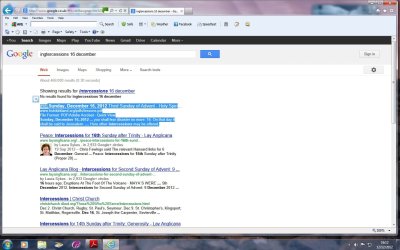
Every time I tgry to open a PDF fkrom Gogle either windows stops working or I am told there is a problem, see screen shots.

Can anyone tell me how to overcome this please. I can read PDF's sent to me by friends but not from the internet???
RonBin79
 

Attachments
  • Intercessions1.jpg
    Intercessions1.jpg
    125.4 KB · Views: 12
  • Intercessions2.jpg
    Intercessions2.jpg
    66.4 KB · Views: 15

My Computer

Computer Manufacturer/Model Number
Dell XP8300
OS
Windows Seven Premium
CPU
Intel Core i5-2300
Motherboard
Unknown
Memory
8GB
Graphics Card(s)
1GB ATI Raedon HD 5450
Sound Card
Integrated 7.1 with THX TrueStudio
Monitor(s) Displays
Dell 17"
Hard Drives
1 Terrabyte Serial ATA
Case
Dell (Metal)
Cooling
None
Keyboard
Dell
Mouse
Dell Laser
Internet Speed
2.8Gb
I guess you mean you want to open a PDF file in your browser? If so try this:
  1. Start Acrobat or Adobe Reader.


  2. Choose Edit > Preferences.


  3. Select Internet in the list on the left.


  4. Check Display PDF in Browser, and click OK.


  5. Start Internet Explorer


My Computer

Computer type
PC/Desktop
OS
Microsoft Windows 7 Home Premium 64-bit 7601 Multiprocessor Free Service Pack 1
CPU
Intel(R) Core(TM) i7-3770 CPU @ 3.40GHz
Motherboard
ASUSTeK COMPUTER INC. P8H77-M
Memory
8.00 GB
Graphics Card(s)
Intel(R) HD Graphics 4000
Sound Card
On Board
Monitor(s) Displays
Dell 24"
Screen Resolution
1920 x 1080
Hard Drives
(1) INTEL SSDSC2CT180A3 ATA Device (2) ST500DM002-1BD142 ATA Device (3) WDC WD3200AAKS-75L9A0 ATA Device (4) Generic- Compact Flash USB Device (5) Generic- MS/MS-Pro USB Device (6) Generic- SD/MMC USB Device (7) Generic- SM/xD-Picture USB
PSU
500w Corsair
Case
Cooler Master
Cooling
3 Fans
Keyboard
Logitech MK300
Mouse
Logitech WOM
Internet Speed
75Mb
Antivirus
Norton 360
Browser
Firefox, Opera, IE
I guess you mean you want to open a PDF file in your browser? If so try this:
  1. Start Acrobat or Adobe Reader.
  2. Choose Edit > Preferences.
  3. Select Internet in the list on the left.
  4. Check Display PDF in Browser, and click OK.
  5. Start Internet Explorer
BTW, I could be wrong, but I think that the option to "Display PDF in Browser" has been removed from version XI (version 11) of Adobe's PDF reader. Now all PDFs must be displayed within the browser (which I hate).

@OP, go ahead and install version 11 of the reader and see if that solves your problem. Sadly, there is already an exploit that cause a malicious PDF to automatically download and run a program on your computer. This exploit impacts versions 10 and 11 of Adobe's reader.

If installing version 11 does not solve your issue, consider uninstalling all aspects of AVG and using Microsoft Security Essentials as your antivirus tool instead.

Edit: this post might be of interest to the OP as well:
http://www.sevenforums.com/browsers...as-stopped-working-acrobat-2.html#post2211625
 

My Computer

Computer type
Laptop
Computer Manufacturer/Model Number
Employer provided Dell Latitude
OS
W7 Pro SP1 64bit
CPU
i7
Memory
8GB
Graphics Card(s)
Intel HD Graphics
Hard Drives
crappy SSD
Antivirus
Employer mandated Symantec Endpoint Protection
Browser
Pale Moon 64bit, IE11 64bit & Chrome 64bit
Cant open a PDF file from Google

Thank you Mitchell65. I did as suggested but alas, no luck. I uninstalled the programme, rebooted then de activated my AVG and downloaded Acobat vers 9 again. Still no luck. On once ocassion I got as far as the "Terms of Agreement". I clicked the Accept box then Windows7 started in and told me there was a problem and they would let me know if they found a solution, which of course they never so they closed the page down!

If you have any more advice, I will be glad to receive it.

RonBin79 (now 80)
 

My Computer

Computer Manufacturer/Model Number
Dell XP8300
OS
Windows Seven Premium
CPU
Intel Core i5-2300
Motherboard
Unknown
Memory
8GB
Graphics Card(s)
1GB ATI Raedon HD 5450
Sound Card
Integrated 7.1 with THX TrueStudio
Monitor(s) Displays
Dell 17"
Hard Drives
1 Terrabyte Serial ATA
Case
Dell (Metal)
Cooling
None
Keyboard
Dell
Mouse
Dell Laser
Internet Speed
2.8Gb
Cant open a PDF file from Google
Thank you Mitchell65. I did as suggested but alas, no luck. I uninstalled the programme, rebooted then de activated my AVG and downloaded Acobat vers 9 again. Still no luck. On once ocassion I got as far as the "Terms of Agreement". I clicked the Accept box then Windows7 started in and told me there was a problem and they would let me know if they found a solution, which of course they never so they closed the page down!

If you have any more advice, I will be glad to receive it.

RonBin79 (now 80)
 

My Computer

Computer Manufacturer/Model Number
Dell XP8300
OS
Windows Seven Premium
CPU
Intel Core i5-2300
Motherboard
Unknown
Memory
8GB
Graphics Card(s)
1GB ATI Raedon HD 5450
Sound Card
Integrated 7.1 with THX TrueStudio
Monitor(s) Displays
Dell 17"
Hard Drives
1 Terrabyte Serial ATA
Case
Dell (Metal)
Cooling
None
Keyboard
Dell
Mouse
Dell Laser
Internet Speed
2.8Gb
Did you do this as advised:
If installing version 11 does not solve your issue, consider uninstalling all aspects of AVG and using Microsoft Security Essentials as your antivirus tool instead.
 

My Computer

Computer type
PC/Desktop
OS
Microsoft Windows 7 Home Premium 64-bit 7601 Multiprocessor Free Service Pack 1
CPU
Intel(R) Core(TM) i7-3770 CPU @ 3.40GHz
Motherboard
ASUSTeK COMPUTER INC. P8H77-M
Memory
8.00 GB
Graphics Card(s)
Intel(R) HD Graphics 4000
Sound Card
On Board
Monitor(s) Displays
Dell 24"
Screen Resolution
1920 x 1080
Hard Drives
(1) INTEL SSDSC2CT180A3 ATA Device (2) ST500DM002-1BD142 ATA Device (3) WDC WD3200AAKS-75L9A0 ATA Device (4) Generic- Compact Flash USB Device (5) Generic- MS/MS-Pro USB Device (6) Generic- SD/MMC USB Device (7) Generic- SM/xD-Picture USB
PSU
500w Corsair
Case
Cooler Master
Cooling
3 Fans
Keyboard
Logitech MK300
Mouse
Logitech WOM
Internet Speed
75Mb
Antivirus
Norton 360
Browser
Firefox, Opera, IE
or download foxit reader. link found under free software
 

My Computer

Computer type
PC/Desktop
Computer Manufacturer/Model Number
gigabyte z77-d3sh
OS
win 7 home premium 64 bit
CPU
intel I5 3470 3.2ghz
Motherboard
gigabyte z77-d3sh
Memory
12gb
Graphics Card(s)
asus radeon 5450 512mb
Sound Card
no
Monitor(s) Displays
viewsonic
Screen Resolution
1920*1080
Hard Drives
Crucial m4 sata 3 SSD
PSU
0cz
Case
corair carbide 200
Cooling
corsair h60
Keyboard
wireless logitech
Internet Speed
60 mbs
or download foxit reader. link found under free software
When Adobe removed the option to display a PDF outside of the browser,
I changed to Foxit, but I had to change back to Adobe...
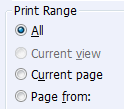
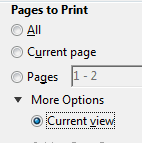
...because Foxit disabled the option to print current view in too many PDFs:

From Foxit:
foxit.png

From Adobe:
adobe.png

These screenshots were taken while attempting to print* the same PDF.

*Actually, I often "print" to another PDF via PDFCreator.

All of the usual caveats apply:
Watch out for junk that installs via the installers for Foxit, Adobe's reader and PDFCreator.
 

My Computer

Computer type
Laptop
Computer Manufacturer/Model Number
Employer provided Dell Latitude
OS
W7 Pro SP1 64bit
CPU
i7
Memory
8GB
Graphics Card(s)
Intel HD Graphics
Hard Drives
crappy SSD
Antivirus
Employer mandated Symantec Endpoint Protection
Browser
Pale Moon 64bit, IE11 64bit & Chrome 64bit
Back
Top