Can't open system recovery?

I want to back up one step first.

Can you get to BIOS?
If you can - reset to defaults, save on exit, and reboot.

If resetting BIOS to defaults worked, skip the rest of this post.

Can you still get to the Quick Web screen shown in your post #3?
How did you get to command prompt?


There are two things that are troubling me
  • Quick Web is on a FAT32 partitioned (usually E:\ and labeled HP_Tools)
  • Command Prompt is on the System Drive
Before I declare this a HW issue, see what Windows Defender Offline (WDO) finds: What is Windows Defender Offline?
Download and create WDO on a USB stick (if you can, put WDO on another stick and keep the Win7 Home Premium media just in case it's needed). WDO is small < 300 MB

See this tutorial: http://www.sevenforums.com/tutorials/166445-windows-defender-offline.html
Option 1 tells you how to create the media (step 6 in option 1 is for USB)
Option 2 ells you how to use the media and scan your machine.

There is a full regiment of AV tools that I could suggest, but your machine doesn't have Internet or CD drive. I've found a few that can be put on a USB stick but I'm not sure about the others.

Anyway, run WDO and post results. It might not see your drive either. That still leaves why Quick Web and Command Prompt work off the disk as a mystery.
 

My Computer My Computer

At a glance

x64 (6.3.9600) Win8.1 Pro & soon dual boot x6...AMD A6-3420M APU with Radeon(tm) HD Graphics6.00 GBAMD Radeon(TM) HD 6520G
Computer type
Laptop
Computer Manufacturer/Model Number
HP Pavilion dv6-6c10us
OS
x64 (6.3.9600) Win8.1 Pro & soon dual boot x64 (6.1.7601) Win7_SP1 HomePrem
CPU
AMD A6-3420M APU with Radeon(tm) HD Graphics
Motherboard
Hewlett-Packard 1805
Memory
6.00 GB
Graphics Card(s)
AMD Radeon(TM) HD 6520G
Sound Card
(1) AMD High Definition Audio Device (2) IDT High Definiti
Monitor(s) Displays
HP W2072a 20" LCD (1600 x 900) @ 60 Hz
Screen Resolution
1366 x 768 x 32 bits (4294967296 colors) @ 60 Hz
Hard Drives
ST640LM0 00 HM641JI SATA Disk Device
Keyboard
Logitech k520 wireless KB
Mouse
Logitech m320 wireless mouse (bundled with KB)
Internet Speed
15/5 | 54 MB Wireless 'n'
Antivirus
Realtime: Defender or Avast | On-demand: Malwarebytes, ESET
Browser
IE 11 on Win8, IE 10 on win 7
Other Info
Media: [Gimp, Audacity, VLC] || Comm: [WEmail 2012, Skype] || Productivity: [OpenOffice,| Textpad] || Utils: [Sysinternals, cCleaner, Speccy, Defraggler]
Ty, follow Slarty's most recent instructions before you try mine and follow up on what you have found out, I just want to go over some different angles if Slarty's help hasn't worked so far.


The really weird thing about this is Quick Web. It's on the disk!!!!!
I know. To borrow a phrase; this is almost like Einstein's entanglement theory "Spooky action at a distance", and it reasons that HP and others could have thought of something like this.

Quantum Mechanics in computers is already here:
Quantum mechanics, which aims to describe the nano-scale world around us, has already led to the development of many technologies ubiquitous in modern life, including broadband optical fibre communication and smartphone displays.

Read more at: The power of one: Single photons illuminate quantum technology
I thought we needed a break, but I digress....... :p


This is what I found on HP's Quick Web and the IOS environment, it sounds like it is on the HDD, but I haven't found anything definitive yet:
Instant On Software (IOS) is an optional, instant-on environment that is separate from your Windows operating system. IOS allows you to rapidly access certain programs without the need to start the Windows 7 operating system. The IOS environment provides less functionality than Windows 7; however you can use your computer within 10 seconds or less of pressing the power button..........
..........However, if you do not select any program, the computer will automatically launch the full Windows 7 operating system.
HP Notebook PCs - Overview of Instant On Software Environment
And:
QuickWeb and Windows do not use the same hardware and software driver configuration settings.
Configuring Applications in Instant On Software (IOS) and QuickWeb Environment | HP® Support
Now, for what I'd like you to try:

  • Ty in the first HP quote (highlighted) have you tried just letting the 1071 sit for a bit and see if it automatically boots into the main OS?

  • In the second quote, have you tried going to the General Tab in quick web and restore the 1071 from there?
Click the Setup icon
c02205383.png
to open the Configuration Panel window, and click the desired configuration option. (Environment Settings (4 tabs)).

When in Environment Settings click on the General Tab, in there you are supposed to be able to:
General -
Allow the computer to check for updated drivers and software once a month, restore the computer's system to factory setting, and specify a time delay for when the computer should start into the Windows OS if the IOS is inactive for some period of time.
Also:

  • Check those IOS time delays before it enters the OS, they might be set to "never".
  • Set the date and time, Input Language, Language and keyboard, Windows can be finicky about those and checks them to see if their right, before it will start up.


On the task bar, click the Setup icon
c02205383.png
to open the Configuration Panel window.


EDIT:
I don't see a setup icon on your quick web taskbar:
ty1.JPG
It might be under the HP icon to the right, try left or right clicking on it, if it isn't there try right clicking on the Start button you have circled, and, what is that little house icon beside the shutdown button to the left, the one with the letter "A" in it, what's it for?
 
Last edited:

My Computer My Computer

At a glance

Originally Win 7 Hm Prem x64 Ver 6.1.7600 Bui...Intel i3 530 2.93GHz, 2933MHz 2 Cores 4 Logic...6GB of 1,333MHz DDR3 SDRAM32MB Intel Graphics Media Accelerator HD IGChip
Computer type
PC/Desktop
Computer Manufacturer/Model Number
Gateway DX4831-01e (Mid-Tower Desktop)
OS
Originally Win 7 Hm Prem x64 Ver 6.1.7600 Build 7601-SP1 | Upgraded to Windows 10 December 14, 2019
CPU
Intel i3 530 2.93GHz, 2933MHz 2 Cores 4 Logical Processors
Motherboard
Gateway H57M01 133 megahertz
Memory
6GB of 1,333MHz DDR3 SDRAM
Graphics Card(s)
32MB Intel Graphics Media Accelerator HD IGChip
Sound Card
Realtek High Definition Audio
Monitor(s) Displays
Gateway HX2000 20inch TFT active matrix TN
Screen Resolution
1600 x 900 x 59 hertz
Hard Drives
WDC WD10EADS-00M2B0 [HDD] (1000.20 GB) -- drive 0,
HL-DT-ST DVDRAM GH41N [CD-ROM dr]
Four card readers, and Four USB 2.0
PSU
300watts.
Case
Mid-Tower Desktop
Cooling
Stock from Gateway
Keyboard
Natural Ergonomic Keyboard 4000, see Other Info
Mouse
Orig. Gateway wore out now using Insignia USB wired optical
Internet Speed
Vz FIOS 10ms png 57.64Mbps down 65.53Mbps up Speedtest.org
Antivirus
Zamana Anti-logger with Anti-malware, MSE, Windows Firewall,
Browser
IE11.0.9600.19399-Upd ver11.0.135, Firefox 68.0.1 x64
Other Info
System Specs by Belarc.

BIOS: American Megatrends Inc. P01-A0 11/17/2009

Replaced the MS 'Natural' Standard PS/2 Enhanced 101-102 Keyboard with a new Natural Ergonomic Keyboard 4000 on August 1st 2014.

Canon Pixma MG3222 Printer.

Updated to IE11 on 12102015 | Fios Quantum Router g1100

Additional AV: SpywareBlaster, manual Mbam, SAS
Can you get to BIOS?
Yes, I just hit esc. on startup.

Can you still get to the Quick Web screen shown in your post #3?
Yep, also in the startup menu.

How did you get to command prompt?
When I boot windows from the HDD, it gives me 2 options:
1) Launch Startup Repair (Recommended)
2) Start Windows Normally

2 just restarts my computer, bringing me back to that screen, and 1 starts up recovery manager. In the recovery manager window, The "I need help immediately" section and "I'd like to take precautions" section are both disabled. The only option I can choose is "Run Computer Checkup" where I can open the command prompt. I don't have the windows installation disk.

When I created the WDO usb, I booted it, but it gave me the error:

This app can't be started.

Error: Unable to detect a Windows system drive. This could be due to missing drivers, an encrypted drive, or a corrupt Windows installation.

Error Code: 0x8004cc01
 

My Computer My Computer

At a glance

Windows 7 Home Premium 64bit
OS
Windows 7 Home Premium 64bit
Ty in the first HP quote (highlighted) have you tried just letting the 1071 sit for a bit and see if it automatically boots into the main OS?
Yes, it does the same thing as clicking the windows button.

In the second quote, have you tried going to the General Tab in quick web and restore the 1071 from there?
Just tried that, but it changed nothing.

I opened the settings by clicking on the hp button, so they're all there.
The little house icon is the "Home" button. You click it to close anything open in HP Quickweb, to go back to the Dashboard.
 

My Computer My Computer

At a glance

Windows 7 Home Premium 64bit
OS
Windows 7 Home Premium 64bit
Damn...

Ty, about the only two things I can think of are in the Service Manual a 105 page pdf: HP Mini 2102, HP Mini 210, and Compaq Mini 210 Maintenance and Service Guide

  • The cable to the HDD is loose/broken or cracked at the HDD or the Motherboard (MB).
If you want to check; start with Chapter Four on page 31 to read up on precautions, then go to page 41, Hard Drive and the instructions below. you may not have to completely remove the drive, just enough to check the cable connections. There is a picture on page 42.


  • Special recovery utilities
On page 81 there are instructions on using a disaster recovery utility. On page 82 there are instructions for using an instant restore utility. the instant restore may be better, it has a feature "when the OS is not functioning".


I imagine the warranty ran out?
 

My Computer My Computer

At a glance

Originally Win 7 Hm Prem x64 Ver 6.1.7600 Bui...Intel i3 530 2.93GHz, 2933MHz 2 Cores 4 Logic...6GB of 1,333MHz DDR3 SDRAM32MB Intel Graphics Media Accelerator HD IGChip
Computer type
PC/Desktop
Computer Manufacturer/Model Number
Gateway DX4831-01e (Mid-Tower Desktop)
OS
Originally Win 7 Hm Prem x64 Ver 6.1.7600 Build 7601-SP1 | Upgraded to Windows 10 December 14, 2019
CPU
Intel i3 530 2.93GHz, 2933MHz 2 Cores 4 Logical Processors
Motherboard
Gateway H57M01 133 megahertz
Memory
6GB of 1,333MHz DDR3 SDRAM
Graphics Card(s)
32MB Intel Graphics Media Accelerator HD IGChip
Sound Card
Realtek High Definition Audio
Monitor(s) Displays
Gateway HX2000 20inch TFT active matrix TN
Screen Resolution
1600 x 900 x 59 hertz
Hard Drives
WDC WD10EADS-00M2B0 [HDD] (1000.20 GB) -- drive 0,
HL-DT-ST DVDRAM GH41N [CD-ROM dr]
Four card readers, and Four USB 2.0
PSU
300watts.
Case
Mid-Tower Desktop
Cooling
Stock from Gateway
Keyboard
Natural Ergonomic Keyboard 4000, see Other Info
Mouse
Orig. Gateway wore out now using Insignia USB wired optical
Internet Speed
Vz FIOS 10ms png 57.64Mbps down 65.53Mbps up Speedtest.org
Antivirus
Zamana Anti-logger with Anti-malware, MSE, Windows Firewall,
Browser
IE11.0.9600.19399-Upd ver11.0.135, Firefox 68.0.1 x64
Other Info
System Specs by Belarc.

BIOS: American Megatrends Inc. P01-A0 11/17/2009

Replaced the MS 'Natural' Standard PS/2 Enhanced 101-102 Keyboard with a new Natural Ergonomic Keyboard 4000 on August 1st 2014.

Canon Pixma MG3222 Printer.

Updated to IE11 on 12102015 | Fios Quantum Router g1100

Additional AV: SpywareBlaster, manual Mbam, SAS
Ok, I unseated the hard drive, but as far as I know, everything looks in tact, no bent pieces or wires. Reseated it and turned it on to try the instant restore utility. When I pressed F6, there was no Roxio option.

When I tried using the disaster recovery utility, I couldn't find the file SP42226 that is mentioned in step 3.
 

My Computer My Computer

At a glance

Windows 7 Home Premium 64bit
OS
Windows 7 Home Premium 64bit

My Computer My Computer

At a glance

Originally Win 7 Hm Prem x64 Ver 6.1.7600 Bui...Intel i3 530 2.93GHz, 2933MHz 2 Cores 4 Logic...6GB of 1,333MHz DDR3 SDRAM32MB Intel Graphics Media Accelerator HD IGChip
Computer type
PC/Desktop
Computer Manufacturer/Model Number
Gateway DX4831-01e (Mid-Tower Desktop)
OS
Originally Win 7 Hm Prem x64 Ver 6.1.7600 Build 7601-SP1 | Upgraded to Windows 10 December 14, 2019
CPU
Intel i3 530 2.93GHz, 2933MHz 2 Cores 4 Logical Processors
Motherboard
Gateway H57M01 133 megahertz
Memory
6GB of 1,333MHz DDR3 SDRAM
Graphics Card(s)
32MB Intel Graphics Media Accelerator HD IGChip
Sound Card
Realtek High Definition Audio
Monitor(s) Displays
Gateway HX2000 20inch TFT active matrix TN
Screen Resolution
1600 x 900 x 59 hertz
Hard Drives
WDC WD10EADS-00M2B0 [HDD] (1000.20 GB) -- drive 0,
HL-DT-ST DVDRAM GH41N [CD-ROM dr]
Four card readers, and Four USB 2.0
PSU
300watts.
Case
Mid-Tower Desktop
Cooling
Stock from Gateway
Keyboard
Natural Ergonomic Keyboard 4000, see Other Info
Mouse
Orig. Gateway wore out now using Insignia USB wired optical
Internet Speed
Vz FIOS 10ms png 57.64Mbps down 65.53Mbps up Speedtest.org
Antivirus
Zamana Anti-logger with Anti-malware, MSE, Windows Firewall,
Browser
IE11.0.9600.19399-Upd ver11.0.135, Firefox 68.0.1 x64
Other Info
System Specs by Belarc.

BIOS: American Megatrends Inc. P01-A0 11/17/2009

Replaced the MS 'Natural' Standard PS/2 Enhanced 101-102 Keyboard with a new Natural Ergonomic Keyboard 4000 on August 1st 2014.

Canon Pixma MG3222 Printer.

Updated to IE11 on 12102015 | Fios Quantum Router g1100

Additional AV: SpywareBlaster, manual Mbam, SAS

My Computer My Computer

At a glance

x64 (6.3.9600) Win8.1 Pro & soon dual boot x6...AMD A6-3420M APU with Radeon(tm) HD Graphics6.00 GBAMD Radeon(TM) HD 6520G
Computer type
Laptop
Computer Manufacturer/Model Number
HP Pavilion dv6-6c10us
OS
x64 (6.3.9600) Win8.1 Pro & soon dual boot x64 (6.1.7601) Win7_SP1 HomePrem
CPU
AMD A6-3420M APU with Radeon(tm) HD Graphics
Motherboard
Hewlett-Packard 1805
Memory
6.00 GB
Graphics Card(s)
AMD Radeon(TM) HD 6520G
Sound Card
(1) AMD High Definition Audio Device (2) IDT High Definiti
Monitor(s) Displays
HP W2072a 20" LCD (1600 x 900) @ 60 Hz
Screen Resolution
1366 x 768 x 32 bits (4294967296 colors) @ 60 Hz
Hard Drives
ST640LM0 00 HM641JI SATA Disk Device
Keyboard
Logitech k520 wireless KB
Mouse
Logitech m320 wireless mouse (bundled with KB)
Internet Speed
15/5 | 54 MB Wireless 'n'
Antivirus
Realtime: Defender or Avast | On-demand: Malwarebytes, ESET
Browser
IE 11 on Win8, IE 10 on win 7
Other Info
Media: [Gimp, Audacity, VLC] || Comm: [WEmail 2012, Skype] || Productivity: [OpenOffice,| Textpad] || Utils: [Sysinternals, cCleaner, Speccy, Defraggler]
My two cents worth again what form of BIOS is his machine if it is EUFI TY will have to go look for the drive in the boot section I have just swapped in anew SSD (clone) but my BIOS did not "see" it -kept giving me no boot mngr.
So it needs to be selected from the list which is further down the BIOS listing than the drive first boot preference.
 

My Computer My Computer

At a glance

Desk1 7 Home Prem / Desk2 10 Pro / Main lap A...Desk1 i5 3750K / Laptop i7 GTX 860M / Desk2 i...Desk1 8GB (1866) / Desk2 16GB (1333) / Laptop...Desk 1& 2NVidia GTX 650 & Laptops on board Intel
Computer type
PC/Desktop
Computer Manufacturer/Model Number
Own build (new) Desk1 / Asus ROG Win 7 / Desk2 1st build
OS
Desk1 7 Home Prem / Desk2 10 Pro / Main lap Asus ROG 10 Pro 2 laptop Toshiba 7 Pro Asus P2520 7 & 10
CPU
Desk1 i5 3750K / Laptop i7 GTX 860M / Desk2 i5 2500
Motherboard
Desk1 Asus P877-V / Desk2 Gigabyte H67 UD3H / Laptop ?
Memory
Desk1 8GB (1866) / Desk2 16GB (1333) / Laptop 8Gb DDR3
Graphics Card(s)
Desk 1& 2NVidia GTX 650 & Laptops on board Intel
Sound Card
Desk 1 & 2 -XONAR DG Realtek High Def audio Laptop
Monitor(s) Displays
Desk 1 Benq HD 2450 / Desk2 Philips 24" / Laptop 17.5"
Screen Resolution
1920x1080 D1 & D2 & Laptop 1
Hard Drives
Desk1 Samsung 120GB 830 SSD
Asus ROG 256GB 850 Pro SSD
Desk2 Samsung 840 256 SSD
Toshiba 120GB EVO
PSU
Desk 1 Corsair HX 1050/ Laptop ? / Desk 2 Corsair HX 650
Case
Desk 1 Cooler HAF XM ? Toshiba laptop / Desk2 Coolermaster
Cooling
Fans on all Desk1 -2 Desk2 - all Coolermasters 5 Laptop ?
Keyboard
Desk 1 MS Sidewinder X6 Desk 2 MS Sidewinder X 4
Mouse
Desk 1&2 - Gigabyte MS 900 gamer - laptop - Logitec wireless
Internet Speed
ADSL2+
Other Info
One other Desktop (tester) and spare Toshba laptop both with SSD's
Running Kaspersky 2016 ISS on all machines config'd identically
Logitec audio stereo systems on each machine (x3)
Canon MG5250MFC
Router/modem TP-Link running WPA2SK
Anak, I think the link you provided is for HP Mini 110-1000 CTO PC. I think I need one specifically for my mini. I tried looking for it, but couldn't find the right one.

Slarty, when I typed in "bcdedit /export C:\BCD_Backup" into cmd, it said "The store export operation has failed. The system cannot find the path specified."

I moved on to step 8, but when I clicked system restore, it said I need to specify which Windows installation to restore.

Should I move on to step 9?

ICit2lol, how can I check what form of BIOS I have?
 

My Computer My Computer

At a glance

Windows 7 Home Premium 64bit
OS
Windows 7 Home Premium 64bit
Anak, I think the link you provided is for HP Mini 110-1000 CTO PC. I think I need one specifically for my mini. I tried looking for it, but couldn't find the right one.

Slarty, when I typed in "bcdedit /export C:\BCD_Backup" into cmd, it said "The store export operation has failed. The system cannot find the path specified."

I moved on to step 8, but when I clicked system restore, it said I need to specify which Windows installation to restore.

Should I move on to step 9?

ICit2lol, how can I check what form of BIOS I have?
Have a look here am on way out or I would type it up:)
Find Your BIOS Version the Really Easy Way
 

My Computer My Computer

At a glance

Desk1 7 Home Prem / Desk2 10 Pro / Main lap A...Desk1 i5 3750K / Laptop i7 GTX 860M / Desk2 i...Desk1 8GB (1866) / Desk2 16GB (1333) / Laptop...Desk 1& 2NVidia GTX 650 & Laptops on board Intel
Computer type
PC/Desktop
Computer Manufacturer/Model Number
Own build (new) Desk1 / Asus ROG Win 7 / Desk2 1st build
OS
Desk1 7 Home Prem / Desk2 10 Pro / Main lap Asus ROG 10 Pro 2 laptop Toshiba 7 Pro Asus P2520 7 & 10
CPU
Desk1 i5 3750K / Laptop i7 GTX 860M / Desk2 i5 2500
Motherboard
Desk1 Asus P877-V / Desk2 Gigabyte H67 UD3H / Laptop ?
Memory
Desk1 8GB (1866) / Desk2 16GB (1333) / Laptop 8Gb DDR3
Graphics Card(s)
Desk 1& 2NVidia GTX 650 & Laptops on board Intel
Sound Card
Desk 1 & 2 -XONAR DG Realtek High Def audio Laptop
Monitor(s) Displays
Desk 1 Benq HD 2450 / Desk2 Philips 24" / Laptop 17.5"
Screen Resolution
1920x1080 D1 & D2 & Laptop 1
Hard Drives
Desk1 Samsung 120GB 830 SSD
Asus ROG 256GB 850 Pro SSD
Desk2 Samsung 840 256 SSD
Toshiba 120GB EVO
PSU
Desk 1 Corsair HX 1050/ Laptop ? / Desk 2 Corsair HX 650
Case
Desk 1 Cooler HAF XM ? Toshiba laptop / Desk2 Coolermaster
Cooling
Fans on all Desk1 -2 Desk2 - all Coolermasters 5 Laptop ?
Keyboard
Desk 1 MS Sidewinder X6 Desk 2 MS Sidewinder X 4
Mouse
Desk 1&2 - Gigabyte MS 900 gamer - laptop - Logitec wireless
Internet Speed
ADSL2+
Other Info
One other Desktop (tester) and spare Toshba laptop both with SSD's
Running Kaspersky 2016 ISS on all machines config'd identically
Logitec audio stereo systems on each machine (x3)
Canon MG5250MFC
Router/modem TP-Link running WPA2SK
Anak, I think the link you provided is for HP Mini 110-1000 CTO PC. I think I need one specifically for my mini. I tried looking for it, but couldn't find the right one.
This link describes Roxio BackOnTrack 3 Disaster Recovery Boot Utility (BOT3) and updating to win7: Roxio BackOnTrack 3 [complete guide]. - HP Support Forum - 564483

Slarty, when I typed in "bcdedit /export C:\BCD_Backup" into cmd, it said "The store export operation has failed. The system cannot find the path specified."
Strange, my system said the same when I tried using bcdedit. It finally responded when I just typed in bcdedit. :p

I moved on to step 8, but when I clicked system restore, it said I need to specify which Windows installation to restore.

Should I move on to step 9?
Did it give you a choice, how/what were you to specify?

Remember Ty, Details! We need Details. A detailed description from the 1071 after you try something from us or you can be significant.

~~~ ~~~~ ~~~~~ ~~~~ ~~~

ICit2lol, how can I check what form of BIOS I have?
Have a look here am on way out or I would type it up:)
Find Your BIOS Version the Really Easy Way

   Note
It needs to be re-affirmed that a great part of TyGuy96's problem involves the fact that he cannot boot into windows, and this has severely limited the use of certain utilities that may have helped in reaching a quicker resolution to TyGuy96's situation.

The quick web IOS app can run from the HDD, but Windows will not boot when he tries to close quick web. He can however use the CMD prompt and see the BIOS.


Ty. I tested this by using a CMD prompt, and typing in msinfo32, touch Enter or Return on your keyboard.

If it responds you should see a Windows, System Summary window open on top of the CMD window.

At the 10th entry down the list you should see "BIOS/Version/Date", see if you can left click on it (to highlight) then go up to Edit on the menu bar and click on copy, this is what I have: BIOS Version/Date American Megatrends Inc. P01-A0, 11/17/2009.
I want to see if the 1071 will work simple Windows CMD's

If it won't copy you will have to manually copy it and type the value for "BIOS/Version/Date" into your next reply.

From there we should be able to ascertain for ICit2lol whether or not your BIOS (a generic term) is BIOS, EFI or UEFI.


My Computer My Computer

At a glance

Originally Win 7 Hm Prem x64 Ver 6.1.7600 Bui...Intel i3 530 2.93GHz, 2933MHz 2 Cores 4 Logic...6GB of 1,333MHz DDR3 SDRAM32MB Intel Graphics Media Accelerator HD IGChip
Computer type
PC/Desktop
Computer Manufacturer/Model Number
Gateway DX4831-01e (Mid-Tower Desktop)
OS
Originally Win 7 Hm Prem x64 Ver 6.1.7600 Build 7601-SP1 | Upgraded to Windows 10 December 14, 2019
CPU
Intel i3 530 2.93GHz, 2933MHz 2 Cores 4 Logical Processors
Motherboard
Gateway H57M01 133 megahertz
Memory
6GB of 1,333MHz DDR3 SDRAM
Graphics Card(s)
32MB Intel Graphics Media Accelerator HD IGChip
Sound Card
Realtek High Definition Audio
Monitor(s) Displays
Gateway HX2000 20inch TFT active matrix TN
Screen Resolution
1600 x 900 x 59 hertz
Hard Drives
WDC WD10EADS-00M2B0 [HDD] (1000.20 GB) -- drive 0,
HL-DT-ST DVDRAM GH41N [CD-ROM dr]
Four card readers, and Four USB 2.0
PSU
300watts.
Case
Mid-Tower Desktop
Cooling
Stock from Gateway
Keyboard
Natural Ergonomic Keyboard 4000, see Other Info
Mouse
Orig. Gateway wore out now using Insignia USB wired optical
Internet Speed
Vz FIOS 10ms png 57.64Mbps down 65.53Mbps up Speedtest.org
Antivirus
Zamana Anti-logger with Anti-malware, MSE, Windows Firewall,
Browser
IE11.0.9600.19399-Upd ver11.0.135, Firefox 68.0.1 x64
Other Info
System Specs by Belarc.

BIOS: American Megatrends Inc. P01-A0 11/17/2009

Replaced the MS 'Natural' Standard PS/2 Enhanced 101-102 Keyboard with a new Natural Ergonomic Keyboard 4000 on August 1st 2014.

Canon Pixma MG3222 Printer.

Updated to IE11 on 12102015 | Fios Quantum Router g1100

Additional AV: SpywareBlaster, manual Mbam, SAS
HP mini 210-1071CA support page: HP Mini 210-1071CA PC
(had to change support region to Canada)

With regards to BIOS/EFI/UEFI: HP is a hybrid of sorts. You can download the diagnostics here: HP System Diagnostics UEFI - HP Mini 210-1071CA PC
but it is not required to boot and can be placed on a Flash drive. It is diagnostics only.
In other words, it is a std BIOS - no special considerations for UEFI.


I'd like you to run the HP diagnostics from BIOS, see Setup Utility Menus / Diagnostic Menu in http://h10032.www1.hp.com/ctg/Manual/c02182682.pdf
It might be helpful to run the advanced diags as noted above, but let's just try the std.

Then it will be very helpful to see what Partition Wizard can see: Boot partition manager from USB Flash disk directly to manage disk partition - Partition Wizard Bootable Flash Drive.
So yes please go to step 9 - post a snapshot as described

You're doing great Ty, with a very difficult troubleshoot (everything has to be addressed from a standpoint of HD access limited to Command Prompt - where nothing seems to see the disk - and HP QuickWeb and no OD installed)

Bill
 

My Computer My Computer

At a glance

x64 (6.3.9600) Win8.1 Pro & soon dual boot x6...AMD A6-3420M APU with Radeon(tm) HD Graphics6.00 GBAMD Radeon(TM) HD 6520G
Computer type
Laptop
Computer Manufacturer/Model Number
HP Pavilion dv6-6c10us
OS
x64 (6.3.9600) Win8.1 Pro & soon dual boot x64 (6.1.7601) Win7_SP1 HomePrem
CPU
AMD A6-3420M APU with Radeon(tm) HD Graphics
Motherboard
Hewlett-Packard 1805
Memory
6.00 GB
Graphics Card(s)
AMD Radeon(TM) HD 6520G
Sound Card
(1) AMD High Definition Audio Device (2) IDT High Definiti
Monitor(s) Displays
HP W2072a 20" LCD (1600 x 900) @ 60 Hz
Screen Resolution
1366 x 768 x 32 bits (4294967296 colors) @ 60 Hz
Hard Drives
ST640LM0 00 HM641JI SATA Disk Device
Keyboard
Logitech k520 wireless KB
Mouse
Logitech m320 wireless mouse (bundled with KB)
Internet Speed
15/5 | 54 MB Wireless 'n'
Antivirus
Realtime: Defender or Avast | On-demand: Malwarebytes, ESET
Browser
IE 11 on Win8, IE 10 on win 7
Other Info
Media: [Gimp, Audacity, VLC] || Comm: [WEmail 2012, Skype] || Productivity: [OpenOffice,| Textpad] || Utils: [Sysinternals, cCleaner, Speccy, Defraggler]
Alright, so I tried using Roxio BackOnTrack 3, and got it on a bootable usb, but I couldn't select a drive image, because Roxio isn't installed on the mini, it's on my desktop.
Also, I accidentally formatted and put Roxio on my HP_Recovery drive instead of my usb :( any idea on how I can get those files back?

Typing in bcdedit after bootrec.exe gave me the error:

The boot configuration data store could not be opened.
The system cannot find the path specified.

The system restore didn't give me an option. I think it might be because I chose the highlighted option in the picture below.
9039d1379263829t-system-recovery-options-xp-w7_3.jpg


As shown in the picture, there were no system images to select.

Typing in msinfo32 into the cmd prompt returned:

'msinfo32' is not recognized as an internal or external command, operable program or batch file.


I ran the Primary Hard Disk Self Test, but a window popped up saying "Replace Hard Disk 1" [OK].
The memory test just said "Memory Test Pass"

I moved onto step 9, but the Partition Wizard doesn't look the same?
jdGVhsV.jpg
 

My Computer My Computer

At a glance

Windows 7 Home Premium 64bit
OS
Windows 7 Home Premium 64bit
As far as overwriting your HP Recovery flash drive.... you only get to make one copy.

HP might supply media to you if you explain that the hard drive failed before you could make media on the 1071. Don't worry about that for now - you still have the Win7 install media on a flash drive, yes? We'll need that to do windows startup repairs after we fix your drive partitioning.

If we can... the diags said the disk failed, but let's try to resolve it. There's a chance that the drive is failed or failing, the decision to replace it afterwards will be your call - it's your data.


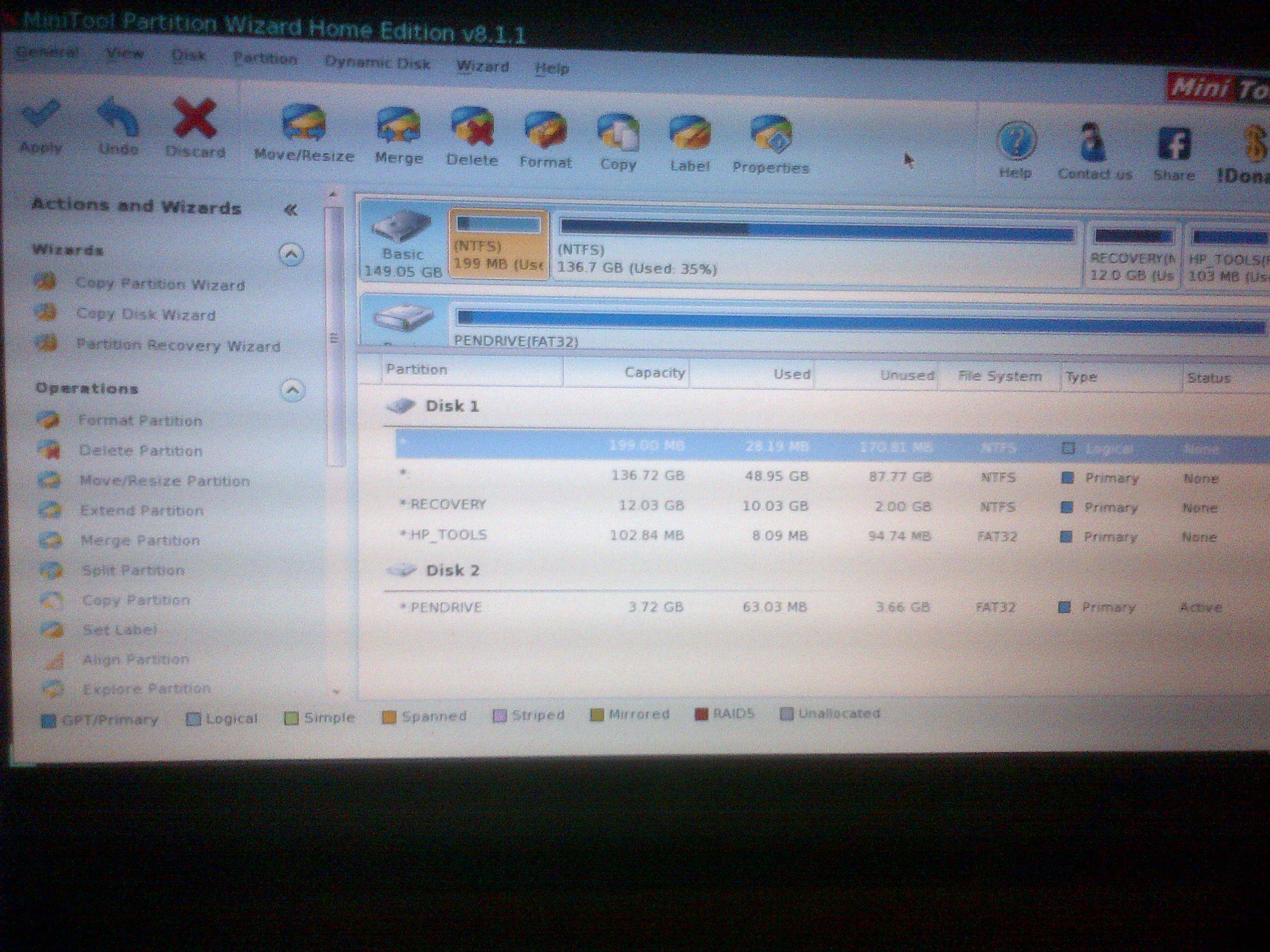
Your 199 MB system partition is logical, should be primary

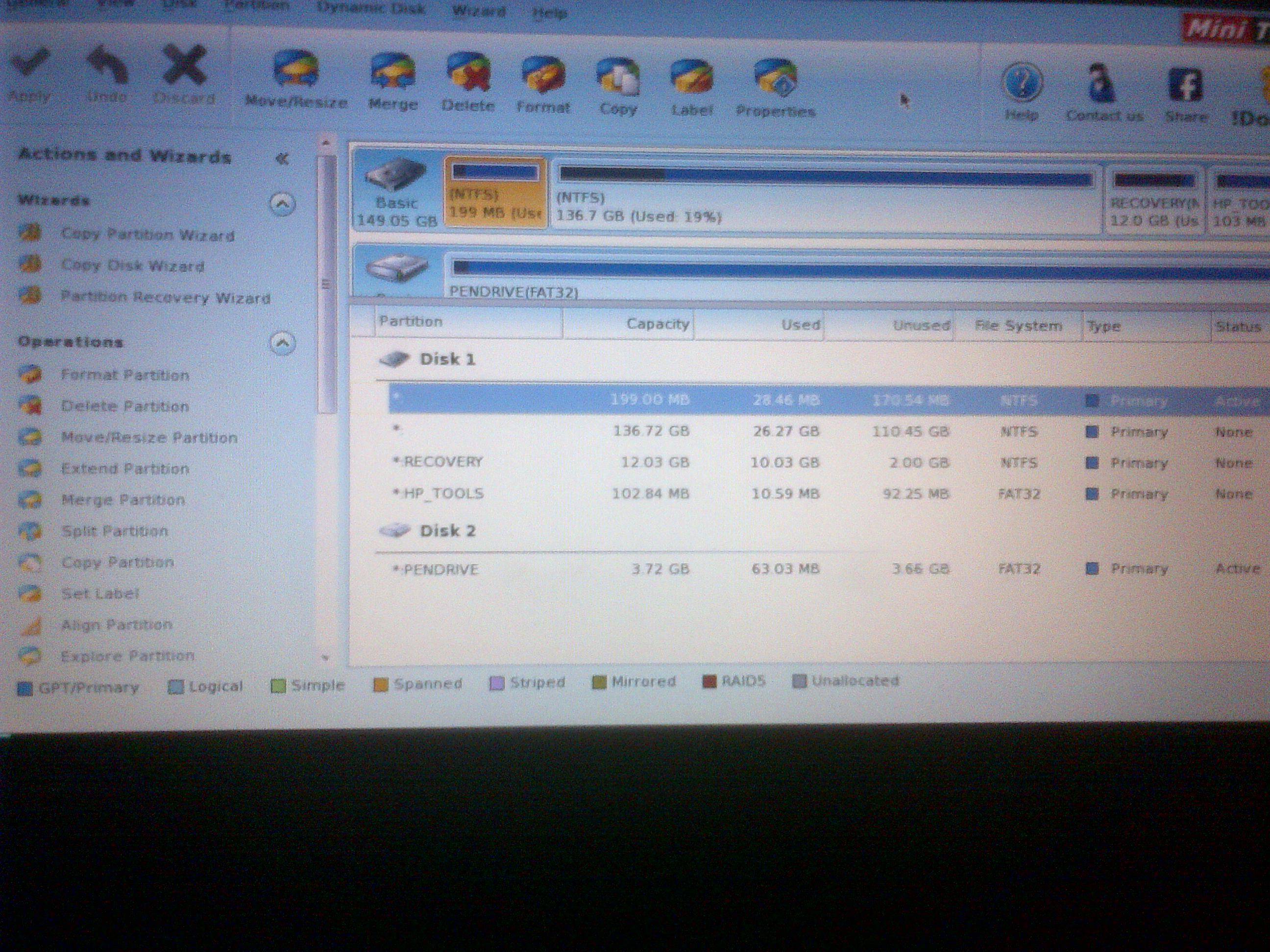
Before going any further, take a look at the 1010 partitioning (in Partition Wizard) and post a picture. I just want to be sure the mini /quickweb stuff isn't a bit wonky.

If the mini 1010 looks the same, I'm stumped.

I expect that the on the mini 1010 (PartWiz displays info differently, but the concepts are the same)
* 199 MB will be (System, Active, Primary)
* 136.72 GB will be (Boot, Page, Crash, Primary)
* Recovery
* HP_TOOLS
 

My Computer My Computer

At a glance

x64 (6.3.9600) Win8.1 Pro & soon dual boot x6...AMD A6-3420M APU with Radeon(tm) HD Graphics6.00 GBAMD Radeon(TM) HD 6520G
Computer type
Laptop
Computer Manufacturer/Model Number
HP Pavilion dv6-6c10us
OS
x64 (6.3.9600) Win8.1 Pro & soon dual boot x64 (6.1.7601) Win7_SP1 HomePrem
CPU
AMD A6-3420M APU with Radeon(tm) HD Graphics
Motherboard
Hewlett-Packard 1805
Memory
6.00 GB
Graphics Card(s)
AMD Radeon(TM) HD 6520G
Sound Card
(1) AMD High Definition Audio Device (2) IDT High Definiti
Monitor(s) Displays
HP W2072a 20" LCD (1600 x 900) @ 60 Hz
Screen Resolution
1366 x 768 x 32 bits (4294967296 colors) @ 60 Hz
Hard Drives
ST640LM0 00 HM641JI SATA Disk Device
Keyboard
Logitech k520 wireless KB
Mouse
Logitech m320 wireless mouse (bundled with KB)
Internet Speed
15/5 | 54 MB Wireless 'n'
Antivirus
Realtime: Defender or Avast | On-demand: Malwarebytes, ESET
Browser
IE 11 on Win8, IE 10 on win 7
Other Info
Media: [Gimp, Audacity, VLC] || Comm: [WEmail 2012, Skype] || Productivity: [OpenOffice,| Textpad] || Utils: [Sysinternals, cCleaner, Speccy, Defraggler]

whP4eBB.jpg
 

My Computer My Computer

At a glance

Windows 7 Home Premium 64bit
OS
Windows 7 Home Premium 64bit
Ok, that's what I expected... good.

On the 1071
Delete the 199 MB partition: How to Delete Partition with partition manager? Partition Wizard Help
Create a new 199 MB primary partition: Create Partition help of partition software - Partition Wizard.
- NTFS
- label System Reserved
- no drive letter

Rebuild MBR on Disk 1: How to Rebuild MBR with partition manager - Partition Wizard Rebuild MBR Help
Make the 199 MB partition the active partition: How to Set Active/Inactive partition with partition magic? Partition Wizard Help

Then boot with the Win7 install flash - select repair and follow this tutorial: http://www.sevenforums.com/tutorials/681-startup-repair.html

Hopefully PartWiz or Startup Repair will have down the work for you, otherwise I'll have to come up with another utility to fix the boot.

Bill
 

My Computer My Computer

At a glance

x64 (6.3.9600) Win8.1 Pro & soon dual boot x6...AMD A6-3420M APU with Radeon(tm) HD Graphics6.00 GBAMD Radeon(TM) HD 6520G
Computer type
Laptop
Computer Manufacturer/Model Number
HP Pavilion dv6-6c10us
OS
x64 (6.3.9600) Win8.1 Pro & soon dual boot x64 (6.1.7601) Win7_SP1 HomePrem
CPU
AMD A6-3420M APU with Radeon(tm) HD Graphics
Motherboard
Hewlett-Packard 1805
Memory
6.00 GB
Graphics Card(s)
AMD Radeon(TM) HD 6520G
Sound Card
(1) AMD High Definition Audio Device (2) IDT High Definiti
Monitor(s) Displays
HP W2072a 20" LCD (1600 x 900) @ 60 Hz
Screen Resolution
1366 x 768 x 32 bits (4294967296 colors) @ 60 Hz
Hard Drives
ST640LM0 00 HM641JI SATA Disk Device
Keyboard
Logitech k520 wireless KB
Mouse
Logitech m320 wireless mouse (bundled with KB)
Internet Speed
15/5 | 54 MB Wireless 'n'
Antivirus
Realtime: Defender or Avast | On-demand: Malwarebytes, ESET
Browser
IE 11 on Win8, IE 10 on win 7
Other Info
Media: [Gimp, Audacity, VLC] || Comm: [WEmail 2012, Skype] || Productivity: [OpenOffice,| Textpad] || Utils: [Sysinternals, cCleaner, Speccy, Defraggler]
So I'm guessing the 'Create As' section should be 'primary' and the 'Partition Size' is 190, while the others are 0?
 

My Computer My Computer

At a glance

Windows 7 Home Premium 64bit
OS
Windows 7 Home Premium 64bit
190?

Primary, NTFS, 199 MB (0 before, 0 after)

If it forces you to give a drive letter, it won't matter, you can remove the drive letter later.

Post a picture, I'm not sure what the "others" are.

Looking at the PartWiz instructions, I gave you the pertinent information.

It should be 199 MB - and the size and location should match that.

I'll be crashing soon


it should NOT be 190 (0 before, 0 after)
 

My Computer My Computer

At a glance

x64 (6.3.9600) Win8.1 Pro & soon dual boot x6...AMD A6-3420M APU with Radeon(tm) HD Graphics6.00 GBAMD Radeon(TM) HD 6520G
Computer type
Laptop
Computer Manufacturer/Model Number
HP Pavilion dv6-6c10us
OS
x64 (6.3.9600) Win8.1 Pro & soon dual boot x64 (6.1.7601) Win7_SP1 HomePrem
CPU
AMD A6-3420M APU with Radeon(tm) HD Graphics
Motherboard
Hewlett-Packard 1805
Memory
6.00 GB
Graphics Card(s)
AMD Radeon(TM) HD 6520G
Sound Card
(1) AMD High Definition Audio Device (2) IDT High Definiti
Monitor(s) Displays
HP W2072a 20" LCD (1600 x 900) @ 60 Hz
Screen Resolution
1366 x 768 x 32 bits (4294967296 colors) @ 60 Hz
Hard Drives
ST640LM0 00 HM641JI SATA Disk Device
Keyboard
Logitech k520 wireless KB
Mouse
Logitech m320 wireless mouse (bundled with KB)
Internet Speed
15/5 | 54 MB Wireless 'n'
Antivirus
Realtime: Defender or Avast | On-demand: Malwarebytes, ESET
Browser
IE 11 on Win8, IE 10 on win 7
Other Info
Media: [Gimp, Audacity, VLC] || Comm: [WEmail 2012, Skype] || Productivity: [OpenOffice,| Textpad] || Utils: [Sysinternals, cCleaner, Speccy, Defraggler]
Sorry, I meant 199.
So I did all that, applied the changes, and rebooted with the windows usb.
I ran startup repair 3 times without it finding anything. It says the root cause is "A hard disk could not be found. If a hard disk is installed, it is not responding."
 

My Computer My Computer

At a glance

Windows 7 Home Premium 64bit
OS
Windows 7 Home Premium 64bit
Back
Top