Cant remove Autorun Worm

Dinesh

Wonder Man
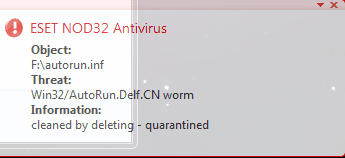
Hi there, looks like Im in a serious problem now. I plugged in my USB flash drive. NOD32 comes up with Win32/AutoRun.Delf.CN worm.
Capture.PNG
I formatted my flash drive. When the format completes, a files named svchost still stays in the flash drive. If I delete it, it comes back. I dont know how do I remove it.
Capture1.PNG

I have run full scans with Vipre, NOD32 and MBAM and they all seems to have failed. What's next?
 

My Computer

Computer Manufacturer/Model Number
Samsung NP530U4B-S02IN
OS
Windows® 8 Pro (64-bit)
CPU
Intel® Core™ i5 Processor 2467M (1.60GHz, 3MB L3 Cache)
Motherboard
Samsung Electronics
Memory
6GB DDR3 System Memory at 1,333MHz (on BD 4GB + 2GB x 1)
Graphics Card(s)
AMD Radeon™ HD7550M 1GB DDR3 (Ext. Graphic)
Sound Card
Realtek High Definition Audio
Monitor(s) Displays
35.56cm (14.0) SuperBright 300nit HD LED Display
Screen Resolution
1366x768
Hard Drives
1TB S-ATA II Hard Drive (5400RPM) with ExpressCache 16GB SSD
Internet Speed
sucks
Antivirus
Microsoft Security Essentials
Browser
Google Chrome (Sync enabled)
Nevermind.
 

My Computer

Computer Manufacturer/Model Number
Samsung NP530U4B-S02IN
OS
Windows® 8 Pro (64-bit)
CPU
Intel® Core™ i5 Processor 2467M (1.60GHz, 3MB L3 Cache)
Motherboard
Samsung Electronics
Memory
6GB DDR3 System Memory at 1,333MHz (on BD 4GB + 2GB x 1)
Graphics Card(s)
AMD Radeon™ HD7550M 1GB DDR3 (Ext. Graphic)
Sound Card
Realtek High Definition Audio
Monitor(s) Displays
35.56cm (14.0) SuperBright 300nit HD LED Display
Screen Resolution
1366x768
Hard Drives
1TB S-ATA II Hard Drive (5400RPM) with ExpressCache 16GB SSD
Internet Speed
sucks
Antivirus
Microsoft Security Essentials
Browser
Google Chrome (Sync enabled)
NEVERMIND??? You titillate us then say NEVERMIND???.. :roflmao:
 

My Computer

Computer type
PC/Desktop
Computer Manufacturer/Model Number
LENOVO K450 @3.0GHZ
OS
64-bit Windows 8.1 Pro
CPU
Core(TM) i5 CPU 4330 Haswell @ 3.20GHz
Motherboard
LENOVO
Memory
12.00 GB
Graphics Card(s)
Intel(R) HD Graphics
Sound Card
Intel HD integtrated
Monitor(s) Displays
HP 25' ISP Monitor
Screen Resolution
1900/1020
Hard Drives
(1) ST1000DM003-1CH162 (2) Generic STORAGE DEVICE USB Device (3) Generic STORAGE DEVICE USB Device
Internet Speed
100mb down/10mb up
I had posted this question 24 mins ago and there was no reply. So i thought I'd handle it on my own.
 

My Computer

Computer Manufacturer/Model Number
Samsung NP530U4B-S02IN
OS
Windows® 8 Pro (64-bit)
CPU
Intel® Core™ i5 Processor 2467M (1.60GHz, 3MB L3 Cache)
Motherboard
Samsung Electronics
Memory
6GB DDR3 System Memory at 1,333MHz (on BD 4GB + 2GB x 1)
Graphics Card(s)
AMD Radeon™ HD7550M 1GB DDR3 (Ext. Graphic)
Sound Card
Realtek High Definition Audio
Monitor(s) Displays
35.56cm (14.0) SuperBright 300nit HD LED Display
Screen Resolution
1366x768
Hard Drives
1TB S-ATA II Hard Drive (5400RPM) with ExpressCache 16GB SSD
Internet Speed
sucks
Antivirus
Microsoft Security Essentials
Browser
Google Chrome (Sync enabled)
Curious if this will work on your autorun worm:

download http://download.bleepingcomputer.com/sUBs/Flash_Disinfector.exe

Next, turn off the Autorun feature in Windows
http://www.sevenforums.com/tutorials/27544-autoplay-enable-disable-autorun.html
*** Note: Be sure to insert your flashdrives before you begin!

Double-click Flash_Disinfector.exe to run it and follow any prompts that may appear.
The utility may ask you to insert your flash drive and/or other removable drives including your mobile phone. Please do so and allow the utility to clean up those drives as well.
Wait until it has finished scanning and then exit the program.
Reboot your computer when done.
Note: Flash_Disinfector will create a hidden folder named autorun.inf in each partition and every USB drive plugged in when you ran it. Don't delete this folder...it will help protect your drives from future infection.
 

My Computer

Computer type
PC/Desktop
Computer Manufacturer/Model Number
Bruce ... somewhere in his 40's
OS
Windows 7 Ultimate 32bit SP1
CPU
Intel(R) Core(TM)2 Quad CPU @ 2.40GHz, 2400 MHz
Motherboard
INTEL/D975XBX2
Memory
4 GB
Graphics Card(s)
ATI Radeon HD 2600 Pro
Monitor(s) Displays
Samsung SyncMaster 914v
Screen Resolution
1280 x 1024
Hard Drives
2/500GB each ... ST3500630AS ATA Device.
One is not connected
PSU
Rocketfish 700 W
Case
G.Skill Gigabyte Chassis
Keyboard
Standard PS/2 Keyboard
Mouse
Microsoft PS/2 Mouse
Internet Speed
DSL
Antivirus
Avira Internet Security
Browser
IE 11
Other Info
ATI HDMI Audio
Nevermind.

Everytime my pc has had NOD32 and got infected its because of a USB worm.
I recommend running a scan with MBAM.
 

My Computer

Computer Manufacturer/Model Number
HP
OS
Windows 7 Enterprise x64
CPU
AMD Athlon II X4 @ 2.6ghz
Memory
8GB
Graphics Card(s)
Galaxy 250 GTS 512MB Super-Clocked
Screen Resolution
1600x900
Hard Drives
640GB hard Drive
1.5TB External Hard Drive
PSU
700W OCZ StealthxStreme
Cooling
2 Heatsink and 3 Fans
Internet Speed
3MB/sec download, 322kb/sec upload
My post was invisible? :confused:
 

My Computer

Computer type
PC/Desktop
Computer Manufacturer/Model Number
Bruce ... somewhere in his 40's
OS
Windows 7 Ultimate 32bit SP1
CPU
Intel(R) Core(TM)2 Quad CPU @ 2.40GHz, 2400 MHz
Motherboard
INTEL/D975XBX2
Memory
4 GB
Graphics Card(s)
ATI Radeon HD 2600 Pro
Monitor(s) Displays
Samsung SyncMaster 914v
Screen Resolution
1280 x 1024
Hard Drives
2/500GB each ... ST3500630AS ATA Device.
One is not connected
PSU
Rocketfish 700 W
Case
G.Skill Gigabyte Chassis
Keyboard
Standard PS/2 Keyboard
Mouse
Microsoft PS/2 Mouse
Internet Speed
DSL
Antivirus
Avira Internet Security
Browser
IE 11
Other Info
ATI HDMI Audio
Hi there, I did a clean install and fixed all issues.
 

My Computer

Computer Manufacturer/Model Number
Samsung NP530U4B-S02IN
OS
Windows® 8 Pro (64-bit)
CPU
Intel® Core™ i5 Processor 2467M (1.60GHz, 3MB L3 Cache)
Motherboard
Samsung Electronics
Memory
6GB DDR3 System Memory at 1,333MHz (on BD 4GB + 2GB x 1)
Graphics Card(s)
AMD Radeon™ HD7550M 1GB DDR3 (Ext. Graphic)
Sound Card
Realtek High Definition Audio
Monitor(s) Displays
35.56cm (14.0) SuperBright 300nit HD LED Display
Screen Resolution
1366x768
Hard Drives
1TB S-ATA II Hard Drive (5400RPM) with ExpressCache 16GB SSD
Internet Speed
sucks
Antivirus
Microsoft Security Essentials
Browser
Google Chrome (Sync enabled)
Hi there, looks like Im in a serious problem now. I plugged in my USB flash drive. NOD32 comes up with Win32/AutoRun.Delf.CN worm.
View attachment 37122
I formatted my flash drive. When the format completes, a files named svchost still stays in the flash drive. If I delete it, it comes back. I dont know how do I remove it.
View attachment 37123

I have run full scans with Vipre, NOD32 and MBAM and they all seems to have failed. What's next?
try malwarebytes out as it could be maleware is your nod 32 up to date i use eset smart security 4 if that doesent work phone up eset they will want to help you out big time and they will sort it out for you they really are great and most helpfull
 

My Computer

Computer Manufacturer/Model Number
cutom built
OS
windows xp pro sp3 now windows 7 x64 ultimate
CPU
intel q9550 overclocked to 3.3 crazy am going higher soon
Motherboard
asus sriker 2 extreme
Memory
4.00 gb ddr3 geil
Graphics Card(s)
nvidia 9600gt
Sound Card
nvidia on board sound
Monitor(s) Displays
compac v75+ samsung 50 inch plasma tv conected via hdmi
Screen Resolution
various works nice with nvidia graphics card
Hard Drives
160gb
PSU
thermaltake 900 watt
Case
soprano
Cooling
air and fusion heat pipe
Keyboard
yep
Mouse
yep
Internet Speed
20 meg virgin
Other Info
sound via J b l speakers hp officejet j5780 all in one printer

My Computer

OS
XP Pro/Vista Ultimate (64)/Windows 7 Ultimate Signature Edition(64)
CPU
Core 2 Duo E8500 @ stock
Motherboard
Gigabyte EP45-UD3R
Memory
8Gb (4 X 2Gb) Corsair Dominator 1066Mhz DDR2
Graphics Card(s)
XFX ATI Radeon 4870 1Gb
Sound Card
Onboard 7.1
Monitor(s) Displays
BenQ E2200Hd, Asus VW161D, HP L1506
Screen Resolution
1920 X 1080
Hard Drives
Seagate 7200.12 500Gb
2 X Hitachi 1Tb
PSU
CoolerMaster 650 EPD
Case
Thermaltake
Cooling
2 X Noctua 120mm's, Stock Intel
Keyboard
Logitech
Mouse
Logitech

My Computer

Computer Manufacturer/Model Number
Samsung NP530U4B-S02IN
OS
Windows® 8 Pro (64-bit)
CPU
Intel® Core™ i5 Processor 2467M (1.60GHz, 3MB L3 Cache)
Motherboard
Samsung Electronics
Memory
6GB DDR3 System Memory at 1,333MHz (on BD 4GB + 2GB x 1)
Graphics Card(s)
AMD Radeon™ HD7550M 1GB DDR3 (Ext. Graphic)
Sound Card
Realtek High Definition Audio
Monitor(s) Displays
35.56cm (14.0) SuperBright 300nit HD LED Display
Screen Resolution
1366x768
Hard Drives
1TB S-ATA II Hard Drive (5400RPM) with ExpressCache 16GB SSD
Internet Speed
sucks
Antivirus
Microsoft Security Essentials
Browser
Google Chrome (Sync enabled)
Next time use > Smart Virus Remover <, just run it then plug in the Flash drive and viola, it's gone..


Edit: you install windows every month or 2? dude, my windows xp lasted once for 11 months (from June 2008 to May 2009) but then it was infected with a stupid virus which was hiding my hidden files permanently and whenever I open a folder it opens in a new folder, that stuff was really annoying so I had to format cause not a single AV (Kaspersky, Norton, Bitdefender, Nod, Avast) was able to remove it, but even after formatting it came back and then I found that miracle worker AV called "Smart Virus Remover" and as soon as I ran it, the virus was removed and I lived happily ever after..

Note that "Smart Virus Remover" only removes certain viruses, it doesn't offer full protection, just use it when you have a stupid virus that no other AV can remove.
 

My Computer

Computer Manufacturer/Model Number
Custom
OS
Windows 7 Ultimate x64
CPU
AMD Phenom II x4 B50
Motherboard
GA-MA770T-UD3P
Memory
2x4 G.skill DDR3 CL9 @1600
Graphics Card(s)
Powercolor HD 6950 2G GDDR5
Sound Card
Built in + Creative T6200 5.1 sub system
Monitor(s) Displays
LG FLATRON W1934S
Screen Resolution
1440x900
Hard Drives
2 1T WD Blacks (No Raid), 1 2T WD Green
PSU
NZXT HALE90 1000W 80Gold+
Case
HAF 932
Cooling
5 Fans
Keyboard
Upgrading~
Mouse
Upgrading~
Internet Speed
ADSL 2mb
I keep playing with viruses and anti-virus programs.[/QUOTE said:
Go to http://www.eicar.org/anti_virus_test_file.htm to see if your antivirus works properly.
These are test files, they do NOT contain any malicious code at all, it is just merely text.

Next time use > Smart Virus Remover <[/QUOTE said:
You can use TrojanGuarder Golden, which guards you from almost all trojans and keyloggers, it's free (also legally free) and to use without limit. Ive made a portable version which you can download here:
http://rapidshare.com/files/187175694/Trojan_Guarder_Gold_portable.rar

The Virus you had is a keylogger, similar to the Avpo variant. Avpo logs the keys from online games like World of Warcraft, Warhammer, Lord of the Rings online, Aion, etc.

Technically;

It abuses system names, like ntdetect, it makes a system file called for example ntde1ect (note the ntde1ect) which looks the same but contains the information of the keylogger. Ntdetect is a needed system file (without it your system cannot boot!) whereas Ntde1ect is the virus. It also creates amvo.exe files and avp1 or other random generated names (1cdazz.cmd, etc.) at your system32 folder in windows and at every root location of any drive which you got connected (removable devices like usb sticks also get infected!)

To get rid of it, simply do the following;

Go start, press run and type in; msconfig
Go to the tab startup and search for any stupid names, like for example rdzx.com (things that dont make any sense). If you are not sure you can always google on it (type in the name of the program on google). Once you have disabled the startup of the virus, you will still need to get rid of the files, the most handiest thing to do is use an antivirus to scan (I found Eset had the most chance to find this virus, together with Avira). However, it can be that the files are hiding themselves by making them systemfiles. Therefor, it is a good idea to make them visible.

Go to start, press run and type cmd
type: C:
type cd\
you should see C:
type attrib -r -s -h *.*
type D:
type attrib -r -s -h *.*

continue typing the driveletters and typing attrib for all of the drives you have connected, (note that cd/dvd drives cannot be infected so you do not have to clean them!).

Also, after having attribbed all drives, do not open any of your drives by double clicking on them, as the virus will start respreading itself again (due to the fact that there is a autorun.inf file on it). Let your antivirus do a full system scan and the virus should be removed.

If you really need to access any of your drives, then you can do that, by doing so the following way (which will NOT trigger the virus to reproduce!).

Click on my computer
In the address bar, type the driveletter of your drive (for example C: ) and press enter
You then see your drive which you want to access and if you see autorun.inf you can also manually delete it.

NOTE; if autorun.inf has been deleted on one of your drives you may not be able to access it via the usual way untill you reboot your computer, the best way to access your drive untill the system scan is complete is by doing it the way as descrebibed above.


I hope this helps people in the future who come across this problem. I had this problem and had a hard time to figure all this out by myself and get rid of this problem (but I know alot about it now). If you need help with THIS problem and this post does not provide you all the necessary information, you can reply to this post or send me a PM ;). Goodluck.
 
Last edited:

My Computer

Computer Manufacturer/Model Number
Acer Aspire 7730G
OS
Windows 7 Ultimate x64
Back
Top