Solved Cant view logical partitions in windows explorer after reinstall

adamjedgar

New member
Local time
10:02 PM
Messages
5
Hi guys,
i have a 1 terabyte drive set up with dual boot windows 7 operating systems.
It is partitioned into 4 with original drive letters
1. contained an older version of Wind 7 (C:\)
2&3 contained data storage (D:\ and E:\)
4. contained a new version of Win 7 (F:\)
I attempted to change motherboards and stuffed up the sysprep.exe process somewhat. I did get the older OS (C:\) up and running again but since it has a registry problem unrelated to this (from a virus i got about 6 months ago and removed) i decided to reformat c:\ drive and start again.
The second Win 7 OS (f:\) basically is stuffed...not that im worried about it as i had only just installed it recently and hadnt put anything important on that partition anyway.
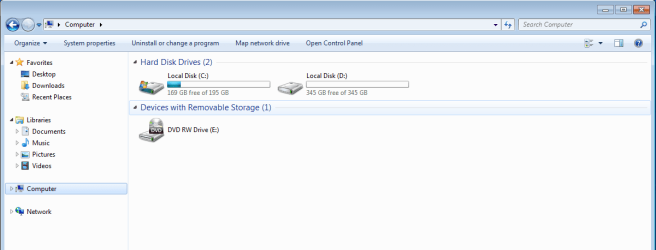
Since i have reformated c:\ and put a new win7 OS on it, i am now unable to view the d:\ and E:\ drives in windows explorer!
I went into control panel>computer managment>disk management and am able to see the missing partitions (labelled D:\ and E:\).
What do i do in order to recover the data off D:\ and E:\ partitions???
i tried using Piriform's software program called "Recuva" but it cannot see those drives either...instead finding all the files on c:\ and F:\ (which it lables as C:\ and D:\ because it cannot see the other 2 partitions)
 

Attachments

  • Drives.png
    Drives.png
    23.3 KB · Views: 13
  • drives in windows explorer.png
    drives in windows explorer.png
    18.4 KB · Views: 7

My Computer My Computer

At a glance

Win 7 x64 HomeI7 2700kATi Radeon 6970
OS
Win 7 x64 Home
CPU
I7 2700k
Motherboard
Gigabyte Z77x-UD3H
Graphics Card(s)
ATi Radeon 6970
Hard Drives
1 Treabyte Seagate 7200 rpm
PSU
1000W Cooler Master

My Computer My Computer

At a glance

64-bit Windows 11 Pro for WorkstationsIntel i7-8700K OC'd to 5 GHz64 GB (4x16GB) G.SKILL TridentZ RGB DDR4 3600...ASUS ROG-STRIX-GTX1080TI-O11G-GAMING
Computer type
PC/Desktop
Computer Manufacturer/Model Number
Self built custom
OS
64-bit Windows 11 Pro for Workstations
CPU
Intel i7-8700K OC'd to 5 GHz
Motherboard
ASUS ROG Maximus XI Formula Z390
Memory
64 GB (4x16GB) G.SKILL TridentZ RGB DDR4 3600 MHz
Graphics Card(s)
ASUS ROG-STRIX-GTX1080TI-O11G-GAMING
Sound Card
Integrated
Monitor(s) Displays
2 x Samsung Odyssey G7 27"
Screen Resolution
2560x1440
Hard Drives
1TB Samsung 990 PRO M.2,
4TB Samsung 990 PRO PRO M.2,
TerraMaster F8 SSD Plus NAS
PSU
Seasonic Prime Titanium 850W
Case
Thermaltake Core P3
Cooling
Corsair Hydro H115i
Keyboard
Logitech wireless K800
Mouse
Logitech MX Master 4
Internet Speed
2 Gb/s Download and 100 Mb/s Upload
Antivirus
Malwarebyte Anti-Malware Premium
Browser
Google Chrome
Other Info
Logitech Z625 speaker system,
Logitech BRIO 4K Pro webcam,
HP Color LaserJet Pro MFP M477fdn,
APC SMART-UPS RT 1000 XL - SURT1000XLI,
Galaxy S23 Plus phone

My Computer My Computer

At a glance

Microsoft Windows 7 Home Premium 64-bits 7601...Intel(R) Core(TM) i3 CPU M 370 @ 2.40GHz4,00 GBATI Mobility Radeon HD 5400 Series
Computer type
Laptop
Computer Manufacturer/Model Number
ACER ASPIRE 5742G
OS
Microsoft Windows 7 Home Premium 64-bits 7601 Multiprocessor Free Service Pack 1
CPU
Intel(R) Core(TM) i3 CPU M 370 @ 2.40GHz
Motherboard
Acer Aspire 5742G
Memory
4,00 GB
Graphics Card(s)
ATI Mobility Radeon HD 5400 Series
Sound Card
(1) AMD High Definition Audio Device (2) Realtek High Defi
Screen Resolution
1366 x 768 x 32 bits (4294967296 colors) @ 60 Hz
Hard Drives
WDC WD5000BEVT-22ZAT0
Hello Adam,

It appears that you should be able to just add drive letters to your 195.31 GB and 195.32 GB primary partitions in Disk Management to be able to have them available in the Computer window. Logical partitions would be the blue one instead.

http://www.sevenforums.com/tutorials/82994-drive-letter-add-change-remove-windows-7-a.html

Hope this helps, :)
Shawn


Hi Shawn,
i cant seem to change the drive letters on these two missing drives...i get an error saying i need to refresh...but refresh doesnt make any difference (i havent tried a restart as yet, but will after i submit this post).

Having said the above, i can right click on the last drive (345 GB Healthy logical...) and was able to change its drive letter no problem.

Just wondering, what would happen if i right clicked on the two 195 GB partitions and choose the "make active option"? (windows warns me that i should only choose this option if they have a functioning OS on them or my computer might stop working)
 

My Computer My Computer

At a glance

Win 7 x64 HomeI7 2700kATi Radeon 6970
OS
Win 7 x64 Home
CPU
I7 2700k
Motherboard
Gigabyte Z77x-UD3H
Graphics Card(s)
ATi Radeon 6970
Hard Drives
1 Treabyte Seagate 7200 rpm
PSU
1000W Cooler Master
update shawn,
i restarted computer and still get same error...it keeps wanting me to refresh, but the refresh doesnt work!
any ideas???
 

My Computer My Computer

At a glance

Win 7 x64 HomeI7 2700kATi Radeon 6970
OS
Win 7 x64 Home
CPU
I7 2700k
Motherboard
Gigabyte Z77x-UD3H
Graphics Card(s)
ATi Radeon 6970
Hard Drives
1 Treabyte Seagate 7200 rpm
PSU
1000W Cooler Master

I have also downloaded the partition wizard software you pointed me to...got it running now...will hopefully get some results!
 

My Computer My Computer

At a glance

Win 7 x64 HomeI7 2700kATi Radeon 6970
OS
Win 7 x64 Home
CPU
I7 2700k
Motherboard
Gigabyte Z77x-UD3H
Graphics Card(s)
ATi Radeon 6970
Hard Drives
1 Treabyte Seagate 7200 rpm
PSU
1000W Cooler Master
Hello Adam,

It appears that you should be able to just add drive letters to your 195.31 GB and 195.32 GB primary partitions in Disk Management to be able to have them available in the Computer window. Logical partitions would be the blue one instead.

http://www.sevenforums.com/tutorials/82994-drive-letter-add-change-remove-windows-7-a.html

Hope this helps, :)
Shawn


Hi Shawn,
i cant seem to change the drive letters on these two missing drives...i get an error saying i need to refresh...but refresh doesnt make any difference (i havent tried a restart as yet, but will after i submit this post).

Having said the above, i can right click on the last drive (345 GB Healthy logical...) and was able to change its drive letter no problem.

Just wondering, what would happen if i right clicked on the two 195 GB partitions and choose the "make active option"? (windows warns me that i should only choose this option if they have a functioning OS on them or my computer might stop working)
Leave the first partition ACTIVE!! it has the boot manager and boot menu.
 

My Computer My Computer

At a glance

Microsoft Windows 7 Home Premium 64-bits 7601...Intel(R) Core(TM) i3 CPU M 370 @ 2.40GHz4,00 GBATI Mobility Radeon HD 5400 Series
Computer type
Laptop
Computer Manufacturer/Model Number
ACER ASPIRE 5742G
OS
Microsoft Windows 7 Home Premium 64-bits 7601 Multiprocessor Free Service Pack 1
CPU
Intel(R) Core(TM) i3 CPU M 370 @ 2.40GHz
Motherboard
Acer Aspire 5742G
Memory
4,00 GB
Graphics Card(s)
ATI Mobility Radeon HD 5400 Series
Sound Card
(1) AMD High Definition Audio Device (2) Realtek High Defi
Screen Resolution
1366 x 768 x 32 bits (4294967296 colors) @ 60 Hz
Hard Drives
WDC WD5000BEVT-22ZAT0
yeah i did that.
In the end, i rang a computer guru mate of mine and he said that realistically the easiest solution was to use a data recovery program. I downloaded "MiniTool Power Data REcovery" (cost me approx $70 and was worth every cent). I have now almost completed recovering all of my data off the middle 2 drives. I reformated the other 2 and should be back up and running with all of my old programs reinstalled soon.

Thanks for your help
adam
 

My Computer My Computer

At a glance

Win 7 x64 HomeI7 2700kATi Radeon 6970
OS
Win 7 x64 Home
CPU
I7 2700k
Motherboard
Gigabyte Z77x-UD3H
Graphics Card(s)
ATi Radeon 6970
Hard Drives
1 Treabyte Seagate 7200 rpm
PSU
1000W Cooler Master
Back
Top