
Solved Problem Merging Non Adjacent Partitions in Windows 7

Serpentz

New member
Member
Local time
5:14 PM
Messages
46
Location
Kiev, Ukraine
Hey everyone. I've spent a good deal of time today trying to find a solution for this problem. Before I give up and call it quits, I want to see if someone here has done this before successfully. I had a problem with my girlfriends laptop running out of space. She had a 25GB partition on D and a 180 GB partition on E. I backed up the 25GB's on D and went into Disk Management to merge D with the main Windows 7 partition: C

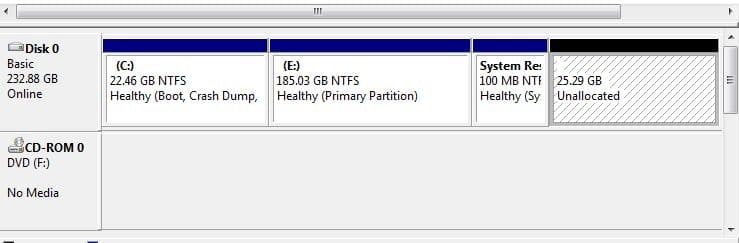
However, looking at the partitions in D.M. you can see the two partitions are not adjacent to each other. Therefore I cannot extend C to D and get that needed space because they are not adjacent to each other. I need to get that unallocated space as part of C drive:

Untitled-2.jpg picture by Ziah691 - Photobucket

I've downloaded some programs to try to move this partition next to C so I can extend C onto it, and I've not had any luck. Even though I've seen some programs say that it can merge two non adjacent partitions, they fail and cannot do this. I've tried creating a partition, logical, primary....anything to get it to move next to C and I've not found a solution. I've tried a bunch of different programs as well.

Before I call it quits and backup the 185GB partition onto a new drive, has anyone successfully merged two non adjacent partitions? If so is there some steps on how to do this? Google search shows a bunch of useless crap and bad English. I download Partition Wizard and they even have some weird tutorial on this, but it has nothing to do with what I need. Some help is greatly appreciated.
 

Attachments
  • Untitled-2.jpg
    Untitled-2.jpg
    35.9 KB · Views: 261

My Computer My Computer

OS
Windows 7 Ultimate x64
CPU
QuadCore AMD Phenom II X4 B45, 3100 MHz
Motherboard
ASRock M3A770DE
Memory
4GB Kingston HyperX DDR3 1600MHz
Graphics Card(s)
MSI R5770 Hawk 1GB GDDR5
Sound Card
M-Audio Delta 1010 PCI
Monitor(s) Displays
2X Acer 22" LCD
Screen Resolution
1680X1050
Hard Drives
2x Hitachi 7200RPM SATA 500GB
1x Seagate Barracuda 7200RPM 500GB
PSU
Thermaltake 675watt 80 Bronze
Case
Generic
Cooling
Thermaltake SpinQ 360
Mouse
Logitech G9 Laser

My Computer My Computer

Computer Manufacturer/Model Number
HP, Dell, Gateway, Toshiba - 4 laptops and 2 desktops
OS
Vista, Windows7, Mint Mate, Zorin, Windows 8
CPU
from 1.6GHz Duo to i7
Monitor(s) Displays
2x HP w2207
Hard Drives
5x HDD, 7x SSD, 12x Externals
Keyboard
with trackball - no mices
Mouse
Trackball mice
Internet Speed
DSL 6000
Thanks for the reply...it still does not help me solve the problem of the partitions not being adjacent to each other in order to extend C to D
 

My Computer My Computer

OS
Windows 7 Ultimate x64
CPU
QuadCore AMD Phenom II X4 B45, 3100 MHz
Motherboard
ASRock M3A770DE
Memory
4GB Kingston HyperX DDR3 1600MHz
Graphics Card(s)
MSI R5770 Hawk 1GB GDDR5
Sound Card
M-Audio Delta 1010 PCI
Monitor(s) Displays
2X Acer 22" LCD
Screen Resolution
1680X1050
Hard Drives
2x Hitachi 7200RPM SATA 500GB
1x Seagate Barracuda 7200RPM 500GB
PSU
Thermaltake 675watt 80 Bronze
Case
Generic
Cooling
Thermaltake SpinQ 360
Mouse
Logitech G9 Laser
Hello Serpentz, and welcome to Seven Forums.

You will not be able to do this with Disk Management. Did you download and install the free program that WHS posted above to see if you could extend C: into the "unallocated space"?
 

My Computer My Computer

Computer type
PC/Desktop
Computer Manufacturer/Model Number
Self built custom
OS
64-bit Windows 11 Pro for Workstations
CPU
Intel i7-8700K OC'd to 5 GHz
Motherboard
ASUS ROG Maximus XI Formula Z390
Memory
64 GB (4x16GB) G.SKILL TridentZ RGB DDR4 3600 MHz
Graphics Card(s)
ASUS ROG-STRIX-GTX1080TI-O11G-GAMING
Sound Card
Integrated
Monitor(s) Displays
2 x Samsung Odyssey G7 27"
Screen Resolution
2560x1440
Hard Drives
1TB Samsung 990 PRO M.2,
4TB Samsung 990 PRO PRO M.2,
TerraMaster F8 SSD Plus NAS
PSU
Seasonic Prime Titanium 850W
Case
Thermaltake Core P3
Cooling
Corsair Hydro H115i
Keyboard
Logitech wireless K800
Mouse
Logitech MX Master 4
Internet Speed
2 Gb/s Download and 100 Mb/s Upload
Antivirus
Malwarebyte Anti-Malware Premium
Browser
Google Chrome
Other Info
Logitech Z625 speaker system,
Logitech BRIO 4K Pro webcam,
HP Color LaserJet Pro MFP M477fdn,
APC SMART-UPS RT 1000 XL - SURT1000XLI,
Galaxy S23 Plus phone
Serpentz:

I think, perhaps, you misunderstand the concept.
You say you've backed up your D: drive, so delete that partition and extend the C: partition to fill the unallocated space.
That simple maneuver can be accomplished with Windows' Disk Management Tool.

If you had programs on the D: drive, you're going to have to re-install them; simply copying them back won't do the trick.
 

My Computer My Computer

Computer Manufacturer/Model Number
OEM - Me
OS
Windows 7 Home Premium x64
CPU
AMD Phenom II X6 1600T
Motherboard
GigaByte GZ-990FXA-UD3
Memory
16GB PC3-10700 (1342MHz)
Graphics Card(s)
ATI Radeon 5770 HD (x2) CrossFire
Sound Card
On-board RealTek chipset
Monitor(s) Displays
3x Hanns-G 1920x1080 Monitors
Screen Resolution
3x Hanns-G 1920x1080 Monitors
Hard Drives
Intel 25-V SSD 40GB: 218 MB/s AT: 0.1ms
Intel X-25M SSD 80GB: 230MB/s AT: 0.1ms
Seagate 750GB: 133 MB/s AT: 13ms (perpendicular storage)
Buffalo HD-PCTU3 1TB External drive
PSU
OCZ Stealth X Stream 750W
Case
Cheap (unknown)
Cooling
Stock
Keyboard
HP USB
Mouse
LogiTech USB
Internet Speed
1.5 Mbps - Slow - At the tail-end of a rural network
Other Info
Printer: Epson Stylus C-84
Scanner: HP 3500C Flatbed
DVD-RW: Plextor
DVD-ROM: Unknown
WEI: 7.4
Hi there, thanks everyone for the replies. The unallocated space you see in DM used to be the D: partition. I backed everything up on this, removed the pagefile from systems, and then reboot, then deleted the partition. I wanted to merge this unallocated space with C drive because as you can see, it's about out of free space. However, in Disk Management, the unallocated space or the partition you want to extend whatever drive to has to be adjacent. The drive that is adjacent to C is E: that has a bunch of stuff backed up to it. I tried to find a program to move this unallocated space, or even create a partition that would move it next to C. This just doesn't seem possible. See this partition of unallocated space is at the end of System Reserved. you can't extend partitions in Windows 7 to any partition that isn't sitting next to the partition you want to merge. Those partitions have to be sitting next to each other or adjacent. Does anyone understand what I am running into?

Thanks in advance for the help
 

My Computer My Computer

OS
Windows 7 Ultimate x64
CPU
QuadCore AMD Phenom II X4 B45, 3100 MHz
Motherboard
ASRock M3A770DE
Memory
4GB Kingston HyperX DDR3 1600MHz
Graphics Card(s)
MSI R5770 Hawk 1GB GDDR5
Sound Card
M-Audio Delta 1010 PCI
Monitor(s) Displays
2X Acer 22" LCD
Screen Resolution
1680X1050
Hard Drives
2x Hitachi 7200RPM SATA 500GB
1x Seagate Barracuda 7200RPM 500GB
PSU
Thermaltake 675watt 80 Bronze
Case
Generic
Cooling
Thermaltake SpinQ 360
Mouse
Logitech G9 Laser
Yes, we understand you, but we need to know if you tried the free program Partition Wizard Home Edition that WHS posted above to see if you could extend C: into the "unallocated space".
 
Last edited:

My Computer My Computer

Computer type
PC/Desktop
Computer Manufacturer/Model Number
Self built custom
OS
64-bit Windows 11 Pro for Workstations
CPU
Intel i7-8700K OC'd to 5 GHz
Motherboard
ASUS ROG Maximus XI Formula Z390
Memory
64 GB (4x16GB) G.SKILL TridentZ RGB DDR4 3600 MHz
Graphics Card(s)
ASUS ROG-STRIX-GTX1080TI-O11G-GAMING
Sound Card
Integrated
Monitor(s) Displays
2 x Samsung Odyssey G7 27"
Screen Resolution
2560x1440
Hard Drives
1TB Samsung 990 PRO M.2,
4TB Samsung 990 PRO PRO M.2,
TerraMaster F8 SSD Plus NAS
PSU
Seasonic Prime Titanium 850W
Case
Thermaltake Core P3
Cooling
Corsair Hydro H115i
Keyboard
Logitech wireless K800
Mouse
Logitech MX Master 4
Internet Speed
2 Gb/s Download and 100 Mb/s Upload
Antivirus
Malwarebyte Anti-Malware Premium
Browser
Google Chrome
Other Info
Logitech Z625 speaker system,
Logitech BRIO 4K Pro webcam,
HP Color LaserJet Pro MFP M477fdn,
APC SMART-UPS RT 1000 XL - SURT1000XLI,
Galaxy S23 Plus phone
I've downloaded a few programs to try this and none of them will move that partition adjacent to C. None of them will merge non-adjacent partitions. The only solution is to backup and delete E. I figured it wasn't possible but I thought I would ask.

Thanks for the replies.
 

My Computer My Computer

OS
Windows 7 Ultimate x64
CPU
QuadCore AMD Phenom II X4 B45, 3100 MHz
Motherboard
ASRock M3A770DE
Memory
4GB Kingston HyperX DDR3 1600MHz
Graphics Card(s)
MSI R5770 Hawk 1GB GDDR5
Sound Card
M-Audio Delta 1010 PCI
Monitor(s) Displays
2X Acer 22" LCD
Screen Resolution
1680X1050
Hard Drives
2x Hitachi 7200RPM SATA 500GB
1x Seagate Barracuda 7200RPM 500GB
PSU
Thermaltake 675watt 80 Bronze
Case
Generic
Cooling
Thermaltake SpinQ 360
Mouse
Logitech G9 Laser
Just as a general FYI:

In my experience using the freeware version of Partition Wizard the procedure of merging partitions to the left, or merging non-adjacent partitions, is not possible as those advance features of the program seem to be disabled.

From the help files in free PW it indicates that the paid Professional Version will perform those procedures.

I'm guessing that Brink and the others are using the paid professional version and the OP is, like I was, using the freeware version. Please correct me if I am wrong.

The professional version is only $29 US.
 

My Computer My Computer

Computer type
PC/Desktop
Computer Manufacturer/Model Number
Home Built - Jan 2013
OS
Windows 7 64 Bit Home Premium SP1
CPU
i7-3820
Motherboard
Asus P9X79-PRO - Bios 4608
Memory
GSkill F3-14900CL9Q - 16GB
Graphics Card(s)
EVGA GeForce GTX660 - Driver 352.86
Sound Card
On board Realtek ALC898
Monitor(s) Displays
Acer S271HL
Screen Resolution
1920 x 1080
Hard Drives
#1- Samsung 840 Pro Series
#2- Western Digital WD1002FAEX Sata3 Black
#3- Western Digital WD1002FAEX Sata3 Black
PSU
Corsair CMPSU-850TX-V2 - 850 watt (by Seasonic)
Case
Corsair Obsidian 550D
Cooling
Standard 3 120mm case fans, Cooler Master Hyper 212 EVO
Keyboard
MS KC-0405
Mouse
Intellimouse 5-button
Internet Speed
56 Mbits/Sec (on a good day)
Antivirus
Avast & Malwarebytes
Browser
Firefox
Other Info
Asus DVD - DRW-24B1ST 24X
Yeah...that's possible I guess. I really don't want to pay $30 to try and see if it doesn't work though. I do appreciate the help and responses though ;)

Thanks
 

My Computer My Computer

OS
Windows 7 Ultimate x64
CPU
QuadCore AMD Phenom II X4 B45, 3100 MHz
Motherboard
ASRock M3A770DE
Memory
4GB Kingston HyperX DDR3 1600MHz
Graphics Card(s)
MSI R5770 Hawk 1GB GDDR5
Sound Card
M-Audio Delta 1010 PCI
Monitor(s) Displays
2X Acer 22" LCD
Screen Resolution
1680X1050
Hard Drives
2x Hitachi 7200RPM SATA 500GB
1x Seagate Barracuda 7200RPM 500GB
PSU
Thermaltake 675watt 80 Bronze
Case
Generic
Cooling
Thermaltake SpinQ 360
Mouse
Logitech G9 Laser
One other option for you would be to remove the W7 System Reserved partition. Then it would be a simple task that could be done with Disk Management.

I don't know if you would want to go to that extent. I would read up on the pros and cons first. But if you are game, see here: http://www.sevenforums.com/tutorials/71363-system-reserved-partition-delete.html

I'm still holding out to see what others say about free Partition Wizard. I only tried it that once. There is always the possibility that I am just a "person of diminished intellectual capabilities".

Do you recall what the message was that PW gives you when you attempt to perform the procedure?
 
Last edited:

My Computer My Computer

Computer type
PC/Desktop
Computer Manufacturer/Model Number
Home Built - Jan 2013
OS
Windows 7 64 Bit Home Premium SP1
CPU
i7-3820
Motherboard
Asus P9X79-PRO - Bios 4608
Memory
GSkill F3-14900CL9Q - 16GB
Graphics Card(s)
EVGA GeForce GTX660 - Driver 352.86
Sound Card
On board Realtek ALC898
Monitor(s) Displays
Acer S271HL
Screen Resolution
1920 x 1080
Hard Drives
#1- Samsung 840 Pro Series
#2- Western Digital WD1002FAEX Sata3 Black
#3- Western Digital WD1002FAEX Sata3 Black
PSU
Corsair CMPSU-850TX-V2 - 850 watt (by Seasonic)
Case
Corsair Obsidian 550D
Cooling
Standard 3 120mm case fans, Cooler Master Hyper 212 EVO
Keyboard
MS KC-0405
Mouse
Intellimouse 5-button
Internet Speed
56 Mbits/Sec (on a good day)
Antivirus
Avast & Malwarebytes
Browser
Firefox
Other Info
Asus DVD - DRW-24B1ST 24X
There's nothing wrong with the current version of gParted either. It's free, and its not some neutered shareware with disabled features (half of which probably don't work as advertised) that can't be accessed until you send your credit card number to their website.
 
Hey... a fellow cheap prick! That was my decision too. Cheers!

You should be careful who you call a "cheap prick" :mad:

Just because I don't want to blow $30 doesn't give you this right.

Who the **** do you think you are anyway?

I'm not "cheap" - I just don't like throwing money away.
 

My Computer My Computer

OS
Windows 7 Ultimate x64
CPU
QuadCore AMD Phenom II X4 B45, 3100 MHz
Motherboard
ASRock M3A770DE
Memory
4GB Kingston HyperX DDR3 1600MHz
Graphics Card(s)
MSI R5770 Hawk 1GB GDDR5
Sound Card
M-Audio Delta 1010 PCI
Monitor(s) Displays
2X Acer 22" LCD
Screen Resolution
1680X1050
Hard Drives
2x Hitachi 7200RPM SATA 500GB
1x Seagate Barracuda 7200RPM 500GB
PSU
Thermaltake 675watt 80 Bronze
Case
Generic
Cooling
Thermaltake SpinQ 360
Mouse
Logitech G9 Laser
Hey guys, be nice and cool down. No need to get at each other's throat. I am sure TVeblen made the remark jokingly. I would hate to see you guys banned from the forum.
 

My Computer My Computer

Computer Manufacturer/Model Number
HP, Dell, Gateway, Toshiba - 4 laptops and 2 desktops
OS
Vista, Windows7, Mint Mate, Zorin, Windows 8
CPU
from 1.6GHz Duo to i7
Monitor(s) Displays
2x HP w2207
Hard Drives
5x HDD, 7x SSD, 12x Externals
Keyboard
with trackball - no mices
Mouse
Trackball mice
Internet Speed
DSL 6000
I'm sorry Serpentz. I didn't mean to offend. Just a bad attempt at humor.
Please accept my apologies.
 

My Computer My Computer

Computer type
PC/Desktop
Computer Manufacturer/Model Number
Home Built - Jan 2013
OS
Windows 7 64 Bit Home Premium SP1
CPU
i7-3820
Motherboard
Asus P9X79-PRO - Bios 4608
Memory
GSkill F3-14900CL9Q - 16GB
Graphics Card(s)
EVGA GeForce GTX660 - Driver 352.86
Sound Card
On board Realtek ALC898
Monitor(s) Displays
Acer S271HL
Screen Resolution
1920 x 1080
Hard Drives
#1- Samsung 840 Pro Series
#2- Western Digital WD1002FAEX Sata3 Black
#3- Western Digital WD1002FAEX Sata3 Black
PSU
Corsair CMPSU-850TX-V2 - 850 watt (by Seasonic)
Case
Corsair Obsidian 550D
Cooling
Standard 3 120mm case fans, Cooler Master Hyper 212 EVO
Keyboard
MS KC-0405
Mouse
Intellimouse 5-button
Internet Speed
56 Mbits/Sec (on a good day)
Antivirus
Avast & Malwarebytes
Browser
Firefox
Other Info
Asus DVD - DRW-24B1ST 24X
  • Like
Reactions: whs
Back
Top