Case getting hot

rossy87

New member
Local time
2:46 AM
Messages
34
Location
London
Hi guys.

My case is getting very hot inside and has only recently started doing so.

My case is a Coolermaster Elite 334 and i have a 92mm variable fan up front and a 120mm fan on the back.

Any ideas as i am pretty new to this.

Thanks in advance.
 

My Computer

Computer Manufacturer/Model Number
Custom Built
OS
Windows 7 Professional x64
CPU
Intel Pentium D 2.8ghz
Motherboard
MSI Cuba ms-7301
Memory
2gb DDR2 266mhz
Graphics Card(s)
ATI Radeon HD4760
Sound Card
Realtek HD Audio Onboard
Monitor(s) Displays
Samsung 19" Widescreen
Screen Resolution
1600x900
Hard Drives
Seagate 250Gb
Western Digital 320Gb External
Western Digital Caviar 500 GB
PSU
EZcool 700w PSU
Case
Coolermaster Elite 334
Cooling
Coolermaster Hyper TX3
Keyboard
Logitech G11
Mouse
Logitech Wireless Laser
Internet Speed
9.8mbps
How hot is very hot? You need a temp monitor like HWMonitor or just look in the BIOS for most temps.

How many degrees has it changed? Or are you just relying on putting your finger in an exhaust fan wake?

Have you been inside the case fiddling--particularly with your heatsink, processor, or fans?

Do you overclock?

Has your fan noise or apparent functioning changed recently?

Any new hardware?

System apparently working OK except for your concerns?

Many more details needed, particularly if it is a sudden development and not gradual.
 

My Computer

Computer type
PC/Desktop
Computer Manufacturer/Model Number
Ignatz Special; 4 speed manual gearbox; factory air conditioning; one of one
OS
Windows 7 Home Premium SP1, 64-bit
CPU
Intel Skylake i5-6600K, not overclocked
Motherboard
AsRock Z170M Extreme 4, micro ATX
Memory
8 GB HyperX DDR4-2666 (2 x 4 GB)
Graphics Card(s)
none; graphics are integrated on CPU
Sound Card
onboard: Realtek ALC1150; external: USB Behringer UF0-202
Monitor(s) Displays
Dell S2340M 23 inch IPS
Screen Resolution
1600 x 900
Hard Drives
System: Crucial MX100 series SSD, 128 GB;
Data: Samsung Spinpoint 103SJ, 1 TB;
Backup: WD Caviar Green WD30EZRX-00D8PB0, 3 TB
PSU
Rosewill SilentNight 500 watt fanless, semi-modular
Case
Antec Solo II
Cooling
Noctua NH-U12S; Noctua F12 intake, Noctua S12A exhaust
Keyboard
Microsoft 200 6JH-00001 USB
Mouse
Dell or Microsoft optical wired; USB
Antivirus
Microsoft Security Essentials and Malwarebytes Premium
Browser
Pale Moon
Other Info
All fans PWM; speeds at idle: CPU circa 500 rpm; intake circa 600 rpm; exhaust circa 600 rpm; CPU temps 27 idle and 47 C load in a warm room (27 C/81 F) when running Intel Extreme Tuning Utility stress test.
Don't forget that a periodic vaccuming or blowout with compressed air, to shoo away the dust bunnies, is always good preventative medicine for airflow considerations. Does your case have a filter on the inlet side?
 

My Computer

Computer type
PC/Desktop
Computer Manufacturer/Model Number
Custom
OS
7 x64 Ultimate
CPU
AMD Ryzen 5
Motherboard
Gigabyte GA-AB350-Gaming
Memory
16GB DDR4
Graphics Card(s)
Radeon R7 360
Monitor(s) Displays
2 x Dell U2518D
Screen Resolution
2560x1440 2560x1440
Hard Drives
WD 500GB x2
Samsung SSD 128MB (OS)
XPG SX8200 Pro M.2 2280 1TB
PSU
Antec 500
Cooling
Hyper 212 EVO
Keyboard
Logitech cordless K800
Mouse
Logitech M510
Antivirus
Avira
Hi guys.

Thanks for the quick reply. sorry mine wasnt as quick but hey, work calls!

To answer your questions ignatzatsonic:

I am indeed putting my finger in the exhaust fan wake.
I have only been inside the case to see what the temp was like in there (warmer)
I do not overclock.
No new hardware
System is fine apart from temp.
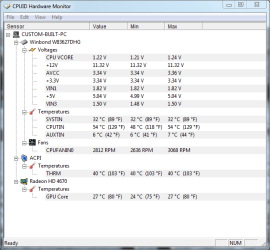
My temps from HWmonitor are as shown.

Thanks.
 

Attachments

  • Capture.PNG
    Capture.PNG
    19.7 KB · Views: 30

My Computer

Computer Manufacturer/Model Number
Custom Built
OS
Windows 7 Professional x64
CPU
Intel Pentium D 2.8ghz
Motherboard
MSI Cuba ms-7301
Memory
2gb DDR2 266mhz
Graphics Card(s)
ATI Radeon HD4760
Sound Card
Realtek HD Audio Onboard
Monitor(s) Displays
Samsung 19" Widescreen
Screen Resolution
1600x900
Hard Drives
Seagate 250Gb
Western Digital 320Gb External
Western Digital Caviar 500 GB
PSU
EZcool 700w PSU
Case
Coolermaster Elite 334
Cooling
Coolermaster Hyper TX3
Keyboard
Logitech G11
Mouse
Logitech Wireless Laser
Internet Speed
9.8mbps
According to the specs on the case you can change out the 90mm front fan for a 120mm and while there remove the air filter and give it a cleaning along with blowing out the case.

Probably would not be to difficult to mod the mesh opening on the side pannel to install another 120mm fan and make sure you have the air flow coming into the case.

Hope this helps some
 

My Computer

Computer Manufacturer/Model Number
My Build
OS
win7 Ult 64
CPU
i7 3930K & 3960X
Motherboard
ASUS P9X79 Deluxe
Memory
16GB G-Skill 2133MHz
Graphics Card(s)
Sapphire HD 7970
Sound Card
On-board
Monitor(s) Displays
ASUS 27 inch
Screen Resolution
1920X1080
Hard Drives
Crucial M4 256GB, 1.5TB WD Black for Data/Images
PSU
Corsair AX1200
Case
NZXT 810
Cooling
Custom Loop, Swiftech HDBlock
Keyboard
Mionix
Mouse
Mionix
Internet Speed
Cable
Rossy:

A few comments:

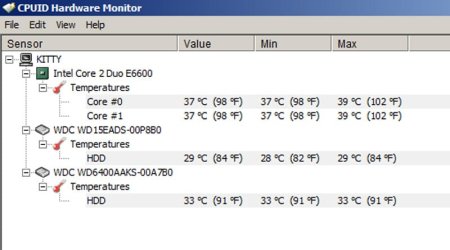
Attached is my HWMon screen. Notice that I do not show any voltages or fan speeds. I'd like to see my voltages and fan speeds, but am clueless enough that I can't figger out how to do that. Can you help me or do you simply have a more advanced version of the program?? Mine is version 1.14.0 and seems to have NO configuration options. Help? Where exactly did you get that version? Was it free?

Notice I have HD temps in my screenshot and you don't. Don't know why on that either.

On to your screenshot:

I see you have a Pentium D. Just going from memory, don't they tend to run hot?? I don't know offhand if 52 is unusual. My Core 2 Duo is always in the low 40s or lower.

I see your fans are turning pretty high (compared to my PC). Are they single speed fans or do they change speeds according to internal temps? Some fans can be adjusted to always run faster through a manual switch.

I have to believe the AUXTIN reading is bogus. How could you have any part of your PC operating at 6 (43 fahrenheit) unless you are outside??

Don't know where the SYSTIN monitor is, but that looks quite low.

ACPI: I know what the acronym means, but I don't know exactly where or what that is measuring. Appears acceptable temp.

Radeon temps appear quite low.

General opinion: Google Pentium D and find out if they are known to run hot and if 52 is excessive. There were some Pentium models that were known to be furnaces and I think it may have been the D models.

Make a spreadsheet or Word doc and monitor temps periodically so you have a baseline by date. Expect higher temps in summer if ambient temp is higher then.

Download a system utility "stress tester" type of free app that can make that Pentium D really sweat so you have an idea of how hot it can get. Google acceptable Pentium D ranges. 52 may be very acceptable and beware of relying on fingertip in a wake as an accurate indicator.

Possibly locate another temp tracking app as the 6 degree reading on that one location makes you wonder about the overall accuracy.

I notice your 12 volt line is at about 11.3. I would track that as well. That's lowish, but I think still within acceptable ranges. If it got down to say 11.0, I might worry. Maybe it is transient as those things do move around.

Help me out on where I get your version of HWMon.

 

Attachments

  • Untitled-1.jpg
    Untitled-1.jpg
    39.9 KB · Views: 10

My Computer

Computer type
PC/Desktop
Computer Manufacturer/Model Number
Ignatz Special; 4 speed manual gearbox; factory air conditioning; one of one
OS
Windows 7 Home Premium SP1, 64-bit
CPU
Intel Skylake i5-6600K, not overclocked
Motherboard
AsRock Z170M Extreme 4, micro ATX
Memory
8 GB HyperX DDR4-2666 (2 x 4 GB)
Graphics Card(s)
none; graphics are integrated on CPU
Sound Card
onboard: Realtek ALC1150; external: USB Behringer UF0-202
Monitor(s) Displays
Dell S2340M 23 inch IPS
Screen Resolution
1600 x 900
Hard Drives
System: Crucial MX100 series SSD, 128 GB;
Data: Samsung Spinpoint 103SJ, 1 TB;
Backup: WD Caviar Green WD30EZRX-00D8PB0, 3 TB
PSU
Rosewill SilentNight 500 watt fanless, semi-modular
Case
Antec Solo II
Cooling
Noctua NH-U12S; Noctua F12 intake, Noctua S12A exhaust
Keyboard
Microsoft 200 6JH-00001 USB
Mouse
Dell or Microsoft optical wired; USB
Antivirus
Microsoft Security Essentials and Malwarebytes Premium
Browser
Pale Moon
Other Info
All fans PWM; speeds at idle: CPU circa 500 rpm; intake circa 600 rpm; exhaust circa 600 rpm; CPU temps 27 idle and 47 C load in a warm room (27 C/81 F) when running Intel Extreme Tuning Utility stress test.
Hi guys. I sometimes get allot of peeps who have a squillion fans or sometimes oversized fans and are still getting some high temp in side their cases. This can sometimes be due to a negative air flow. You might have to look at the size/design of your case and also check out if your cables are neat and tidy and not restricting your air flow.

Have a looky here .... it makes for some interesting reading

Positive air flow vs. Negative air flows
 

My Computer

Computer type
PC/Desktop
Computer Manufacturer/Model Number
Self Built
OS
Windows 7 Ultimate 64bit
CPU
AMD Phenom Quad core 9950 black edition
Motherboard
Gigabyte
Memory
16Gb
Graphics Card(s)
2x XFX Radeon 5850
Sound Card
PCI Express X-Fi Titanium / Logitech G35
Monitor(s) Displays
2x HP 2410i
Screen Resolution
1920x1080
Hard Drives
2x 500Gb Seagate
1x 300Gb Seagate
1x 1Tb Seagate
2x 1Tb Hitatchi
PSU
Jean Tech Storm 700W
Case
Cooler Master COSMOS S
Cooling
Akasa Evo Blue Pro
Keyboard
Logitech G15
Mouse
Mad Catz M.M.O. 7
Internet Speed
12mb
Back
Top