CD/DVD drive not showing up

jmanwithplan

New member
Member
Local time
8:23 AM
Messages
88
Hello Forums, I'm having yet another problem with my dell inspiron one 2305. A repair shop reinstalled windows (not from the factory default image because it was corrupted)

But, I'm sure the CD drive was working when I got it back. I don't know when it stopped showing up, but I thought it might have something to do with deamon tools lite (which I used to mount an ISO image)

CD/DVD drive is not showing up in Device manager either. It's like it's not installed, but I'm sure it is. There is a pin hole on the tray for the CD/DVD. If I press it it opens up, but I can't hear the CD spinning.

Please help!
 

My Computer My Computer

Computer Manufacturer/Model Number
Dell Inspiron One2305
OS
Window 7 Home Premium x64
CPU
AMD Athlon II X@ 240e Processor 2.80 GHZ
Memory
4 GB
If you can "System Restore" to a point before you installed Daemon Tools, try that first and check whether it brings back your optical drive.
 

My Computer My Computer

OS
Windows 7 Home Premium 32 bit
No, sorry. This didn't work. It may not have had anything to do with daemon tools lite. I've installed a lot of programs so I'm not really sure what caused it.

Do you have any other suggestions.
 

My Computer My Computer

Computer Manufacturer/Model Number
Dell Inspiron One2305
OS
Window 7 Home Premium x64
CPU
AMD Athlon II X@ 240e Processor 2.80 GHZ
Memory
4 GB
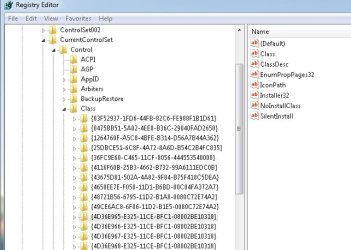
Yes, the option to boot from a cd/dvd drive shows up. It's second in the boot order. I tried to do the method outlined in the microsoft page, however, I could not find upper and lower filters. Here is a screenshot to prove I'm looking in the right place.
 

Attachments

  • nofilters.jpg
    nofilters.jpg
    69.2 KB · Views: 117

My Computer My Computer

Computer Manufacturer/Model Number
Dell Inspiron One2305
OS
Window 7 Home Premium x64
CPU
AMD Athlon II X@ 240e Processor 2.80 GHZ
Memory
4 GB
btw, it says on the page it can happen when you uninstall itunes. For some reason, my repair shop put itunes on here, and I uninstalled it using Revo Uninstaller (also removing registry entries related to itunes).
 

My Computer My Computer

Computer Manufacturer/Model Number
Dell Inspiron One2305
OS
Window 7 Home Premium x64
CPU
AMD Athlon II X@ 240e Processor 2.80 GHZ
Memory
4 GB
Did u ran the fix it from the microsoft website?
 

My Computer My Computer

OS
windows xp profwssional x32
Yes, and it said, CD/DRIVE is missing or not installed. It then forwarded me to their support forum.
 

My Computer My Computer

Computer Manufacturer/Model Number
Dell Inspiron One2305
OS
Window 7 Home Premium x64
CPU
AMD Athlon II X@ 240e Processor 2.80 GHZ
Memory
4 GB
But this is the weird thing about it, If I insert a CD at boot up, it will display under my computer, however, If I'm booted into windows, the CD tray wont even open up.

EDIT: I think I was able to fix it by inserting a CD at boot up, when I booted into windows, I went to Device Manager, CDROM/DVD and then Went to Properties. I then went to volume, and populate.
 

My Computer My Computer

Computer Manufacturer/Model Number
Dell Inspiron One2305
OS
Window 7 Home Premium x64
CPU
AMD Athlon II X@ 240e Processor 2.80 GHZ
Memory
4 GB
Yes, it's fixed. I'm sure a lot of other people might have this problem, and I haven't seen this fix described anywhere else.
 

My Computer My Computer

Computer Manufacturer/Model Number
Dell Inspiron One2305
OS
Window 7 Home Premium x64
CPU
AMD Athlon II X@ 240e Processor 2.80 GHZ
Memory
4 GB
Good to hear that ur issue is fixed...........CONGO:)
 

My Computer My Computer

OS
windows xp profwssional x32
I too have an Inspiron One 2305 and the DVD drive is just gone. Not in the BIOS, not in Windows, and can't boot anything from it. I took the back panel off and found that the SATA power connecter, the lower cable, is very loose and has a VERY poor connection to the drive. Moving it around and wedging a piece of paper inside to force it to be more snug has fixed the issue.

The drive is now visible in the BIOS and Windows. If anyone wants to give it a try, there's only 2 screws to remove from the bottom and the whole back panel slides upward.
 

My Computer My Computer

Computer type
PC/Desktop
OS
7 Pro 32bit
Back
Top