CdRom0 has a bad block

lynyrd47

New member
Local time
11:31 PM
Messages
29
I have a problem with my DVD-RW. Whenever I try to install games in my computer, the installation process stops randomly and a message will pop out, showing a cyclic redundancy check error. When I checked it in the Event Viewer, the log says "The device, \Device\CdRom0, has a bad block." The only way to install the games was ejecting the CD/DVD when the error pops out then reinserting it again and the installation would continue its progress. I'm pretty sure it's not a faulty CD/DVD because it happens in almost all of the games that I'm attempting to install, so I guess this has something to do with the DVD-RW. I'm thinking that the DVD-RW is defective, but I've been using it for only a month so maybe that's not really the case.

Help!
 

My Computer My Computer

At a glance

Windows 7 Ultimate 32-bitPentium(R) Dual Core CPU E5500 @ 2.80 GHz1 GBIntel GMA 3100
OS
Windows 7 Ultimate 32-bit
CPU
Pentium(R) Dual Core CPU E5500 @ 2.80 GHz
Motherboard
ECS EliteGroup G31T-M7
Memory
1 GB
Graphics Card(s)
Intel GMA 3100
Sound Card
VIA High Definition Audio
Monitor(s) Displays
SyncMaster CX155P
Screen Resolution
1024x768
Hard Drives
Hitachi HDT721032SLA360 ATA Device
Internet Speed
You don't wanna know
Did you have this problem with the old DVD?
 

My Computer My Computer

At a glance

ME/XP/Vista/Win7
OS
ME/XP/Vista/Win7
Go to the manufacturers web site and see if there is a firmware update for it.
If it's a common problem with that drive they may have a fix for it. Check their
forums (if they have them) as well.
 

My Computer My Computer

At a glance

Windows 7 Home Premium 64bitQ66004GB.Sapphire Vapor-X 5750
Computer type
PC/Desktop
Computer Manufacturer/Model Number
Acer M5641
OS
Windows 7 Home Premium 64bit
CPU
Q6600
Motherboard
Nvidia MCP73PV
Memory
4GB.
Graphics Card(s)
Sapphire Vapor-X 5750
Sound Card
XFI Extreem music
Monitor(s) Displays
Acer X223W
Screen Resolution
1680x1050
Hard Drives
WD10 02FAEX
WD64 00AAKS
PSU
stock 450w
Case
acer
Cooling
stock
Keyboard
Microsoft Digital Media Pro.
Mouse
Logitech MX620
Internet Speed
49.51Mbs down 4.98Mbs up 17.6ms ping
Antivirus
MSE
Browser
Waterfox
Other Info
Shaw Cable
Netgear R6200
@theog: what exactly do you mean by old DVD? If you're referring to an old DVD-RW that I use then no. I haven't used any DVD-RW except for this because my whole system is just as new as the DVD.

@rvbfan: OK, I'll check that out.
 

My Computer My Computer

At a glance

Windows 7 Ultimate 32-bitPentium(R) Dual Core CPU E5500 @ 2.80 GHz1 GBIntel GMA 3100
OS
Windows 7 Ultimate 32-bit
CPU
Pentium(R) Dual Core CPU E5500 @ 2.80 GHz
Motherboard
ECS EliteGroup G31T-M7
Memory
1 GB
Graphics Card(s)
Intel GMA 3100
Sound Card
VIA High Definition Audio
Monitor(s) Displays
SyncMaster CX155P
Screen Resolution
1024x768
Hard Drives
Hitachi HDT721032SLA360 ATA Device
Internet Speed
You don't wanna know
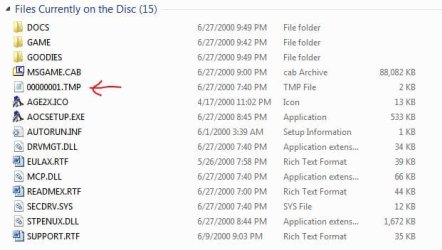
Many games intentionally put a bad block on the disc to thwart copying. My fave game of all time (AOE2) is like that. If other discs work OK then I doubt it's the drive.

Not sure how to turn the error message off, though... :rolleyes:
 

My Computer My Computer

At a glance

Main - Windows 7 Pro SP1 64-Bit; 2nd - Window...Main - Core i7 2600K; 2nd - Core i7 920Main - 16GB Corsair Vengeance; 2nd - 12GB Cor...Main - XFX Radeon 6870 1GB; 2nd - XFX Radeon ...
Computer Manufacturer/Model Number
Self
OS
Main - Windows 7 Pro SP1 64-Bit; 2nd - Windows Server 2008 R2
CPU
Main - Core i7 2600K; 2nd - Core i7 920
Motherboard
Main - Asus P8Z68-V Pro/Gen3; 2nd - Gigabyte GA-EX58-UDR3
Memory
Main - 16GB Corsair Vengeance; 2nd - 12GB Corsair Vengeance
Graphics Card(s)
Main - XFX Radeon 6870 1GB; 2nd - XFX Radeon 4870 1GB
Sound Card
Both: Onboard Realtek Azalia
Monitor(s) Displays
Main - Hann 25" + I-INC 25" + Acer 23"; 2nd - Upgrading Soon
Screen Resolution
Main - 1920x1080 (All Three Monitors); 2nd - Upgrading Soon
Hard Drives
Main - (1) Crucial M4 128GB (Boot)
Main - (1) Seagate 2TB 64MB Cache (Data)
Main - (1) Seagate 2TB 64MB Cache (Data Backup)
2nd - (1) Intel X25-M SSD 80GB (Boot)
2nd - (3) Seagate 1TB 32MB Cache (Data Backup)
2nd - (1) Seagate 320GB (Because)
PSU
Main - OCZ 600W Modular; 2nd - OCZ 600W
Case
Main - Thermaltake Element G; 2nd - NZXT something or other
Cooling
Main - Corsair H80; 2nd - Prolimatech Megahalems
Keyboard
Main - Razer Reclusa; 2nd - Old MS Keyboard
Mouse
Main - Logitech MX Revolution; 2nd - Old MS Mouse
Internet Speed
20Mbps Time-Warner Cable
^
I'm quite sure it's the drive, 'cause it happens to me in any DVD game that I install. It never happens in CD games, but when I play those games it often crashes and the Event Viewer says its a bad block as well.


EDIT: I already updated the firmware, but the same thing still happens.
 
Last edited:

My Computer My Computer

At a glance

Windows 7 Ultimate 32-bitPentium(R) Dual Core CPU E5500 @ 2.80 GHz1 GBIntel GMA 3100
OS
Windows 7 Ultimate 32-bit
CPU
Pentium(R) Dual Core CPU E5500 @ 2.80 GHz
Motherboard
ECS EliteGroup G31T-M7
Memory
1 GB
Graphics Card(s)
Intel GMA 3100
Sound Card
VIA High Definition Audio
Monitor(s) Displays
SyncMaster CX155P
Screen Resolution
1024x768
Hard Drives
Hitachi HDT721032SLA360 ATA Device
Internet Speed
You don't wanna know
You might have got a bum drive. Maybe the head is out of alignment or something. That's just a guess, though. :(

What I was talking about with the intentional bad block looks like this:
 

Attachments

  • AOE2-Disc Contents.JPG
    AOE2-Disc Contents.JPG
    38.7 KB · Views: 97

My Computer My Computer

At a glance

Main - Windows 7 Pro SP1 64-Bit; 2nd - Window...Main - Core i7 2600K; 2nd - Core i7 920Main - 16GB Corsair Vengeance; 2nd - 12GB Cor...Main - XFX Radeon 6870 1GB; 2nd - XFX Radeon ...
Computer Manufacturer/Model Number
Self
OS
Main - Windows 7 Pro SP1 64-Bit; 2nd - Windows Server 2008 R2
CPU
Main - Core i7 2600K; 2nd - Core i7 920
Motherboard
Main - Asus P8Z68-V Pro/Gen3; 2nd - Gigabyte GA-EX58-UDR3
Memory
Main - 16GB Corsair Vengeance; 2nd - 12GB Corsair Vengeance
Graphics Card(s)
Main - XFX Radeon 6870 1GB; 2nd - XFX Radeon 4870 1GB
Sound Card
Both: Onboard Realtek Azalia
Monitor(s) Displays
Main - Hann 25" + I-INC 25" + Acer 23"; 2nd - Upgrading Soon
Screen Resolution
Main - 1920x1080 (All Three Monitors); 2nd - Upgrading Soon
Hard Drives
Main - (1) Crucial M4 128GB (Boot)
Main - (1) Seagate 2TB 64MB Cache (Data)
Main - (1) Seagate 2TB 64MB Cache (Data Backup)
2nd - (1) Intel X25-M SSD 80GB (Boot)
2nd - (3) Seagate 1TB 32MB Cache (Data Backup)
2nd - (1) Seagate 320GB (Because)
PSU
Main - OCZ 600W Modular; 2nd - OCZ 600W
Case
Main - Thermaltake Element G; 2nd - NZXT something or other
Cooling
Main - Corsair H80; 2nd - Prolimatech Megahalems
Keyboard
Main - Razer Reclusa; 2nd - Old MS Keyboard
Mouse
Main - Logitech MX Revolution; 2nd - Old MS Mouse
Internet Speed
20Mbps Time-Warner Cable
So I guess the only way to fix this is to replace the DVD-RW? :(

I still have a 1 year warranty, I hope they would replace this.
 

My Computer My Computer

At a glance

Windows 7 Ultimate 32-bitPentium(R) Dual Core CPU E5500 @ 2.80 GHz1 GBIntel GMA 3100
OS
Windows 7 Ultimate 32-bit
CPU
Pentium(R) Dual Core CPU E5500 @ 2.80 GHz
Motherboard
ECS EliteGroup G31T-M7
Memory
1 GB
Graphics Card(s)
Intel GMA 3100
Sound Card
VIA High Definition Audio
Monitor(s) Displays
SyncMaster CX155P
Screen Resolution
1024x768
Hard Drives
Hitachi HDT721032SLA360 ATA Device
Internet Speed
You don't wanna know
Back
Top