Certain websites dont connect - DNS - static IP

balm

New member
Local time
11:07 PM
Messages
58
Certain websites dont connect. I get the following message:

it seems to have started since i assigned static IPS on the network. But im not sure.

How can i resolve this, thank you.
 

Attachments

  • i8.jpg
    i8.jpg
    26.7 KB · Views: 30

My Computer My Computer

Computer Manufacturer/Model Number
compaq
OS
Windows 7 Home Premium - Desktop 32 bit / Laptop HP (G62) 64 BIT
CPU
AMD Athlon 64 Dualcore - 2.1 GHz
Memory
RAM 2 G
Other Info
2 in 1, Bell Gateway 2-Wire 2701, wireless, modem, NAT router
Try changing your DNS with:
Open DNS:
208.67.222.222
208.67.220.220
or
Google DNS
8.8.8.8
8.8.8.4
 

My Computer My Computer

Computer type
PC/Desktop
Computer Manufacturer/Model Number
Custom Build
OS
Windows 10 Pro x64
CPU
Intel Core i5 4440 @Stock
Motherboard
Gigabyte Z97 D3H
Memory
4 x 4GB HyperX Fury DDR3
Graphics Card(s)
Gigabyte GTX 1050Ti O4G
Sound Card
Integrated
Monitor(s) Displays
Dell P2417H
Screen Resolution
1920 x 1080
Hard Drives
Samsung EVO 850 120GB / Toshiba DT01ACA050 1TB 7200prm 32MB
PSU
Riotoro Onyx 750W
Case
NZXT H500 Black-Red
Cooling
Stock CPU + NZXT 120mm + 2x120mm red fans
Keyboard
Modecom Volcano Lanparty
Mouse
Asus ROG Gladius / DeepCool E-Pad Plus
Internet Speed
DOCSIS 50/3 Mbit
Browser
Google Chrome
Other Info
Asus K55VJ(i5 3210M, GT635M / 2GB, 8GB DDR3, 500GB HDD)
stalker,

thank you, i tried 8.8.4.4 in the wireless connection properties preferred dns box, but it didnt make a difference

previously i had my default router gateway address in there.

it is always one site in particular that doesnt work....windowsupdate.microsoft.com...

ive heard its common problem, and never found posted resolutions...

i also tried flushing dns cache, and ipconfig /renew

i also reconfigured router to manual dns with 8888, 8844, and domain name= google.com???, anyway it didnt make a difference

i also closed AV & windows firewall...

tracert timed out and ping numeric address timed out...
 
Last edited:

My Computer My Computer

Computer Manufacturer/Model Number
compaq
OS
Windows 7 Home Premium - Desktop 32 bit / Laptop HP (G62) 64 BIT
CPU
AMD Athlon 64 Dualcore - 2.1 GHz
Memory
RAM 2 G
Other Info
2 in 1, Bell Gateway 2-Wire 2701, wireless, modem, NAT router

My Computer My Computer

Computer type
PC/Desktop
Computer Manufacturer/Model Number
Custom Build
OS
Windows 10 Pro x64
CPU
Intel Core i5 4440 @Stock
Motherboard
Gigabyte Z97 D3H
Memory
4 x 4GB HyperX Fury DDR3
Graphics Card(s)
Gigabyte GTX 1050Ti O4G
Sound Card
Integrated
Monitor(s) Displays
Dell P2417H
Screen Resolution
1920 x 1080
Hard Drives
Samsung EVO 850 120GB / Toshiba DT01ACA050 1TB 7200prm 32MB
PSU
Riotoro Onyx 750W
Case
NZXT H500 Black-Red
Cooling
Stock CPU + NZXT 120mm + 2x120mm red fans
Keyboard
Modecom Volcano Lanparty
Mouse
Asus ROG Gladius / DeepCool E-Pad Plus
Internet Speed
DOCSIS 50/3 Mbit
Browser
Google Chrome
Other Info
Asus K55VJ(i5 3210M, GT635M / 2GB, 8GB DDR3, 500GB HDD)
no luck so far...
 

Attachments

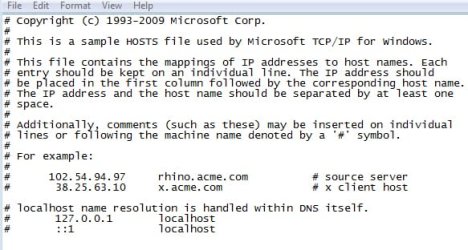
  • host.jpg
    host.jpg
    39.4 KB · Views: 14

My Computer My Computer

Computer Manufacturer/Model Number
compaq
OS
Windows 7 Home Premium - Desktop 32 bit / Laptop HP (G62) 64 BIT
CPU
AMD Athlon 64 Dualcore - 2.1 GHz
Memory
RAM 2 G
Other Info
2 in 1, Bell Gateway 2-Wire 2701, wireless, modem, NAT router
I'd try a spyware scan if you haven't done that already. SUPERAntiSpyware is a good one.

If still no luck, give Firefox a shot and see if that makes a difference. If it does we'll know the problem lies with IE and not your Network settings in general.

What happens when you try to run Windows Update from Control Panel? :)
 

My Computer My Computer

Computer Manufacturer/Model Number
Self
OS
Main - Windows 7 Pro SP1 64-Bit; 2nd - Windows Server 2008 R2
CPU
Main - Core i7 2600K; 2nd - Core i7 920
Motherboard
Main - Asus P8Z68-V Pro/Gen3; 2nd - Gigabyte GA-EX58-UDR3
Memory
Main - 16GB Corsair Vengeance; 2nd - 12GB Corsair Vengeance
Graphics Card(s)
Main - XFX Radeon 6870 1GB; 2nd - XFX Radeon 4870 1GB
Sound Card
Both: Onboard Realtek Azalia
Monitor(s) Displays
Main - Hann 25" + I-INC 25" + Acer 23"; 2nd - Upgrading Soon
Screen Resolution
Main - 1920x1080 (All Three Monitors); 2nd - Upgrading Soon
Hard Drives
Main - (1) Crucial M4 128GB (Boot)
Main - (1) Seagate 2TB 64MB Cache (Data)
Main - (1) Seagate 2TB 64MB Cache (Data Backup)
2nd - (1) Intel X25-M SSD 80GB (Boot)
2nd - (3) Seagate 1TB 32MB Cache (Data Backup)
2nd - (1) Seagate 320GB (Because)
PSU
Main - OCZ 600W Modular; 2nd - OCZ 600W
Case
Main - Thermaltake Element G; 2nd - NZXT something or other
Cooling
Main - Corsair H80; 2nd - Prolimatech Megahalems
Keyboard
Main - Razer Reclusa; 2nd - Old MS Keyboard
Mouse
Main - Logitech MX Revolution; 2nd - Old MS Mouse
Internet Speed
20Mbps Time-Warner Cable
update works fine from CP.


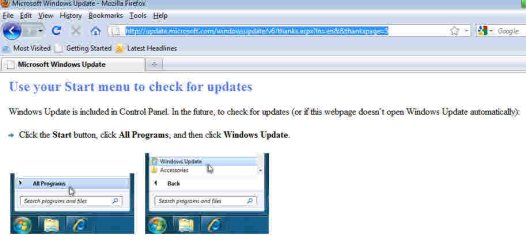
thanks ! FF gives me this for that site , better than before for sure.... so whats up with IE8...:eek:
 

Attachments

  • ff.jpg
    ff.jpg
    27.3 KB · Views: 27

My Computer My Computer

Computer Manufacturer/Model Number
compaq
OS
Windows 7 Home Premium - Desktop 32 bit / Laptop HP (G62) 64 BIT
CPU
AMD Athlon 64 Dualcore - 2.1 GHz
Memory
RAM 2 G
Other Info
2 in 1, Bell Gateway 2-Wire 2701, wireless, modem, NAT router
Have you run a spyware check? Besides the one I mentioned before, a go-round with Malwarebytes would be a good idea.
 

My Computer My Computer

Computer Manufacturer/Model Number
Self
OS
Main - Windows 7 Pro SP1 64-Bit; 2nd - Windows Server 2008 R2
CPU
Main - Core i7 2600K; 2nd - Core i7 920
Motherboard
Main - Asus P8Z68-V Pro/Gen3; 2nd - Gigabyte GA-EX58-UDR3
Memory
Main - 16GB Corsair Vengeance; 2nd - 12GB Corsair Vengeance
Graphics Card(s)
Main - XFX Radeon 6870 1GB; 2nd - XFX Radeon 4870 1GB
Sound Card
Both: Onboard Realtek Azalia
Monitor(s) Displays
Main - Hann 25" + I-INC 25" + Acer 23"; 2nd - Upgrading Soon
Screen Resolution
Main - 1920x1080 (All Three Monitors); 2nd - Upgrading Soon
Hard Drives
Main - (1) Crucial M4 128GB (Boot)
Main - (1) Seagate 2TB 64MB Cache (Data)
Main - (1) Seagate 2TB 64MB Cache (Data Backup)
2nd - (1) Intel X25-M SSD 80GB (Boot)
2nd - (3) Seagate 1TB 32MB Cache (Data Backup)
2nd - (1) Seagate 320GB (Because)
PSU
Main - OCZ 600W Modular; 2nd - OCZ 600W
Case
Main - Thermaltake Element G; 2nd - NZXT something or other
Cooling
Main - Corsair H80; 2nd - Prolimatech Megahalems
Keyboard
Main - Razer Reclusa; 2nd - Old MS Keyboard
Mouse
Main - Logitech MX Revolution; 2nd - Old MS Mouse
Internet Speed
20Mbps Time-Warner Cable
do i need to reload IE8 ?

i noticed its happening on both networked computers, laptop & desktop. The desktop is only a few months.
 

My Computer My Computer

Computer Manufacturer/Model Number
compaq
OS
Windows 7 Home Premium - Desktop 32 bit / Laptop HP (G62) 64 BIT
CPU
AMD Athlon 64 Dualcore - 2.1 GHz
Memory
RAM 2 G
Other Info
2 in 1, Bell Gateway 2-Wire 2701, wireless, modem, NAT router
Have you run the spyware check?
 

My Computer My Computer

Computer Manufacturer/Model Number
Self
OS
Main - Windows 7 Pro SP1 64-Bit; 2nd - Windows Server 2008 R2
CPU
Main - Core i7 2600K; 2nd - Core i7 920
Motherboard
Main - Asus P8Z68-V Pro/Gen3; 2nd - Gigabyte GA-EX58-UDR3
Memory
Main - 16GB Corsair Vengeance; 2nd - 12GB Corsair Vengeance
Graphics Card(s)
Main - XFX Radeon 6870 1GB; 2nd - XFX Radeon 4870 1GB
Sound Card
Both: Onboard Realtek Azalia
Monitor(s) Displays
Main - Hann 25" + I-INC 25" + Acer 23"; 2nd - Upgrading Soon
Screen Resolution
Main - 1920x1080 (All Three Monitors); 2nd - Upgrading Soon
Hard Drives
Main - (1) Crucial M4 128GB (Boot)
Main - (1) Seagate 2TB 64MB Cache (Data)
Main - (1) Seagate 2TB 64MB Cache (Data Backup)
2nd - (1) Intel X25-M SSD 80GB (Boot)
2nd - (3) Seagate 1TB 32MB Cache (Data Backup)
2nd - (1) Seagate 320GB (Because)
PSU
Main - OCZ 600W Modular; 2nd - OCZ 600W
Case
Main - Thermaltake Element G; 2nd - NZXT something or other
Cooling
Main - Corsair H80; 2nd - Prolimatech Megahalems
Keyboard
Main - Razer Reclusa; 2nd - Old MS Keyboard
Mouse
Main - Logitech MX Revolution; 2nd - Old MS Mouse
Internet Speed
20Mbps Time-Warner Cable
thanks, i ran both on C:, the super found 51 Adware tracking cookies which i deleted, the MALWAREBYTES was fine

made no difference though....

do i need to reset IE8 settings to default...which one could be at fault...


also did CCleaner, diskcleanup etc, etc...
 

My Computer My Computer

Computer Manufacturer/Model Number
compaq
OS
Windows 7 Home Premium - Desktop 32 bit / Laptop HP (G62) 64 BIT
CPU
AMD Athlon 64 Dualcore - 2.1 GHz
Memory
RAM 2 G
Other Info
2 in 1, Bell Gateway 2-Wire 2701, wireless, modem, NAT router
I'd go for the Reset to Default. :)
 

My Computer My Computer

Computer Manufacturer/Model Number
Self
OS
Main - Windows 7 Pro SP1 64-Bit; 2nd - Windows Server 2008 R2
CPU
Main - Core i7 2600K; 2nd - Core i7 920
Motherboard
Main - Asus P8Z68-V Pro/Gen3; 2nd - Gigabyte GA-EX58-UDR3
Memory
Main - 16GB Corsair Vengeance; 2nd - 12GB Corsair Vengeance
Graphics Card(s)
Main - XFX Radeon 6870 1GB; 2nd - XFX Radeon 4870 1GB
Sound Card
Both: Onboard Realtek Azalia
Monitor(s) Displays
Main - Hann 25" + I-INC 25" + Acer 23"; 2nd - Upgrading Soon
Screen Resolution
Main - 1920x1080 (All Three Monitors); 2nd - Upgrading Soon
Hard Drives
Main - (1) Crucial M4 128GB (Boot)
Main - (1) Seagate 2TB 64MB Cache (Data)
Main - (1) Seagate 2TB 64MB Cache (Data Backup)
2nd - (1) Intel X25-M SSD 80GB (Boot)
2nd - (3) Seagate 1TB 32MB Cache (Data Backup)
2nd - (1) Seagate 320GB (Because)
PSU
Main - OCZ 600W Modular; 2nd - OCZ 600W
Case
Main - Thermaltake Element G; 2nd - NZXT something or other
Cooling
Main - Corsair H80; 2nd - Prolimatech Megahalems
Keyboard
Main - Razer Reclusa; 2nd - Old MS Keyboard
Mouse
Main - Logitech MX Revolution; 2nd - Old MS Mouse
Internet Speed
20Mbps Time-Warner Cable
nothing worked....so its like the others who have this problem...


how to best reload IE8, the one i have came with windows 7, do i just download an update IE8 for windows 7, if it exists
 

My Computer My Computer

Computer Manufacturer/Model Number
compaq
OS
Windows 7 Home Premium - Desktop 32 bit / Laptop HP (G62) 64 BIT
CPU
AMD Athlon 64 Dualcore - 2.1 GHz
Memory
RAM 2 G
Other Info
2 in 1, Bell Gateway 2-Wire 2701, wireless, modem, NAT router

My Computer My Computer

Computer type
Laptop
Computer Manufacturer/Model Number
Sony Vaio VPCEB47GM Laptop
OS
Win 7 Pro 64-bit
CPU
Intel i5 2.4 Ghz
Memory
8GB DDR3
Graphics Card(s)
Intel HD 3000
Sound Card
IDT High Definition
Monitor(s) Displays
15.6 WGXA Anti-Glare LED
Screen Resolution
1280x800
Hard Drives
640Gb 7200rpm
Antivirus
MSE
Browser
Opera (primary) with IE9 backup
nope, no go....the only thing i didnt try was to reset the router/modem, but since websites using FF worked, resetting the router shouldnt make the difference...
 

My Computer My Computer

Computer Manufacturer/Model Number
compaq
OS
Windows 7 Home Premium - Desktop 32 bit / Laptop HP (G62) 64 BIT
CPU
AMD Athlon 64 Dualcore - 2.1 GHz
Memory
RAM 2 G
Other Info
2 in 1, Bell Gateway 2-Wire 2701, wireless, modem, NAT router
the IE8 i have installed with WINDOWS 7

whats the PROPER procedure to reinstall/download IE8, do i uninstall my IE8, where do i get IE8 download for WINDOWS 7 from

thx
 

My Computer My Computer

Computer Manufacturer/Model Number
compaq
OS
Windows 7 Home Premium - Desktop 32 bit / Laptop HP (G62) 64 BIT
CPU
AMD Athlon 64 Dualcore - 2.1 GHz
Memory
RAM 2 G
Other Info
2 in 1, Bell Gateway 2-Wire 2701, wireless, modem, NAT router

My Computer My Computer

Computer type
Laptop
Computer Manufacturer/Model Number
Sony Vaio VPCEB47GM Laptop
OS
Win 7 Pro 64-bit
CPU
Intel i5 2.4 Ghz
Memory
8GB DDR3
Graphics Card(s)
Intel HD 3000
Sound Card
IDT High Definition
Monitor(s) Displays
15.6 WGXA Anti-Glare LED
Screen Resolution
1280x800
Hard Drives
640Gb 7200rpm
Antivirus
MSE
Browser
Opera (primary) with IE9 backup

My Computer My Computer

Computer type
PC/Desktop
Computer Manufacturer/Model Number
Dwarf Dwf/11/2012 r09/2013
OS
Windows 8.1 Pro RTM x64
CPU
Intel Core-i5-3570K 4-core @ 3.4GHz (Ivy Bridge) (OC 4.4GHz)
Motherboard
ASRock Z77 Extreme4-M
Memory
4 x 4GB DDR3-1600 Corsair Vengeance CMZ8GX3M2A1600C9B (16GB)
Graphics Card(s)
MSI GeForce GTX770 Gaming OC 2GB
Sound Card
Realtek High Definition on board solution (ALC 898)
Monitor(s) Displays
ViewSonic VA1912w Widescreen (VGA)
Screen Resolution
1440x900
Hard Drives
OCZ Agility 3 SSD 120GB SATA III x2 (RAID 0)
Samsung HD501LJ 500GB SATA II x2
Hitachi HDS721010CLA332 1TB SATA II
Iomega 1.5TB Ext USB 2.0
WD 2.0TB Ext USB 3.0
PSU
XFX Pro Series 850W Semi-Modular
Case
Gigabyte IF233
Cooling
1 x 120mm Front Inlet 1 x 120mm Rear Exhaust
Keyboard
Microsoft Comfort Curve Keyboard 3000 (USB)
Mouse
Microsoft Comfort Mouse 3000 for Business (USB)
Internet Speed
NetGear DG834Gv3 ADSL Modem/Router (Ethernet) ~4.0 Mb/s (O2)
Antivirus
Avast! 8.0.1497
Browser
IE 11
Other Info
Optical Drive: HL-DT-ST BD-RE BH10LS30 SATA Bluray
Lexmark S305 Printer/Scanner/Copier (USB)
WEI Score: 8.1/8.1/8.5/8.5/8.25
Asus Eee PC 1011PX Netbook (Windows 7 x86 Starter)
Back
Top