MadMaxData
Banned
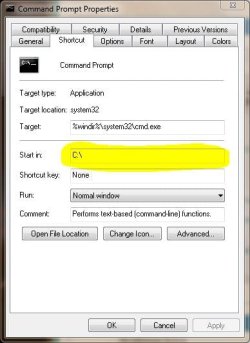
This is a simple registry hack to change the default directory you see when opening command prompt. I like to have it set to the OS root drive, but you can change it to whatever you like. This will keep you from having to use the "change directory" switch every time you open command prompt, which can be more than a little annoying. 
1.) Open up registry editor by typing "regedit" [without the quotes] in the search box, and then clicking on the link up top.
2.) Navigate to the key HKEY_CURRENT_USER \ Software \ Microsoft \ Command Processor and search for the string "Autorun" in the left window. If that string is not existing yet, create it. Double-click it afterwards and add the new directory path in the following way: CD /d C:\
3.) If you would like the command prompt to open in the system32 folder, use this string instead:
CD /d C:\windows\system32
4.) Close the registry editor, and then open the command prompt to check your work.
As you can see, you can easily change the default directory to whatever you like. Hope this helps you from being annoyed at the command prompt.
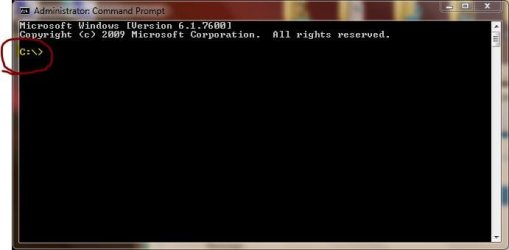
Here's the rusult....

Max
1.) Open up registry editor by typing "regedit" [without the quotes] in the search box, and then clicking on the link up top.
2.) Navigate to the key HKEY_CURRENT_USER \ Software \ Microsoft \ Command Processor and search for the string "Autorun" in the left window. If that string is not existing yet, create it. Double-click it afterwards and add the new directory path in the following way: CD /d C:\
3.) If you would like the command prompt to open in the system32 folder, use this string instead:
CD /d C:\windows\system32
4.) Close the registry editor, and then open the command prompt to check your work.
As you can see, you can easily change the default directory to whatever you like. Hope this helps you from being annoyed at the command prompt.
Here's the rusult....
Max
My Computer
- Computer Manufacturer/Model Number
- NVIDIA
- OS
- Windows 7 Enterprise x64
- CPU
- AMD Athlon 64X2 Dual Core 3800+
- Motherboard
- GeForce 6100-M9
- Memory
- OCZ Platinum Dual Channel - 4x1Gb
- Graphics Card(s)
- NVIDIA GeForce 8800 GT PCI Express x16
- Sound Card
- Creative Audigy Sound Blaster Extreme PCI
- Monitor(s) Displays
- Compaq 7500
- Screen Resolution
- 1024x768
- Hard Drives
- C: Seagate ST3250318AS SataII - 250Gb
D: Seagate ST3500418AS SataII - 500Gb
- PSU
- OCZ 600w Dual 12v Rails
- Case
- Thermaltake
- Cooling
- OCZ Heatsinks, Fans, and Thermal Paste on CPU & Chipsets
- Keyboard
- Logitech
- Mouse
- Radio Shack PS2
- Internet Speed
- Cable
- Other Info
- Dual Pioneer DVD/RW optical drives. LG CD/RW optical drive.