

No that's okay, I've already done that, I just didn't want to go through all that trouble, but apparently I had to....No worries, if you want to upload your png's I will make them into icons for you.
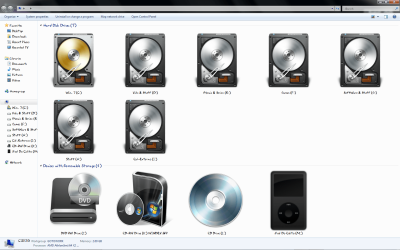
Here you have ScreenShots below, I was already using the setup on the first screen shot for some time now, I had applied the icons with tune Up utilities as an Icon package I had saved before, but now it's updated and I'm no longer using tuneup utilities because now they're integrated into the imageres.dll....
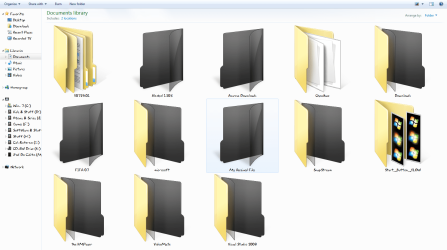
about the second ScreenShot, there seems to be something I did wrong because as you can see the icons aren't completely applied or working, if you have any ideas to fix it than I'm all ears.
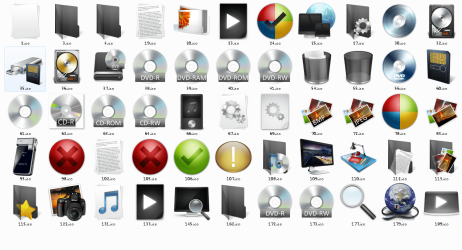
the 3rd screen shot has the icons I've used....
I actually used that Web site to convert them, I had googled it few days ago, thanks for re-assuring me that I'm using the right service...
Attachments
My Computer
At a glance
Windows 7 Ultimate x64, 7600.20647 RTMIntel Core2Quad Q9505 @ 4.0Ghz6GB Transcend DDR3-1333 Dual ChannelASUS GTX285 1GB GDDR3
- Computer Manufacturer/Model Number
- It's a Custom Build.....
- OS
- Windows 7 Ultimate x64, 7600.20647 RTM
- CPU
- Intel Core2Quad Q9505 @ 4.0Ghz
- Motherboard
- Intel Skyburg DP45SG
- Memory
- 6GB Transcend DDR3-1333 Dual Channel
- Graphics Card(s)
- ASUS GTX285 1GB GDDR3
- Sound Card
- OnBoard Intel IDT HD Audio
- Monitor(s) Displays
- HP w2207h 22" WideScreen LCD, VGA & HDMI
- Screen Resolution
- 1680x1050, 60Hz
- Hard Drives
- 1TB WD Caviar Black, Green Power...
1TB Dell, 32Mb/s, Internal SATA
320GB Seagate Internal SATA (3 Partitions)
- PSU
- Omega 600W ATX2.0 Dual Rail, 2x Fans
- Case
- Cooler Master HAF 922
- Cooling
- Corsair Hydro H50 in Push-Pull mode, 4 Case Fans with LED
- Keyboard
- White aigo keyboard with blue LED on the keys....
- Mouse
- Genius Mini Tracer
- Internet Speed
- I'm ashamed to say...
- Other Info
- Aigo wireless keyboard(black) and a 2.1 Speaker System(white)


 ........


