Change Start Menu Orb?

No worries, if you want to upload your png's I will make them into icons for you.
No that's okay, I've already done that, I just didn't want to go through all that trouble, but apparently I had to....
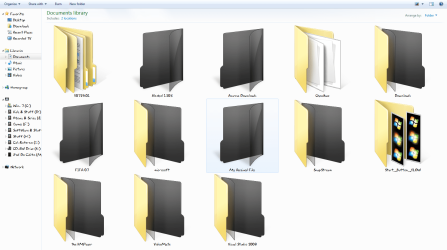
Here you have ScreenShots below, I was already using the setup on the first screen shot for some time now, I had applied the icons with tune Up utilities as an Icon package I had saved before, but now it's updated and I'm no longer using tuneup utilities because now they're integrated into the imageres.dll....

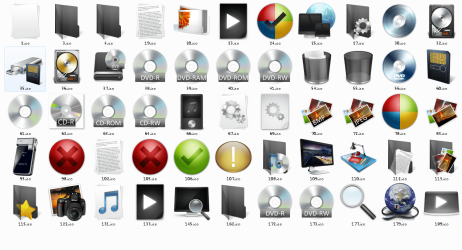
about the second ScreenShot, there seems to be something I did wrong because as you can see the icons aren't completely applied or working, if you have any ideas to fix it than I'm all ears.

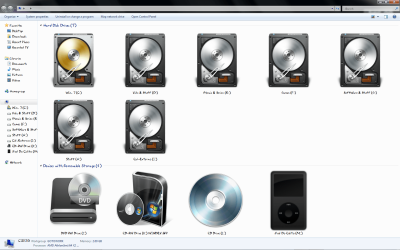
the 3rd screen shot has the icons I've used....


I actually used that Web site to convert them, I had googled it few days ago, thanks for re-assuring me that I'm using the right service...
 

Attachments
  • My Comp. 3.png
    My Comp. 3.png
    162.2 KB · Views: 328
  • Capture.PNG
    Capture.PNG
    118.1 KB · Views: 252
  • Capture2.PNG
    Capture2.PNG
    233.6 KB · Views: 321

My Computer

Computer Manufacturer/Model Number
It's a Custom Build.....
OS
Windows 7 Ultimate x64, 7600.20647 RTM
CPU
Intel Core2Quad Q9505 @ 4.0Ghz
Motherboard
Intel Skyburg DP45SG
Memory
6GB Transcend DDR3-1333 Dual Channel
Graphics Card(s)
ASUS GTX285 1GB GDDR3
Sound Card
OnBoard Intel IDT HD Audio
Monitor(s) Displays
HP w2207h 22" WideScreen LCD, VGA & HDMI
Screen Resolution
1680x1050, 60Hz
Hard Drives
1TB WD Caviar Black, Green Power...
1TB Dell, 32Mb/s, Internal SATA
320GB Seagate Internal SATA (3 Partitions)
PSU
Omega 600W ATX2.0 Dual Rail, 2x Fans
Case
Cooler Master HAF 922
Cooling
Corsair Hydro H50 in Push-Pull mode, 4 Case Fans with LED
Keyboard
White aigo keyboard with blue LED on the keys....
Mouse
Genius Mini Tracer
Internet Speed
I'm ashamed to say...
Other Info
Aigo wireless keyboard(black) and a 2.1 Speaker System(white)
No that's okay, I've already done that, I just didn't want to go through all that trouble, but apparently I had to....
Here you have ScreenShots below, I was already using the setup on the first screen shot for some time now, I had applied the icons with tune Up utilities as an Icon package I had saved before, but now it's updated and I'm no longer using tuneup utilities because now they're integrated into the imageres.dll....

about the second ScreenShot, there seems to be something I did wrong because as you can see the icons aren't completely applied or working, if you have any ideas to fix it than I'm all ears.

the 3rd screen shot has the icons I've used....


I actually used that Web site to convert them, I had googled it few days ago, thanks for re-assuring me that I'm using the right service...

Yeah by the looks of it you are missing some important icons and some of the ones your using seemed to have been applied backwards, I don't know how tune up utlites work but if your replaceing icons in the imageres dll then you need to have the live folder (front and back icons) components and the icons need to align with the locations of the old ones otherwise the thumbnails will not be positioned in the folders correctly.

This is what your imageres icons should look like.

2009-08-09_235522.jpg
 

My Computer

Computer Manufacturer/Model Number
Home Brew
OS
Windows 7 Ultimate Vista Ultimate x64
CPU
Core 2 Duo E8500 3.16Ghz @ 3.8Ghz
Motherboard
eVGA 750i FTW
Memory
2x2Gigs Patriot PC2-6400 LL
Graphics Card(s)
Inno3D GeForce GTX260 216 SP
Monitor(s) Displays
ASUS VW222U 22" 2ms Response time
Screen Resolution
1680x1050
Hard Drives
SATA 150GB
SATA II 250GB
USB IDE 750GB Ext.
PSU
HYTEC 600W & Thermaltake 650W Toughpower Power Exp
Case
Thermaltake Armor LCS (Liquid Cooling System)
Cooling
Liquid Cooling System
Keyboard
Logitech G15 Gaming Keyboard
Mouse
Logitech G9 Gaming Mouse
....This is what your imageres icons should look like.

View attachment 22243

Wow, those icons look very Good, I think I know what the problem is with my setup, my folder icons are not as complete as these ones you've just showed me... I only have 3 & 4, number 162 seems to be a wrong, fake one compared to the correct ones you've just posted, take a look at my 3rd screen shot and you'll see that 3,4 & 162 are all the same.

Are you using that icon folder package? If so, do you mind sharing? or could you perhaps point out some other source with some sort of gallery with a variety of other options, preferably folder icons in black because black is kind of my favorite colour:p........
 

My Computer

Computer Manufacturer/Model Number
It's a Custom Build.....
OS
Windows 7 Ultimate x64, 7600.20647 RTM
CPU
Intel Core2Quad Q9505 @ 4.0Ghz
Motherboard
Intel Skyburg DP45SG
Memory
6GB Transcend DDR3-1333 Dual Channel
Graphics Card(s)
ASUS GTX285 1GB GDDR3
Sound Card
OnBoard Intel IDT HD Audio
Monitor(s) Displays
HP w2207h 22" WideScreen LCD, VGA & HDMI
Screen Resolution
1680x1050, 60Hz
Hard Drives
1TB WD Caviar Black, Green Power...
1TB Dell, 32Mb/s, Internal SATA
320GB Seagate Internal SATA (3 Partitions)
PSU
Omega 600W ATX2.0 Dual Rail, 2x Fans
Case
Cooler Master HAF 922
Cooling
Corsair Hydro H50 in Push-Pull mode, 4 Case Fans with LED
Keyboard
White aigo keyboard with blue LED on the keys....
Mouse
Genius Mini Tracer
Internet Speed
I'm ashamed to say...
Other Info
Aigo wireless keyboard(black) and a 2.1 Speaker System(white)

Yeah that 162 folder you have isn't really the problem although it is meant to represnt folders inside of folders like mine, your real problem is 5 and 6 are missing and thats why you still have the yellow folders, plus the fact that some of your custom folders are facing the wrong way is very strange.

If you want to use my custom icons you can use the installer that Generator made for everyone in this thread, there are 3 different icon packs to choose although some are just for the most recent build as I figured that most people will be using it now.

20178d1248733930-installer-custom-glossy-blue-icon-pack-glossyblue.jpg


20179d1248733930-installer-custom-glossy-blue-icon-pack-blackglass.jpg


21563d1249538069-installer-custom-glossy-blue-icon-pack-ultimateicons.jpg
 

My Computer

Computer Manufacturer/Model Number
Home Brew
OS
Windows 7 Ultimate Vista Ultimate x64
CPU
Core 2 Duo E8500 3.16Ghz @ 3.8Ghz
Motherboard
eVGA 750i FTW
Memory
2x2Gigs Patriot PC2-6400 LL
Graphics Card(s)
Inno3D GeForce GTX260 216 SP
Monitor(s) Displays
ASUS VW222U 22" 2ms Response time
Screen Resolution
1680x1050
Hard Drives
SATA 150GB
SATA II 250GB
USB IDE 750GB Ext.
PSU
HYTEC 600W & Thermaltake 650W Toughpower Power Exp
Case
Thermaltake Armor LCS (Liquid Cooling System)
Cooling
Liquid Cooling System
Keyboard
Logitech G15 Gaming Keyboard
Mouse
Logitech G9 Gaming Mouse
Thanx very much, I'll try it now....
 

My Computer

Computer Manufacturer/Model Number
It's a Custom Build.....
OS
Windows 7 Ultimate x64, 7600.20647 RTM
CPU
Intel Core2Quad Q9505 @ 4.0Ghz
Motherboard
Intel Skyburg DP45SG
Memory
6GB Transcend DDR3-1333 Dual Channel
Graphics Card(s)
ASUS GTX285 1GB GDDR3
Sound Card
OnBoard Intel IDT HD Audio
Monitor(s) Displays
HP w2207h 22" WideScreen LCD, VGA & HDMI
Screen Resolution
1680x1050, 60Hz
Hard Drives
1TB WD Caviar Black, Green Power...
1TB Dell, 32Mb/s, Internal SATA
320GB Seagate Internal SATA (3 Partitions)
PSU
Omega 600W ATX2.0 Dual Rail, 2x Fans
Case
Cooler Master HAF 922
Cooling
Corsair Hydro H50 in Push-Pull mode, 4 Case Fans with LED
Keyboard
White aigo keyboard with blue LED on the keys....
Mouse
Genius Mini Tracer
Internet Speed
I'm ashamed to say...
Other Info
Aigo wireless keyboard(black) and a 2.1 Speaker System(white)
I used Angus Johnson's Resource Hacker. Does the trick.
Changed the orb to be our company logo. People are impressed, and I've just earnt brownie points. Thanks guys!

However, one lad pointed out, that when using a non-black desktop image, the start button flickers its transparency to black as it transitions to the next... what do you call it... sprite? state? Then it goes back to transparent.
Any idea on this?

But just out of curiosity to go one step up, is it possible to make it animated instead?

Cheers,
 
Last edited:

My Computer

OS
Windows 7 Enterprise
CPU
Intel Pentium Dual E2200 @2.2GHz
Motherboard
Gigabyte II-G31
Memory
4GB
Graphics Card(s)
Palit GForce 9500GT 1GB
Sound Card
onBoard
Hard Drives
WesternDigital: 250GB + 1TB + 1TB + 2TB
PSU
450W
Case
CoolerMaster CM690
Cooling
Corsair H50
Mouse
Logitech MX518

My Computer

Computer Manufacturer/Model Number
COMPAQ Presario Laptop
OS
Windows 7 Ultimate 64 bit, Mac OS X 10.6
CPU
Intel Pentium Dual Core @2.0GHz
Motherboard
Compaq Generic
Memory
12GB
Graphics Card(s)
NVIDIA Graphics For Mobile 512MB VRAM
Sound Card
IDT High definition Audio
Monitor(s) Displays
Laptop LCD Display
Screen Resolution
1280*800 Bright View Widescreen
Hard Drives
500 GB Primary Master@7200rpm + 1 TB External HDD
Cooling
Direct ; generic fan
Keyboard
Generic Laptop Keyboard
Mouse
Touch Pad
Internet Speed
3.1 Mbps wireless Broadband
Other Info
Generic Dock
Back
Top