Changes to Yahoo Troubles

Chips

New member
Member
VIP
Local time
1:14 PM
Messages
204
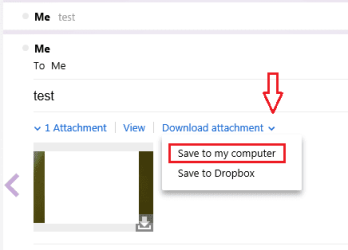
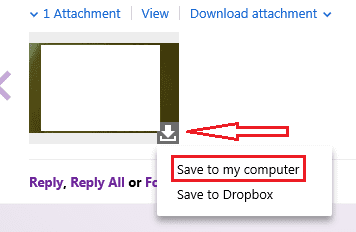
As some of you must know by now, Yahoo have recently had a major overhaul of its mailing system. However, I'm having slight troubles with downloading attachments. I click on "Save to my computer" and it downloads automatically, no options where I want it saved to or anything. Then, upon searching there's absolutely no sign of the aforementioned files anywhere on my computer! Can anyone tell me how I can find where it's sending my files and how to change their destination?
 

My Computer

Computer type
PC/Desktop
OS
Windows 10
Depends on your browser.
There is usually a setting in the Options that sets the download directory.

I assume the attachments aren't going to your Downloads folder.
 

My Computer

Computer type
PC/Desktop
Computer Manufacturer/Model Number
n/a
OS
W7 Ultimate SP1, LM19.2 MATE, W10 Home 1703, W10 Pro 1703 VM, #All 64 bit
CPU
AMD Phenom II x6 1100T, 3.3 GHz
Motherboard
ASUS M4A88T-M/USB3 (AM3)
Memory
12GB DDR3 1333 G-Skill (4GB x 2), G-Skill (2GB x 2)
Graphics Card(s)
NVIDIA GeForce GTX 660
Sound Card
Realtek?
Monitor(s) Displays
Samsung S23B350
Screen Resolution
1920x1080
Hard Drives
WD Green 2TB (SATA), WD Green 3TB (SATA), WD Blue 4TB (SATA), WD Blue 6TB (SATA)
PSU
Cooler Master
Case
Antec GX300 Tower
Cooling
3x Antec TRICOOL 120mm Fans
Mouse
Wired Optical
Internet Speed
DSL
Antivirus
Avast
Browser
Pale Moon (64 bit)
Other Info
2018-12-27 Upgraded HDDs
2015-12-10 Upgraded case, graphics card, storage
2015-08-15 Upgraded motherboard & RAM
2015-07-15 Upgraded LM17.1 to LM17.2
Nope, there's nothing in my Downloads folder. Where is my browser options located?
 

My Computer

Computer type
PC/Desktop
OS
Windows 10
In Firefox under Tools.

The other browsers, I have no idea.
 

My Computer

Computer type
PC/Desktop
Computer Manufacturer/Model Number
Home Built
OS
Windows `10 Professional 64bit
CPU
Intel i5 [email protected]
Motherboard
MSI P67A-GD55 (MS7681)
Memory
Corsair Vengeance DDR3 1600 16G
Graphics Card(s)
NVIDIA GeForce GT520 1GHz
Sound Card
Realtek High Definition Audio
Monitor(s) Displays
Haans G 241
Screen Resolution
1600X1024
Hard Drives
Crucial MX100 256GB SSD
PSU
OCZ ModXStream Modular High Performance 500 Watt
Case
Rosewill Challenger-U3
Cooling
Just Fans
Keyboard
Kensington K64338B
Mouse
Microsoft wheel mouse 1.1A
Internet Speed
240.0 Mbps
Antivirus
ESET Internet Security
Browser
Firefox
Other Info
SuperAntiSpyware-Pro
Malwarebytes (Premium)
Kerish Doctor
Yep, found it easily on Firefox, but what of Internet Explorer?
 

My Computer

Computer type
PC/Desktop
OS
Windows 10
Click the gears (tools) icon and click view downloads. Then options.
 

My Computer

Computer type
PC/Desktop
Computer Manufacturer/Model Number
Custom Built
OS
Windows 10 Pro
CPU
AMD Ryzen 5 2400G Processor with Radeon RX Vega 11 Graphics
Motherboard
ASRock X470 Master SLI/AC AM4 AMD Promontory X470 SATA 6Gb/s
Memory
G.SKILL Ripjaws V Series 16GB (2 x 8GB) 288-Pin DDR4 SDRAM D
Graphics Card(s)
2047MB NVIDIA GeForce GTX 1060 6GB (EVGA)
Sound Card
Motherboard Built in
Monitor(s) Displays
Acer R240HY bidx 23.8-Inch IPS HDMI DVI VGA (1920 x 1080) Wi
Screen Resolution
1920 x 1080
Hard Drives
1TB Sandisk SSD PLUS (Main drive)
500 GB Seagate 7200 RPM (Games)
500 GB Western Digital 7200 RPM (Virtual Machines)
PSU
CORSAIR TX Series TX650M 650W 80+ Gold Modular Power Supply
Case
CORSAIR CARBIDE SPEC-02 Mid-Tower Gaming Case, Red LED Fan
Cooling
220mm, two 120mm, and four 60mm fans
Keyboard
Wired Dell keyboard
Mouse
Wireless Logitech mouse
Internet Speed
250mb down, 30mb up
Antivirus
Panda Cloud Antivirus
Browser
Chrome-ish x64
Other Info
Your awesome for reading this.

My Computer

Computer type
Laptop
Computer Manufacturer/Model Number
Employer provided Dell Latitude
OS
W7 Pro SP1 64bit
CPU
i7
Memory
8GB
Graphics Card(s)
Intel HD Graphics
Hard Drives
crappy SSD
Antivirus
Employer mandated Symantec Endpoint Protection
Browser
Pale Moon 64bit, IE11 64bit & Chrome 64bit
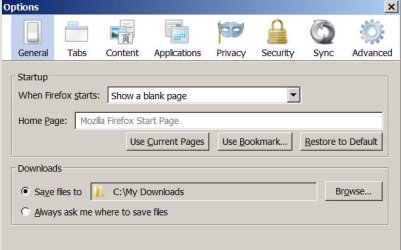
Firefox lets you select the folder
 

Attachments

  • Snap1.jpg
    Snap1.jpg
    31.2 KB · Views: 24

My Computer

Computer type
PC/Desktop
Computer Manufacturer/Model Number
Home Built
OS
Windows `10 Professional 64bit
CPU
Intel i5 [email protected]
Motherboard
MSI P67A-GD55 (MS7681)
Memory
Corsair Vengeance DDR3 1600 16G
Graphics Card(s)
NVIDIA GeForce GT520 1GHz
Sound Card
Realtek High Definition Audio
Monitor(s) Displays
Haans G 241
Screen Resolution
1600X1024
Hard Drives
Crucial MX100 256GB SSD
PSU
OCZ ModXStream Modular High Performance 500 Watt
Case
Rosewill Challenger-U3
Cooling
Just Fans
Keyboard
Kensington K64338B
Mouse
Microsoft wheel mouse 1.1A
Internet Speed
240.0 Mbps
Antivirus
ESET Internet Security
Browser
Firefox
Other Info
SuperAntiSpyware-Pro
Malwarebytes (Premium)
Kerish Doctor
Firefox lets you select the folder
I'm not sure if your post was directed at me or the OP. According to post #5, the OP found that setting; so I'm going to guess that your post was in response to my saying "I understand this happening for Firefox...".

Yes, Firefox lets the user select a folder (or Ff can be set to ask the user), but the OP stated:
I click on "Save to my computer" and it downloads automatically, no options where I want it saved to or anything.
Firefox can be set to "not ask" - thus Ff will work just as the OP described. As far as I know, IE cannot be setup to work like the OP described. Hence my statement: "I understand this happening for Firefox, but not for IE".

For Firefox, once one clicks on Yahoo's "Save to my computer" (for quick downloads), the next indication could be a notification that the download/save has completed. For slower downloads, there is a tiny progress bar with an estimated remaining time and then a notification that the download/save has completed. One can click on the "download arrow" in the upper right corner of the Firefox browser, then right click on the item that was downloaded and select "Open Containing Folder" if desired.

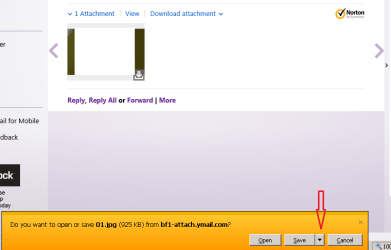
However, I do not know of a way to tell IE to save the file the way that the OP mentioned. There should always be at least one additional button to click to finish saving the item to the final folder destination. I don't think that one can go from Yahoo's "Save to my computer" to "download complete" without getting one or more additional dialog boxes when working with IE.

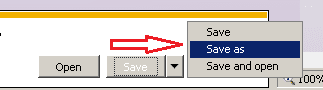
Starting with IE9, that extra dialog box should offer a "Save as" option - which is an opportunity to select a folder - thus solving part of the OP's original dilemma.

The OP asked: "Can anyone tell me how I can find where it's sending my files and how to change their destination?" You answered that for Ff and andrew129260 answered that for IE. My post was to an attempt to share additional info with the OP and to point out IE's "Save as" feature that the OP might not have noticed.


Now - having said all of that - let me also point out that I don't mean for this post to sound defensive. My previous post to this thread was brief and I can see how it could be taken a few different ways. This post is meant to clarify my last post and to throw in some additional info about "Open Containing Folder" in Ff.

 

My Computer

Computer type
Laptop
Computer Manufacturer/Model Number
Employer provided Dell Latitude
OS
W7 Pro SP1 64bit
CPU
i7
Memory
8GB
Graphics Card(s)
Intel HD Graphics
Hard Drives
crappy SSD
Antivirus
Employer mandated Symantec Endpoint Protection
Browser
Pale Moon 64bit, IE11 64bit & Chrome 64bit
Orange Button vs Menu Toolbar

In Firefox under Tools.

The other browsers, I have no idea.

If you are using the Orange button, instead of the Menu toolbar, it is under Options > Options > General Tab
161207d1308803550-firefox-browser-auto-cleanup-how-set-firefox-auto-cleanup-step-1a.png

Also, if you open up "Downloads" you should be able to:

  • Right click on an item
  • Choose "Open Containing Folder" from the menu.
 
Last edited:

My Computer

Computer type
PC/Desktop
Computer Manufacturer/Model Number
n/a
OS
W7 Ultimate SP1, LM19.2 MATE, W10 Home 1703, W10 Pro 1703 VM, #All 64 bit
CPU
AMD Phenom II x6 1100T, 3.3 GHz
Motherboard
ASUS M4A88T-M/USB3 (AM3)
Memory
12GB DDR3 1333 G-Skill (4GB x 2), G-Skill (2GB x 2)
Graphics Card(s)
NVIDIA GeForce GTX 660
Sound Card
Realtek?
Monitor(s) Displays
Samsung S23B350
Screen Resolution
1920x1080
Hard Drives
WD Green 2TB (SATA), WD Green 3TB (SATA), WD Blue 4TB (SATA), WD Blue 6TB (SATA)
PSU
Cooler Master
Case
Antec GX300 Tower
Cooling
3x Antec TRICOOL 120mm Fans
Mouse
Wired Optical
Internet Speed
DSL
Antivirus
Avast
Browser
Pale Moon (64 bit)
Other Info
2018-12-27 Upgraded HDDs
2015-12-10 Upgraded case, graphics card, storage
2015-08-15 Upgraded motherboard & RAM
2015-07-15 Upgraded LM17.1 to LM17.2
I cannot download attachments from bt yahoo either

As some of you must know by now, Yahoo have recently had a major overhaul of its mailing system. However, I'm having slight troubles with downloading attachments. I click on "Save to my computer" and it downloads automatically, no options where I want it saved to or anything. Then, upon searching there's absolutely no sign of the aforementioned files anywhere on my computer! Can anyone tell me how I can find where it's sending my files and how to change their destination?

I have had the same problem for the past 24 hours or so. I have forwarded emails to a back-up address I have with hotmail and can then download. Not a very satisfactory solution though.
 

My Computer

Computer type
PC/Desktop
OS
Windows 7 Service Pack 1 Home Premium 64bit
CPU
Inspiron 560 MT : Intel Pentium Dual Core E5400
Memory
2048MB(2x1024) 1066MHz DDR3 Dual Channel
Graphics Card(s)
Integrated Intel Graphics Media Accelerator X4500
Hard Drives
320GB Serial ATA (7200RPM)
Keyboard
Logitech Classic 200
Antivirus
McCafee
Browser
IE and Google Chrome
As some of you must know by now, Yahoo have recently had a major overhaul of its mailing system. However, I'm having slight troubles with downloading attachments. I click on "Save to my computer" and it downloads automatically, no options where I want it saved to or anything. Then, upon searching there's absolutely no sign of the aforementioned files anywhere on my computer! Can anyone tell me how I can find where it's sending my files and how to change their destination?

I have had the same problem for the past 24 hours or so. I have forwarded emails to a back-up address I have with hotmail and can then download. Not a very satisfactory solution though.
Does task manager show the download? How about Process Monitor?
 

My Computer

Computer type
Laptop
Computer Manufacturer/Model Number
Employer provided Dell Latitude
OS
W7 Pro SP1 64bit
CPU
i7
Memory
8GB
Graphics Card(s)
Intel HD Graphics
Hard Drives
crappy SSD
Antivirus
Employer mandated Symantec Endpoint Protection
Browser
Pale Moon 64bit, IE11 64bit & Chrome 64bit
Try this because it worked for me

The download works when I enter my email account via Yahoo website as opposed to BTYahoo! Don't know why but it does. One of life's mysteries. As I said in an earlier post I had an on-line chat with BT help last night and they said they would be back in touch within 48 hours. I suspect that is to be translated as, "We know there's a problem and we are working on it!".
 

My Computer

Computer type
PC/Desktop
OS
Windows 7 Service Pack 1 Home Premium 64bit
CPU
Inspiron 560 MT : Intel Pentium Dual Core E5400
Memory
2048MB(2x1024) 1066MHz DDR3 Dual Channel
Graphics Card(s)
Integrated Intel Graphics Media Accelerator X4500
Hard Drives
320GB Serial ATA (7200RPM)
Keyboard
Logitech Classic 200
Antivirus
McCafee
Browser
IE and Google Chrome
The download works when I enter my email account via Yahoo website as opposed to BTYahoo! Don't know why but it does. One of life's mysteries. As I said in an earlier post I had an on-line chat with BT help last night and they said they would be back in touch within 48 hours. I suspect that is to be translated as, "We know there's a problem and we are working on it!".

BT have been in touch now and say that the problem arises out of the transfer of email facilities from Yahoo to the new BT portal. The transfer of email accounts is expected to finish during December and they ask for patience in the meantime. They too say to log in via Yahoo as opposed to the btYahoo portal until the transfer takes place and this will overcome the problem. :)
 

My Computer

Computer type
PC/Desktop
OS
Windows 7 Service Pack 1 Home Premium 64bit
CPU
Inspiron 560 MT : Intel Pentium Dual Core E5400
Memory
2048MB(2x1024) 1066MHz DDR3 Dual Channel
Graphics Card(s)
Integrated Intel Graphics Media Accelerator X4500
Hard Drives
320GB Serial ATA (7200RPM)
Keyboard
Logitech Classic 200
Antivirus
McCafee
Browser
IE and Google Chrome
Back
Top