CHKDSK comes erratically at start up

icacream

New member
Member
Local time
9:39 PM
Messages
89
Hello
I shut down my computer every night.
When I start up in the morning, once or twice a week CHKDSK will pop up and do its thing. Not each morning, only now and then...
But I have no idea WHY. It's very annoying.
I did not schedule it to do this... And it's not each time...
I tried to read the log (with the tutorial) but when I right click "application", "find" is not active.... :(
So CHKDSK has run dozen of times at start up on my machine and created no logs ? :shock:
I just don't know where to go from there..... I cannot very well reset it each day in case it decides to to its thing the next morning... :confused:
I went to the task scheduler but lost my way... :sick: Could not find CHKDSK at all in there...
Help please ??!!!
 

My Computer

Computer type
PC/Desktop
OS
win7 x64 ultimate
CPU
3.30 gigahertz Intel Core i5-4590
Motherboard
Asus H97M-PLUS
Memory
8 MB
Graphics Card(s)
PNY Quadro K600
Screen Resolution
1920 x 1080

My Computer

Computer type
PC/Desktop
Computer Manufacturer/Model Number
Dell XPS 420
OS
Windows 10, Home Clean Install
CPU
Intel Core2 processsor Q8200(2.33Ghz 1333FSB) Quad Core Tech
Motherboard
Dell
Memory
6 gb
Graphics Card(s)
ATI Radeon 256MB HD3650
Sound Card
Intergrated 7.1 Channel Audio
Monitor(s) Displays
Dell SP2009W 20"
Hard Drives
640 GB Serial ATA Hard drive
Cooling
Fan
Keyboard
Dell USB Keyboard
Mouse
Dell Premium Optical USB
Internet Speed
DSL 2.85
Thanks rich46.
I tested both my hard drives and they passed with flying colors...
So the problem is elsewhere....
 

My Computer

Computer type
PC/Desktop
OS
win7 x64 ultimate
CPU
3.30 gigahertz Intel Core i5-4590
Motherboard
Asus H97M-PLUS
Memory
8 MB
Graphics Card(s)
PNY Quadro K600
Screen Resolution
1920 x 1080
Try defrag
 

My Computer

Computer type
PC/Desktop
Computer Manufacturer/Model Number
Dell XPS 420
OS
Windows 10, Home Clean Install
CPU
Intel Core2 processsor Q8200(2.33Ghz 1333FSB) Quad Core Tech
Motherboard
Dell
Memory
6 gb
Graphics Card(s)
ATI Radeon 256MB HD3650
Sound Card
Intergrated 7.1 Channel Audio
Monitor(s) Displays
Dell SP2009W 20"
Hard Drives
640 GB Serial ATA Hard drive
Cooling
Fan
Keyboard
Dell USB Keyboard
Mouse
Dell Premium Optical USB
Internet Speed
DSL 2.85
hmmmm...
using DiskKeeper...
never have worries with fragmentation....
 

My Computer

Computer type
PC/Desktop
OS
win7 x64 ultimate
CPU
3.30 gigahertz Intel Core i5-4590
Motherboard
Asus H97M-PLUS
Memory
8 MB
Graphics Card(s)
PNY Quadro K600
Screen Resolution
1920 x 1080
When ck disc pops up, it is usually and indication of a problem. I would back up my stuff from the HD just in case.
 

My Computer

Computer type
PC/Desktop
Computer Manufacturer/Model Number
Dell XPS 420
OS
Windows 10, Home Clean Install
CPU
Intel Core2 processsor Q8200(2.33Ghz 1333FSB) Quad Core Tech
Motherboard
Dell
Memory
6 gb
Graphics Card(s)
ATI Radeon 256MB HD3650
Sound Card
Intergrated 7.1 Channel Audio
Monitor(s) Displays
Dell SP2009W 20"
Hard Drives
640 GB Serial ATA Hard drive
Cooling
Fan
Keyboard
Dell USB Keyboard
Mouse
Dell Premium Optical USB
Internet Speed
DSL 2.85
I'm using Genie Timeline so that's ok too.
But I remember a time, with Win2000Pro, when CHKDSK would pop up and request to run while I was working on the laptop !
It went on like that for a year or a year and a half. It was not often but it kept coming...
And it stopped. I did not do anything special, the bother just vanished....
I hope it will be the same here, but once a week is really annoying... so if there is something I can do... I would gladly try !
And how come I can't find a log ???? :huh:
 

My Computer

Computer type
PC/Desktop
OS
win7 x64 ultimate
CPU
3.30 gigahertz Intel Core i5-4590
Motherboard
Asus H97M-PLUS
Memory
8 MB
Graphics Card(s)
PNY Quadro K600
Screen Resolution
1920 x 1080
Can you see what drive that always checked at the startup?
For example if you had 3 drives (C, D and E) then every startup your drive D: always run chkdsk it mean the D: is need advance check.
So perform --> chkdsk /r /f [Drive:] --> chkdsk /r /f D:
 

My Computer

Computer type
PC/Desktop
OS
Windows 7 Ultimate x64 SP1
CPU
AMD A10-5800K
Motherboard
ECS A55F2-M3
Memory
4.00GB Dual-Channel DDR3
Graphics Card(s)
ATI AMD Radeon HD 7660D
Sound Card
Steelseries Siberia
Monitor(s) Displays
1366x768
Hard Drives
WDC 3 TB
Seagate 500 GB
Internet Speed
2 Mbps
Nooo because basically I start the machine, go and grab a cup of tea and come back when Windows ought to be all loaded in... and now and then I find CHKDSK doing its thing instead of a ready to use laptop... :mad:
And reading those fast coming lines makes no sense to me.
I figured that if there indeed was a problem I should get some sort of MESSAGE... instead of an ever repeat performance... no ? :confused:

But you're right wish. I'll run CHKDSK on both my drives to at least have a log...
See if this tells me something :(
 

My Computer

Computer type
PC/Desktop
OS
win7 x64 ultimate
CPU
3.30 gigahertz Intel Core i5-4590
Motherboard
Asus H97M-PLUS
Memory
8 MB
Graphics Card(s)
PNY Quadro K600
Screen Resolution
1920 x 1080
richc46 suggested "Try Defrag"

I have tried it. On my system it won't defrag due to corruption that creeps in very quickly after I log in, as evidenced by the Event Viewer. Similarly, I cannot shrink the partition. IN both cases it tells me to run chkdsk to fix the corruption. I have run chkdsk C: /R /X /B and it never identifies any problem. But within 10 minutes of logging in, Event Viewer will show a few incidents of NTFS Error 55, task 2.

So far, in all the chkdsk postings I have seen, nobody has looked into the Event Viewer.

Please, everyone who has experienced this problem, look at the Event Viewer:

Start -> Control Panel -> Administrative Tools -> Event Viewer

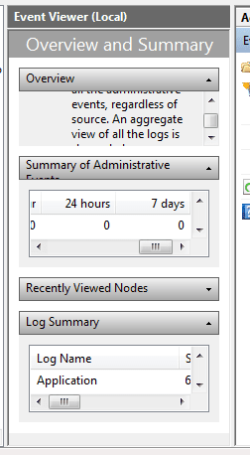
Within EV, under the shaded bar that reads "Reading Administrative Data", wait for it to fill with "Summary of Administrative Events". You will see several menus, with + as first character. Click the + on the line that reads Error. You will surely notice:
Event ID: 55 Ntfs
and how many time this has occurred in the past hour, 24 hours, and 7 days.

My drive is a Samsung SATA drive and my system is Dell running Win-7 Ho9me Premium 64-bit. I'd like to see if there is a pattern here. I am obviously not alone in this.

There is some techno-bufoonery occurring here and this gives us the chance to force our vendors to come clean!


My Computer

Computer Manufacturer/Model Number
Dell Studio XPS 7100
OS
Windows 7 Home Premium 64 bit
CPU
AMD Phenom II X6 1035T 2.6 GHz
Memory
4GB
Hard Drives
1TB
Hello rpask....
I can't find a line with ERROR....
This is what it looks like :

eventv.png

this says I have had no critical event for 7 days...
but this very morning chkdsk came at start up.
And I have not yet had time (hmmm :sarc: well, let's say it so) to actually program a chkdsk to have a log... :o
do you think I am in the wrong place in EV ?
 

My Computer

Computer type
PC/Desktop
OS
win7 x64 ultimate
CPU
3.30 gigahertz Intel Core i5-4590
Motherboard
Asus H97M-PLUS
Memory
8 MB
Graphics Card(s)
PNY Quadro K600
Screen Resolution
1920 x 1080
Cause should be logged either in Event Viewer>Custom Views>Administrative, or in the Performance log on Advanced Tools page accessed by clicking your WEI score link at Computer>Properties.

Google repeat errors to see how others have resolved them.

While at Advanced Tools page, look for cued issues at top of page, Generate a System Health Report.

See also here: http://www.sevenforums.com/tutorials/96938-check-disk-chkdsk-read-event-viewer-log.html

Try running chkdsk /r from booted Win7 DVD or Repair CD Command Line: http://www.sevenforums.com/tutorials/433-disk-check.html
 
I used to have chkdsk run on every boot and found a fix for it while trying to fix AVG on another computer.
But you need to know what you are doing for this.
open up regedit and go to
HKEY_LOCAL_MACHINE\SYSTEM\CurrentControlSet\Control\Session Manager

and look at BootExecute.

its value should be somewhat like this
Code:
autocheck autochk *

tell us if its something different.
 

My Computer

OS
Windows 7 Ultimate 64 bit
CPU
Intel Core i5 750
Motherboard
Gigabyte P55 US3L
Memory
Kingston 1333 DDR3 2gb x 2
Graphics Card(s)
ASUS ENGTX 275
Monitor(s) Displays
BenQ T705
Screen Resolution
1280 x 1024
Hard Drives
W.D. 500 GB SATA HDD
PSU
550W CoolerMaster Extreme
Case
CoolerMaster Elite 335
Hello
thanks for your answer, this seems to be ok though :

boot.png

but I had chkdsk again this morning, two days in a row is a new development... not one I like. :mad:
 

My Computer

Computer type
PC/Desktop
OS
win7 x64 ultimate
CPU
3.30 gigahertz Intel Core i5-4590
Motherboard
Asus H97M-PLUS
Memory
8 MB
Graphics Card(s)
PNY Quadro K600
Screen Resolution
1920 x 1080
Sorry greg... had not seen your post
will do and report.
thks
 

My Computer

Computer type
PC/Desktop
OS
win7 x64 ultimate
CPU
3.30 gigahertz Intel Core i5-4590
Motherboard
Asus H97M-PLUS
Memory
8 MB
Graphics Card(s)
PNY Quadro K600
Screen Resolution
1920 x 1080
icacream, I had the same problem (chkdsk running at startup from time to time) when I had Diskeeper 2010 installed. Later I removed Diskeeper, and the problem is gone completely - chkdsk does not run anymore. So I believe it's quite likely your problem may be caused Diskeeper.
I would therefore suggest to remove Diskeeper and see if the problem persists.
 

My Computer

Computer Manufacturer/Model Number
Toshiba Satellite U500
OS
Windows 7 Home Premium x64 SP1
CPU
Intel Core i3 M330 @ 2.13GHz
Memory
4 GB
Graphics Card(s)
NVidia GeForce 310M
Screen Resolution
1280x800
Warning, Garlic!
There is a reason chkdsk is coming up. the event viewer will probably show that there are disk errors. To stop chkdisk from running is like solving the 'Check Engine" warning light on the dashboard by disabling the light. It has only disabled the warning, not solved the problem. It's a good bet that idacream cannot run the defragmenter or shrink the partition due to disk errors.

I solved it, but I don't know how it happened, by downloading and burning the "Super Rescue CD" and booting from that to poke around. While I did not intentionally "fix" anything, apparently the mere act of mounting the Windows partition while booted into that limited Linux was enough to fix whatever problem was loading together with the Windows boot.

Good Luck!
 

My Computer

Computer Manufacturer/Model Number
Dell Studio XPS 7100
OS
Windows 7 Home Premium 64 bit
CPU
AMD Phenom II X6 1035T 2.6 GHz
Memory
4GB
Hard Drives
1TB
If chkdsk is running repeatedly at startup, it needs to be run from Windows or from the DVD or Repair CD command line to make sure it is completing its needed task.

If it continues to run, then test your HD with the maker's diag/repair full CD scan: Hard Drive Diagnostics Tools and Utilities (Storage) - TACKtech Corp.

The combination of HD maker's diag/repair surface scan and chkdsk can repair and return to service a problem HD indefinitely, although I would make regular backups and tests to be sure.
 
well... after having dhkdsk run EVERY day at start up for 3 days... nothing happened on the last 4 days.
I have had an issue with chkdsk in win xp, which resolved itself after a few months... and never bothered me again.
true I also had diskeeper installed, an earlier version though.
so I'll just wait and see (with my fingers crossed) ;)
I'm using a thinkpad and the lenovo health checks keep telling me all is fine and dandy.
thanks to you all, I'll come back here and try the different suggestions if it gets bad again.
 

My Computer

Computer type
PC/Desktop
OS
win7 x64 ultimate
CPU
3.30 gigahertz Intel Core i5-4590
Motherboard
Asus H97M-PLUS
Memory
8 MB
Graphics Card(s)
PNY Quadro K600
Screen Resolution
1920 x 1080
Back
Top