Solved Chrome assistance - failed network error

mmurray1988

New member
Member
Local time
6:46 PM
Messages
98
Location
San Diego
I apologize ahead of time if this is in the wrong forum. I debated putting this into the system and security forum but I didn't know if it would fit.

Whenever I try to download any form of media, lately I am constantly confronted with a "failed - network error" message. I have run Trend Micro and Malwarebytes, and it has come up with alerting me I still have remnants of the Trovi virus in my Chrome preferences. I got rid of the Trovi, but it is still there, even after multiple quarantined and quarantined to deletes.

I have tried resetting my setting to factory setting on Chrome, but I still get this issue.

My question is; how do I get rid of this? If I uninstall and reinstall Chrome will that get rid of it? Or will it still be in my settings once I do?

Thanks for your help.
 

My Computer

Computer type
PC/Desktop
Computer Manufacturer/Model Number
Custom Build
OS
Windows 7 Professional
CPU
GenuineIntel Intel(R) Core(TM) i7-3770K CPU @ 3.50GHz
Motherboard
ASRock, Z77 Extreme4
Memory
16.0 GB
Graphics Card(s)
NVIDIA GeForce GTX 1070
Monitor(s) Displays
Viewsonic VX2450WM-LED 24-Inch
Screen Resolution
1080
Hard Drives
1TB WD Black
250 GB 850 EVO
PSU
HX 650
Antivirus
MSE
Browser
Brave
Try booting into safe mode, and performing the Virus scans.

Where are you downloading the media from? I wondering if they are infected?
 

My Computer

Computer type
PC/Desktop
Computer Manufacturer/Model Number
Custom Build
OS
Windows 7 Ultimate 64-bit
CPU
Intel G3420 3.2GHZ Dual Core
Motherboard
Gigabyte H87-HD3
Memory
Kingson 8GB 1600mhz
Graphics Card(s)
MSI R7970 TF 3GD5/OC BE
Monitor(s) Displays
21" LG & "19 Vertical Samsung
Hard Drives
120GB SSD - Boot
1TB WD
350GB External
2TB External (Wireless)
PSU
Corsair CX 500 modular
Case
Zalman Z11 Plus (modified)
Cooling
Corsair H55, 2x 120mm SP Corsair, 1x 140 Coolermaster
Keyboard
Corsair K50
Mouse
CSL Gaming
Internet Speed
164Mbps
Antivirus
Avast, Malwarebytes
Browser
Google Chrome, IE, Firefox
Try booting into safe mode, and performing the Virus scans.

Where are you downloading the media from? I wondering if they are infected?

I only got infected because I accidently clicked something that was infected during the time I was reinstalling my virus scan. I did it without thinking since my virus protection always catches stuff. Unfortunately you can't run Trend Micro in safe mode.
 

My Computer

Computer type
PC/Desktop
Computer Manufacturer/Model Number
Custom Build
OS
Windows 7 Professional
CPU
GenuineIntel Intel(R) Core(TM) i7-3770K CPU @ 3.50GHz
Motherboard
ASRock, Z77 Extreme4
Memory
16.0 GB
Graphics Card(s)
NVIDIA GeForce GTX 1070
Monitor(s) Displays
Viewsonic VX2450WM-LED 24-Inch
Screen Resolution
1080
Hard Drives
1TB WD Black
250 GB 850 EVO
PSU
HX 650
Antivirus
MSE
Browser
Brave
Okay, just a recommend AV like avast.
 

My Computer

Computer type
PC/Desktop
Computer Manufacturer/Model Number
Custom Build
OS
Windows 7 Ultimate 64-bit
CPU
Intel G3420 3.2GHZ Dual Core
Motherboard
Gigabyte H87-HD3
Memory
Kingson 8GB 1600mhz
Graphics Card(s)
MSI R7970 TF 3GD5/OC BE
Monitor(s) Displays
21" LG & "19 Vertical Samsung
Hard Drives
120GB SSD - Boot
1TB WD
350GB External
2TB External (Wireless)
PSU
Corsair CX 500 modular
Case
Zalman Z11 Plus (modified)
Cooling
Corsair H55, 2x 120mm SP Corsair, 1x 140 Coolermaster
Keyboard
Corsair K50
Mouse
CSL Gaming
Internet Speed
164Mbps
Antivirus
Avast, Malwarebytes
Browser
Google Chrome, IE, Firefox
Hi and welcome to SevenForums,
Review your Extensions in Chrome and post a screen shot of them here,
chrome-apps%20run-a.jpg

Also use Safe mode with networking to download and run them and repeat them booting regularly,
Review Jacee’s instructions to run Adwcleaner here post #7,
Ignore the title of the thread,
http://www.sevenforums.com/system-security/316404-instant-savings-app.html
Screen shot of the download button to use for Adwcleaner
You can use these free tools to see if they find anything,
Manually Update them before running full scans,
Try not to use your computer while the scans are running, (one at a time of course).
See this tutorial on how to download and run Malwarebytes,
http://www.sevenforums.com/tutorials/338716-malwarebytes-anti-malware-free.html
Also use the Custom scan option not the Threat scan,

Please Do Not clean/ Delete or Remove Any detections before posting the scan results first before review especially Malwarebytes,
http://www.malwarebytes.org/products/malwarebytes_free
SAS is safe to remove anything it finds ;)
http://www.superantispyware.com/?tag=SUPERANTISPYWARE
This one is the longest up to 4 hours, the others are only about 45 minutes,
http://www.microsoft.com/security/scanner/en-us/default.aspx
 

My Computer

Computer type
PC/Desktop
Computer Manufacturer/Model Number
Custom assembled by me :}
OS
Win-7-Pro64bit 7-H-Prem-64bit
CPU
i7-5930K 2nd i9-9940x both water blocked VRM's too
Motherboard
ASUS SABERTOOTH X99 2nd ASUS x299 Apex
Memory
Trident-z 3200C14 2nd Trident-z 3600C16
Graphics Card(s)
EVGA 1080ti ftw3 2nd Titan Xp both water blocked
Sound Card
Built-in Realtek
Monitor(s) Displays
1-AOC G2460PG 24"G-Sync 144Hz/ 2nd 1-ASUS VG248QE 24" 144Hz
Screen Resolution
1920 x 1080 144Hz
Hard Drives
2-Samsung M.2 Evo & Evo Plus
2-Samsung 850 EVO 500GB SSD's/ 3-2.5 W.D. Black 1tb-&3-1tb/3-3.5 WD Black 1tb hdd's
PSU
EVGA SuperNOVA 1000-P2 2nd 1200-P2
Case
2-Corsair Obsidian Series 450D Black ATX Mid Tower
Cooling
Custom water loops
Keyboard
Logitech G710+/ 2nd Logitech G910
Mouse
2-RedDragon M901 Perdition 16400 dpi Gaming mouse = wired
Internet Speed
Comcast Ping 19ms 89.31mbps download speed 6.12mbps upload
Antivirus
Malwarebytes Pro/ Superantispyware Pro
Browser
FireFox & Pale moon
Other Info
2nd ASUS X299 Apex/Intel i9-9940x with Custom water loop/7H-Prem-x64/Corsair 450D case/Ram Trident-z 3600C16 4x8gb / Samsung970Evo plus 500gb SSD/Dual ssd EZ swap evo/PSU EVGA SuperNova 1200w-P2 80+Platinum/GPU Titan Xp /8-ML-140 on push-pull on 2-280GTX rads

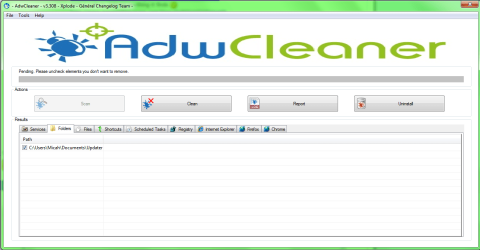
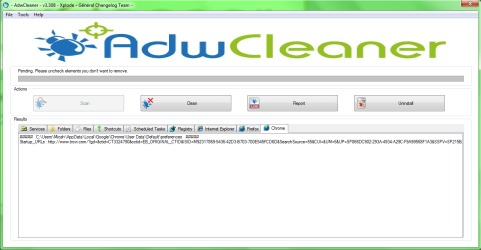
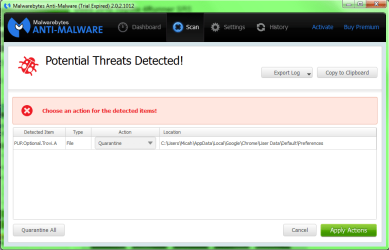
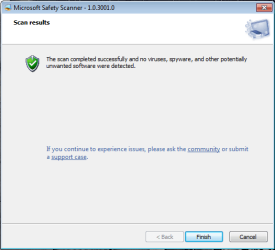
Here are the results:

ADW1.png

ADW2.png

ADW3.png

mb.png

MSS.png
 

My Computer

Computer type
PC/Desktop
Computer Manufacturer/Model Number
Custom Build
OS
Windows 7 Professional
CPU
GenuineIntel Intel(R) Core(TM) i7-3770K CPU @ 3.50GHz
Motherboard
ASRock, Z77 Extreme4
Memory
16.0 GB
Graphics Card(s)
NVIDIA GeForce GTX 1070
Monitor(s) Displays
Viewsonic VX2450WM-LED 24-Inch
Screen Resolution
1080
Hard Drives
1TB WD Black
250 GB 850 EVO
PSU
HX 650
Antivirus
MSE
Browser
Brave

My Computer

Computer type
PC/Desktop
OS
Windows 10 Home x64
CPU
INTEL Core i5-750 Quad-Core 3.37GHz
Motherboard
ASUS P7P55D
Memory
HyperX Fury Black Series 8GB (2 x 4GB) 1866Mhz
Graphics Card(s)
EVGA GeForce GTX 750 Superclocked 1GB 128-Bit GDDR5
Monitor(s) Displays
LG 32MA68HY 32" IPS
Screen Resolution
1920 x 1080
Hard Drives
Samsung 840 Evo 120GB, SEAGATE 500GB Barracuda® 7200.12, SATA 3 Gb/s, 7200 RPM, 16MB cache
PSU
ANTEC TruePower New TP-550, 80 PLUS, 550W
Case
ANTEC Three Hundred Illusion
Cooling
COOLER MASTER Hyper 212 Plus, 4 x 120mm 1 x 140mm Noctua's
Internet Speed
85 + Mbps
Antivirus
Avast
Browser
Vivaldi
Back
Top