
Chrome issues...

blackroseMD1

(nothing can stop me now)
Guru
Gold Member
VIP
Local time
2:16 AM
Messages
1,658
Location
San Diego, CA
So, I'm experiencing some issues with the stable, beta and dev builds of Chrome.

First off, I was having issues with explorer.exe freezing. I though it was because I had added a custom start button into it, but then I noticed that whenever I closed Chrome, it would unfreeze.

Secondly, attached is what my task manager looks like when running Chrome. Now, I'm by no means an expert on browsers, but that seems to be a bit much.

Any ideas, or should I just dump Chrome and go back to FF?
 

Attachments
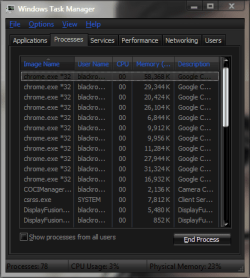
  • Task manager.png
    Task manager.png
    17.3 KB · Views: 14

My Computer

Computer type
PC/Desktop
Computer Manufacturer/Model Number
SuperBeast
OS
Windows 10 Tech Preview 9926 x64
CPU
AMD FX-8350
Motherboard
Gigabyte GA-990FXA-UD3
Memory
16GB DDR3 1333
Graphics Card(s)
Asus R9 290 DirectCU II OC, Gigabyte Windforce R9 290 OC
Sound Card
Integrated w/ Creative A250 2.1 speakers
Monitor(s) Displays
Main: Asus VN289H 28" Secondary: Acer G246HL 24"
Screen Resolution
1920x1080
Hard Drives
128 GB SanDisk Ultra Plus (Windows drive)

240 GB Crucial M500 SSD (Games drive)

1 TB WDC WD10EACS 7200RPM HDD (Data drive)

2 TB Seagate Expansion Desktop external HDD (Backup drive)
PSU
900w Antec HCG-900
Case
Raidmax Agusta Full ATX
Cooling
Corsair H80
Keyboard
Cooler Master Devastator MB24
Mouse
Cooler Master Devastator MS2K 1000/1600/2000 DPI
Internet Speed
100Mbps cable
Antivirus
Avast!
Browser
Chrome
Hi Brian ,

You could try to run the Chrome in Single Process Mode

C:\Users\<User name>\AppData\Local\Google\Chrome\Application\chrome.exe" --single-process

See whether that makes a difference

Hope this helps
 

My Computer

Computer Manufacturer/Model Number
Samsung NP550P5C-S02IN
OS
Windows 7 Ultimate - 64-bit | Windows 8 Pro - 64-bit
CPU
Intel® Core™ i7 Processor 3,610QM (2.30Hz, 6MB L3 Cach
Memory
8 GB
Graphics Card(s)
NVIDIA® GeForce® GT 650M 2GB Graphics, Optimus™ techno
Sound Card
SoundAlive™ JBL 3 Speakers (With sub-Woofer)
Monitor(s) Displays
39.62cm (15.6) SuperBright 300nit HD+ LED Display
Screen Resolution
1,600 x 900, Anti-Reflective
Hard Drives
1TB S-ATA II Hard Drive (5,400RPM)
Member Jonathan_King will be all over me if he sees this, but I think that you should go back to FF. I know that you have the speed and all of that. But, it bothers me that Chrome is not compatible with some (although few) websites. Lets not get into a big discussion over this gang. Im just giving my opinion to the poster. I know many will disagree.
 

My Computer

Computer type
PC/Desktop
Computer Manufacturer/Model Number
Dell XPS 420
OS
Windows 10, Home Clean Install
CPU
Intel Core2 processsor Q8200(2.33Ghz 1333FSB) Quad Core Tech
Motherboard
Dell
Memory
6 gb
Graphics Card(s)
ATI Radeon 256MB HD3650
Sound Card
Intergrated 7.1 Channel Audio
Monitor(s) Displays
Dell SP2009W 20"
Hard Drives
640 GB Serial ATA Hard drive
Cooling
Fan
Keyboard
Dell USB Keyboard
Mouse
Dell Premium Optical USB
Internet Speed
DSL 2.85
Member Jonathan_King will be all over me if he sees this, but I think that you should go back to FF. I know that you have the speed and all of that. But, it bothers me that Chrome is not compatible with some (although few) websites. Lets not get into a big discussion over this gang. Im just giving my opinion to the poster. I know many will disagree.

Rich,
Yeah, I used to be a huge FF fan, and the website incompatibility can be a PITA, but I love how useful some of the extensions on Chrome are. When I go back to using FF, I miss the accessibility that the extensions give me.

For some reason, the explorer.exe crashes seem to have stopped for now, and, while Chrome is still eating up memory, is just about the same as FF uses.

Jack,
Thanks for the info. I set the target shortcut with --single-process, and it's all running as one now. I happened to look that up, and found that you can also use --process-per-site so that if you have multiple tabs open on a single site, it will only run as one process.
 

My Computer

Computer type
PC/Desktop
Computer Manufacturer/Model Number
SuperBeast
OS
Windows 10 Tech Preview 9926 x64
CPU
AMD FX-8350
Motherboard
Gigabyte GA-990FXA-UD3
Memory
16GB DDR3 1333
Graphics Card(s)
Asus R9 290 DirectCU II OC, Gigabyte Windforce R9 290 OC
Sound Card
Integrated w/ Creative A250 2.1 speakers
Monitor(s) Displays
Main: Asus VN289H 28" Secondary: Acer G246HL 24"
Screen Resolution
1920x1080
Hard Drives
128 GB SanDisk Ultra Plus (Windows drive)

240 GB Crucial M500 SSD (Games drive)

1 TB WDC WD10EACS 7200RPM HDD (Data drive)

2 TB Seagate Expansion Desktop external HDD (Backup drive)
PSU
900w Antec HCG-900
Case
Raidmax Agusta Full ATX
Cooling
Corsair H80
Keyboard
Cooler Master Devastator MB24
Mouse
Cooler Master Devastator MS2K 1000/1600/2000 DPI
Internet Speed
100Mbps cable
Antivirus
Avast!
Browser
Chrome
Well, the explorer freeze is back. It's been present in every build of Chrome I've tried over the past two months. The only workaround that I have found is to start Firefox first, and then launch Chrome. For some reason, it doesn't freeze then.

It seems ridiculous that I have to launch another browser to keep Chrome from almost completely crashing my system and, after looking over at the Chrome help forums, it seems that I'm far from the only one with this issue.
 

My Computer

Computer type
PC/Desktop
Computer Manufacturer/Model Number
SuperBeast
OS
Windows 10 Tech Preview 9926 x64
CPU
AMD FX-8350
Motherboard
Gigabyte GA-990FXA-UD3
Memory
16GB DDR3 1333
Graphics Card(s)
Asus R9 290 DirectCU II OC, Gigabyte Windforce R9 290 OC
Sound Card
Integrated w/ Creative A250 2.1 speakers
Monitor(s) Displays
Main: Asus VN289H 28" Secondary: Acer G246HL 24"
Screen Resolution
1920x1080
Hard Drives
128 GB SanDisk Ultra Plus (Windows drive)

240 GB Crucial M500 SSD (Games drive)

1 TB WDC WD10EACS 7200RPM HDD (Data drive)

2 TB Seagate Expansion Desktop external HDD (Backup drive)
PSU
900w Antec HCG-900
Case
Raidmax Agusta Full ATX
Cooling
Corsair H80
Keyboard
Cooler Master Devastator MB24
Mouse
Cooler Master Devastator MS2K 1000/1600/2000 DPI
Internet Speed
100Mbps cable
Antivirus
Avast!
Browser
Chrome
Back
Top