Solved Clean Install on my Sony VAIO Laptop

writhziden

Closed by request.
Local time
9:11 AM
Messages
11,269
Location
Colorado
I noted earlier that gregrocker mentioned tech savy members tend to do clean installs of their systems. I am having some difficulty doing a clean install of my Sony VAIO due to a backlit keyboard issue and was wondering if someone might be able to help.

I tried to do a clean install when I first got the system (after making the recovery discs, of course). Unfortunately, I ended up with a backlit keyboard that would randomly turn on and then off with no apparent reason like it was on a time cycle (not a huge deal breaker for a clean install, but rather annoying and worrisome for someone who is a power conservation user). I went to the support site for my laptop and tried to install the drivers and VAIO Control Center for the keyboard light management, but that just resulted in even stranger issues. The VAIO Control Center software removed my UAC settings and left my system in a state where I would get access denied trying to access anything that required administrator privileges. VAIO Control Center also did not have the options it is supposed to for changing the settings for the backlit keyboard (I like to be able to turn it off, or at least have it set to only turn on when lighting is low).


My question is: if I were to try to do a clean install again, would someone help me to iron out these issues?
 

My Computer My Computer

At a glance

Windows 7 Home Premium 64 BitIntel(R) Core(TM)2 Quad CPU Q9550 @ 2.83GHz6.00 GB Hundai HMT125U6BFR8C-H9ATI Radeon HD 4850
Computer Manufacturer/Model Number
HP Pavilion e9110t
OS
Windows 7 Home Premium 64 Bit
CPU
Intel(R) Core(TM)2 Quad CPU Q9550 @ 2.83GHz
Motherboard
Pegatron IPIEL-LA3
Memory
6.00 GB Hundai HMT125U6BFR8C-H9
Graphics Card(s)
ATI Radeon HD 4850
Sound Card
Realtek High Definition Audio/ATI High Definition Audio
Monitor(s) Displays
Acer AL2216W
Screen Resolution
1680x1050
Hard Drives
Hitachi HDP725050GLA360 ATA Device 500 GB
PSU
Unknown/installed by HP
Case
HP generic case
Cooling
Intel Stock Cooling
Keyboard
HP Keyboard
Mouse
HP Mouse
Internet Speed
Download: 19.15 Mbps Upload: 1.67 Mbps
Other Info
Network Adapter Realtek RTL8168D/8111D Family PCI-E Gigabit Ethernet NIC (NDIS 6.20)
Network Adapter 802.11n Wireless PCI Express Card LAN Adapter
What told you that it's Vaio Control Center which handles keyboard light management? Did you find this via a Google search for the model + Backlit keyboard + Clean Reinstall? This is where I would start, after trying the software you absolutely need which is offered on the Vaio Support Downloads webpage for your model.

Although I can't remember seeing this specific issue I do remember Sony and Samsung laptops having problems getting the OEM software to work correctly for some features like Cam special effects, touchpad gestures, etc. Some users were forced to factory recover after trying faulty software, exhausting all research and OEM Tech Support avenues.

That said, I've always been able to get all features needed to work correctly on Clean Reinstalls by whatever means are necessary. It's rare that it takes a lot of work, or going to the extend of pulling feature software off a torrent, etc.

But if all this is necessary it wouldn't surprise me it's on a Sony or Samsung, which don't seem to care that much if the software they post on their Downloads pages will work when installed independent of the factory install. These makers stand out in this way.

Others may be able to contribute their experiences, or you can go and find them with deft Google Fu.
 
What told you that it's Vaio Control Center which handles keyboard light management?

It was actually from reading all the information about each driver/software installation available on the support page. I did very thorough research before doing the clean install.

Did you find this via a Google search for the model + Backlit keyboard + Clean Reinstall? This is where I would start, after trying the software you absolutely need which is offered on the Vaio Support Downloads webpage for your model.
I followed this guide: Sony VAIO SA/SB Windows 7 Clean Install / Backup and Restore (I actually did not read the guide as I went as I just found this tonight, but these are the steps I did, so I do not understand why they did not work)

The Sony® Notebook Utilities is where I ran into issues.

Although I can't remember seeing this specific issue I do remember Sony and Samsung laptops having problems getting the OEM software to work correctly for some features like Cam special effects, touchpad gestures, etc. Some users were forced to factory recover after trying faulty software, exhausting all research and OEM Tech Support avenues.
The nice thing about Sony systems is they do come with significantly less bloatware than most other systems. I don't really notice a significant difference between a clean install and the factory install.


That said, I've always been able to get all features needed to work correctly on Clean Reinstalls by whatever means are necessary. It's rare that it takes a lot of work, or going to the extend of pulling feature software off a torrent, etc.
As have I. This is the first real issue I've ever had with this route...


But if all this is necessary it wouldn't surprise me it's on a Sony or Samsung, which don't seem to care that much if the software they post on their Downloads pages will work when installed independent of the factory install. These makers stand out in this way.
I contacted Sony support, but I did not want to provide too much info in case the clean install voided my warranty for software support...

Others may be able to contribute their experiences, or you can go and find them with deft Google Fu.
I am open to any suggestions from others who may have experienced this problem. Google does not provide much help since backlit keyboards with Sonys are either fairly new, or few people do a clean install on them...
 

My Computer My Computer

At a glance

Windows 7 Home Premium 64 BitIntel(R) Core(TM)2 Quad CPU Q9550 @ 2.83GHz6.00 GB Hundai HMT125U6BFR8C-H9ATI Radeon HD 4850
Computer Manufacturer/Model Number
HP Pavilion e9110t
OS
Windows 7 Home Premium 64 Bit
CPU
Intel(R) Core(TM)2 Quad CPU Q9550 @ 2.83GHz
Motherboard
Pegatron IPIEL-LA3
Memory
6.00 GB Hundai HMT125U6BFR8C-H9
Graphics Card(s)
ATI Radeon HD 4850
Sound Card
Realtek High Definition Audio/ATI High Definition Audio
Monitor(s) Displays
Acer AL2216W
Screen Resolution
1680x1050
Hard Drives
Hitachi HDP725050GLA360 ATA Device 500 GB
PSU
Unknown/installed by HP
Case
HP generic case
Cooling
Intel Stock Cooling
Keyboard
HP Keyboard
Mouse
HP Mouse
Internet Speed
Download: 19.15 Mbps Upload: 1.67 Mbps
Other Info
Network Adapter Realtek RTL8168D/8111D Family PCI-E Gigabit Ethernet NIC (NDIS 6.20)
Network Adapter 802.11n Wireless PCI Express Card LAN Adapter
Sometimes the factory chipset is required to get OEM software to be full-featured.

There's some discussion on Laptop Review Sony room of how to keep the keyboard lit with reg values: Manually keep backlight keyboard on Sony Vaio Z21 - Page 9

In fact there's plenty to read doing a Google search for sony vaio backlit keyboard clean reinstall even though the top result is already strangely this thread.

With the low bloatware quotient on Sony you may want to settle for the factory image and then just Clean Up Factory Bloatware - Windows 7 Forums.

But what you find will be useful to countless others - already.
 
I was thinking of going through a clean install tomorrow. I want to do a full system image backup tonight first so I can return to the current state if need be. The current state is the factory image with the bloatware removed, and it is running very well at the moment. I also have a dual boot Ubuntu setup that I do not want to lose.

I have read through most of the sites that pop up through a Google search, but none seem to address the problems I faced. It is possible my issues are unique to the VPCF232FX/B system and have not yet been discovered by other users...

I will try the factory chipset because although I am fairly sure I did that last clean install, it would not hurt to make sure on this one.
 
Last edited:

My Computer My Computer

At a glance

Windows 7 Home Premium 64 BitIntel(R) Core(TM)2 Quad CPU Q9550 @ 2.83GHz6.00 GB Hundai HMT125U6BFR8C-H9ATI Radeon HD 4850
Computer Manufacturer/Model Number
HP Pavilion e9110t
OS
Windows 7 Home Premium 64 Bit
CPU
Intel(R) Core(TM)2 Quad CPU Q9550 @ 2.83GHz
Motherboard
Pegatron IPIEL-LA3
Memory
6.00 GB Hundai HMT125U6BFR8C-H9
Graphics Card(s)
ATI Radeon HD 4850
Sound Card
Realtek High Definition Audio/ATI High Definition Audio
Monitor(s) Displays
Acer AL2216W
Screen Resolution
1680x1050
Hard Drives
Hitachi HDP725050GLA360 ATA Device 500 GB
PSU
Unknown/installed by HP
Case
HP generic case
Cooling
Intel Stock Cooling
Keyboard
HP Keyboard
Mouse
HP Mouse
Internet Speed
Download: 19.15 Mbps Upload: 1.67 Mbps
Other Info
Network Adapter Realtek RTL8168D/8111D Family PCI-E Gigabit Ethernet NIC (NDIS 6.20)
Network Adapter 802.11n Wireless PCI Express Card LAN Adapter
As a rule I would run with the drivers Win7 and optional Updates provide to see what performance they yield first, providing only the drivers missing in Device Manager after all of your Updates are done.
 
Thanks, Greg. I am in the process of creating my current system image as I type this.

I will heed the advice about the drivers and create a system image once I have finished getting all necessary drivers and Windows updates installed. That way, if something is botched, it will be simple to return to the clean install state.

Then I can install only the recommended Sony software and see if I can get the VAIO Control Center working as it should.

Does that seem reasonable?
 

My Computer My Computer

At a glance

Windows 7 Home Premium 64 BitIntel(R) Core(TM)2 Quad CPU Q9550 @ 2.83GHz6.00 GB Hundai HMT125U6BFR8C-H9ATI Radeon HD 4850
Computer Manufacturer/Model Number
HP Pavilion e9110t
OS
Windows 7 Home Premium 64 Bit
CPU
Intel(R) Core(TM)2 Quad CPU Q9550 @ 2.83GHz
Motherboard
Pegatron IPIEL-LA3
Memory
6.00 GB Hundai HMT125U6BFR8C-H9
Graphics Card(s)
ATI Radeon HD 4850
Sound Card
Realtek High Definition Audio/ATI High Definition Audio
Monitor(s) Displays
Acer AL2216W
Screen Resolution
1680x1050
Hard Drives
Hitachi HDP725050GLA360 ATA Device 500 GB
PSU
Unknown/installed by HP
Case
HP generic case
Cooling
Intel Stock Cooling
Keyboard
HP Keyboard
Mouse
HP Mouse
Internet Speed
Download: 19.15 Mbps Upload: 1.67 Mbps
Other Info
Network Adapter Realtek RTL8168D/8111D Family PCI-E Gigabit Ethernet NIC (NDIS 6.20)
Network Adapter 802.11n Wireless PCI Express Card LAN Adapter
No go...
  • Got the system updated, drivers installed, etc.
  • Backed up the system after activating Windows.
  • Installed the VAIO Control Center software and VAIO Power Management software from my Recovery Disc 1

NOTE: To install any software from the Recovery Discs, Disc 1 must be inserted first. Then after clicking OK to choose to re-install drivers or software, the recovery software will ask for Disc 3 to be inserted to install VAIO Care. Once VAIO Care is installed (there is no notice given that it is finished, so the user must check through the Start Menu and All Programs that it has been installed), then Disc 1 can be inserted and OK selected again to re-install drivers/software.

The keyboard backlight settings do not show up in VAIO Control Center...

Only about 10% of the options remain through VAIO Control Center in the clean install compared to those in the factory install. I tried updating the software via the Sony website, and it gives the message: "This update is not intended for use with your computer model"

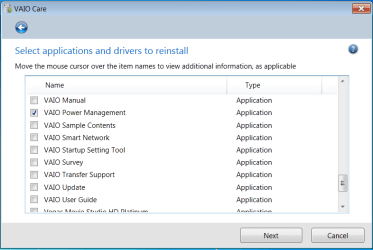
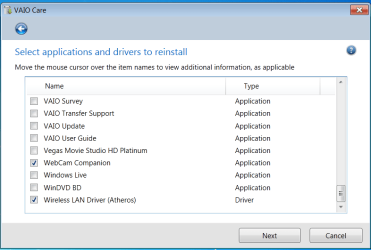
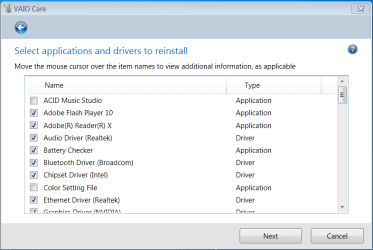
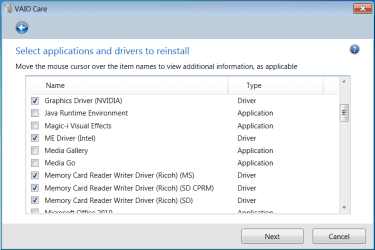
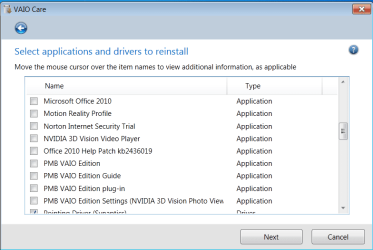
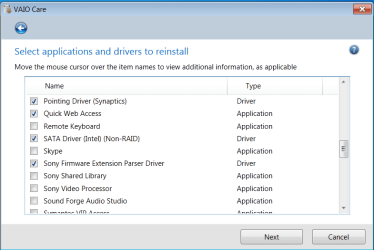
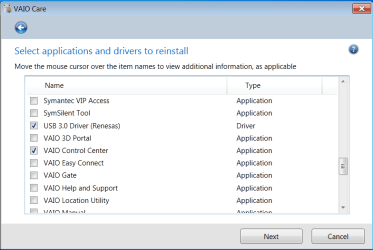
Any ideas? I have checked all drivers and software on my recovery disc and see nothing pertaning to my keyboard or power settings beyond the two already installed. The options are in the images that follow, and I have checked the software/drivers that are already installed (anything with a check mark is already installed on my system):

VAIORecoverySoftwareDrivers.PNG VAIORecoverySoftwareDrivers2.PNG

VAIORecoverySoftwareDrivers3.PNG VAIORecoverySoftwareDrivers4.PNG

VAIORecoverySoftwareDrivers5.PNG VAIORecoverySoftwareDrivers6.PNG

VAIORecoverySoftwareDrivers7.PNG
 
Last edited:

My Computer My Computer

At a glance

Windows 7 Home Premium 64 BitIntel(R) Core(TM)2 Quad CPU Q9550 @ 2.83GHz6.00 GB Hundai HMT125U6BFR8C-H9ATI Radeon HD 4850
Computer Manufacturer/Model Number
HP Pavilion e9110t
OS
Windows 7 Home Premium 64 Bit
CPU
Intel(R) Core(TM)2 Quad CPU Q9550 @ 2.83GHz
Motherboard
Pegatron IPIEL-LA3
Memory
6.00 GB Hundai HMT125U6BFR8C-H9
Graphics Card(s)
ATI Radeon HD 4850
Sound Card
Realtek High Definition Audio/ATI High Definition Audio
Monitor(s) Displays
Acer AL2216W
Screen Resolution
1680x1050
Hard Drives
Hitachi HDP725050GLA360 ATA Device 500 GB
PSU
Unknown/installed by HP
Case
HP generic case
Cooling
Intel Stock Cooling
Keyboard
HP Keyboard
Mouse
HP Mouse
Internet Speed
Download: 19.15 Mbps Upload: 1.67 Mbps
Other Info
Network Adapter Realtek RTL8168D/8111D Family PCI-E Gigabit Ethernet NIC (NDIS 6.20)
Network Adapter 802.11n Wireless PCI Express Card LAN Adapter
What bit version is all of this software intended for? Do you get a choice up front?
 
Found the solution! Through the recovery discs, I installed the Sony Shared Library. The system now has all the functionality I had hoped for. This thread is now solved. :)

I found the information in Sony Vaio "FN" Keys - Page 10


It's all 64-bit, and no, there is no choice. The laptop comes with 64-bit Windows 7 Home Premium, so all the software and drivers provided are also 64-bit. The only choices I have are Windows 7 64-bit or Windows XP (which I assume are the x86/32-bit versions).
 

My Computer My Computer

At a glance

Windows 7 Home Premium 64 BitIntel(R) Core(TM)2 Quad CPU Q9550 @ 2.83GHz6.00 GB Hundai HMT125U6BFR8C-H9ATI Radeon HD 4850
Computer Manufacturer/Model Number
HP Pavilion e9110t
OS
Windows 7 Home Premium 64 Bit
CPU
Intel(R) Core(TM)2 Quad CPU Q9550 @ 2.83GHz
Motherboard
Pegatron IPIEL-LA3
Memory
6.00 GB Hundai HMT125U6BFR8C-H9
Graphics Card(s)
ATI Radeon HD 4850
Sound Card
Realtek High Definition Audio/ATI High Definition Audio
Monitor(s) Displays
Acer AL2216W
Screen Resolution
1680x1050
Hard Drives
Hitachi HDP725050GLA360 ATA Device 500 GB
PSU
Unknown/installed by HP
Case
HP generic case
Cooling
Intel Stock Cooling
Keyboard
HP Keyboard
Mouse
HP Mouse
Internet Speed
Download: 19.15 Mbps Upload: 1.67 Mbps
Other Info
Network Adapter Realtek RTL8168D/8111D Family PCI-E Gigabit Ethernet NIC (NDIS 6.20)
Network Adapter 802.11n Wireless PCI Express Card LAN Adapter
Great work, Mike! This will help many others.

Have you figured out what Sony Shared Library is exactly? Possibly includes .dll files needed to enable various functions in the various apps when installed individually?
 
Sony Shared Library: It provides more functionality to VAIO applications by enabling those applications to send commands to affect the hardware of the system.

The above is the simple explanation. Basically, what the shared library does is provides an interface between VAIO applications and the device drivers so commands can be passed to the drivers to affect the hardware.

Most laptops have this ability through the combination of the Function (Fn) key and the F keys at the top of the keyboard. VAIO also provides specific power management to systems for special thermal control and additional functionality for added hardware like my keyboard backlight. I also have a light sensor that gives power management for my screen brightness and whether to turn that backlight on. As a robotics engineer, autonomous functionality like this is pretty cool! :geek:
 

My Computer My Computer

At a glance

Windows 7 Home Premium 64 BitIntel(R) Core(TM)2 Quad CPU Q9550 @ 2.83GHz6.00 GB Hundai HMT125U6BFR8C-H9ATI Radeon HD 4850
Computer Manufacturer/Model Number
HP Pavilion e9110t
OS
Windows 7 Home Premium 64 Bit
CPU
Intel(R) Core(TM)2 Quad CPU Q9550 @ 2.83GHz
Motherboard
Pegatron IPIEL-LA3
Memory
6.00 GB Hundai HMT125U6BFR8C-H9
Graphics Card(s)
ATI Radeon HD 4850
Sound Card
Realtek High Definition Audio/ATI High Definition Audio
Monitor(s) Displays
Acer AL2216W
Screen Resolution
1680x1050
Hard Drives
Hitachi HDP725050GLA360 ATA Device 500 GB
PSU
Unknown/installed by HP
Case
HP generic case
Cooling
Intel Stock Cooling
Keyboard
HP Keyboard
Mouse
HP Mouse
Internet Speed
Download: 19.15 Mbps Upload: 1.67 Mbps
Other Info
Network Adapter Realtek RTL8168D/8111D Family PCI-E Gigabit Ethernet NIC (NDIS 6.20)
Network Adapter 802.11n Wireless PCI Express Card LAN Adapter
This is a happy ending that reminds me of one epic thread which didn't end as well. It is also the only other discussion I can recall of OEM software refusing to work correctly when following carefully the recommended steps to Clean Reinstall - Factory OEM Windows 7 .

I wonder if some acilliary software could have helped Nicole get her Samsung touchpad gestures and cam features working correctly. Samsung kept telling her she needed the software off of the Recovery partition she'd deleted instead of what they had posted on her model's downloads page, and they wanted her to pay for reloading it on her HD again!

Nicole fought a long valiant battle made especially frustrating due to an atrocious Samsung "Tech Support" parody troupe heckling her efforts. They were rewarded with a top Google search result which documents the whole ugly episode: http://www.sevenforums.com/installation-setup/200607-new-laptop-changing-partition-disks-4.html
 
Back
Top