Clean Install Windows 7 from the Windows 7 Desktop

How to Do a Clean Installation of Windows 7 from the Windows Desktop

This shows how to do a clean installation of Windows 7 from the Windows 7 desktop, using only an ISO - Disk Image File; though you will have to supply a valid, purchased Windows 7 activation key for the Windows 7 version you install.

This method is very helpful if you don't have a way to boot the Windows 7 installation media, whether the CD/DVD drive is not functioning or not present, as in a Netbook; or the PC is not capable of booting independently from a USB stick.
   Warning

Be advised: You must make back-ups of any personal data you need to save to external media before you start this process as it will over-write all data on the Windows 7 partition and it will not be recoverable at all after this installation is finished, this is not an upgrade.

You will have to reinstall all the programs/apps that you use as they integrate themselves into the Windows registry and are not moveable from one Windows installation to another so be sure to save the program installers and the product activation keys where applicable.

As there is no upgrade path to go from 32-bit to 64-bit, or vise-versa, this method will not work for that, that has to be a true, complete clean installation from scratch.

This works exactly the same to clean install Windows 7 from the Vista desktop.
If you need information on how best to extract the Windows 7 installation files from an ISO to the Windows 7 desktop, have a look at the tutorial at this link.
ISO - Disk Image File : Extract to the Desktop
If you want to copy the Windows 7 installation files to the Windows 7 desktop from a Windows 7 installation DVD, have a look at the Copy To method of this tutorial.
Context Menu - Add Copy To Folder and Move To Folder
Let's get started!

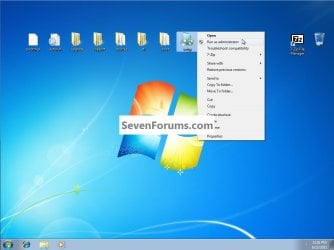
1) Right click Setup and select Run as Administrator and enter your user credentials for the UAC prompt, then click OK to start the process.
click any image to enlarge
Setup.jpg
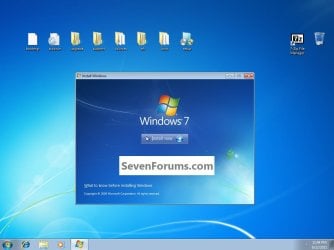
2) In the window that opens click Install Now.
Install.jpg
3) You'll get Setup is Starting; then this Get Updates dialog box, just select to not get updates during the installation process, it just seems to go smoother this way, Windows will auto-update later, after the installation has completed.
Update.jpg
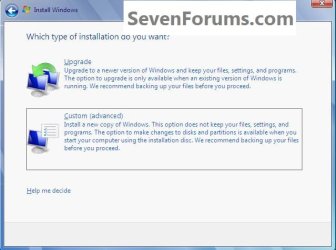
4) Accept the License Terms, then choose Custom (advanced) at this "What Type Install ... " dialog box.
Custom.jpg
5) Be sure to click to highlight/select the Windows 7 C: partition to do the installation to, you don't want to select the wrong partition if there is more than one partition; then OK for the Windows.old dialog box.
click any image to enlarge
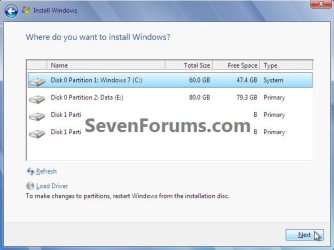
Where.jpg
Windows.old.jpg
6) The Copying Windows files goes fairly fast.
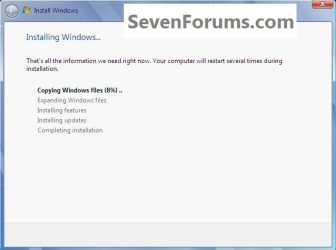
CopyFiles.jpg
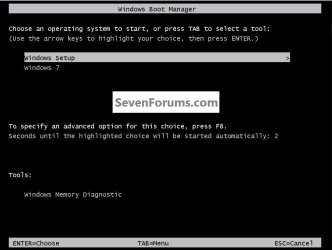
7) Then it'll start Expanding Windows files to about 27% and restart and you'll see this boot screen in the second snip down, it's not a dual boot so don't be concerned, that's normal.
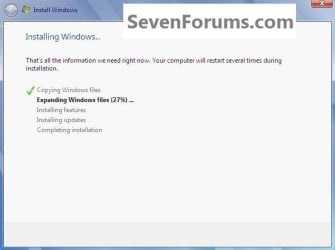
ExpFiles#1.jpg
Boot#1.jpg
8) Then it'll finish Expanding Windows files and then a second restart, as in this second snip, same thing, don't be concerned that's normal and it will correct it's self by the time the installation completes and it'll boot straight to Windows 7.
ExpFiles#2.jpg
Boot#2.jpg
9) Then you'll see Updating Registry Settings, than Starting Services, then Completing Installation and a normal restart.
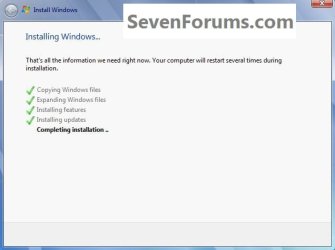
CompleteInstall.jpg
10) To view the rest of the steps, have a look at this tutorial starting at Step #10 to complete the installation process.
Clean Install Windows 7
Enjoy! :)


Last edited by a moderator:
Last edited:

My Computer My Computer

At a glance

W 7 64-bit UltimateIntel Q9550 Yorkfield8GB Dominator 8500C5DATI : XFX 5870
Computer Manufacturer/Model Number
* BFK Customs *
OS
W 7 64-bit Ultimate
CPU
Intel Q9550 Yorkfield
Motherboard
ASUS P5Q Pro
Memory
8GB Dominator 8500C5D
Graphics Card(s)
ATI : XFX 5870
Sound Card
Realtek HD Audio 7-1
Monitor(s) Displays
1x 47" LCD HDMI & 3x 26" LCD HDMI
Screen Resolution
1920x1080P & 1920x1200
Hard Drives
1x 80GB Intel X25-M G2 SSD : 1x 500GB & 1x 640GB WD Caviar Black(s)
PSU
Corsair 620HX
Case
Cooler Master RC-690
Cooling
Tuniq Tower 120, 2x 140mm and 3x 120mm case fans
Keyboard
Microsoft 500
Mouse
Razer Diamondback 3G
Internet Speed
14 Mb/s
Other Info
1x Koutech 3Gb/s SATA HDD Hot Swap Rack
Saved thanks guys.
 

My Computer My Computer

At a glance

Windows 7
Computer type
PC/Desktop
OS
Windows 7

My Computer My Computer

At a glance

W 7 64-bit UltimateIntel Q9550 Yorkfield8GB Dominator 8500C5DATI : XFX 5870
Computer Manufacturer/Model Number
* BFK Customs *
OS
W 7 64-bit Ultimate
CPU
Intel Q9550 Yorkfield
Motherboard
ASUS P5Q Pro
Memory
8GB Dominator 8500C5D
Graphics Card(s)
ATI : XFX 5870
Sound Card
Realtek HD Audio 7-1
Monitor(s) Displays
1x 47" LCD HDMI & 3x 26" LCD HDMI
Screen Resolution
1920x1080P & 1920x1200
Hard Drives
1x 80GB Intel X25-M G2 SSD : 1x 500GB & 1x 640GB WD Caviar Black(s)
PSU
Corsair 620HX
Case
Cooler Master RC-690
Cooling
Tuniq Tower 120, 2x 140mm and 3x 120mm case fans
Keyboard
Microsoft 500
Mouse
Razer Diamondback 3G
Internet Speed
14 Mb/s
Other Info
1x Koutech 3Gb/s SATA HDD Hot Swap Rack
Great work Ted and Greg! :thumbsup:
 

My Computer My Computer

At a glance

Windows 10 Pro x64Intel Core i5 4440 @Stock4 x 4GB HyperX Fury DDR3Gigabyte GTX 1050Ti O4G
Computer type
PC/Desktop
Computer Manufacturer/Model Number
Custom Build
OS
Windows 10 Pro x64
CPU
Intel Core i5 4440 @Stock
Motherboard
Gigabyte Z97 D3H
Memory
4 x 4GB HyperX Fury DDR3
Graphics Card(s)
Gigabyte GTX 1050Ti O4G
Sound Card
Integrated
Monitor(s) Displays
Dell P2417H
Screen Resolution
1920 x 1080
Hard Drives
Samsung EVO 850 120GB / Toshiba DT01ACA050 1TB 7200prm 32MB
PSU
Riotoro Onyx 750W
Case
NZXT H500 Black-Red
Cooling
Stock CPU + NZXT 120mm + 2x120mm red fans
Keyboard
Modecom Volcano Lanparty
Mouse
Asus ROG Gladius / DeepCool E-Pad Plus
Internet Speed
DOCSIS 50/3 Mbit
Browser
Google Chrome
Other Info
Asus K55VJ(i5 3210M, GT635M / 2GB, 8GB DDR3, 500GB HDD)
Thanks Boshko! :)
 

My Computer My Computer

At a glance

W 7 64-bit UltimateIntel Q9550 Yorkfield8GB Dominator 8500C5DATI : XFX 5870
Computer Manufacturer/Model Number
* BFK Customs *
OS
W 7 64-bit Ultimate
CPU
Intel Q9550 Yorkfield
Motherboard
ASUS P5Q Pro
Memory
8GB Dominator 8500C5D
Graphics Card(s)
ATI : XFX 5870
Sound Card
Realtek HD Audio 7-1
Monitor(s) Displays
1x 47" LCD HDMI & 3x 26" LCD HDMI
Screen Resolution
1920x1080P & 1920x1200
Hard Drives
1x 80GB Intel X25-M G2 SSD : 1x 500GB & 1x 640GB WD Caviar Black(s)
PSU
Corsair 620HX
Case
Cooler Master RC-690
Cooling
Tuniq Tower 120, 2x 140mm and 3x 120mm case fans
Keyboard
Microsoft 500
Mouse
Razer Diamondback 3G
Internet Speed
14 Mb/s
Other Info
1x Koutech 3Gb/s SATA HDD Hot Swap Rack
Great tutorial, Ted :D It will help a lot of members !
 

My Computer My Computer

At a glance

Microsoft Windows 10 Pro Insider Preview 64-bitIntel(R) Core(TM) i3-4130 CPU @ 3.40GHzCorsair Vengence 4GB x2 (8.00GB Dual-Channel ...2047MB GeForce GTS 450 (ZOTAC International)
Computer type
PC/Desktop
Computer Manufacturer/Model Number
Self Assembled
OS
Microsoft Windows 10 Pro Insider Preview 64-bit
CPU
Intel(R) Core(TM) i3-4130 CPU @ 3.40GHz
Motherboard
Gigabyte Technology Co., Ltd. B85M-D3H
Memory
Corsair Vengence 4GB x2 (8.00GB Dual-Channel DDR3 @ 798MHz)
Graphics Card(s)
2047MB GeForce GTS 450 (ZOTAC International)
Sound Card
Onboard (Realtek High Definition Audio)
Monitor(s) Displays
LG Flatron E2040T
Screen Resolution
1600x900
Hard Drives
Western Digital 1 TB
Seagate 500 GB
PSU
Corsair VS550
Case
Cooler Master K380
Cooling
Cooler Master Seidon 120V Plus
Keyboard
Logitech MK260r
Mouse
Logitech MK260r
Internet Speed
PMPL Broadband
Antivirus
Windows Defender + MBAM
Browser
Firefox
Other Info
Dell Studio 15" Laptop
Thank you Archan, I hope so! :)
 

My Computer My Computer

At a glance

W 7 64-bit UltimateIntel Q9550 Yorkfield8GB Dominator 8500C5DATI : XFX 5870
Computer Manufacturer/Model Number
* BFK Customs *
OS
W 7 64-bit Ultimate
CPU
Intel Q9550 Yorkfield
Motherboard
ASUS P5Q Pro
Memory
8GB Dominator 8500C5D
Graphics Card(s)
ATI : XFX 5870
Sound Card
Realtek HD Audio 7-1
Monitor(s) Displays
1x 47" LCD HDMI & 3x 26" LCD HDMI
Screen Resolution
1920x1080P & 1920x1200
Hard Drives
1x 80GB Intel X25-M G2 SSD : 1x 500GB & 1x 640GB WD Caviar Black(s)
PSU
Corsair 620HX
Case
Cooler Master RC-690
Cooling
Tuniq Tower 120, 2x 140mm and 3x 120mm case fans
Keyboard
Microsoft 500
Mouse
Razer Diamondback 3G
Internet Speed
14 Mb/s
Other Info
1x Koutech 3Gb/s SATA HDD Hot Swap Rack
Hey Guys can i get more information from the 7 and 8th step?
i dont know what to choose from them.. thanks for the reply :D
 

My Computer My Computer

At a glance

Windows 7 Ultimate 32bit
Computer type
PC/Desktop
OS
Windows 7 Ultimate 32bit
Hello RJ,

No worries. The items highlighted in the screenshot is what is supposed to be selected.

However, you could also just let it sit and automatically choose for you when the timer runs out at step 7 and 8 to continue with the installation. :)
 

My Computer My Computer

At a glance

64-bit Windows 11 Pro for WorkstationsIntel i7-8700K OC'd to 5 GHz64 GB (4x16GB) G.SKILL TridentZ RGB DDR4 3600...ASUS ROG-STRIX-GTX1080TI-O11G-GAMING
Computer type
PC/Desktop
Computer Manufacturer/Model Number
Self built custom
OS
64-bit Windows 11 Pro for Workstations
CPU
Intel i7-8700K OC'd to 5 GHz
Motherboard
ASUS ROG Maximus XI Formula Z390
Memory
64 GB (4x16GB) G.SKILL TridentZ RGB DDR4 3600 MHz
Graphics Card(s)
ASUS ROG-STRIX-GTX1080TI-O11G-GAMING
Sound Card
Integrated
Monitor(s) Displays
2 x Samsung Odyssey G7 27"
Screen Resolution
2560x1440
Hard Drives
1TB Samsung 990 PRO M.2,
4TB Samsung 990 PRO PRO M.2,
TerraMaster F8 SSD Plus NAS
PSU
Seasonic Prime Titanium 850W
Case
Thermaltake Core P3
Cooling
Corsair Hydro H115i
Keyboard
Logitech wireless K800
Mouse
Logitech MX Master 4
Internet Speed
2 Gb/s Download and 100 Mb/s Upload
Antivirus
Malwarebyte Anti-Malware Premium
Browser
Google Chrome
Other Info
Logitech Z625 speaker system,
Logitech BRIO 4K Pro webcam,
HP Color LaserJet Pro MFP M477fdn,
APC SMART-UPS RT 1000 XL - SURT1000XLI,
Galaxy S23 Plus phone
Back
Top