Solved Clean install wont partition Disk 0 with system reserved partition

artbysmiley

New member
Local time
2:58 PM
Messages
6
Trying to do a clean install and my Windows 7 Home Premium x64 seems to have an aversion to putting the system reserved partion on disk 0. My HP notebook has two identical disk drives. If I boot up the windows install with both drives unallocated and do a custom install, the window where i select the partition for the install if I click new to create a partition on disk 0, it creates one partition on the whole disk. If I do the same for disk 1 it automatically creates two partitions, one for the system reserved. If I try to do that in reverse order by partioning disk 1 first it will still create two partitions on disk 1 (one for the system reserved). It wont partion disk 0 with the system reserved partition.

I tried to install windows with only disk 0 plugged to into the motherboard and that worked when i partitioned the drive during the windows install it created the system partion on disk 0. However once i had windows up in running, I plugged disk 1 (unallocated) back into the mother board and windows woudnt boot up.

I could jsut install windows on disk 1 but ive read that it is better to install it on disk 0.
 

My Computer My Computer

At a glance

Windows 7 Home Premium x64
Computer type
Laptop
Computer Manufacturer/Model Number
HP DV7-4073ca
OS
Windows 7 Home Premium x64
Welcome to the forum.

When you tried to boot with both disks installed, did you go to the BIOS and check that disk 0 was the first in the boot priority?
 

My Computer My Computer

At a glance

Windows 10 Pro x64, Windows 8.1 Pro x64, Wind...INTEL i9-7920X LGA 206664 GB (4 X 16 GB) G-Skill V Series DDR4 3200 ...EVGA GTX 1060 SC 3 GB
Computer type
PC/Desktop
Computer Manufacturer/Model Number
Custom Built
OS
Windows 10 Pro x64, Windows 8.1 Pro x64, Windows 7 Ultimate x64 SP1,
CPU
INTEL i9-7920X LGA 2066
Motherboard
Gigabyte X299-WU8 F3
Memory
64 GB (4 X 16 GB) G-Skill V Series DDR4 3200 Quad Channel
Graphics Card(s)
EVGA GTX 1060 SC 3 GB
Sound Card
Realtek Onboard ALC1220
Monitor(s) Displays
2 x Samsung S27E310
Screen Resolution
1920x1080
Hard Drives
Samsung 2 x 970 EVO Plus 500 GB NVMe
1 x 6TB WD 6003FZBX SATA
1 x 6TB WD 60EFRX SATA
12 x 3TB WD 30EFRX SATA
PSU
Seasonic X-1050
Case
Thermaltake Armor+
Cooling
Corsair H80i V2 Liquid AOI Cooler
Keyboard
Logitech G510s
Mouse
Logitech MX Master 2S
Internet Speed
200 Mb/s
Antivirus
ESET NOD32 13.1
Browser
EDGE (Dev, Canary, Beta), Chrome
Other Info
ASUS RT-AC68U router
Malwarebytes 4.0.4

My Computer My Computer

At a glance

Windows 10 Pro x64Intel Core i7 6700KGSkill TridentZ RGB 16GB 3600 16-16-16-36EVGA GTX 980 Ti SC x2
Computer type
PC/Desktop
Computer Manufacturer/Model Number
Skylake Special #666
OS
Windows 10 Pro x64
CPU
Intel Core i7 6700K
Motherboard
Asus Sabertooth Z170 Mark 1
Memory
GSkill TridentZ RGB 16GB 3600 16-16-16-36
Graphics Card(s)
EVGA GTX 980 Ti SC x2
Sound Card
Realtek High Definition
Monitor(s) Displays
AOC G2460PG
Screen Resolution
1920 x 1080 144Hz
Hard Drives
Samsung 860 Pro 256GB, Seagate Barracuda 4TB x2
PSU
EVGA 1000 P2, EVGA White Custom Braided Cables
Case
Corsair Vengeance C70 Gunmetal Black
Cooling
Corsair H100i v2, Corsair ML120 x2, Thermal Grizzly Kryonaut
Keyboard
Logitech G910 Orion Spectrum
Mouse
Logitech G700s
Internet Speed
Verizon Fios Quantum Gateway 75/75
Antivirus
Windows Defender, Malwarebytes Free 3.8.3
Browser
Chrome
Other Info
Corsair SP120 x4, LG Blu-ray Drive, Durabrand HT-395 100 Watt Dolby Digital Amp, Corsair H2100 Wireless 7.1 Headset
Since you were able to unplug the other HD as is recommended for multiple disks when doing a Clean Install, then the only reason it wouldn't boot after plugging back in the other drive(s) is because the OS drive wasn't set first to boot. Try that now.

For those who can't unplug the drive if they want to install to the second drive and it forces System Rserved onto the first one, the way to block this is to pre-partition the first drive as Logical which cannot be marked Active to receive the System files.
 
Welcome to the forum.

When you tried to boot with both disks installed, did you go to the BIOS and check that disk 0 was the first in the boot priority?

I tried that but I can only select notebook hardrive in the boot order. After doing some more research apparently with my notebook dv7-4073ca in the bios, HP doesnt allow the option to set which hard drive it boots from. Somehow by default it is booting from the second hdd i guess.

I was trying to install windows from just a clean windows 7 install disk using my serial # from my hp. I am going to try and do a factory reset with my hp recovry disks and see if by default it installs windows to the second hhd. Maybe for some reason my hp bios is hard coded to only boot from that disk?
 

My Computer My Computer

At a glance

Windows 7 Home Premium x64
Computer type
Laptop
Computer Manufacturer/Model Number
HP DV7-4073ca
OS
Windows 7 Home Premium x64
When only one HD appears is BIOS Boot Priority order, then there is usually another place to set which is Primary HD and which is Secondary.

Why are you proceeding the HP recovery which gives you the worst possible install of Win7 one can have, when I just told you how to assure no part of the OS is put on a certain HD - by preformatting it as Logical. You can use Partition Wizard http://www.partitionwizard.com/download.htmlboot disk to do this, following Partition Wizard Create Partition - Video Help

or from the Win7 System Recovery Options Command Line use DiskPart Command-Line Options to Create Partition Logical on the HD you want saved for data. I can write out the commands for you if you want.
 
When only one HD appears is BIOS Boot Priority order, then there is usually another place to set which is Primary HD and which is Secondary.

Why are you proceeding the HP recovery which gives you the worst possible install of Win7 one can have, when I just told you how to assure no part of the OS is put on a certain HD - by preformatting it as Logical. You can use Partition Wizard boot disk to do this, following Partition Wizard Create Partition - Video Help

or from the Win7 System Recovery Options Command Line use DiskPart Command-Line Options to Create Partition Logical on the HD you want saved for data. I can write out the commands for you if you want.

I've checked my entire bios. I dont think HP included an option to change which hdd is the primary and secondy in my bios. Unfortuantly there is no newer bios update. I was just going to do the HP recovery as an experiment to see if it defaulted to installing windows on disk 1. Since that appears to be setup as the primary for some reason. If I follow your method and use partition wizard boot disk to format disk 1 as logical and then install windows on disk 0. Wont i still have an issue because my bios is still going to use disk 1 to boot off.
 

My Computer My Computer

At a glance

Windows 7 Home Premium x64
Computer type
Laptop
Computer Manufacturer/Model Number
HP DV7-4073ca
OS
Windows 7 Home Premium x64
What is the SATA controller setting in BIOS setup? Is it set to RAID? SHould be AHCI. Normally when two same-size HD's are shipped with a PC its in a RAID.

All that formatting Logical will do is stop the boot files from being derailed to the HD you format Logical.

If you cannot boot from any other than DISK1 they you may need to install Win7 or its boot files to that disk if you can't find the setting in BIOS to make DISK0 Primary. Is there a BIOS Update?
 
I read this article that says you should always install Windows on disk 0

Why You Should Always Install Windows on Disk Zero - gHacks Tech News

But the article states the reason for that is because windows will install the system portion on disk 0 so you should install Windows on that same disk. In my case my computer wants to do the opposite. It wants to install the system partition on disk 1. Therefor I guess there is no harm installing the OS on disk 1 as long as the system and Windows are on the same disk. And the computer wants to boot from disc 1 by default.

No bios update. It a a few years old and Hp seemed to severely limit what I can do in the bios. no raid options. Although I don't think they're in any raid setup. I'll just install my windows on disk 1 since that's what it wants.
 

My Computer My Computer

At a glance

Windows 7 Home Premium x64
Computer type
Laptop
Computer Manufacturer/Model Number
HP DV7-4073ca
OS
Windows 7 Home Premium x64
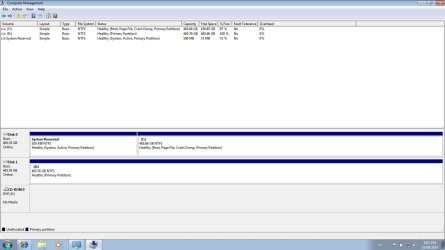
Could you please post the shot of disk management ;)
 

My Computer My Computer

At a glance

Windows 10 Pro x64Intel Core i7 6700KGSkill TridentZ RGB 16GB 3600 16-16-16-36EVGA GTX 980 Ti SC x2
Computer type
PC/Desktop
Computer Manufacturer/Model Number
Skylake Special #666
OS
Windows 10 Pro x64
CPU
Intel Core i7 6700K
Motherboard
Asus Sabertooth Z170 Mark 1
Memory
GSkill TridentZ RGB 16GB 3600 16-16-16-36
Graphics Card(s)
EVGA GTX 980 Ti SC x2
Sound Card
Realtek High Definition
Monitor(s) Displays
AOC G2460PG
Screen Resolution
1920 x 1080 144Hz
Hard Drives
Samsung 860 Pro 256GB, Seagate Barracuda 4TB x2
PSU
EVGA 1000 P2, EVGA White Custom Braided Cables
Case
Corsair Vengeance C70 Gunmetal Black
Cooling
Corsair H100i v2, Corsair ML120 x2, Thermal Grizzly Kryonaut
Keyboard
Logitech G910 Orion Spectrum
Mouse
Logitech G700s
Internet Speed
Verizon Fios Quantum Gateway 75/75
Antivirus
Windows Defender, Malwarebytes Free 3.8.3
Browser
Chrome
Other Info
Corsair SP120 x4, LG Blu-ray Drive, Durabrand HT-395 100 Watt Dolby Digital Amp, Corsair H2100 Wireless 7.1 Headset
Could you please post the shot of disk management ;)

Hahah, so I installed windows on the the hdd labeled Disk 1. Now in disk management the installation is listed as disk 0. Go figure. I guess there was never an issue. Why would windows label the disk 1 during installation and then show it as disk 0 in windows? Guess that is windows for ya Sorry for all the trouble. :o
 

Attachments

  • diskmanagement.jpg
    diskmanagement.jpg
    88.6 KB · Views: 5

My Computer My Computer

At a glance

Windows 7 Home Premium x64
Computer type
Laptop
Computer Manufacturer/Model Number
HP DV7-4073ca
OS
Windows 7 Home Premium x64
That looks good ;)
 

My Computer My Computer

At a glance

Windows 10 Pro x64Intel Core i7 6700KGSkill TridentZ RGB 16GB 3600 16-16-16-36EVGA GTX 980 Ti SC x2
Computer type
PC/Desktop
Computer Manufacturer/Model Number
Skylake Special #666
OS
Windows 10 Pro x64
CPU
Intel Core i7 6700K
Motherboard
Asus Sabertooth Z170 Mark 1
Memory
GSkill TridentZ RGB 16GB 3600 16-16-16-36
Graphics Card(s)
EVGA GTX 980 Ti SC x2
Sound Card
Realtek High Definition
Monitor(s) Displays
AOC G2460PG
Screen Resolution
1920 x 1080 144Hz
Hard Drives
Samsung 860 Pro 256GB, Seagate Barracuda 4TB x2
PSU
EVGA 1000 P2, EVGA White Custom Braided Cables
Case
Corsair Vengeance C70 Gunmetal Black
Cooling
Corsair H100i v2, Corsair ML120 x2, Thermal Grizzly Kryonaut
Keyboard
Logitech G910 Orion Spectrum
Mouse
Logitech G700s
Internet Speed
Verizon Fios Quantum Gateway 75/75
Antivirus
Windows Defender, Malwarebytes Free 3.8.3
Browser
Chrome
Other Info
Corsair SP120 x4, LG Blu-ray Drive, Durabrand HT-395 100 Watt Dolby Digital Amp, Corsair H2100 Wireless 7.1 Headset
Thank you for posting the picture. I like it also.
 

My Computer My Computer

At a glance

Windows 10 Pro. 64/ version 1709 Windows 7 Pr...Intel i7-6800K @ 4.3Corsair Platinum 16 gig @2400EVGA GTX 1070 OC
Computer type
PC/Desktop
Computer Manufacturer/Model Number
Home made Desktop
OS
Windows 10 Pro. 64/ version 1709 Windows 7 Pro/64
CPU
Intel i7-6800K @ 4.3
Motherboard
ASUS X-99 Deluxe II
Memory
Corsair Platinum 16 gig @2400
Graphics Card(s)
EVGA GTX 1070 OC
Monitor(s) Displays
Asus 27" LED LCD/VE278Q
Screen Resolution
1920-1080 or 1280-720 HDMI
Hard Drives
INTEL SSD 730-240 Gb Sata 3.0/
PSU
EVGA Platium 1200W
Case
Phanteks Luxe Tempered Glass 8 fans/ one radiator
Cooling
XSPC/ Water Cooled CPU
Keyboard
Das 4 Professional
Mouse
Logitech M705/MX Anywhere 2-S
Internet Speed
100 mbits
Antivirus
Microsoft Security Essentials/ Malwarebytes Premium 3.0/ SAS
Browser
I.E. 11 default/Firefox/ ISP Time Warner Cable/Spectrum
Other Info
LG BluRay Burner/
Sound system-KLipsch-THX/
Icy Dock ssd Hot Swap bays.
I read this article that says you should always install Windows on disk 0

Why You Should Always Install Windows on Disk Zero - gHacks Tech News

But the article states the reason for that is because windows will install the system portion on disk 0 so you should install Windows on that same disk. In my case my computer wants to do the opposite. It wants to install the system partition on disk 1. Therefor I guess there is no harm installing the OS on disk 1 as long as the system and Windows are on the same disk. And the computer wants to boot from disc 1 by default.

There is no reason you can't have an OS on any disk you want. I only recommended putting it on DISK0 because otherwise during Startup Repairs or Reinstall the boot files can be derailed to the first Primary partition on the system. It's for this reason that I would either install Win7 to DISK0 or make sure any preceding partition to the disk it's on is Logical which cannot be marked Active to accept boot files.

Glad it sorted itself. How is performance?

You can get and keep a perfect install if you stick with the tools and methods in http://www.sevenforums.com/tutorials/219487-clean-reinstall-factory-oem-windows-7-a.html#post1839164 which compiles everything that works best in tens of thousands of installs we've directly helped with here.
 
What I am about to say is not specifically related to the OP HDD's as he said they were identical but worth noting none the less, The BIOS views your drives differently than when your looking at them within windows itself there is a few reasons for this that are explained elsewhere on here, however if you have a slightly older BIOS and you have fitted a faster drive 7,500 rpm alongside a slower one it will not show up as being Drive 0 no matter how you set it up in the BIOS (or physical location) due to the older BIOS not recognising the higher transfer speed, it's not until you select to load drivers for said HDD that it will detect it correctly prior to a Windows install, problem being finding specific drivers that will work prior to an install... If not then don't worry about it many times even from within Windows I have seen the OS on Drive 1 until the Intel drivers are installed then just like in the case of the OP upon a reboot you will see Drive 1 is now Drive 0 and vice versa... Just a quirk in some cases with slightly older systems and more modern HDD's
 

My Computer My Computer

At a glance

Windows 7 x64 SP1Intel4gbNvidia
Computer type
Laptop
Computer Manufacturer/Model Number
Sony
OS
Windows 7 x64 SP1
CPU
Intel
Motherboard
Sony
Memory
4gb
Graphics Card(s)
Nvidia
Hard Drives
WD
Internet Speed
Dial up wasn't as bad as this !
Antivirus
Avast
Browser
Firefox
Thanks everyone for your help. Thank you gregrocker for all your advice and the link to the clean install guide. performance is perfect so far. Nice to have a clean version of windows not full of bloatware and start-up crap bogging it down.

Marked as solved.
 

My Computer My Computer

At a glance

Windows 7 Home Premium x64
Computer type
Laptop
Computer Manufacturer/Model Number
HP DV7-4073ca
OS
Windows 7 Home Premium x64
Back
Top