Solved Clean installation of Windows 7 64bit, Black Screen Hand for 2 minutes

Giaccovitch

New member
Local time
9:59 PM
Messages
55
Hi, I ran my computer for about 2 days with the clean installation of Windows on my SSD and it was running fine. Now whenever I start up my computer after the Starting Windows Logo, my screen hangs on a black screen for around 1-2mins without a cursor, and then proceeds to the Welcome screen, starting up normally. This was the main reason why I reintalled Windows and I thought it would fix this problem, which it did not... I have uninstalled Avast! and installed Microsoft Security Essentials, tired reinstalling graphics drivers. I can enter Safe Mode without any problems. The problem occurred after I installed 95 required Windows Update's and after the installation I booted into safe mode to try and delete Windows from my HDD. I failed at doing that so I restarted my computer normally and the black screen hang occurred. I ran a boot manager log and I will upload it (Windows Performance Analyzer Session File is contained in the ZIP). Thanks.
Edit: Hang* made a mistake in the title sorry. :D
 

Attachments

Last edited:

My Computer My Computer

At a glance

Windows 7 Ultimate x64Intel Core i7 4820kCorsair Vengeance 4x4GB Quad ChannelGalaxy Nvidia Geforce GTX 680 2GB
Computer type
PC/Desktop
Computer Manufacturer/Model Number
Custom Build
OS
Windows 7 Ultimate x64
CPU
Intel Core i7 4820k
Motherboard
ASRock X79 Extreme6
Memory
Corsair Vengeance 4x4GB Quad Channel
Graphics Card(s)
Galaxy Nvidia Geforce GTX 680 2GB
Hard Drives
Samsung EVO 250GB SSD
Seagate Barracuda 500GB HDD
Seagate Barracuda 2TB HDD
PSU
EVGA SuperNova G2 1000W
Case
Aerocool XPredator Black Orange
Cooling
Noctua NH-D14
Keyboard
Corsair K95 RGB
Mouse
Thermaltake Theron
Internet Speed
100Mbps/40Mbps
Antivirus
Avast Standard Edition
Browser
Google Chrome
Other Info
Reference GTX 680 2GB in SLI

My Computer My Computer

At a glance

Windows 7 Ultimate x64Intel Core i7 4820kCorsair Vengeance 4x4GB Quad ChannelGalaxy Nvidia Geforce GTX 680 2GB
Computer type
PC/Desktop
Computer Manufacturer/Model Number
Custom Build
OS
Windows 7 Ultimate x64
CPU
Intel Core i7 4820k
Motherboard
ASRock X79 Extreme6
Memory
Corsair Vengeance 4x4GB Quad Channel
Graphics Card(s)
Galaxy Nvidia Geforce GTX 680 2GB
Hard Drives
Samsung EVO 250GB SSD
Seagate Barracuda 500GB HDD
Seagate Barracuda 2TB HDD
PSU
EVGA SuperNova G2 1000W
Case
Aerocool XPredator Black Orange
Cooling
Noctua NH-D14
Keyboard
Corsair K95 RGB
Mouse
Thermaltake Theron
Internet Speed
100Mbps/40Mbps
Antivirus
Avast Standard Edition
Browser
Google Chrome
Other Info
Reference GTX 680 2GB in SLI

My Computer My Computer

At a glance

Windows 7 Ultimate x64Intel Core i7 4820kCorsair Vengeance 4x4GB Quad ChannelGalaxy Nvidia Geforce GTX 680 2GB
Computer type
PC/Desktop
Computer Manufacturer/Model Number
Custom Build
OS
Windows 7 Ultimate x64
CPU
Intel Core i7 4820k
Motherboard
ASRock X79 Extreme6
Memory
Corsair Vengeance 4x4GB Quad Channel
Graphics Card(s)
Galaxy Nvidia Geforce GTX 680 2GB
Hard Drives
Samsung EVO 250GB SSD
Seagate Barracuda 500GB HDD
Seagate Barracuda 2TB HDD
PSU
EVGA SuperNova G2 1000W
Case
Aerocool XPredator Black Orange
Cooling
Noctua NH-D14
Keyboard
Corsair K95 RGB
Mouse
Thermaltake Theron
Internet Speed
100Mbps/40Mbps
Antivirus
Avast Standard Edition
Browser
Google Chrome
Other Info
Reference GTX 680 2GB in SLI
I'm afraid that AFAIK you can't just open an Event viewer file from one computer on a different one (there is a way but the data has to be collected in a special way on the source computer)
Considering that your problems started
after I installed 95 required Windows Update's and after the installation I booted into safe mode to try and delete Windows from my HDD
You could check what updates were installed, in particular if any drivers were installed, and try to roll back/uninstall those.
It will probably be easier to just reinstall but make a backup before you start updating windows. Don't allow Windows update to update your drivers and don't install 95 updates all at the same time! Reboot the computer in between batches of updates and check that things are working as expected before you install the next batch.
 

My Computer My Computer

At a glance

windows 7 ultimate x64
Computer type
PC/Desktop
OS
windows 7 ultimate x64
Thanks for the reply, the problem is that It is random when it happens. Some days on cold boot it doesn't, some other days it does, very weird.
 

My Computer My Computer

At a glance

Windows 7 Ultimate x64Intel Core i7 4820kCorsair Vengeance 4x4GB Quad ChannelGalaxy Nvidia Geforce GTX 680 2GB
Computer type
PC/Desktop
Computer Manufacturer/Model Number
Custom Build
OS
Windows 7 Ultimate x64
CPU
Intel Core i7 4820k
Motherboard
ASRock X79 Extreme6
Memory
Corsair Vengeance 4x4GB Quad Channel
Graphics Card(s)
Galaxy Nvidia Geforce GTX 680 2GB
Hard Drives
Samsung EVO 250GB SSD
Seagate Barracuda 500GB HDD
Seagate Barracuda 2TB HDD
PSU
EVGA SuperNova G2 1000W
Case
Aerocool XPredator Black Orange
Cooling
Noctua NH-D14
Keyboard
Corsair K95 RGB
Mouse
Thermaltake Theron
Internet Speed
100Mbps/40Mbps
Antivirus
Avast Standard Edition
Browser
Google Chrome
Other Info
Reference GTX 680 2GB in SLI

My Computer My Computer

At a glance

Windows 10 Pro x64Intel Core i7 6700KGSkill TridentZ RGB 16GB 3600 16-16-16-36EVGA GTX 980 Ti SC x2
Computer type
PC/Desktop
Computer Manufacturer/Model Number
Skylake Special #666
OS
Windows 10 Pro x64
CPU
Intel Core i7 6700K
Motherboard
Asus Sabertooth Z170 Mark 1
Memory
GSkill TridentZ RGB 16GB 3600 16-16-16-36
Graphics Card(s)
EVGA GTX 980 Ti SC x2
Sound Card
Realtek High Definition
Monitor(s) Displays
AOC G2460PG
Screen Resolution
1920 x 1080 144Hz
Hard Drives
Samsung 860 Pro 256GB, Seagate Barracuda 4TB x2
PSU
EVGA 1000 P2, EVGA White Custom Braided Cables
Case
Corsair Vengeance C70 Gunmetal Black
Cooling
Corsair H100i v2, Corsair ML120 x2, Thermal Grizzly Kryonaut
Keyboard
Logitech G910 Orion Spectrum
Mouse
Logitech G700s
Internet Speed
Verizon Fios Quantum Gateway 75/75
Antivirus
Windows Defender, Malwarebytes Free 3.8.3
Browser
Chrome
Other Info
Corsair SP120 x4, LG Blu-ray Drive, Durabrand HT-395 100 Watt Dolby Digital Amp, Corsair H2100 Wireless 7.1 Headset
you might want to check out this topic http://www.sevenforums.com/performance-maintenance/135029-startup-delay-blank-screen.html

This however sounds worrisome
I booted into safe mode to try and delete Windows from my HDD. I failed at doing that

You can`t delete windows if your booted into windows.

Hopefully a fresh install will fix it.

It is on my HDD with all my games and stuff on it, I boot into Windows on my SSD, I've tried to overwrite permissions but it doesn't seem to work.
 

My Computer My Computer

At a glance

Windows 7 Ultimate x64Intel Core i7 4820kCorsair Vengeance 4x4GB Quad ChannelGalaxy Nvidia Geforce GTX 680 2GB
Computer type
PC/Desktop
Computer Manufacturer/Model Number
Custom Build
OS
Windows 7 Ultimate x64
CPU
Intel Core i7 4820k
Motherboard
ASRock X79 Extreme6
Memory
Corsair Vengeance 4x4GB Quad Channel
Graphics Card(s)
Galaxy Nvidia Geforce GTX 680 2GB
Hard Drives
Samsung EVO 250GB SSD
Seagate Barracuda 500GB HDD
Seagate Barracuda 2TB HDD
PSU
EVGA SuperNova G2 1000W
Case
Aerocool XPredator Black Orange
Cooling
Noctua NH-D14
Keyboard
Corsair K95 RGB
Mouse
Thermaltake Theron
Internet Speed
100Mbps/40Mbps
Antivirus
Avast Standard Edition
Browser
Google Chrome
Other Info
Reference GTX 680 2GB in SLI
What`s on your hdd with the games ???
 

My Computer My Computer

At a glance

Windows 10 Pro x64Intel Core i7 6700KGSkill TridentZ RGB 16GB 3600 16-16-16-36EVGA GTX 980 Ti SC x2
Computer type
PC/Desktop
Computer Manufacturer/Model Number
Skylake Special #666
OS
Windows 10 Pro x64
CPU
Intel Core i7 6700K
Motherboard
Asus Sabertooth Z170 Mark 1
Memory
GSkill TridentZ RGB 16GB 3600 16-16-16-36
Graphics Card(s)
EVGA GTX 980 Ti SC x2
Sound Card
Realtek High Definition
Monitor(s) Displays
AOC G2460PG
Screen Resolution
1920 x 1080 144Hz
Hard Drives
Samsung 860 Pro 256GB, Seagate Barracuda 4TB x2
PSU
EVGA 1000 P2, EVGA White Custom Braided Cables
Case
Corsair Vengeance C70 Gunmetal Black
Cooling
Corsair H100i v2, Corsair ML120 x2, Thermal Grizzly Kryonaut
Keyboard
Logitech G910 Orion Spectrum
Mouse
Logitech G700s
Internet Speed
Verizon Fios Quantum Gateway 75/75
Antivirus
Windows Defender, Malwarebytes Free 3.8.3
Browser
Chrome
Other Info
Corsair SP120 x4, LG Blu-ray Drive, Durabrand HT-395 100 Watt Dolby Digital Amp, Corsair H2100 Wireless 7.1 Headset
What`s on your hdd with the games ???

Games, and the windows installation, its full so I cant transfer them to my SSD and format the HDD.
 

My Computer My Computer

At a glance

Windows 7 Ultimate x64Intel Core i7 4820kCorsair Vengeance 4x4GB Quad ChannelGalaxy Nvidia Geforce GTX 680 2GB
Computer type
PC/Desktop
Computer Manufacturer/Model Number
Custom Build
OS
Windows 7 Ultimate x64
CPU
Intel Core i7 4820k
Motherboard
ASRock X79 Extreme6
Memory
Corsair Vengeance 4x4GB Quad Channel
Graphics Card(s)
Galaxy Nvidia Geforce GTX 680 2GB
Hard Drives
Samsung EVO 250GB SSD
Seagate Barracuda 500GB HDD
Seagate Barracuda 2TB HDD
PSU
EVGA SuperNova G2 1000W
Case
Aerocool XPredator Black Orange
Cooling
Noctua NH-D14
Keyboard
Corsair K95 RGB
Mouse
Thermaltake Theron
Internet Speed
100Mbps/40Mbps
Antivirus
Avast Standard Edition
Browser
Google Chrome
Other Info
Reference GTX 680 2GB in SLI

My Computer My Computer

At a glance

Windows 7 Ultimate x64Intel Core i7 4820kCorsair Vengeance 4x4GB Quad ChannelGalaxy Nvidia Geforce GTX 680 2GB
Computer type
PC/Desktop
Computer Manufacturer/Model Number
Custom Build
OS
Windows 7 Ultimate x64
CPU
Intel Core i7 4820k
Motherboard
ASRock X79 Extreme6
Memory
Corsair Vengeance 4x4GB Quad Channel
Graphics Card(s)
Galaxy Nvidia Geforce GTX 680 2GB
Hard Drives
Samsung EVO 250GB SSD
Seagate Barracuda 500GB HDD
Seagate Barracuda 2TB HDD
PSU
EVGA SuperNova G2 1000W
Case
Aerocool XPredator Black Orange
Cooling
Noctua NH-D14
Keyboard
Corsair K95 RGB
Mouse
Thermaltake Theron
Internet Speed
100Mbps/40Mbps
Antivirus
Avast Standard Edition
Browser
Google Chrome
Other Info
Reference GTX 680 2GB in SLI
The correct way to uninstall the OS is to delete its partition, even if you need to move files off of it first. They should be backed up anyway.

Does the problem with SSD boot happen if the HD is unplugged? Check now and see. This can be due to boot code on the HD interfering which is solved by wiping it.

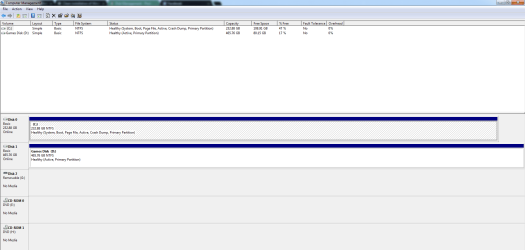
However if you intstalled Win7 to the SSD with the HD plugged in it likely placed the new Win7 boot files on the old HD which is still booting it as a dual boot. So first please post back a screenshot of Disk Management - Post a Screen Capture Image so we can look it over to see if its correct. Then test the SSD boot without the HD.
 
The correct way to uninstall the OS is to delete its partition, even if you need to move files off of it first. They should be backed up anyway.

Does the problem with SSD boot happen if the HD is unplugged? Check now and see. This can be due to boot code on the HD interfering which is solved by wiping it.

However if you intstalled Win7 to the SSD with the HD plugged in it likely placed the new Win7 boot files on the old HD which is still booting it as a dual boot. So first please post back a screenshot of Disk Management - Post a Screen Capture Image so we can look it over to see if its correct. Then test the SSD boot without the HD.

Thanks for the reply mate, I've attached the image, also if this may help, sometimes I get a boot disk read error on startup and it tells me to press ctrl + alt + del to restart, but it works normally after that.
 

Attachments

  • Disk Management.PNG
    Disk Management.PNG
    24.8 KB · Views: 4

My Computer My Computer

At a glance

Windows 7 Ultimate x64Intel Core i7 4820kCorsair Vengeance 4x4GB Quad ChannelGalaxy Nvidia Geforce GTX 680 2GB
Computer type
PC/Desktop
Computer Manufacturer/Model Number
Custom Build
OS
Windows 7 Ultimate x64
CPU
Intel Core i7 4820k
Motherboard
ASRock X79 Extreme6
Memory
Corsair Vengeance 4x4GB Quad Channel
Graphics Card(s)
Galaxy Nvidia Geforce GTX 680 2GB
Hard Drives
Samsung EVO 250GB SSD
Seagate Barracuda 500GB HDD
Seagate Barracuda 2TB HDD
PSU
EVGA SuperNova G2 1000W
Case
Aerocool XPredator Black Orange
Cooling
Noctua NH-D14
Keyboard
Corsair K95 RGB
Mouse
Thermaltake Theron
Internet Speed
100Mbps/40Mbps
Antivirus
Avast Standard Edition
Browser
Google Chrome
Other Info
Reference GTX 680 2GB in SLI
Everything is correct on the SSD: System means it has its boot files which are booting the OS on it, Active flag points to the intended boot partition, Boot only means that it is the presently booted partition.

However on the HD in DISK1, it should not be marked Active which could account for the problem, so mark it Inactive and reboot to see if problems persist. Partition - Mark as Inactive - Windows 7 Forums

If this doesn't solve the boot problem, unplug the HD to see what happens with repeated reboots of the SSD. Report back.
 
Everything is correct on the SSD: System means it has its boot files which are booting the OS on it, Active flag points to the intended boot partition, Boot only means that it is the presently booted partition.

However on the HD in DISK1, it should not be marked Active which could account for the problem, so mark it Inactive and reboot to see if problems persist. Partition - Mark as Inactive - Windows 7 Forums

If this doesn't solve the boot problem, unplug the HD to see what happens with repeated reboots of the SSD. Report back.

Ok It didn't work when I marked it as inactive, and it worked the first time when I booted without the HDD plugged in, but the second time the black screen hang occured
 

My Computer My Computer

At a glance

Windows 7 Ultimate x64Intel Core i7 4820kCorsair Vengeance 4x4GB Quad ChannelGalaxy Nvidia Geforce GTX 680 2GB
Computer type
PC/Desktop
Computer Manufacturer/Model Number
Custom Build
OS
Windows 7 Ultimate x64
CPU
Intel Core i7 4820k
Motherboard
ASRock X79 Extreme6
Memory
Corsair Vengeance 4x4GB Quad Channel
Graphics Card(s)
Galaxy Nvidia Geforce GTX 680 2GB
Hard Drives
Samsung EVO 250GB SSD
Seagate Barracuda 500GB HDD
Seagate Barracuda 2TB HDD
PSU
EVGA SuperNova G2 1000W
Case
Aerocool XPredator Black Orange
Cooling
Noctua NH-D14
Keyboard
Corsair K95 RGB
Mouse
Thermaltake Theron
Internet Speed
100Mbps/40Mbps
Antivirus
Avast Standard Edition
Browser
Google Chrome
Other Info
Reference GTX 680 2GB in SLI
What is the SATA controller setting in BIOS setup?

Reset the BIOS to defaults.
 
What is the SATA controller setting in BIOS setup?

Reset the BIOS to defaults.

SATA Controller: Enabled
SATA Type: Native IDE (I've been wanting to change this to AHCI, because I believe it enhances performance, but I am not to sure on what settings I have to change on the BIOS)

I reset to BIOS defaults and the problem still persists.
 

My Computer My Computer

At a glance

Windows 7 Ultimate x64Intel Core i7 4820kCorsair Vengeance 4x4GB Quad ChannelGalaxy Nvidia Geforce GTX 680 2GB
Computer type
PC/Desktop
Computer Manufacturer/Model Number
Custom Build
OS
Windows 7 Ultimate x64
CPU
Intel Core i7 4820k
Motherboard
ASRock X79 Extreme6
Memory
Corsair Vengeance 4x4GB Quad Channel
Graphics Card(s)
Galaxy Nvidia Geforce GTX 680 2GB
Hard Drives
Samsung EVO 250GB SSD
Seagate Barracuda 500GB HDD
Seagate Barracuda 2TB HDD
PSU
EVGA SuperNova G2 1000W
Case
Aerocool XPredator Black Orange
Cooling
Noctua NH-D14
Keyboard
Corsair K95 RGB
Mouse
Thermaltake Theron
Internet Speed
100Mbps/40Mbps
Antivirus
Avast Standard Edition
Browser
Google Chrome
Other Info
Reference GTX 680 2GB in SLI
I'd reinstall in AHCI mode to see if it helps as it does in other cases. This time though wipe both drives first with Diskpart Clean Command from the installation media Command Line in System Recovery Options.

You can change to AHCI : Enable in Windows 7 / Vista - Windows 7 Forums but I don't think it'd have the same effect towards resolving your problem. But you can try it first.

I would also test the hardware from Troubleshooting Steps for Windows 7

Just changed to ACHI, shutdown my computer, waited 5 minutes rebooted, and restarted the computer another 4 times after that. I can barely see the welcome screen that's how quick it is! I think the problem is solved. I will see tomorrow when I perform a cold boot. Thanks for all of your help.
 

My Computer My Computer

At a glance

Windows 7 Ultimate x64Intel Core i7 4820kCorsair Vengeance 4x4GB Quad ChannelGalaxy Nvidia Geforce GTX 680 2GB
Computer type
PC/Desktop
Computer Manufacturer/Model Number
Custom Build
OS
Windows 7 Ultimate x64
CPU
Intel Core i7 4820k
Motherboard
ASRock X79 Extreme6
Memory
Corsair Vengeance 4x4GB Quad Channel
Graphics Card(s)
Galaxy Nvidia Geforce GTX 680 2GB
Hard Drives
Samsung EVO 250GB SSD
Seagate Barracuda 500GB HDD
Seagate Barracuda 2TB HDD
PSU
EVGA SuperNova G2 1000W
Case
Aerocool XPredator Black Orange
Cooling
Noctua NH-D14
Keyboard
Corsair K95 RGB
Mouse
Thermaltake Theron
Internet Speed
100Mbps/40Mbps
Antivirus
Avast Standard Edition
Browser
Google Chrome
Other Info
Reference GTX 680 2GB in SLI
Thank you for all of your help gentlemen, appreciate it, problem is solved!
Solution: Change SATA controller to AHCI from IDE.
 

My Computer My Computer

At a glance

Windows 7 Ultimate x64Intel Core i7 4820kCorsair Vengeance 4x4GB Quad ChannelGalaxy Nvidia Geforce GTX 680 2GB
Computer type
PC/Desktop
Computer Manufacturer/Model Number
Custom Build
OS
Windows 7 Ultimate x64
CPU
Intel Core i7 4820k
Motherboard
ASRock X79 Extreme6
Memory
Corsair Vengeance 4x4GB Quad Channel
Graphics Card(s)
Galaxy Nvidia Geforce GTX 680 2GB
Hard Drives
Samsung EVO 250GB SSD
Seagate Barracuda 500GB HDD
Seagate Barracuda 2TB HDD
PSU
EVGA SuperNova G2 1000W
Case
Aerocool XPredator Black Orange
Cooling
Noctua NH-D14
Keyboard
Corsair K95 RGB
Mouse
Thermaltake Theron
Internet Speed
100Mbps/40Mbps
Antivirus
Avast Standard Edition
Browser
Google Chrome
Other Info
Reference GTX 680 2GB in SLI
Back
Top