Clean Up Factory Bloatware

   Information
Today's consumer PC's are loaded with pre-installed sponsors' bloatware programs and useless factory utilities which interfere with better versions built into Win7. Bloatware can compromise the OS in many ways. Even uninstalling it can damage System files. These tips are based on helping countless users here to safely clean up OEM factory bloatware.


1. Type "msconfig" in Start Search box, right click result to Run As Administrator. On Startup tab, uncheck everything except AV, MS listings for Sidebar Gadgets, Stickies, Skydrive if you use them; and touchpad driver software if required to use certain features like scrolling or gestures. The rest are freeloaders that slow startup, hog CPU/RAM, and can spy on you. Programs can wait to start until you run them.

● Illustrated steps here: Startup Programs - Change.

● If you have a question about any listing, google it to find out what it does.

● Turning off HP Wireless manager sometimes requires first ticking "Allow Independent Wireless" box in its Preferences to default to Windows 7's superior wireless manager.

2. After reboot enter msconfig>Services, check box to "Hide all MS services" then again deselect items same as in #1. Check back repeatedly here and in Startup list to see if anything writes itself back in - if so turn it off in its Program Preferences or Uninstall it.
:party:You now have a Clean Boot!:party:

3. Decide which programs you can do without over time then uninstall them in Control Panel>Programs and Features. To help decide, open each program and look at its features, google it's name to learn more. If in doubt keep the program until you can try it. Almost no OEM utilities are worth keeping except cam software if you use its special features, battery or HD monitor if these work better for you than what's built into Win7.

Specific HP software which might be worth keeping is discussed in
subscribed.png
HP Bloatware, or useful system utilities?

4. Monitor whether bloatware uninstalls corrupt System files by running SFC /SCANNOW Command - System File Checker. Irreparable system files which will not repair after running SFC three times and result in Performance problems can sometimes be remedied without reinstall by a Repair Install.

5. Use a lightweight free AV like MS Security Essentials with the Windows Firewall to gain back performance from more bloated AV's, which should be uninstalled first without even starting them up if possible. These AV's are so cumbersome they require special Uninstallers (removal tools) for common antivirus software - ESET Knowledgebase

6. Type WIndows Update in Start :orb:Search Box. Check for Updates, Install all Important and Optional Windows Updates until no more are offered when you go back to check after reboot. In Windows Updates Settings, set to Automatic install, ticking box to Treat Recommended as Important.

Check optional Windows Updates regularly for driver updates after enabling Automatically deliver drivers via Windows Update (Step 3). You can trust all Updates given by Windows 7 as malfunctions are one in a million, they keep your drivers current, OS performance updated and Firewall security fortified. Without an SP2, Win7 is so heavily patched by these that if you don't have all Updates, you really don't have Win7!

7. For less than 4gb RAM I always edit Visual Effects to improve performance. At Control Panel\System and Security\System\Advanced System Settings\Performance\ Settings uncheck boxes pertaining to animation, fading, sliding, Show translucent selection rectangle, and Show Window content while dragging. T

8. Type "event" in Start Search box. Monitor Event Viewer>Administrative View to google repeat error text and ID# to find how others have resolved these.

9. Do a Windows Experience Index - Reset then in the Advanced Tools shown in Option One, look for queued issues at the top, resolve repeat errors in Performance log also listed, then Generate a System Health Report.

10. Type "Solutions" in Start Search box to see solutions to problems sent and not. Windows 7 is interactive this way so always send Problem Reports.

11. Clean and order the HD perfectly using free state-of-the-art CCleaner (using "Run Cleaner" and Registry tab at defaults).

12. Type Defrag in Start Search box, run Windows Defragmenter, set a scheduled defrag if you want. Do not defrag SSD's!

13. Keep a file backup to another hard drive or external using Backup User and System Files. You can simultaneously back up your files to the cloud and sync to your other devices using a method such as this to Sync, Backup and Store your Files to the Cloud with OneDrive

14. The most important thing you can do to avoid spyware creeping in is to watch your program installs like a hawk at every step because programs have found ingenious ways to sneak in spyware with tricky checkbox choices, even in the License Agreement. I always do a Custom install and only allow the features I know I want, later removing any extra in Control Panel>Change.

15. You can scan for infection or to remove spy/adware leftovers using Malwarebytes and SUPERAntiSpyware freeware scanners - decline the free trial unless regularly infected for which I would buy Malwarebytes Real Time protection at $25 for life.

16. Keep an eye also on your Browser Add-Ons to only allow the ones you know you want or are required to make a page display correctly, including Flash, Shockwave, WMP or Quicktime plug-in, Silverlight. Spyware likes to nest here. If you find an intruder in the Add-Ons list you may also need to uninstall in in Control Panel>Programs and Features, then run a full scan with SUPERAntiSpyware on-demand scanner to root it out in the registry where it can hide and run after uninstall.

17. If there are any lags or problems work through these additional Troubleshooting Steps for Windows 7. If needed start a new thread for a specialist's help. Win7 should always have instantaneous performance on adequate tested hardware with a perfect install.

18. Save externally a Windows 7 backup image of your optimized Windows 7 which may become preferable to Factory Recovery and can re-image your HD or it's replacement in 20 minutes: Backup Complete Computer - Create an Image Backup ● System Image Recovery. A more flexible imaging app that will restore to any partition layout instead of the exact same one required by Win7, is Macrium Imaging - Windows 7 Help Forums

19. Consider a Clean Reinstall - Factory OEM Windows 7 which is often better than getting a new computer considering how pre-installed bloatware can corrupt Win7 even if it's completely cleaned up. If you stick with the tools and methods given you will get and keep a perfect install.


Last edited:
Thanks again, Karl. Edits made. The tutorial hadn't been updated since Skydrive came out. Let me know if anything else gets stale or needs correcting. This is an process with many variables always in flux.
 
thanq..for sharing to Forum guys

Nice Job

Regards
Ravitheja madisetty
 

My Computer My Computer

OS
windows 7 Ultimate
Motherboard
GIGABIT
Graphics Card(s)
RAIDON
Monitor(s) Displays
BENQ
Hard Drives
SEAGATE
Mouse
ZENITH
ok.. i didn't think i was THAT stupid.. but i can't even understand fully the first step... 1. Uncheck everything in msconfig>Startup except AV, Gadgets/Stickies/Skydrive if you use them and Touchpads which require driver software running to use certain features like scrolling pad. Illustrated steps here: Startup Programs - Change. The rest are freeloaders that slow startup, hog CPU/RAM, and can spy on you. Programs can wait to start until you run them.

where is the msconfig???????????? i know about the uninstall programs and program files and i know how to access my drivers and that stuff but i am new to windows 7 and the search in the start menu didn't show anything up for msconfig.. so how do i access it? your tutorial might need to start at the beginning for us noobs i guess that don't understand all the jargon or make a youtube vid recording the buttons and such you click or where you type things in at to find these....???
 

My Computer My Computer

OS
windows 7 64-bit
Edited Step 1 to explain how to run msconfig as Administrator, which is also shown in Method Three of Startup Programs - Change
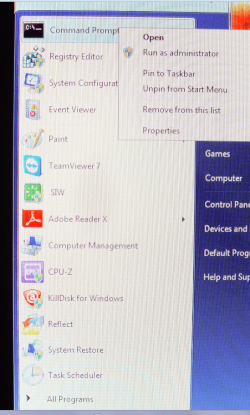
Yep Greg I just type in msconfig, regedit, and cmd and right click - save to to start menu - makes for quick start up of any of them by a right click - run as..
 

Attachments

  • OK.PNG
    OK.PNG
    364 KB · Views: 639

My Computer My Computer

Computer type
PC/Desktop
Computer Manufacturer/Model Number
Own build (new) Desk1 / Asus ROG Win 7 / Desk2 1st build
OS
Desk1 7 Home Prem / Desk2 10 Pro / Main lap Asus ROG 10 Pro 2 laptop Toshiba 7 Pro Asus P2520 7 & 10
CPU
Desk1 i5 3750K / Laptop i7 GTX 860M / Desk2 i5 2500
Motherboard
Desk1 Asus P877-V / Desk2 Gigabyte H67 UD3H / Laptop ?
Memory
Desk1 8GB (1866) / Desk2 16GB (1333) / Laptop 8Gb DDR3
Graphics Card(s)
Desk 1& 2NVidia GTX 650 & Laptops on board Intel
Sound Card
Desk 1 & 2 -XONAR DG Realtek High Def audio Laptop
Monitor(s) Displays
Desk 1 Benq HD 2450 / Desk2 Philips 24" / Laptop 17.5"
Screen Resolution
1920x1080 D1 & D2 & Laptop 1
Hard Drives
Desk1 Samsung 120GB 830 SSD
Asus ROG 256GB 850 Pro SSD
Desk2 Samsung 840 256 SSD
Toshiba 120GB EVO
PSU
Desk 1 Corsair HX 1050/ Laptop ? / Desk 2 Corsair HX 650
Case
Desk 1 Cooler HAF XM ? Toshiba laptop / Desk2 Coolermaster
Cooling
Fans on all Desk1 -2 Desk2 - all Coolermasters 5 Laptop ?
Keyboard
Desk 1 MS Sidewinder X6 Desk 2 MS Sidewinder X 4
Mouse
Desk 1&2 - Gigabyte MS 900 gamer - laptop - Logitec wireless
Internet Speed
ADSL2+
Other Info
One other Desktop (tester) and spare Toshba laptop both with SSD's
Running Kaspersky 2016 ISS on all machines config'd identically
Logitec audio stereo systems on each machine (x3)
Canon MG5250MFC
Router/modem TP-Link running WPA2SK
Edited Step 1 to explain how to run msconfig as Administrator, which is also shown in Method Three of Startup Programs - Change
Yep Greg I just type in msconfig, regedit, and cmd and right click - save to to start menu - makes for quick start up of any of them by a right click - run as..
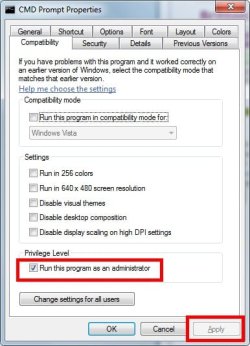
If you select Properties from the right click menu, Compatibility tab and check Run as Administrator it will run that way without the right click in the start menu. I'm lazy. :D
 

My Computer My Computer

Computer type
PC/Desktop
Computer Manufacturer/Model Number
Home Built Desktop By DataTech
OS
Windows 7 Ultimate X64 SP1
CPU
Intel i5-2550K, Differing ~4.4-4.8GHz No built in GPU
Motherboard
ASUS P8Z68-V PRO/GEN3
Memory
16GB G.Skill Sniper 1866MHz @ 2133MHz 2x8GB
Graphics Card(s)
ASUS GTX650TIB-DC2OC-2GD5, (650TI Boost)
Sound Card
Onboard Realtek 5-1
Monitor(s) Displays
Samsung P2570HD
Screen Resolution
1920x1080
Hard Drives
Samsung 840 Pro 256GB SSD for OS, 500GB Seagate Constellation (Enterprise drive) for Data
PSU
Corsair HX650W
Case
Inwin Dragon Rider
Cooling
Hyper 212 EVO w/two Noctua fans, push-pull, @1300 RPM
Keyboard
E-Z Eyes, bright yellow keys with large characters
Mouse
steelseries SENSEI Laser Pro Gaming
Internet Speed
48-51Mbs Mbs down, 11 Mbs up Xfinity Cable
Antivirus
Norton Internet Security 2013
Browser
IE 10, Opera, Pale Moon if needed
Other Info
4 case fans, LG BluRay-RE, ASUS DVD-RW, Mr. Fusion power supply, 1.21 gigawatts.
Hey now I am going to really show how dumb I ma where is the compatibility tab?? or am on the worng track??
 

My Computer My Computer

Computer type
PC/Desktop
Computer Manufacturer/Model Number
Own build (new) Desk1 / Asus ROG Win 7 / Desk2 1st build
OS
Desk1 7 Home Prem / Desk2 10 Pro / Main lap Asus ROG 10 Pro 2 laptop Toshiba 7 Pro Asus P2520 7 & 10
CPU
Desk1 i5 3750K / Laptop i7 GTX 860M / Desk2 i5 2500
Motherboard
Desk1 Asus P877-V / Desk2 Gigabyte H67 UD3H / Laptop ?
Memory
Desk1 8GB (1866) / Desk2 16GB (1333) / Laptop 8Gb DDR3
Graphics Card(s)
Desk 1& 2NVidia GTX 650 & Laptops on board Intel
Sound Card
Desk 1 & 2 -XONAR DG Realtek High Def audio Laptop
Monitor(s) Displays
Desk 1 Benq HD 2450 / Desk2 Philips 24" / Laptop 17.5"
Screen Resolution
1920x1080 D1 & D2 & Laptop 1
Hard Drives
Desk1 Samsung 120GB 830 SSD
Asus ROG 256GB 850 Pro SSD
Desk2 Samsung 840 256 SSD
Toshiba 120GB EVO
PSU
Desk 1 Corsair HX 1050/ Laptop ? / Desk 2 Corsair HX 650
Case
Desk 1 Cooler HAF XM ? Toshiba laptop / Desk2 Coolermaster
Cooling
Fans on all Desk1 -2 Desk2 - all Coolermasters 5 Laptop ?
Keyboard
Desk 1 MS Sidewinder X6 Desk 2 MS Sidewinder X 4
Mouse
Desk 1&2 - Gigabyte MS 900 gamer - laptop - Logitec wireless
Internet Speed
ADSL2+
Other Info
One other Desktop (tester) and spare Toshba laptop both with SSD's
Running Kaspersky 2016 ISS on all machines config'd identically
Logitec audio stereo systems on each machine (x3)
Canon MG5250MFC
Router/modem TP-Link running WPA2SK
After you have pinned the item to the start menu, right click on it. A menu will open at the bottom of it is "Properties". Click Properties, a window will open with several tabs, here it the one for cmd. Click the tab and you'll see where it says "Run as Admin".

msconfig, regedit will be different.
compat tab.jpgadmin.jpg
 

My Computer My Computer

Computer type
PC/Desktop
Computer Manufacturer/Model Number
Home Built Desktop By DataTech
OS
Windows 7 Ultimate X64 SP1
CPU
Intel i5-2550K, Differing ~4.4-4.8GHz No built in GPU
Motherboard
ASUS P8Z68-V PRO/GEN3
Memory
16GB G.Skill Sniper 1866MHz @ 2133MHz 2x8GB
Graphics Card(s)
ASUS GTX650TIB-DC2OC-2GD5, (650TI Boost)
Sound Card
Onboard Realtek 5-1
Monitor(s) Displays
Samsung P2570HD
Screen Resolution
1920x1080
Hard Drives
Samsung 840 Pro 256GB SSD for OS, 500GB Seagate Constellation (Enterprise drive) for Data
PSU
Corsair HX650W
Case
Inwin Dragon Rider
Cooling
Hyper 212 EVO w/two Noctua fans, push-pull, @1300 RPM
Keyboard
E-Z Eyes, bright yellow keys with large characters
Mouse
steelseries SENSEI Laser Pro Gaming
Internet Speed
48-51Mbs Mbs down, 11 Mbs up Xfinity Cable
Antivirus
Norton Internet Security 2013
Browser
IE 10, Opera, Pale Moon if needed
Other Info
4 case fans, LG BluRay-RE, ASUS DVD-RW, Mr. Fusion power supply, 1.21 gigawatts.

My Computer My Computer

Computer type
PC/Desktop
Computer Manufacturer/Model Number
Self Assembled
OS
Microsoft Windows 10 Pro Insider Preview 64-bit
CPU
Intel(R) Core(TM) i3-4130 CPU @ 3.40GHz
Motherboard
Gigabyte Technology Co., Ltd. B85M-D3H
Memory
Corsair Vengence 4GB x2 (8.00GB Dual-Channel DDR3 @ 798MHz)
Graphics Card(s)
2047MB GeForce GTS 450 (ZOTAC International)
Sound Card
Onboard (Realtek High Definition Audio)
Monitor(s) Displays
LG Flatron E2040T
Screen Resolution
1600x900
Hard Drives
Western Digital 1 TB
Seagate 500 GB
PSU
Corsair VS550
Case
Cooler Master K380
Cooling
Cooler Master Seidon 120V Plus
Keyboard
Logitech MK260r
Mouse
Logitech MK260r
Internet Speed
PMPL Broadband
Antivirus
Windows Defender + MBAM
Browser
Firefox
Other Info
Dell Studio 15" Laptop
After you have pinned the item to the start menu, right click on it. A menu will open at the bottom of it is "Properties". Click Properties, a window will open with several tabs, here it the one for cmd. Click the tab and you'll see where it says "Run as Admin".

msconfig, regedit will be different.
View attachment 240903View attachment 240910
Thanks amte:D
 

My Computer My Computer

Computer type
PC/Desktop
Computer Manufacturer/Model Number
Own build (new) Desk1 / Asus ROG Win 7 / Desk2 1st build
OS
Desk1 7 Home Prem / Desk2 10 Pro / Main lap Asus ROG 10 Pro 2 laptop Toshiba 7 Pro Asus P2520 7 & 10
CPU
Desk1 i5 3750K / Laptop i7 GTX 860M / Desk2 i5 2500
Motherboard
Desk1 Asus P877-V / Desk2 Gigabyte H67 UD3H / Laptop ?
Memory
Desk1 8GB (1866) / Desk2 16GB (1333) / Laptop 8Gb DDR3
Graphics Card(s)
Desk 1& 2NVidia GTX 650 & Laptops on board Intel
Sound Card
Desk 1 & 2 -XONAR DG Realtek High Def audio Laptop
Monitor(s) Displays
Desk 1 Benq HD 2450 / Desk2 Philips 24" / Laptop 17.5"
Screen Resolution
1920x1080 D1 & D2 & Laptop 1
Hard Drives
Desk1 Samsung 120GB 830 SSD
Asus ROG 256GB 850 Pro SSD
Desk2 Samsung 840 256 SSD
Toshiba 120GB EVO
PSU
Desk 1 Corsair HX 1050/ Laptop ? / Desk 2 Corsair HX 650
Case
Desk 1 Cooler HAF XM ? Toshiba laptop / Desk2 Coolermaster
Cooling
Fans on all Desk1 -2 Desk2 - all Coolermasters 5 Laptop ?
Keyboard
Desk 1 MS Sidewinder X6 Desk 2 MS Sidewinder X 4
Mouse
Desk 1&2 - Gigabyte MS 900 gamer - laptop - Logitec wireless
Internet Speed
ADSL2+
Other Info
One other Desktop (tester) and spare Toshba laptop both with SSD's
Running Kaspersky 2016 ISS on all machines config'd identically
Logitec audio stereo systems on each machine (x3)
Canon MG5250MFC
Router/modem TP-Link running WPA2SK
Thank you for this great tutorial Greg. I just used it to clean up my sister's new HP laptop. She had some stuff already installed and didn't want to lose it, so I did this rather than a clean install, which is what I would have done if it had been my laptop.
 

My Computer My Computer

Computer Manufacturer/Model Number
Customized build from CyberPower
OS
Windows 7 Home Premium 64bit SP 1
CPU
Intel i5 2500k
Motherboard
Asus P8P67 Deluxe
Memory
8 gigabytes Corsair PC3-12800 DDR3
Graphics Card(s)
EVGA GeForce GTX 460 superclocked
Sound Card
Integrated
Monitor(s) Displays
ViewSonic 23" LCD
Screen Resolution
1980 x 1080
Hard Drives
120 Gb Samsung 840 Pro SSD
120 Gb Kingston Hyper X SSD
1 Tb WD Caviar Black HDD
PSU
Coolermaster 1000 watt modular
Case
Coolermaster HAF X full tower
Cooling
Coolermaster Hyper 212 plus
Keyboard
Logitech USB
Mouse
Microsoft 3 button
Internet Speed
download 1.5 Mb/sec upload 300Kb/sec
I have all items disabled in msconfig start up except my av and 1 microsoft that keeps coming back
Do I need to disable all these programs somewhere else or is disabling them in msconfig good enough?
Thanks
 

My Computer My Computer

OS
Windows 7 home premium 64
Hello Vaper,

If you just didn't want the programs to run at startup, then disabling them in msconfig would be fine. :)
 

My Computer My Computer

Computer type
PC/Desktop
Computer Manufacturer/Model Number
Self built custom
OS
64-bit Windows 11 Pro for Workstations
CPU
Intel i7-8700K OC'd to 5 GHz
Motherboard
ASUS ROG Maximus XI Formula Z390
Memory
64 GB (4x16GB) G.SKILL TridentZ RGB DDR4 3600 MHz
Graphics Card(s)
ASUS ROG-STRIX-GTX1080TI-O11G-GAMING
Sound Card
Integrated
Monitor(s) Displays
2 x Samsung Odyssey G7 27"
Screen Resolution
2560x1440
Hard Drives
1TB Samsung 990 PRO M.2,
4TB Samsung 990 PRO PRO M.2,
TerraMaster F8 SSD Plus NAS
PSU
Seasonic Prime Titanium 850W
Case
Thermaltake Core P3
Cooling
Corsair Hydro H115i
Keyboard
Logitech wireless K800
Mouse
Logitech MX Master 4
Internet Speed
2 Gb/s Download and 100 Mb/s Upload
Antivirus
Malwarebyte Anti-Malware Premium
Browser
Google Chrome
Other Info
Logitech Z625 speaker system,
Logitech BRIO 4K Pro webcam,
HP Color LaserJet Pro MFP M477fdn,
APC SMART-UPS RT 1000 XL - SURT1000XLI,
Galaxy S23 Plus phone
Thanks Brink,I will slowly uninstall them
 

My Computer My Computer

OS
Windows 7 home premium 64
You're welcome. Hopefully they will not uninstall to slowly for you. :)
 

My Computer My Computer

Computer type
PC/Desktop
Computer Manufacturer/Model Number
Self built custom
OS
64-bit Windows 11 Pro for Workstations
CPU
Intel i7-8700K OC'd to 5 GHz
Motherboard
ASUS ROG Maximus XI Formula Z390
Memory
64 GB (4x16GB) G.SKILL TridentZ RGB DDR4 3600 MHz
Graphics Card(s)
ASUS ROG-STRIX-GTX1080TI-O11G-GAMING
Sound Card
Integrated
Monitor(s) Displays
2 x Samsung Odyssey G7 27"
Screen Resolution
2560x1440
Hard Drives
1TB Samsung 990 PRO M.2,
4TB Samsung 990 PRO PRO M.2,
TerraMaster F8 SSD Plus NAS
PSU
Seasonic Prime Titanium 850W
Case
Thermaltake Core P3
Cooling
Corsair Hydro H115i
Keyboard
Logitech wireless K800
Mouse
Logitech MX Master 4
Internet Speed
2 Gb/s Download and 100 Mb/s Upload
Antivirus
Malwarebyte Anti-Malware Premium
Browser
Google Chrome
Other Info
Logitech Z625 speaker system,
Logitech BRIO 4K Pro webcam,
HP Color LaserJet Pro MFP M477fdn,
APC SMART-UPS RT 1000 XL - SURT1000XLI,
Galaxy S23 Plus phone
Nice ref Greg however I am a dedicated Kaspersky freak so won't use the MSE and I was under the impression that Windows 7 was more fussy on the defrag it uses preferring the M$ one instead of after markets??
 

My Computer My Computer

Computer type
PC/Desktop
Computer Manufacturer/Model Number
Own build (new) Desk1 / Asus ROG Win 7 / Desk2 1st build
OS
Desk1 7 Home Prem / Desk2 10 Pro / Main lap Asus ROG 10 Pro 2 laptop Toshiba 7 Pro Asus P2520 7 & 10
CPU
Desk1 i5 3750K / Laptop i7 GTX 860M / Desk2 i5 2500
Motherboard
Desk1 Asus P877-V / Desk2 Gigabyte H67 UD3H / Laptop ?
Memory
Desk1 8GB (1866) / Desk2 16GB (1333) / Laptop 8Gb DDR3
Graphics Card(s)
Desk 1& 2NVidia GTX 650 & Laptops on board Intel
Sound Card
Desk 1 & 2 -XONAR DG Realtek High Def audio Laptop
Monitor(s) Displays
Desk 1 Benq HD 2450 / Desk2 Philips 24" / Laptop 17.5"
Screen Resolution
1920x1080 D1 & D2 & Laptop 1
Hard Drives
Desk1 Samsung 120GB 830 SSD
Asus ROG 256GB 850 Pro SSD
Desk2 Samsung 840 256 SSD
Toshiba 120GB EVO
PSU
Desk 1 Corsair HX 1050/ Laptop ? / Desk 2 Corsair HX 650
Case
Desk 1 Cooler HAF XM ? Toshiba laptop / Desk2 Coolermaster
Cooling
Fans on all Desk1 -2 Desk2 - all Coolermasters 5 Laptop ?
Keyboard
Desk 1 MS Sidewinder X6 Desk 2 MS Sidewinder X 4
Mouse
Desk 1&2 - Gigabyte MS 900 gamer - laptop - Logitec wireless
Internet Speed
ADSL2+
Other Info
One other Desktop (tester) and spare Toshba laptop both with SSD's
Running Kaspersky 2016 ISS on all machines config'd identically
Logitec audio stereo systems on each machine (x3)
Canon MG5250MFC
Router/modem TP-Link running WPA2SK
The Puran Defrag and w7 seem to work fine together. I use it about one a month on my data HDD.
 

My Computer My Computer

Computer type
PC/Desktop
Computer Manufacturer/Model Number
Home Built Desktop By DataTech
OS
Windows 7 Ultimate X64 SP1
CPU
Intel i5-2550K, Differing ~4.4-4.8GHz No built in GPU
Motherboard
ASUS P8Z68-V PRO/GEN3
Memory
16GB G.Skill Sniper 1866MHz @ 2133MHz 2x8GB
Graphics Card(s)
ASUS GTX650TIB-DC2OC-2GD5, (650TI Boost)
Sound Card
Onboard Realtek 5-1
Monitor(s) Displays
Samsung P2570HD
Screen Resolution
1920x1080
Hard Drives
Samsung 840 Pro 256GB SSD for OS, 500GB Seagate Constellation (Enterprise drive) for Data
PSU
Corsair HX650W
Case
Inwin Dragon Rider
Cooling
Hyper 212 EVO w/two Noctua fans, push-pull, @1300 RPM
Keyboard
E-Z Eyes, bright yellow keys with large characters
Mouse
steelseries SENSEI Laser Pro Gaming
Internet Speed
48-51Mbs Mbs down, 11 Mbs up Xfinity Cable
Antivirus
Norton Internet Security 2013
Browser
IE 10, Opera, Pale Moon if needed
Other Info
4 case fans, LG BluRay-RE, ASUS DVD-RW, Mr. Fusion power supply, 1.21 gigawatts.
There is no comparing defrag done from Windows with a boot-time Defrag that has access to all of the System files. I learned this when no defrag would resolve slow reads and boot time on a HD except Puran which improved boot time by a minute.
 
The Puran Defrag and w7 seem to work fine together. I use it about one a month on my data HDD.
Thanks Gary I haven't used a defrag for so long now cos of the SSD's so the only time I use them are for fixes.
 

My Computer My Computer

Computer type
PC/Desktop
Computer Manufacturer/Model Number
Own build (new) Desk1 / Asus ROG Win 7 / Desk2 1st build
OS
Desk1 7 Home Prem / Desk2 10 Pro / Main lap Asus ROG 10 Pro 2 laptop Toshiba 7 Pro Asus P2520 7 & 10
CPU
Desk1 i5 3750K / Laptop i7 GTX 860M / Desk2 i5 2500
Motherboard
Desk1 Asus P877-V / Desk2 Gigabyte H67 UD3H / Laptop ?
Memory
Desk1 8GB (1866) / Desk2 16GB (1333) / Laptop 8Gb DDR3
Graphics Card(s)
Desk 1& 2NVidia GTX 650 & Laptops on board Intel
Sound Card
Desk 1 & 2 -XONAR DG Realtek High Def audio Laptop
Monitor(s) Displays
Desk 1 Benq HD 2450 / Desk2 Philips 24" / Laptop 17.5"
Screen Resolution
1920x1080 D1 & D2 & Laptop 1
Hard Drives
Desk1 Samsung 120GB 830 SSD
Asus ROG 256GB 850 Pro SSD
Desk2 Samsung 840 256 SSD
Toshiba 120GB EVO
PSU
Desk 1 Corsair HX 1050/ Laptop ? / Desk 2 Corsair HX 650
Case
Desk 1 Cooler HAF XM ? Toshiba laptop / Desk2 Coolermaster
Cooling
Fans on all Desk1 -2 Desk2 - all Coolermasters 5 Laptop ?
Keyboard
Desk 1 MS Sidewinder X6 Desk 2 MS Sidewinder X 4
Mouse
Desk 1&2 - Gigabyte MS 900 gamer - laptop - Logitec wireless
Internet Speed
ADSL2+
Other Info
One other Desktop (tester) and spare Toshba laptop both with SSD's
Running Kaspersky 2016 ISS on all machines config'd identically
Logitec audio stereo systems on each machine (x3)
Canon MG5250MFC
Router/modem TP-Link running WPA2SK
Greg and others,
Thanks for all the help with my problem. Any idea's as to why Lenovo would put the recovery data in Q drive? I was looking at my own Lenovo which has a recovery but there is NO separate drive letter. It appears to be all part of the C drive. I made recovery disks and computer says that the Q drive can be deleted when that is done. Would deleting that be the same as taking and removing Q drive letter? I would like to keep the recovery if possible. I'm not sure how I can text the disks I made.
 

My Computer My Computer

Computer type
Laptop
Computer Manufacturer/Model Number
Lenovo Y560
OS
Win 7 Home Premium 64 bit
CPU
i7
Motherboard
Not sure
Memory
8GB
Graphics Card(s)
ATI Radeon Mobility 5730 series
Hard Drives
mSata Intel 80GB SSD , 500GB 7200 speed
Antivirus
MSE
Browser
Internet Explorer 9, Firefox22
Back
Top