
Cleaning up Windows partition

Koles

New member
Local time
3:35 PM
Messages
12
Hi. My Windows 7 partition grew too big and it seems to be growing in time. I really need to clean up some files from there. I did all standard system cleaning up like uninstalling apps which I dont use, running CCleaner, moving virtual memory to other partition, running system "partition cleanup" tool (with system files cleanup), but it's still huge and I'm not sure how to safely delete some files without damaging system. Can you help with this? Thanks.
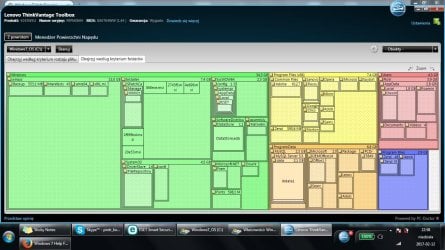
Below screenshot from partition analysis.
 

Attachments
  • partition analysis.jpg
    partition analysis.jpg
    194.6 KB · Views: 12

My Computer

Computer type
Laptop
Computer Manufacturer/Model Number
Lenovo ThinkPad T520
OS
Windows 7 64-bit
Antivirus
Eset NOD32
That diagram makes it very hard to workout just how big your Windows partition actually is. From what I can workout it seems to be about 45 GB, is that about right.

My Windows system has about 43 GB on it & that would seem to be fairly normal for most computers, that get a fair bit of work. It's fairly normal for Windows to get larger over time & often that is due to installing new programs, storage of pictures & videos, adding files & folder with stored data.
 

My Computer

Computer type
PC/Desktop
Computer Manufacturer/Model Number
Self built using existing case
OS
Windows 7 Home Premium 64 bit sp1
CPU
Intel i5 3570 3.4Ghz Ivy Bridge SKT 1155 quad core
Motherboard
Gigabyte Z77-HD3 SKT 1155 2xSata 3, 4x USB 3.0
Memory
G-Skill Rip Jaws 16Gb (8x2) DDR3 -1600 PC3 12800 CL 10 red
Graphics Card(s)
Gigabyte NVIDIA GT610 1Gb DDR3 810/1200 PCI-E 2.0 Silent
Sound Card
NVIDIA High Definition & Realtech High Definition Audio
Monitor(s) Displays
2 x Philips 226V4L 16:9 aspect ratio
Screen Resolution
1920 x 1080 HD
Hard Drives
Samsung 840 Pro 256gb SSD, SATA 3.
Hitachi Touro Portable 1tb, USB 3.0 HDD used for image b/ups.
PSU
Corsair VS450
Case
Codeng
Cooling
PSU fan & CPU fan
Keyboard
Logitech
Mouse
Logitech Wireless trackball M570
Internet Speed
Wireless 3G. 3mg down & 550kb up.
Antivirus
Bitdefender Internet Security 2020
Browser
Opera (Current Version) & Firefox
Other Info
MS Office 2013 Pro. Davis weather station software. MGE Nova 600 avr UPS.
WinDirStat does a better job of showing relative sizes of folders. Easier to read.:)
 

My Computer

Computer type
PC/Desktop
Computer Manufacturer/Model Number
HP p6-2020t
OS
Win 7 Ult 64-bit
CPU
G620 2.6GHZ Pentium R
Memory
6 GB
Monitor(s) Displays
25" HPLV2311
Screen Resolution
1920 x 1200
Hard Drives
1 SATA, 1 exterior SATA
Case
HP
Cooling
PSU
Antivirus
Glasswire
Browser
Waterfox; Firefox; Chrome for work
Other Info
Firewall--Glasswire
Similar specs in Gateway DX4200
Verizon FIOS Wired network

1 other Win7 computer-- has SSD
I'm just asking what are usual places on Windows partition that can be cleaned up. I bet that Windows keeps some old stuff which is not used at all which can be deleted.
 

My Computer

Computer type
Laptop
Computer Manufacturer/Model Number
Lenovo ThinkPad T520
OS
Windows 7 64-bit
Antivirus
Eset NOD32
However WinDirStat did some help for me already, thanks :-)
 

My Computer

Computer type
Laptop
Computer Manufacturer/Model Number
Lenovo ThinkPad T520
OS
Windows 7 64-bit
Antivirus
Eset NOD32
and I use CCleaner regularly, except for the registry-fix feature.
 

My Computer

Computer type
PC/Desktop
Computer Manufacturer/Model Number
HP p6-2020t
OS
Win 7 Ult 64-bit
CPU
G620 2.6GHZ Pentium R
Memory
6 GB
Monitor(s) Displays
25" HPLV2311
Screen Resolution
1920 x 1200
Hard Drives
1 SATA, 1 exterior SATA
Case
HP
Cooling
PSU
Antivirus
Glasswire
Browser
Waterfox; Firefox; Chrome for work
Other Info
Firewall--Glasswire
Similar specs in Gateway DX4200
Verizon FIOS Wired network

1 other Win7 computer-- has SSD
One well known byte-space hog are System Restore Points.
And, there are a few TEMP sub-directories, along with Windows Recent & Prefetch, that can be cleaned maybe quarterly.
 

My Computer

Computer type
PC/Desktop
Computer Manufacturer/Model Number
Antec desktop; Acer Aspire laptops
OS
Windows 7 Professional 64-bit
CPU
Desktop i5; Acers i5 & i7
Memory
desktop 16GB; 1 Acer 8GB & 1 Acer 16GB
Hard Drives
1TB split into 2 equal partitions [OS and data] usable by RJS
Internet Speed
AT&T DSL
Browser
FF, GChrome, msIE
Other Info
Windows 7 Firewall, Emsisoft AM/AV, MSE [scan-only], SpywareBlaster, Ruiware/BillP combine

My Computer

Computer type
PC/Desktop
Computer Manufacturer/Model Number
Home made Desktop
OS
Windows 10 Pro. 64/ version 1709 Windows 7 Pro/64
CPU
Intel i7-6800K @ 4.3
Motherboard
ASUS X-99 Deluxe II
Memory
Corsair Platinum 16 gig @2400
Graphics Card(s)
EVGA GTX 1070 OC
Monitor(s) Displays
Asus 27" LED LCD/VE278Q
Screen Resolution
1920-1080 or 1280-720 HDMI
Hard Drives
INTEL SSD 730-240 Gb Sata 3.0/
PSU
EVGA Platium 1200W
Case
Phanteks Luxe Tempered Glass 8 fans/ one radiator
Cooling
XSPC/ Water Cooled CPU
Keyboard
Das 4 Professional
Mouse
Logitech M705/MX Anywhere 2-S
Internet Speed
100 mbits
Antivirus
Microsoft Security Essentials/ Malwarebytes Premium 3.0/ SAS
Browser
I.E. 11 default/Firefox/ ISP Time Warner Cable/Spectrum
Other Info
LG BluRay Burner/
Sound system-KLipsch-THX/
Icy Dock ssd Hot Swap bays.
Back
Top