
Hi
Up to now I have had just the one hard drive of 500GB (on a spare PC) running dual boot Windows 7 and Windows 10. The drive also has a drives D: and E: containing my programs and data respectively. However, I now have a 240GB SSD free and I want to boot the PC from this SSD, preferrably designated drive C: whichever OS I select to use. However, since I already have a drive C: containing Windows on the hard drive (and I do NOT have a Reserved Partition) I'm a little unsure how to go about this.
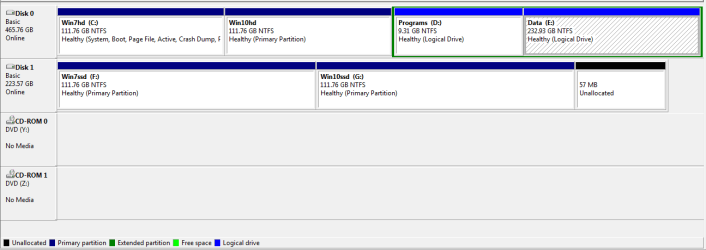
I have now transferred both Windows 7 and 10 to the SSD courtesy of Partition Wizard but now wish to boot from the SSD although I believe this would be designated drive F:. I believe I know what is needed to get this far but what I'm not sure about is how to make the OS partition drive C: instead of drive F:. To show what I mean I attach a graphic of the Disk Management window below.
My initial thinking is to get the OS partition working as drive F: to start with and once that is working I can then delete drive C: on the hard disk. However, where do I go from there? Will I again have to do the three Startup Repairs in order to recognise drive C: as the Windows drive or is/are the any other process/es I have to go through to achieve my aim?
As far as getting Windows 10 up and running I am fully expecting to get the message that "Windows cannot verify the digital signature for this file". Well, I'm fully prepared for this as it would not be the first time I've received this message and dealt with it. My main problem is getting the PC to boot from drive C: on the SSD and any help would be most appreciated. Many thanks.
Tracey
Up to now I have had just the one hard drive of 500GB (on a spare PC) running dual boot Windows 7 and Windows 10. The drive also has a drives D: and E: containing my programs and data respectively. However, I now have a 240GB SSD free and I want to boot the PC from this SSD, preferrably designated drive C: whichever OS I select to use. However, since I already have a drive C: containing Windows on the hard drive (and I do NOT have a Reserved Partition) I'm a little unsure how to go about this.
I have now transferred both Windows 7 and 10 to the SSD courtesy of Partition Wizard but now wish to boot from the SSD although I believe this would be designated drive F:. I believe I know what is needed to get this far but what I'm not sure about is how to make the OS partition drive C: instead of drive F:. To show what I mean I attach a graphic of the Disk Management window below.
My initial thinking is to get the OS partition working as drive F: to start with and once that is working I can then delete drive C: on the hard disk. However, where do I go from there? Will I again have to do the three Startup Repairs in order to recognise drive C: as the Windows drive or is/are the any other process/es I have to go through to achieve my aim?
As far as getting Windows 10 up and running I am fully expecting to get the message that "Windows cannot verify the digital signature for this file". Well, I'm fully prepared for this as it would not be the first time I've received this message and dealt with it. My main problem is getting the PC to boot from drive C: on the SSD and any help would be most appreciated. Many thanks.
Tracey
Attachments
My Computer
- Computer type
- PC/Desktop
- Computer Manufacturer/Model Number
- Self built
- OS
- Windows 7 Home Premium 64-bit and Window 10 Pro (dual boot)
- CPU
- Intel i5-4690K
- Motherboard
- Gigabyte Z97P-D3
- Memory
- 8Gb Vengeance
- Graphics Card(s)
- Nvidia GTX760
- Sound Card
- Integrated with Mobo (Realtek 887)
- Monitor(s) Displays
- Iiyama E2407HDS (x2)
- Screen Resolution
- 1920 x 1080
- Hard Drives
- 1 x 240GB Kingston (System disk)
1 x 256GB Samsung SSD
1 x 1TB Samsung hard disk (internal)
1 x 3TB WD My Book (external)
- PSU
- Atrix 500W
- Case
- Antec One
- Cooling
- Corsair H80i
- Keyboard
- Logitech wireless
- Mouse
- Logitech wireless
- Internet Speed
- Up to 24Mb
- Antivirus
- Avast! Free antivirus
- Browser
- Opera, Firefox, Chrome
- Other Info
- Wacom Bamboo Tablet


