
CLFS transaction logs - Reset
Information
Definition
The Common Log File System (CLFS) is a general-purpose logging service that can be used by software clients running in user-mode or kernel-mode.(source Using Common Log File System (Windows Driver Kit))
If due to any reason system transaction logs are in an inconsistant state you may have following problems in your system
-Windows Update Error 0x80070643,0x8007000B,0x80071A91
-Repeatedly offered the same update,in update history is information about succesfully installed an update,although in Programs and Features>>View Installed Updates there is no this update
-Windows Backup Errror 0x80071A91
-System Restore Error 0x80071A91
-Task Scheduler Error Transaction support within the specified file system resource manager is not started or was shut down due to an error and other issues with Task Scheduler
-issues with Windows Search service (i.e Event ID 1006 and other)
-possibly below methods can help you fix anything 0x80071A91 error in your system and many other unknow poorly documented errors
This tutorial applies to Vista/Windows 7 (all versions).
METHOD I
Run cmd.exe with elevated previlliges (right click on cmd.exe and choose "run as Administrator) and type:
fsutil resource setautoreset true c:\
and next restart computer.Alternatively you can run this MS Fix it 50140
METHOD II
Boot into "safe mode with command prompt" (in normal mode this method may not work fully)
//see also Advanced Boot Options //
and type:
cd %windir%\System32\Config\TxR
press ENTER
attrib -r -s -h *
press ENTER
del *
press ENTER
cd %windir%\System32\SMI\Store\Machine
press ENTER
attrib -r -s -h *
press ENTER
del *.tm*
press ENTER
del *.blf
press ENTER
del *.regtrans-ms
press ENTER
Warning
Pay attention if any command return some error.It would be very important
Possible errors returned by commands
Could not find <file name> -You may not have some file but it's normal and you can safely ignore this error.
The process cannot access the file because it is being used by another process-As message say unable to delete files.If remains succesfuly done commands does not fix problem you have to repeat this step from WinRE level or
any liveCD (See METHOD III)
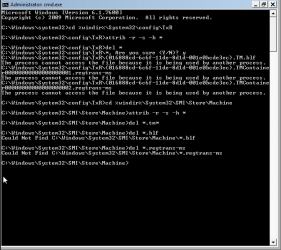
As you can see in this example unable to delete some files in TxR folder
 .If remains commands does not fix your problem you have to repeat this step from WinRE or linux.
METHOD III (from WinRE level)
//apply only if unable to complete all steps in METHOD II and problem still exist//
Warning
Mostly cases OS is installed on first partition and WinRE can see it also as C:.If you have installed OS on other partition you have to change drive letter in my commands i.e if you have OS on second partition the proper first command for you will be cd /d D:\Windows\System32\Config\TxR and so on for remains commands below.For precaution you can check partitions status in diskmgmt.msc in your OS,before you boot installation disk
Boot your Windows installation disk,choose language>>repair computer>>command prompt and type:
cd /d C:\Windows\System32\Config\TxR
press ENTER
attrib -r -s -h *
press ENTER
del *
press ENTER
cd C:\Windows\System32\SMI\Store\Machine
press ENTER
attrib -r -s -h *
press ENTER
del *.tm*
press ENTER
del *.blf
press ENTER
del *.regtrans-ms
press ENTER
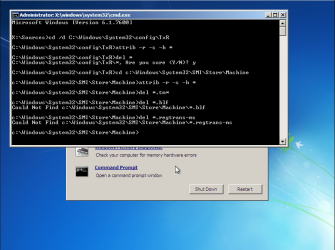
From WinRE there is no problem to make all commands.As I said before you can ignore error about missing files -you may not have all log files and it's normal
If you hate WinRE and command prompt you can use any live CD or linux i.e Ubuntu too.By using linux you have to delete following files:
in Windows\System32\Config\TxR :
-delete all files
in Windows\System32\SMI\Store\Machine:
-delete only files with extensions *.tm*,*.blf,*.regtrans-ms
Last edited:


