
ClickLock - Turn On or Off

How to Turn ClickLock On or Off in Windows 7

   Information
In this tutorial you will learn about the usage of ClickLock to easily select multiple objects.
   Note
ClickLock enables you to highlight or drag without holding down the mouse button.
   Tip
This feature is very useful for selecting items with a laptop touchpad.


Let's Begin:

[1] Open the Start menu. Type in "Mouse" (without the quotation marks) and hit Enter.
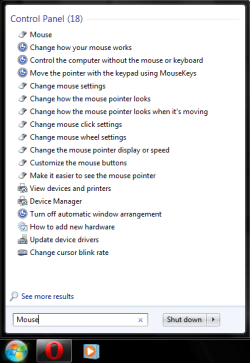
Start-Mouse.png
[2] To Turn On ClickLock
A) At the bottom of the dialog box, check the "Turn on ClickLock" box. Then, hit the "Apply" button, and then the "OK" button.
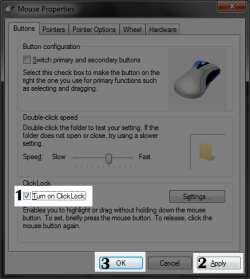
ClickLock - Enable.png
B) Go to step 4.
[3] To Turn Off ClickLock
A) At the bottom of the dialog box, uncheck the "Turn on ClickLock" box. Then, hit the "Apply" button, and then the "OK" button. (See screenshot above)

B) You're done.
[4] Let's go to a folder with some items. Press and hold the left mouse button and slowly begin to make a selection. After 3 seconds of the left mouse button being held, release it. You will notice that the process of selecting is still ongoing. This also works for selecting text and other content.
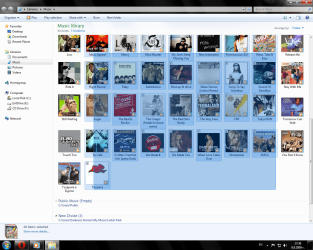
ClickLock Function.png
   Tip
You can adjust how long you have to hold the mouse button before ClickLock activates by going to the Mouse options again and clicking the "Settings" button to the right of the "ClickLock" checkbox. Drag the slider to adjust this setting.
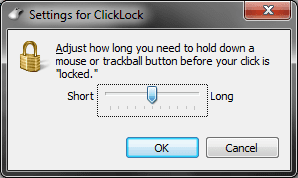
Settings for ClickLock.png

THAT'S IT!!!
-~- D.W.96 -~-


Last edited by a moderator:
Hum I couldn't find how to turn of the touchpad with this tut bu in Control Panel under Mouse Properties I had Touch pad settings and just ticked Disable internal pointing device and bingo on and off it goes!
 

My Computer

Computer type
PC/Desktop
Computer Manufacturer/Model Number
Own build (new) Desk1 / Asus ROG Win 7 / Desk2 1st build
OS
Desk1 7 Home Prem / Desk2 10 Pro / Main lap Asus ROG 10 Pro 2 laptop Toshiba 7 Pro Asus P2520 7 & 10
CPU
Desk1 i5 3750K / Laptop i7 GTX 860M / Desk2 i5 2500
Motherboard
Desk1 Asus P877-V / Desk2 Gigabyte H67 UD3H / Laptop ?
Memory
Desk1 8GB (1866) / Desk2 16GB (1333) / Laptop 8Gb DDR3
Graphics Card(s)
Desk 1& 2NVidia GTX 650 & Laptops on board Intel
Sound Card
Desk 1 & 2 -XONAR DG Realtek High Def audio Laptop
Monitor(s) Displays
Desk 1 Benq HD 2450 / Desk2 Philips 24" / Laptop 17.5"
Screen Resolution
1920x1080 D1 & D2 & Laptop 1
Hard Drives
Desk1 Samsung 120GB 830 SSD
Asus ROG 256GB 850 Pro SSD
Desk2 Samsung 840 256 SSD
Toshiba 120GB EVO
PSU
Desk 1 Corsair HX 1050/ Laptop ? / Desk 2 Corsair HX 650
Case
Desk 1 Cooler HAF XM ? Toshiba laptop / Desk2 Coolermaster
Cooling
Fans on all Desk1 -2 Desk2 - all Coolermasters 5 Laptop ?
Keyboard
Desk 1 MS Sidewinder X6 Desk 2 MS Sidewinder X 4
Mouse
Desk 1&2 - Gigabyte MS 900 gamer - laptop - Logitec wireless
Internet Speed
ADSL2+
Other Info
One other Desktop (tester) and spare Toshba laptop both with SSD's
Running Kaspersky 2016 ISS on all machines config'd identically
Logitec audio stereo systems on each machine (x3)
Canon MG5250MFC
Router/modem TP-Link running WPA2SK
Back
Top