
Ok long story short.
Used messy procedure to clone hdd to ssd via norton ghost.
The 100mbit partition is removed, and new partition is aligned on ssd.
New partition has mbr, marked as active, and is now the system partition, the system boot part WORKS. Its for sure as I removed old system files of original hdd boot.
Now here is where I am currently stuck.
On boot comes up a boot menu with 2 options, both windows 7. One is the hdd, other is supposed to be ssd but also boots the hdd.
In msconfig I see the following.
The non default one is to boot of c: drive.
the default one boots of \device\harddisk\volume3\windows
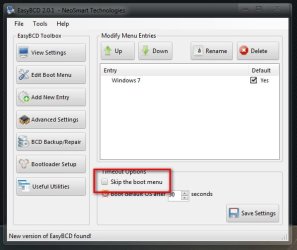
in easy bcd I renamed them so can tell both apart however in terms of boot source of files I can only change drive letter not volume.
so I am stuck.
What defines what is the c: drive right at the start of system boot? in bios the ssd is first boot device yet it seems the original hdd is assigned c:.
currently volume 3 is the old system reserved partition so it seems it points to same device hence both options booting of hdd, the ssd is volume 10. currently without a drive letter, before last reboot it did have a drive letter tho.
Also I just tried setting the device to BOOT in easybcd for the default option but its still booting of hdd.
Used messy procedure to clone hdd to ssd via norton ghost.
The 100mbit partition is removed, and new partition is aligned on ssd.
New partition has mbr, marked as active, and is now the system partition, the system boot part WORKS. Its for sure as I removed old system files of original hdd boot.
Now here is where I am currently stuck.
On boot comes up a boot menu with 2 options, both windows 7. One is the hdd, other is supposed to be ssd but also boots the hdd.
In msconfig I see the following.
The non default one is to boot of c: drive.
the default one boots of \device\harddisk\volume3\windows
in easy bcd I renamed them so can tell both apart however in terms of boot source of files I can only change drive letter not volume.
so I am stuck.
What defines what is the c: drive right at the start of system boot? in bios the ssd is first boot device yet it seems the original hdd is assigned c:.
currently volume 3 is the old system reserved partition so it seems it points to same device hence both options booting of hdd, the ssd is volume 10. currently without a drive letter, before last reboot it did have a drive letter tho.
Also I just tried setting the device to BOOT in easybcd for the default option but its still booting of hdd.
My Computer
At a glance
windows 8.1 Pro x64intel i5 4670k @ 4.3ghz16 gig ram ddr3 @ 1600 corsair vengeanceevga 970 GTX 4 GIG FTW ACX 2.0
- Computer type
- PC/Desktop
- Computer Manufacturer/Model Number
- home built
- OS
- windows 8.1 Pro x64
- CPU
- intel i5 4670k @ 4.3ghz
- Motherboard
- asus z87-plus
- Memory
- 16 gig ram ddr3 @ 1600 corsair vengeance
- Graphics Card(s)
- evga 970 GTX 4 GIG FTW ACX 2.0
- Sound Card
- asus xonar D2X
- Monitor(s) Displays
- benq gw2765ht
- Screen Resolution
- 2560x1440
- Hard Drives
- Samsung 850 pro SSD 512gig - boot device wooosh
WD black cavalier 640gig WD6401AALS
Seagate 500gig ST3500630AS
WD 2TB Green WDC20EARS
2 x WD Red 3TB WD30EFRX
Samsung 750gig HD753LG - on asmedia controller
- PSU
- coolermaster silent pro 600watt modular
- Case
- fractal define R4
- Cooling
- artic freezer i30, 3 case fans
- Keyboard
- microsoft business ps2 keyboard
- Mouse
- microsoft optical black mouse
- Internet Speed
- 80/20 FTTC SkyBB
- Antivirus
- Nod32 AV v8, HitmanProAlert, SRP, System Hardening
- Browser
- Chrome x64
- Other Info
- Intel controller is in AHCI mode currently using IaSTOR 12.8.0.1016 drivers



 . This may be related to me uninstalling my sp1 update backups tho in preperation for the ssd migration? as now I think about i guess that removed all update backups. I had to reaccept eula for the Malicous software removal tool also.

