
Solved COD MW2 Resolution problem after windows 7 upgrade

  • Thread starter Thread starter Jbz
  • Start date Start date
J

Jbz

Guest
Hello everyone

A few days ago I got my Windows 7 upgrade CD in the mail.

After discovering a few flaws (like the "show desktop" being gone), I noticed one problem that I still can't fix.

It is as simple as this:

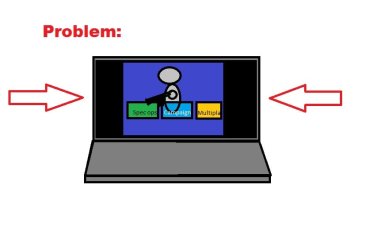
When playing call of duty modern warfare 2 my game window is not maxed out for use of the entire screen. This is very annoying as my laptop only has a 17" screen.

I am suspecting it is a problem with the driver install after I upgraded from Windows Vista to Windows 7 Home Premium 32bits.

I have tried the most of it by now, and even though there are similar problems on this site, the solutions would not fix mine.

View my attachment for a picture drawn with superior paint skills to better the description of my problem.

- Jb
 

Attachments

  • COD Problem.jpg
    COD Problem.jpg
    19 KB · Views: 187
I have little same problem :/ but my game windows show like any other window in my desktop and it sucks play like that! Can anybody help?

...and sry my bad english :p
 

My Computer

OS
SEven 64bit
While that is a very nice picture you made, it can't help us help you as much as you listing your full system specs.

btw... show desktop is still there... it's the rectangle on the very far right of the taskbar, next to your clock.
 

My Computer

OS
7 Ultimate x64
CPU
i5-2500k
Motherboard
Asus P8P67 Pro
Memory
8GB G.Skill Ripjaws X F3-12800CL7D-8GBXH 1866MHz 8-9-8-24
Graphics Card(s)
EVGA GTX 570 SC
Sound Card
X-Fi Titanium Fatality
Monitor(s) Displays
Samsung S27A550H 27" LED
Screen Resolution
1920x1080
Hard Drives
OCZ Vertex 3 120GB.
1TB Samsung F3.
2TB Samsung F4.
PSU
PC Power & Cooling Silencer 760
Case
Lian Li Lancool K62
Cooling
Thermalright Venomous X Black/Scythe S-Flex/Shin-Etsu X23
Keyboard
MS Natural Elite 4000 Ergonomic
Mouse
Logitech G500
Internet Speed
6MB/768
Other Info
Logitech Z-5500 505 watts.
D-Link DGL-4500.
Tripp-Lite Smart Pro 1500.
mmm..ok

nForce 780i SLI, DDR2, SATAII Core 2 Duo
1TB Caviar Black, SATAII, 7200rpm, 32MB
4 x 2GB, XP2-8500 Dual Kit, DDR2 1066MHz (5-5-5-15)
GeForce GTX 295 1792MB GDDR3, 2xDVI, HDMI, HDCP
Silencer 750 Quad (Red, Crossfire edition) ATX-power
CORE 2 QUAD Q9550 2.83GHz~3.30Ghz and NH-C12P, LGA 775
case is Lexa Redline Edition
display Asus vk 246

and what i try to explain:
img2519255.jpg
 

My Computer

OS
SEven 64bit
I know you said you got an upgrade cd, but did you do a clean install or an in place upgrade?
 

My Computer

OS
7 Ultimate x64
CPU
i5-2500k
Motherboard
Asus P8P67 Pro
Memory
8GB G.Skill Ripjaws X F3-12800CL7D-8GBXH 1866MHz 8-9-8-24
Graphics Card(s)
EVGA GTX 570 SC
Sound Card
X-Fi Titanium Fatality
Monitor(s) Displays
Samsung S27A550H 27" LED
Screen Resolution
1920x1080
Hard Drives
OCZ Vertex 3 120GB.
1TB Samsung F3.
2TB Samsung F4.
PSU
PC Power & Cooling Silencer 760
Case
Lian Li Lancool K62
Cooling
Thermalright Venomous X Black/Scythe S-Flex/Shin-Etsu X23
Keyboard
MS Natural Elite 4000 Ergonomic
Mouse
Logitech G500
Internet Speed
6MB/768
Other Info
Logitech Z-5500 505 watts.
D-Link DGL-4500.
Tripp-Lite Smart Pro 1500.
I do this... format and install new seven 32bit.. and then upgrade that -> seven 64 ultimate... I dont get that working any other way :(
 

My Computer

OS
SEven 64bit
Phenomenal, the consensus is that... Upgrading from one OS to a different OS or from a 32 bit OS to a 64 bit OS is not a good idea because of corruption and/or incompatibility, etc, etc.

Now, the only thing I can think of it to tell you to download the latest graphic drivers for your OS & whether 32 or 64 bit and save it to a folder of your choosing. Uninstall the driver you have now, restart and let Win 7 choose the driver.

Go to the folder that you save the downloaded driver, unrar it or uncompressed it there.

Go to DEvice Manager, find the Driver tab and click on Upgrade driver, find the downloaded folder and upgrade from there, restart and hope for the best. ;)
 

My Computer

Computer type
PC/Desktop
Computer Manufacturer/Model Number
Custom Built... Intel/Nvidia/ASRock
OS
Windows 7 x64 (Ultimate)
CPU
Intel i5-4670K
Motherboard
ASRock Z87 Extreme 6
Memory
8GBs Ripjaws 2133Mhz
Graphics Card(s)
Asus GTX660 (2GBs)
Sound Card
Onboard Realtek HD
Monitor(s) Displays
Acer AL2216W
Screen Resolution
1680 x 1050
Hard Drives
Samsung 840 SSD 120GBs
Samsung 750GB 32MB cache
1.5 TB
PSU
PC Cooling 750w Silencer
Case
Thermaltake Spedo Advance
Cooling
Std Cooler
Keyboard
Logitech G15
Mouse
Logitech G9
Internet Speed
Comcast 20Mbit
Antivirus
Avast
Browser
Firefox
Back
Top