
I seem to be having an issue where Windows Desktop Manager service 'thinks' it is being overloaded and switches to Windows Basic color scheme automatically, despite my attempts to prevent this and with very light loads on GPU and Memory.
Windows basic theme is activated every time I launch MEmu Android emulator.
I have two Windows 7 PC's with nearly identical software setups, but only one of them has this issue.
If anyone can help me find out why this is happening and prevent it, I would really appreciate it!
The PC in question is more than capable of handling MEmu. Here are the specs:
Asus x99 Sabertooth Motherboard
Intel i7 5820k
32 GB DDR4 Memory
GTX 980 4GB (Asus Strix)
Single 1920x1080 monitor
I am running the latest nvidia driver and latest geforce experience. Windows 7 x64, fully up to date.
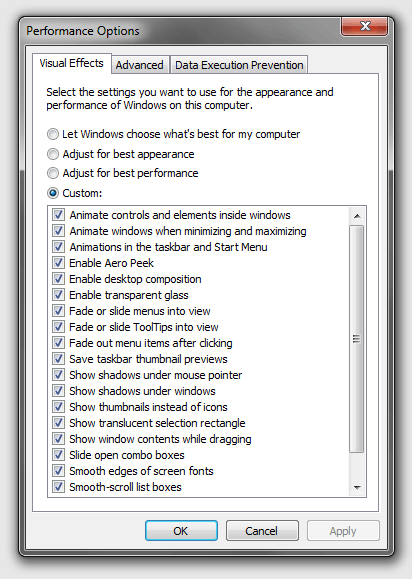
Under 'Control Panel -> Performance Information and Tools -> Adjust Visual Effects > Performance' I have selected 'Adjust for Best Appearance' and have also tried 'Custom' setting here. I do not have the option 'Let Windows choose what's best for your computer' selected, but I tried that as well and it did not have any effect.
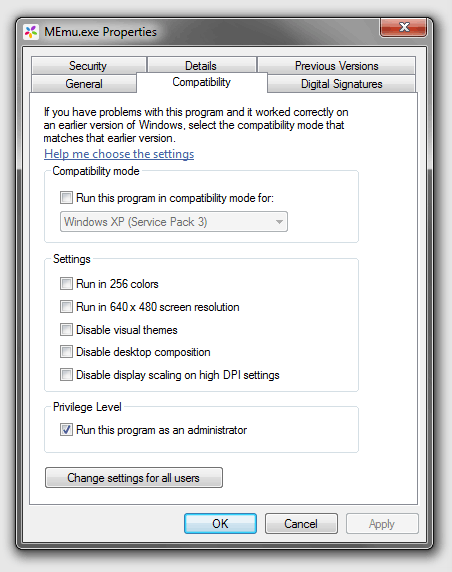
I have checked the properties of MEmu.exe and verified that it is not set to run in compatibility mode and 'Disable Desktop Composition Mode' is not checked, however I have tried checking this option and it did not have any effect on this issue. I also tried setting the app to run as administrator, but that has not helped.
I have increased/decreased/disabled/enabled the system's virtual memory but that has not had any effect. I have tried letting Windows automatically manage virtual memory, as well as setting it manually myself. It did not seem to have any effect.
The only thing I have found that temporarily fixes the issue is to restart the 'Desktop Window Manager' service after launching MEmu and the color scheme auto-changing to basic. After restarting the service, Windows will stay in aero theme without any issues until I restart/quit/start MEmu again.
Checking around, there seems to be a number of people with similar issues but most of them are running multiple monitor setups. The PC where this is happening is running only a single 1920x1080 monitor. Oddly enough, my other PC that does not suffer from this issue is running 3 monitors.
What am I missing? Any help would be greatly appreciated!
Windows basic theme is activated every time I launch MEmu Android emulator.
I have two Windows 7 PC's with nearly identical software setups, but only one of them has this issue.
If anyone can help me find out why this is happening and prevent it, I would really appreciate it!
The PC in question is more than capable of handling MEmu. Here are the specs:
Asus x99 Sabertooth Motherboard
Intel i7 5820k
32 GB DDR4 Memory
GTX 980 4GB (Asus Strix)
Single 1920x1080 monitor
I am running the latest nvidia driver and latest geforce experience. Windows 7 x64, fully up to date.
Under 'Control Panel -> Performance Information and Tools -> Adjust Visual Effects > Performance' I have selected 'Adjust for Best Appearance' and have also tried 'Custom' setting here. I do not have the option 'Let Windows choose what's best for your computer' selected, but I tried that as well and it did not have any effect.
I have checked the properties of MEmu.exe and verified that it is not set to run in compatibility mode and 'Disable Desktop Composition Mode' is not checked, however I have tried checking this option and it did not have any effect on this issue. I also tried setting the app to run as administrator, but that has not helped.
I have increased/decreased/disabled/enabled the system's virtual memory but that has not had any effect. I have tried letting Windows automatically manage virtual memory, as well as setting it manually myself. It did not seem to have any effect.
The only thing I have found that temporarily fixes the issue is to restart the 'Desktop Window Manager' service after launching MEmu and the color scheme auto-changing to basic. After restarting the service, Windows will stay in aero theme without any issues until I restart/quit/start MEmu again.
Checking around, there seems to be a number of people with similar issues but most of them are running multiple monitor setups. The PC where this is happening is running only a single 1920x1080 monitor. Oddly enough, my other PC that does not suffer from this issue is running 3 monitors.
What am I missing? Any help would be greatly appreciated!
My Computer
- Computer type
- PC/Desktop
- Computer Manufacturer/Model Number
- Asus
- OS
- Windows 7 Ultimate x64
- CPU
- Intel i7 5820k
- Motherboard
- Asus X99 Sabertooth
- Memory
- 32GB DDR4
- Graphics Card(s)
- GTX 980 Strix
- Hard Drives
- Intel NVME 750 512 GB
- Antivirus
- Eset Smart Security
- Browser
- Chrome and/or Firefox


