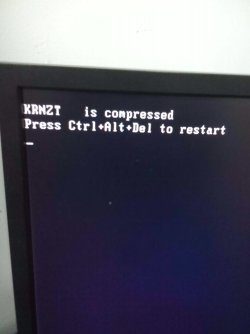
Compression error

Cyberdryne

New member
Local time
8:51 PM
Messages
2
Hello everyone, I'm a new member and will try to be a part of this community and sorry if this has been repeated or not. Ok heading on to the problem, I'm not much of a tech freak but I seem to have this problem after I tried compressing my drive C which has all the Appdata and important functioning systems however the thing is, it was literally hogged with it thus somehow reducing it's reliability, so I was just poking around the 'Computer' and I found for that drive that I could compress it to make some memory space available so it could run faster but ever since I did it I have been receiving the error whenever I tried starting my PC (check image) please help me out, I can't even enter in safe mode and can only access by boot menu and start-up menu which I have no knowledge of knowing what to do with it, could this be the end of my PC? (Also I directly tried searching the error on Google only to get a company that makes stockings for women :confused:)
 

Attachments

  • IMG_20150704_200214.jpg
    IMG_20150704_200214.jpg
    115.7 KB · Views: 0

My Computer

Computer type
PC/Desktop
Computer Manufacturer/Model Number
Dell
OS
Windows 7
so I was just poking around the 'Computer'
Guaranteed to cause problems.

Sounds like some of the boot files got compressed by mistake and the BIOS doesn't know how to handle them to start the booting up. Might read this page:
SOLVED: Win 7 Error - 'some file' is compressed. Press CTRL+ALT+DEL
It's very possible you may be looking at a reinstall of Windows. What I usually do is boot to a Linux Mint LiveDVD and do file management from it but it may not be able to decompress the file/s, always worth a try. It's also a good way to Copy your data files to a different drive.

Did you make the Win7 Repair disc? If not you may be able to use one from a computer with the same version, 32-bit or 64-bit.
Windows 7 Startup Repair - Microsoft Community
 

My Computer

Computer type
PC/Desktop
Computer Manufacturer/Model Number
Customs, Dell, Gateway, HP, Toshiba, Acer, ASUS
OS
Windows 7 Ultimate 64-bit, Windows 8.1 64-bit, Mac OS X 10.10, Linux Mint 17, Windows 10 Pro TP
Keyboard
Microsoft
Mouse
Microsoft
You should never compress your c drive in W7
 

My Computer

Computer type
PC/Desktop
Computer Manufacturer/Model Number
Dude Build
OS
Windows 10 Pro X64
CPU
Intel(R) Core(TM) i5-3570K CPU OC@ 4.5GHZ Turbo
Motherboard
MSI Z77A-G45 Gaming
Memory
8.00 GB DDR3 1600Mhz
Graphics Card(s)
MSI Gaming X GTX 1070
Sound Card
Realtek High Definition
Monitor(s) Displays
Dell S23O9W, HP L1710
Screen Resolution
DELL-1920 x 1080 HP-1280 x1024
Hard Drives
Crucial m4 256 SSD, WD 7200RPM 500GB WD 1TB
PSU
Seasonic X650 GOLD
Case
Zalman Z12
Cooling
Antec Kuhler 920
Keyboard
Logitech
Mouse
MSI DS100 Interceptor
Internet Speed
50 down and 5 up
Antivirus
MSE
Browser
Chrome, IE 11
Other Info
Logitech X-620 Speakers
I can only access my startup menu and boot menu BTW not the repair computer function/windows recovery option
 

My Computer

Computer type
PC/Desktop
Computer Manufacturer/Model Number
Dell
OS
Windows 7
Back
Top