Computer Acting Funny

BinkerNate

New member
Power User
VIP
Local time
7:28 PM
Messages
316
Recently, my computer has been acting funny: freezing at times when I'm online, or working with my Windows Movie Maker, and the screen flashes once, and it's a slow manner with the toolbar and windows becoming blue. It doesn't happen all the time, or most, but it does happen at times. What could be going on?

Just in case: it is a Deskjet F4480, and I got New Years Day 2010.

Thank you.
 

My Computer

Computer Manufacturer/Model Number
Gateway SX2802-07
OS
Windows 7
CPU
Intel Pentium E5300
Motherboard
WG43M
Graphics Card(s)
Intel(R) G45/G43 Express Chipset
Sound Card
Realtek High Definition Audio
Monitor(s) Displays
Acer S232HL
Keyboard
Standard PS/2
Mouse
HID-Compliant
When the window turns blue is there writing on it and what does it say. How do you get out of the blue windows? The deskjet F4480 is a printer not a computer isn't it?
 

My Computers

System One System Two

  • Computer type
    PC/Desktop
    Computer Manufacturer/Model Number
    ALWAYS UNDER CONSTRUCTION
    OS
    Windows 11 Pro
    CPU
    Ryzen 9 5900X
    Motherboard
    Asus X570 Crosshair Viii Hero
    Memory
    32GB G Skill DDR4-3600
    Graphics Card(s)
    EVGA RTX 3080 FTW 3 Ultra
    Sound Card
    On Board/Sennheiser PC37X Headset
    Monitor(s) Displays
    3 X Asus 27"
    Screen Resolution
    2560x1440
    Hard Drives
    2 X 1 TB NVME drives
    PSU
    EVGA 850
    Case
    Phanteks Eclipse P400A
    Cooling
    EVGA 280 AIO
    Keyboard
    Logitech G510s/ Logitech G13
    Mouse
    Logitech G502
    Internet Speed
    24/1
    Antivirus
    ESET/MBAM Pro/SAS Pro
    Browser
    Chrome/ Firefox/ Edge
  • Computer type
    Laptop
    System Manufacturer/Model Number
    Dell 16 Plus
    OS
    Windows 11 Pro
    CPU
    Intel Ultra 9 288V
    Memory
    32 GB LPDDR5X 8533
    Monitor(s) Displays
    16" Mini-LED HDR600 Touch 90 Hz
    Screen Resolution
    2560X1600
    Hard Drives
    1 TB NVME
Recently, my computer has been acting funny: freezing at times when I'm online, or working with my Windows Movie Maker, and the screen flashes once, and it's a slow manner with the toolbar and windows becoming blue. It doesn't happen all the time, or most, but it does happen at times. What could be going on?

Just in case: it is a Deskjet F4480, and I got New Years Day 2010.

Thank you.


Maybe I am not understanding properly but it sounds like it could possibly be a graphics card failure. Most things that make your screen flicker, change colour or freeze the computer like that are to do with the GPU in some way. What graphics card do you have? I would suggest uninstalling the current driver you have for your graphics card and downloading and installing the latest one.
Why do you think your printer would have anything to do with the computer freezing?
 

My Computer

Computer type
PC/Desktop
Computer Manufacturer/Model Number
Self Made =)
OS
Windows 7 Ultimate 64x
CPU
AMD Phenom II X6 1090T
Motherboard
GA-870A-UD3
Memory
8GB DDR3
Graphics Card(s)
NVIDIA GTX 570 SC
Monitor(s) Displays
BenQ XL2420T
Screen Resolution
1980x1080
Hard Drives
Western Digital 500GB
Barracuda 1TB
PSU
Corsair 850W
Case
Cooler Master 690 II Advanced
Mouse
Logitech MX518
I'm sorry, I thought the black box here was for the hard drive; the desktop is Gateway SX2802.

Again, this doesn't happen all the time, like today it didn't.

Is there a way to check if it is the GPU? Where is it and how can I get to it?
 

My Computer

Computer Manufacturer/Model Number
Gateway SX2802-07
OS
Windows 7
CPU
Intel Pentium E5300
Motherboard
WG43M
Graphics Card(s)
Intel(R) G45/G43 Express Chipset
Sound Card
Realtek High Definition Audio
Monitor(s) Displays
Acer S232HL
Keyboard
Standard PS/2
Mouse
HID-Compliant
I'm sorry, I thought the black box here was for the hard drive; the desktop is Gateway SX2802.

Again, this doesn't happen all the time, like today it didn't.

Is there a way to check if it is the GPU? Where is it and how can I get to it?


I'm not very familiar with Gateways. I do know that they are compact and upgrading them and the likes is quite difficult due to space etc.

If you download a program called CPUZ (you can google it to find it) and run that it will tell you what your graphics card is.

As far as I know Gateways have integrated graphics cards which means it's built into your system rather then my one which I bought seperatley and put in myself.
After doing a google check of your PC I found that your graphics card is most likely: Intel Graphics Media Accelerator 4500MHD, Have a look at this page Graphics — Intel® graphics technologies support and see if you can find your driver.
 

My Computer

Computer type
PC/Desktop
Computer Manufacturer/Model Number
Self Made =)
OS
Windows 7 Ultimate 64x
CPU
AMD Phenom II X6 1090T
Motherboard
GA-870A-UD3
Memory
8GB DDR3
Graphics Card(s)
NVIDIA GTX 570 SC
Monitor(s) Displays
BenQ XL2420T
Screen Resolution
1980x1080
Hard Drives
Western Digital 500GB
Barracuda 1TB
PSU
Corsair 850W
Case
Cooler Master 690 II Advanced
Mouse
Logitech MX518
Go to the start orb, type in Device Manager, click on that, look for Display devices, expand display devices and post a screenshot.
 

My Computers

System One System Two

  • Computer type
    PC/Desktop
    Computer Manufacturer/Model Number
    ALWAYS UNDER CONSTRUCTION
    OS
    Windows 11 Pro
    CPU
    Ryzen 9 5900X
    Motherboard
    Asus X570 Crosshair Viii Hero
    Memory
    32GB G Skill DDR4-3600
    Graphics Card(s)
    EVGA RTX 3080 FTW 3 Ultra
    Sound Card
    On Board/Sennheiser PC37X Headset
    Monitor(s) Displays
    3 X Asus 27"
    Screen Resolution
    2560x1440
    Hard Drives
    2 X 1 TB NVME drives
    PSU
    EVGA 850
    Case
    Phanteks Eclipse P400A
    Cooling
    EVGA 280 AIO
    Keyboard
    Logitech G510s/ Logitech G13
    Mouse
    Logitech G502
    Internet Speed
    24/1
    Antivirus
    ESET/MBAM Pro/SAS Pro
    Browser
    Chrome/ Firefox/ Edge
  • Computer type
    Laptop
    System Manufacturer/Model Number
    Dell 16 Plus
    OS
    Windows 11 Pro
    CPU
    Intel Ultra 9 288V
    Memory
    32 GB LPDDR5X 8533
    Monitor(s) Displays
    16" Mini-LED HDR600 Touch 90 Hz
    Screen Resolution
    2560X1600
    Hard Drives
    1 TB NVME
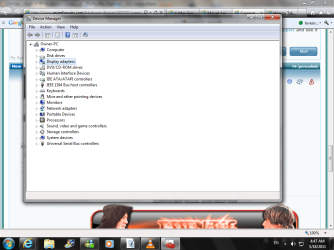
Here's what I saw; there isn't really any "display devices" anywhere.

It's late now, so I'll have to try CPUZ when I get back tomorrow night, but feel free for more suggestions/comments.
 

Attachments

  • Print Screen.png
    Print Screen.png
    77.6 KB · Views: 25

My Computer

Computer Manufacturer/Model Number
Gateway SX2802-07
OS
Windows 7
CPU
Intel Pentium E5300
Motherboard
WG43M
Graphics Card(s)
Intel(R) G45/G43 Express Chipset
Sound Card
Realtek High Definition Audio
Monitor(s) Displays
Acer S232HL
Keyboard
Standard PS/2
Mouse
HID-Compliant
Sorry for the late reply; my graphics card is a G45/G43 Express Chipset, Codename: Eaglelake, Revision: 3, and Technology: 65nm (don't know if that's important).
 

My Computer

Computer Manufacturer/Model Number
Gateway SX2802-07
OS
Windows 7
CPU
Intel Pentium E5300
Motherboard
WG43M
Graphics Card(s)
Intel(R) G45/G43 Express Chipset
Sound Card
Realtek High Definition Audio
Monitor(s) Displays
Acer S232HL
Keyboard
Standard PS/2
Mouse
HID-Compliant
Here's what I saw; there isn't really any "display devices" anywhere.

It's late now, so I'll have to try CPUZ when I get back tomorrow night, but feel free for more suggestions/comments.

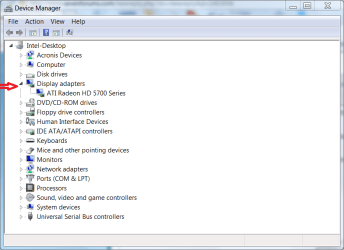
You have display devices highlighted in your screenshot. Click the small pointer next to it
Display.PNG

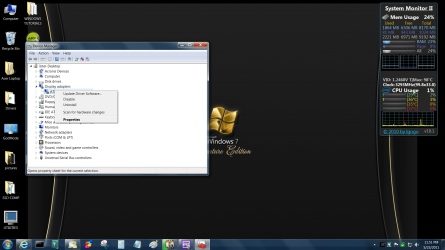
Right click on what it shows and select update driver.
Untitled.png
 

My Computers

System One System Two

  • Computer type
    PC/Desktop
    Computer Manufacturer/Model Number
    ALWAYS UNDER CONSTRUCTION
    OS
    Windows 11 Pro
    CPU
    Ryzen 9 5900X
    Motherboard
    Asus X570 Crosshair Viii Hero
    Memory
    32GB G Skill DDR4-3600
    Graphics Card(s)
    EVGA RTX 3080 FTW 3 Ultra
    Sound Card
    On Board/Sennheiser PC37X Headset
    Monitor(s) Displays
    3 X Asus 27"
    Screen Resolution
    2560x1440
    Hard Drives
    2 X 1 TB NVME drives
    PSU
    EVGA 850
    Case
    Phanteks Eclipse P400A
    Cooling
    EVGA 280 AIO
    Keyboard
    Logitech G510s/ Logitech G13
    Mouse
    Logitech G502
    Internet Speed
    24/1
    Antivirus
    ESET/MBAM Pro/SAS Pro
    Browser
    Chrome/ Firefox/ Edge
  • Computer type
    Laptop
    System Manufacturer/Model Number
    Dell 16 Plus
    OS
    Windows 11 Pro
    CPU
    Intel Ultra 9 288V
    Memory
    32 GB LPDDR5X 8533
    Monitor(s) Displays
    16" Mini-LED HDR600 Touch 90 Hz
    Screen Resolution
    2560X1600
    Hard Drives
    1 TB NVME
Okay, I'm sorry, I don't know why I didn't see that. Anyway, it is the Intel I posted, and it says it is up-to-date.
 

My Computer

Computer Manufacturer/Model Number
Gateway SX2802-07
OS
Windows 7
CPU
Intel Pentium E5300
Motherboard
WG43M
Graphics Card(s)
Intel(R) G45/G43 Express Chipset
Sound Card
Realtek High Definition Audio
Monitor(s) Displays
Acer S232HL
Keyboard
Standard PS/2
Mouse
HID-Compliant
Okay, it happened again, only this time it came with a message: it was done on purpose; the windows turning blue is the Windows 7 Basic Color Scheme. My brother is using WinAVI and it did that, so there's the answer, but the freezeing when I've been using Windows Movie Maker for a while, or the color change that happens sometimes out of nowhere (with no message), isn't answered.

So the color scheme is Windows 7 Basic; is there a way to stop this?
 

My Computer

Computer Manufacturer/Model Number
Gateway SX2802-07
OS
Windows 7
CPU
Intel Pentium E5300
Motherboard
WG43M
Graphics Card(s)
Intel(R) G45/G43 Express Chipset
Sound Card
Realtek High Definition Audio
Monitor(s) Displays
Acer S232HL
Keyboard
Standard PS/2
Mouse
HID-Compliant
New info: the internet freezing up was done to my brother as well, and he said that it was caused by the sound card. Would that do this? Why?
 

My Computer

Computer Manufacturer/Model Number
Gateway SX2802-07
OS
Windows 7
CPU
Intel Pentium E5300
Motherboard
WG43M
Graphics Card(s)
Intel(R) G45/G43 Express Chipset
Sound Card
Realtek High Definition Audio
Monitor(s) Displays
Acer S232HL
Keyboard
Standard PS/2
Mouse
HID-Compliant
New info: the internet freezing up was done to my brother as well, and he said that it was caused by the sound card. Would that do this? Why?
The internet is the internet; your sound card is your sound card. One has nothing to do with the other... what your brother said was false. Having said that, there could be a problem with your sound card, and there could be a problem with your internet, but one would not effect the other.

How many people share the connection? When was the last time you rebooted the router?

As for your machine, does all this happen while you're doing videos? Does the machine otherwise run fine, or does it ever run fine? You really should hurry up and download cpu-z so we can find out what parts we're dealing with.

We don't have to wait until tomorrow, you can click this link right now: CPUID - System & hardware benchmark, monitoring, reporting. It takes seconds to download and seconds to extract. It doesn't install itself to Windows, you just run it from the folder where you extracted it. It'll take you longer to read this paragraph than it will to find out your systems specs. :)
 

My Computer

OS
7 Ultimate x64
CPU
i5-2500k
Motherboard
Asus P8P67 Pro
Memory
8GB G.Skill Ripjaws X F3-12800CL7D-8GBXH 1866MHz 8-9-8-24
Graphics Card(s)
EVGA GTX 570 SC
Sound Card
X-Fi Titanium Fatality
Monitor(s) Displays
Samsung S27A550H 27" LED
Screen Resolution
1920x1080
Hard Drives
OCZ Vertex 3 120GB.
1TB Samsung F3.
2TB Samsung F4.
PSU
PC Power & Cooling Silencer 760
Case
Lian Li Lancool K62
Cooling
Thermalright Venomous X Black/Scythe S-Flex/Shin-Etsu X23
Keyboard
MS Natural Elite 4000 Ergonomic
Mouse
Logitech G500
Internet Speed
6MB/768
Other Info
Logitech Z-5500 505 watts.
D-Link DGL-4500.
Tripp-Lite Smart Pro 1500.
How many people share the connection? When was the last time you rebooted the router?

Me and my brother. We don't change or log off; one sits and does his thing, then when its my turn, he gets up and leaves, and I sit down and do my thing.

As for your machine, does all this happen while you're doing videos? Does the machine otherwise run fine, or does it ever run fine?

When I use Windows Movie Maker, it runs fine when I start. Once I get working at it, after dragging, editing clips and such 15 mintues in, more or less, it'll start to slow (WMM), and then give or take after that, if it does it though, it'll freeze. If I can't get out, I'll have to reset it. Now, I should point this out: my computer is fine when WMM does this. If I leave WMM alone after I get it up, it doesn't do anything no matter how long it's been up. It's only when I actually use it that it happens. That's why unless I forget, I save my stuff once it starts to slow, close, and reopen it, and it's fast like nothing happened or was going to happen.

It's similar to the internet; it just does it. If I open several tabs in one window, it won't do anything. But then, I do it again, and it'll maybe freeze. Do it again, it doesn't. Screen flicking happens once in a while, and nothing is being done for it to be whatever cause to it.

Anyway, I have done the CPUID thing, but I did do it again, this time printing the screens and making a picture of all the tabs from it (except for "About") so you can see from itself what it has to say about my machine:

CPUID6-3-11.jpg
 

My Computer

Computer Manufacturer/Model Number
Gateway SX2802-07
OS
Windows 7
CPU
Intel Pentium E5300
Motherboard
WG43M
Graphics Card(s)
Intel(R) G45/G43 Express Chipset
Sound Card
Realtek High Definition Audio
Monitor(s) Displays
Acer S232HL
Keyboard
Standard PS/2
Mouse
HID-Compliant
BinkerNate, Just to keep you from posting shots of cpuz, at the bottom left of the screen where you posted is my system specs. click that and click update specs and put all the information in. That way people don't keep asking abput your hardware and it makes it easier to answer questions if we know what hardware we are dealing with.
 

My Computers

System One System Two

  • Computer type
    PC/Desktop
    Computer Manufacturer/Model Number
    ALWAYS UNDER CONSTRUCTION
    OS
    Windows 11 Pro
    CPU
    Ryzen 9 5900X
    Motherboard
    Asus X570 Crosshair Viii Hero
    Memory
    32GB G Skill DDR4-3600
    Graphics Card(s)
    EVGA RTX 3080 FTW 3 Ultra
    Sound Card
    On Board/Sennheiser PC37X Headset
    Monitor(s) Displays
    3 X Asus 27"
    Screen Resolution
    2560x1440
    Hard Drives
    2 X 1 TB NVME drives
    PSU
    EVGA 850
    Case
    Phanteks Eclipse P400A
    Cooling
    EVGA 280 AIO
    Keyboard
    Logitech G510s/ Logitech G13
    Mouse
    Logitech G502
    Internet Speed
    24/1
    Antivirus
    ESET/MBAM Pro/SAS Pro
    Browser
    Chrome/ Firefox/ Edge
  • Computer type
    Laptop
    System Manufacturer/Model Number
    Dell 16 Plus
    OS
    Windows 11 Pro
    CPU
    Intel Ultra 9 288V
    Memory
    32 GB LPDDR5X 8533
    Monitor(s) Displays
    16" Mini-LED HDR600 Touch 90 Hz
    Screen Resolution
    2560X1600
    Hard Drives
    1 TB NVME
Nobody else in the house uses that internet connection? What kind is it? DSL, cable... and what's your speed? Have you checked the line?

Editing video is very cpu intense. With only a dual core, I can see why things would get slow... and by your description, it sounds like you're writing to the swap file, which would explain the machine slowing down to a crawl; however, you have 6GB's of RAM... so you should not really be experiencing this.

I do notice though that you've got three 2GB sticks. Cpu-z is reporting this as "symmetrical". It's actually asymmetrical; a dual channel board would use 4GB's or 8GB's... 6GB's is usually seen on triple channel boards. I'm not sure how your board is handling that, but just as a test, I would see how the machine runs with 4GB's in true symmetric dual channel mode.

What anti virus program do you have? Update it and run it... a full/detailed scan and not just a quick one. Also, it would not hurt to run Malwarebytes to see if you have anything your AV doesn't catch. Malwarebytes : Malwarebytes Anti-Malware is a free download that removes viruses and malware from your computer


***EDIT***

I almost forgot to ask... what do you have loaded at startup? OEM's are notorious for bloating up their systems and loading everything at startup, including the kitchen sink. Hit the Windows Logo key, type msconfig. Hit enter, click the startup tab... list everything that's loaded... or take a screen shot and post it.
 
Last edited:

My Computer

OS
7 Ultimate x64
CPU
i5-2500k
Motherboard
Asus P8P67 Pro
Memory
8GB G.Skill Ripjaws X F3-12800CL7D-8GBXH 1866MHz 8-9-8-24
Graphics Card(s)
EVGA GTX 570 SC
Sound Card
X-Fi Titanium Fatality
Monitor(s) Displays
Samsung S27A550H 27" LED
Screen Resolution
1920x1080
Hard Drives
OCZ Vertex 3 120GB.
1TB Samsung F3.
2TB Samsung F4.
PSU
PC Power & Cooling Silencer 760
Case
Lian Li Lancool K62
Cooling
Thermalright Venomous X Black/Scythe S-Flex/Shin-Etsu X23
Keyboard
MS Natural Elite 4000 Ergonomic
Mouse
Logitech G500
Internet Speed
6MB/768
Other Info
Logitech Z-5500 505 watts.
D-Link DGL-4500.
Tripp-Lite Smart Pro 1500.
My money is on temperatures if he is getting the color scheme set to basic...
If the PC is in warranty, send it it and ask them to clean it
If it is not, go get some compressed air. Open your case and blow the air in. Not too close, though. Let the Pc cool first before blowing. Make sure to hold the fan blades with a unused pencil (wooden end) or chopstick so as to not create back voltage. Don't hold the air for too long.
cheers
PS: Always hold the air upright. NEVER INVERT.
 

My Computer

OS
W7
CPU
i7 2600k
Motherboard
Sabertooth P67 B3
Memory
G.Skill 8GB DDR3 1600Mhz CL9
Graphics Card(s)
580 DCUII
Sound Card
onboard
PSU
tx850v2
Case
HAF X
Cooling
H70
Cornholio I agree it would be the first place to start. It appears that Windows is backing things off when the temps are going up.
 

My Computer

Computer type
PC/Desktop
Computer Manufacturer/Model Number
Home made Desktop
OS
Windows 10 Pro. 64/ version 1709 Windows 7 Pro/64
CPU
Intel i7-6800K @ 4.3
Motherboard
ASUS X-99 Deluxe II
Memory
Corsair Platinum 16 gig @2400
Graphics Card(s)
EVGA GTX 1070 OC
Monitor(s) Displays
Asus 27" LED LCD/VE278Q
Screen Resolution
1920-1080 or 1280-720 HDMI
Hard Drives
INTEL SSD 730-240 Gb Sata 3.0/
PSU
EVGA Platium 1200W
Case
Phanteks Luxe Tempered Glass 8 fans/ one radiator
Cooling
XSPC/ Water Cooled CPU
Keyboard
Das 4 Professional
Mouse
Logitech M705/MX Anywhere 2-S
Internet Speed
100 mbits
Antivirus
Microsoft Security Essentials/ Malwarebytes Premium 3.0/ SAS
Browser
I.E. 11 default/Firefox/ ISP Time Warner Cable/Spectrum
Other Info
LG BluRay Burner/
Sound system-KLipsch-THX/
Icy Dock ssd Hot Swap bays.
I thought that it is WIndows throttling the CPU and graphics due to heat. Those OEM PCs are true dust magnets. No filters, nothing about cleaning in the manual. It's just a way so that they can get you to send it to the shop, hopefully after your warranty is over :S
 

My Computer

OS
W7
CPU
i7 2600k
Motherboard
Sabertooth P67 B3
Memory
G.Skill 8GB DDR3 1600Mhz CL9
Graphics Card(s)
580 DCUII
Sound Card
onboard
PSU
tx850v2
Case
HAF X
Cooling
H70
Back
Top