Computer CPU is slamming on 100%

Cliamain

New member
Local time
6:24 PM
Messages
6
Location
San Bernardino, CA.
I'll get right into it. My computer has been running really slowly here as of the paste few months. I check the task manager go to the performance section and the CPU is close to or is not at 100%.

How can i go about fixing this problem. I'm not that great at computers yet. Any help that can be offered would be very kind.
 

My Computer

Computer type
Laptop
Computer Manufacturer/Model Number
Gateway
OS
Windows 7 Professional x32 Service pack I
Cooling
Fan
Antivirus
AVG
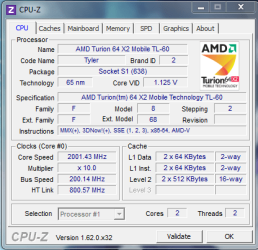
its not sopose to be at 100 percent all the time. mine idles around 1-3%. whene you do heavy tasks it will increase. Do you mean that the frequency is not scaling up and thats making it slow? download CPU-z and tell me if you see the frequency changing at all.
 

My Computer

Computer type
PC/Desktop
Computer Manufacturer/Model Number
Custom Build
OS
Windows 7 Professional x64
CPU
AMD FX 4300 @ 4.2 GHZ
Motherboard
MSI 970A-G43
Memory
G.SKILL Ripjaws X Series 8GB
Graphics Card(s)
PNY GTX 560 Ti OC
Sound Card
Realtek ALC892
Monitor(s) Displays
20" Hanns-G HL203
Screen Resolution
1600x900
Hard Drives
WD Caviar Black 500GB 7200RPM
PSU
Corsair CX500M
Case
Athena Power- Black Widow
Cooling
Cooler Master GeminII S524
Keyboard
Logitech K360 LE
Mouse
Rocketfish Nano
Internet Speed
60Mbps Down 8Mbps Up
Other Info
Dell Studio 1458 Laptop Setup:

Windows 7 Home Premium~
Intel Core i5 560M @3.2GHZ~
6GB DDR3 RAM~
ATI Mobility Radeon 540v 512MB~
Intel 330 Sata III 120GB SSD~
Illuminated Keyboard
I start it up and it runs at about about 40-70% without anything open. Say I open a game i play and a voice chat item like Team speak. It starts to really slow down and sometimes even shut off.
 

My Computer

Computer type
Laptop
Computer Manufacturer/Model Number
Gateway
OS
Windows 7 Professional x32 Service pack I
Cooling
Fan
Antivirus
AVG
You must have something running in the background. Look at task manager for any running processes.
 

My Computer

Computer type
PC/Desktop
Computer Manufacturer/Model Number
Skylake Special #666
OS
Windows 10 Pro x64
CPU
Intel Core i7 6700K
Motherboard
Asus Sabertooth Z170 Mark 1
Memory
GSkill TridentZ RGB 16GB 3600 16-16-16-36
Graphics Card(s)
EVGA GTX 980 Ti SC x2
Sound Card
Realtek High Definition
Monitor(s) Displays
AOC G2460PG
Screen Resolution
1920 x 1080 144Hz
Hard Drives
Samsung 860 Pro 256GB, Seagate Barracuda 4TB x2
PSU
EVGA 1000 P2, EVGA White Custom Braided Cables
Case
Corsair Vengeance C70 Gunmetal Black
Cooling
Corsair H100i v2, Corsair ML120 x2, Thermal Grizzly Kryonaut
Keyboard
Logitech G910 Orion Spectrum
Mouse
Logitech G700s
Internet Speed
Verizon Fios Quantum Gateway 75/75
Antivirus
Windows Defender, Malwarebytes Free 3.8.3
Browser
Chrome
Other Info
Corsair SP120 x4, LG Blu-ray Drive, Durabrand HT-395 100 Watt Dolby Digital Amp, Corsair H2100 Wireless 7.1 Headset
I don't see anything out of the norm. I mean, this laptop did use to belong to my mother and I only have on here what she has left here.

Want me to take a screen shot or something to show you what it looks like? I don't see anything thats really pulling at the heart strings of my CPU.
 

My Computer

Computer type
Laptop
Computer Manufacturer/Model Number
Gateway
OS
Windows 7 Professional x32 Service pack I
Cooling
Fan
Antivirus
AVG
its not sopose to be at 100 percent all the time. mine idles around 1-3%. whene you do heavy tasks it will increase. Do you mean that the frequency is not scaling up and thats making it slow? download CPU-z and tell me if you see the frequency changing at all.

There you go.
 

Attachments

  • Capture.PNG
    Capture.PNG
    18.8 KB · Views: 6

My Computer

Computer type
Laptop
Computer Manufacturer/Model Number
Gateway
OS
Windows 7 Professional x32 Service pack I
Cooling
Fan
Antivirus
AVG
ok so its 2ghz. so that means that it is scaling. yea go into task manager, click processes, click show all processes from all users, then click "cpu" at the top to sort the list by most highest consumption.
 

My Computer

Computer type
PC/Desktop
Computer Manufacturer/Model Number
Custom Build
OS
Windows 7 Professional x64
CPU
AMD FX 4300 @ 4.2 GHZ
Motherboard
MSI 970A-G43
Memory
G.SKILL Ripjaws X Series 8GB
Graphics Card(s)
PNY GTX 560 Ti OC
Sound Card
Realtek ALC892
Monitor(s) Displays
20" Hanns-G HL203
Screen Resolution
1600x900
Hard Drives
WD Caviar Black 500GB 7200RPM
PSU
Corsair CX500M
Case
Athena Power- Black Widow
Cooling
Cooler Master GeminII S524
Keyboard
Logitech K360 LE
Mouse
Rocketfish Nano
Internet Speed
60Mbps Down 8Mbps Up
Other Info
Dell Studio 1458 Laptop Setup:

Windows 7 Home Premium~
Intel Core i5 560M @3.2GHZ~
6GB DDR3 RAM~
ATI Mobility Radeon 540v 512MB~
Intel 330 Sata III 120GB SSD~
Illuminated Keyboard

My Computer

Computer type
PC/Desktop
Computer Manufacturer/Model Number
Skylake Special #666
OS
Windows 10 Pro x64
CPU
Intel Core i7 6700K
Motherboard
Asus Sabertooth Z170 Mark 1
Memory
GSkill TridentZ RGB 16GB 3600 16-16-16-36
Graphics Card(s)
EVGA GTX 980 Ti SC x2
Sound Card
Realtek High Definition
Monitor(s) Displays
AOC G2460PG
Screen Resolution
1920 x 1080 144Hz
Hard Drives
Samsung 860 Pro 256GB, Seagate Barracuda 4TB x2
PSU
EVGA 1000 P2, EVGA White Custom Braided Cables
Case
Corsair Vengeance C70 Gunmetal Black
Cooling
Corsair H100i v2, Corsair ML120 x2, Thermal Grizzly Kryonaut
Keyboard
Logitech G910 Orion Spectrum
Mouse
Logitech G700s
Internet Speed
Verizon Fios Quantum Gateway 75/75
Antivirus
Windows Defender, Malwarebytes Free 3.8.3
Browser
Chrome
Other Info
Corsair SP120 x4, LG Blu-ray Drive, Durabrand HT-395 100 Watt Dolby Digital Amp, Corsair H2100 Wireless 7.1 Headset
I don't see anything out of the norm. I mean, this laptop did use to belong to my mother and I only have on here what she has left here.

Want me to take a screen shot or something to show you what it looks like? I don't see anything thats really pulling at the heart strings of my CPU.

If you haven't run a scan for malware or virus infections, that's where I would start.

HTH
 

My Computer

Computer type
PC/Desktop
Computer Manufacturer/Model Number
Custom Built
OS
Windows 7 Professional x64
CPU
Intel i5 quad processor
Motherboard
DP67BG
Memory
16 GB
Graphics Card(s)
Radeon HD 5770
Sound Card
Realtek High Definition Audio
Monitor(s) Displays
Samsung SyncMaster
Screen Resolution
1920X1080
Hard Drives
WD 2TB (SATA Internal)
WD 1TB (USB External)
PSU
Corsair GS800
Case
Tower (Generic)
Cooling
3 Internal Fans
Keyboard
MS Wireless
Mouse
MS Optical Wired
Internet Speed
54 mbps
Antivirus
Emsisoft
Browser
IE-Version 9, Palemoon-Version 24.2.0
I don't see anything out of the norm. I mean, this laptop did use to belong to my mother and I only have on here what she has left here.

Want me to take a screen shot or something to show you what it looks like? I don't see anything thats really pulling at the heart strings of my CPU.

If you haven't run a scan for malware or virus infections, that's where I would start.

HTH
I've done that. I've used S&D and malwarebites.
 

My Computer

Computer type
Laptop
Computer Manufacturer/Model Number
Gateway
OS
Windows 7 Professional x32 Service pack I
Cooling
Fan
Antivirus
AVG

My Computer

Computer type
Laptop
Computer Manufacturer/Model Number
Gateway
OS
Windows 7 Professional x32 Service pack I
Cooling
Fan
Antivirus
AVG
Back
Top