
Solved Computer does not startup

under partition tools i only have:
GParted partition editor
the partition resizer
ranish partition manager
smart fdisk
special fdisk 2000
extended fdisk
super fdisk
partition table editor

There is no partition wizard home edition.
Yet inside the iso file it is in there but i cannot see in my boot cd visually on boot.
 

My Computer

OS
Windows 7 Ultimate, Gentoo, Archlinux, HLFS, netBSD
Did you format the partitions in linux?? Or did you only delete the existing partitions and recreated the partitions (as type 82)?

I dont think I formatted the partitions... I cannot recall. I try to recall but i was 2 weeks ago. I cannot :/
 

My Computer

OS
Windows 7 Ultimate, Gentoo, Archlinux, HLFS, netBSD
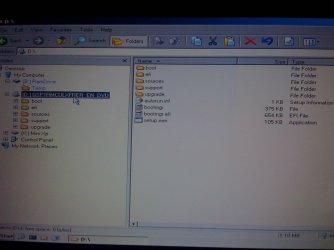
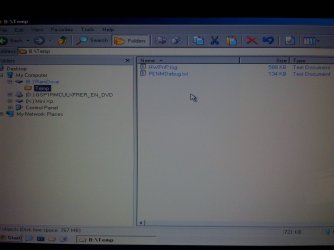
When I boot into the mini windows xp all I see on the desktop is:
My computer
My network places
command prompt
Install all hardware[HwPnP]

I do not see a wrench at the bottom right or anything. Where can I upon up the hirens boot cd menu?
 

My Computer

OS
Windows 7 Ultimate, Gentoo, Archlinux, HLFS, netBSD
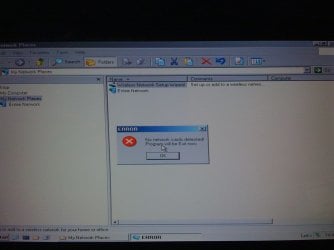
When I go into my network places and select wireless network setup wizard it says:
Error!
No network cards detected!
Program will exit now.
 

My Computer

OS
Windows 7 Ultimate, Gentoo, Archlinux, HLFS, netBSD
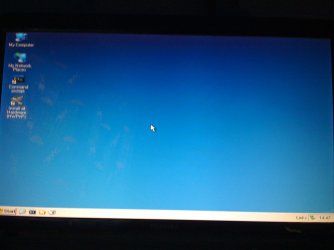
In my system tray all I can see is one icon and that icon is the usb inside the computer where i have the option to safely remove hardware.
 

My Computer

OS
Windows 7 Ultimate, Gentoo, Archlinux, HLFS, netBSD
I installed the hirens boot cd 15.2 menu but when I boot it from my usb at startup I cannot find the partition wizard home edition as described in the video. Maybe it is an earlier version or somethnig or it was just renamed or I just didnt search all possible files in there but I dont want to click on something in there without knowing what it is. Any advice I can get here?
When Hiren's boot menu loads click Mini XP.


Thanks I am in but i cannot really do much here :/
 

My Computer

OS
Windows 7 Ultimate, Gentoo, Archlinux, HLFS, netBSD
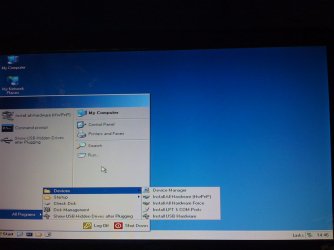
Go into the Start menu, in Settings or Programs under Diagnostic Tools choose Disk Mgmt, take a screenshot as I explained above.
 
I installed the hirens boot cd 15.2 menu but when I boot it from my usb at startup I cannot find the partition wizard home edition as described in the video. Maybe it is an earlier version or somethnig or it was just renamed or I just didnt search all possible files in there but I dont want to click on something in there without knowing what it is. Any advice I can get here?
You have a sub stick that can be rewritten totally? So all is gone afterwards. If so.... try this #2

I am trying your #2 right now I installed the .iso and i am formatting another usb for it.
I have millions of usb's in my house. Many of which are not being used at all hence I can write to as many as I need.
 

My Computer

OS
Windows 7 Ultimate, Gentoo, Archlinux, HLFS, netBSD
Go into the Start menu, in Settings or Programs under Diagnostic Tools choose Disk Mgmt, take a screenshot as I explained above.

Those are pictures that should explain what I see on my screen when I enter the mini windows xp.
I do not see diagnostic tools inside the programs in my start menu
 

Attachments

  • IMG_0131.JPG
    IMG_0131.JPG
    130.3 KB · Views: 1
  • IMG_0127.JPG
    IMG_0127.JPG
    106.9 KB · Views: 1
  • IMG_0128.JPG
    IMG_0128.JPG
    91.5 KB · Views: 1
  • IMG_0129.JPG
    IMG_0129.JPG
    124 KB · Views: 2
  • IMG_0130.JPG
    IMG_0130.JPG
    123.7 KB · Views: 1

My Computer

OS
Windows 7 Ultimate, Gentoo, Archlinux, HLFS, netBSD
I can also get into control panel in which I see and use the following icons:

Administrative tools
Date/Time
Display
Folder Options
Fonts
ImDisk Virtual Disk
Printers and faxes
System (system properties, hardware and specs ... that stuff)
Taskbar and start menu
 

My Computer

OS
Windows 7 Ultimate, Gentoo, Archlinux, HLFS, netBSD
You have a sub stick that can be rewritten totally? So all is gone afterwards. If so.... try this #2
Boot from the stick and post screenshot of partitions. Can't be so difficult!
 

My Computer

Computer type
Laptop
Computer Manufacturer/Model Number
ACER ASPIRE 5742G
OS
Microsoft Windows 7 Home Premium 64-bits 7601 Multiprocessor Free Service Pack 1
CPU
Intel(R) Core(TM) i3 CPU M 370 @ 2.40GHz
Motherboard
Acer Aspire 5742G
Memory
4,00 GB
Graphics Card(s)
ATI Mobility Radeon HD 5400 Series
Sound Card
(1) AMD High Definition Audio Device (2) Realtek High Defi
Screen Resolution
1366 x 768 x 32 bits (4294967296 colors) @ 60 Hz
Hard Drives
WDC WD5000BEVT-22ZAT0
You have a sub stick that can be rewritten totally? So all is gone afterwards. If so.... try this #2
Boot from the stick and post screenshot of partitions. Can't be so difficult!

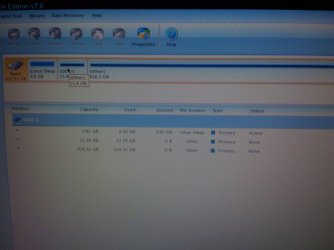
Alright I booted the partition wizard home edition 7.0 from the .iso that i mounted onto the usb and this is the screen that I am at right now. Where do I go from here? What information did you want me to show you now?
 

Attachments

  • IMG_0136.JPG
    IMG_0136.JPG
    126 KB · Views: 4

My Computer

OS
Windows 7 Ultimate, Gentoo, Archlinux, HLFS, netBSD
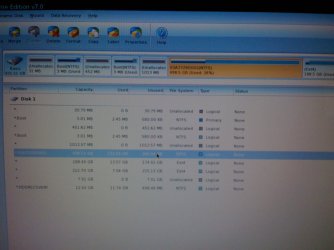
Rightclick on the large (Win7?) partition to Explore, see if your files and the Windows directory are still intact there.

If so, rightclick it again to Modify>Set to Active, click OK.

Then click on Disk 1 to highlight it, from Disk tab select Rebuild MBR, click OK, Apply both steps.

Reboot. If Win7 won't start, boot into the Win7 DVD or Repair CD to run Startup Repair - Run up to 3 Separate Times

If you still have the Linux mess on the HD I would delete those partitions to give Win7 a better chance to recover from ruining it.
 
Last edited:
Rightclick on the large (Win7?) partition to Explore, see if your files and the Windows directory are still intact there.

If so, rightclick it again to Modify>Set to Active, click OK.

Then click on Disk 1 to highlight it, from Disk tab select Rebuild MBR, click OK, Apply both steps.

Reboot while removing Hiren's disk. If Win7 won't start, boot into the Win7 DVD or Repair CD to run Startup Repair - Run up to 3 Separate Times

If you still have the Linux mess on the HD I would delete those partitions to give Win7 a better chance to recover from ruining it.

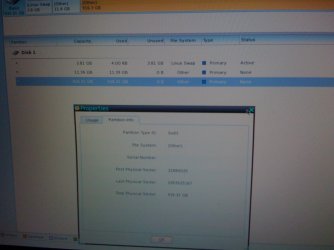
As you can see in the picture the partition is full. It has 916GB storage and 916GB used. I am not sure if that is the windows partition or not. I do not know how to check what files are inside the partition like you said "check if the windows directory is still intact there". What I showed you is the properties of the largest partition in disk 1 ... the 916GB partition.

What do you think I should do next?
 

Attachments

  • IMG_0138.JPG
    IMG_0138.JPG
    125 KB · Views: 3
Last edited:

My Computer

OS
Windows 7 Ultimate, Gentoo, Archlinux, HLFS, netBSD
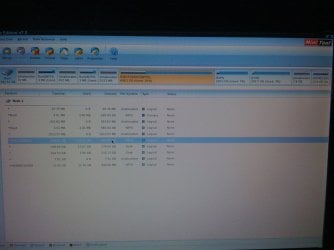
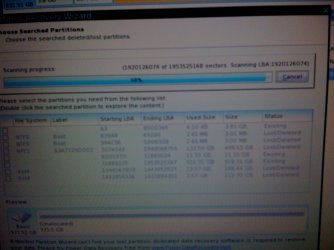
In the picture below I noticed something. Well I clicked partition recovery wizard at the top left of the partition recovery wizard home edition 7.0 -- I clicked quick scan of my entire disk. You can faintly see a disk named S3A7729 ... as the label and the status of that disk is lost/deleted. I can recall on my main operating system (windows 7 ultimate). That was the name of the hard disk -- The C drive. which was my main drive C local. I don't know if this has any relevance but would it be possible somehow recover that drive because I assume that in the process of installing arch linux I may have uninstalled the C drive from my computer or deleted it. Is it possible to recover it now?

You can also see that this hard disk is NTFS which is a boot option or whatever... So how can I recover it? All my information and file are on there. It was the main C drive that I used since I bought the laptop.
 

Attachments

  • IMG_0140.JPG
    IMG_0140.JPG
    155.2 KB · Views: 2
Last edited:

My Computer

OS
Windows 7 Ultimate, Gentoo, Archlinux, HLFS, netBSD
God bless you all. I recovered the C drive... okay now I can see all the files on my drive. Glad I can now retrieve them... hopefully err somehow. Let me retrieve them now and now I guess I need help to re-install windows? Unless my windows 7 os is now recovered too... I will do all that now and give you a status update in a bit.
 

My Computer

OS
Windows 7 Ultimate, Gentoo, Archlinux, HLFS, netBSD
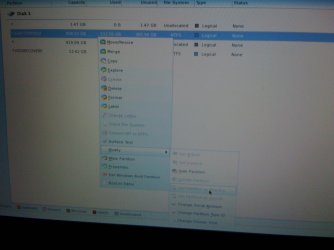
Okay so this is my new drive map after recovery. Errm ... which one do I set to active and/or what do I do next?
I didn't mean to say new drive map. I meant to say this is the drive map that I had before I touched the linux installation. This is how it was before. What I am asking now is - Do I have to change anything here now (i.e set something to active etc...) or can I reboot my pc now and boot from the local hard disk, and will everything be okay?
 

Attachments

  • IMG_0141.JPG
    IMG_0141.JPG
    150.1 KB · Views: 5
  • IMG_0142.JPG
    IMG_0142.JPG
    138.1 KB · Views: 2

My Computer

OS
Windows 7 Ultimate, Gentoo, Archlinux, HLFS, netBSD
Okay so this is my new drive map after recovery. Errm ... which one do I set to active and/or what do I do next?
I didn't mean to say new drive map. I meant to say this is the drive map that I had before I touched the linux installation. This is how it was before. What I am asking now is - Do I have to change anything here now (i.e set something to active etc...) or can I reboot my pc now and boot from the local hard disk, and will everything be okay?
Delete the 2 small 3MB NTFS partitions, they are useless. Delete all ext4 parititions as well.
2NTFS partitions remain. Make them primary
Mark the large NTFS partition active (not the HDRECOVERY).
Do this http://www.partitionwizard.com/partitionmanager/mbr-fix.html
Press apply. Post screenshot

rightclick on the 2 ntfs partitions ->explore. Do you see files? Try to reboot normally from harddisk

post results
 

My Computer

Computer type
Laptop
Computer Manufacturer/Model Number
ACER ASPIRE 5742G
OS
Microsoft Windows 7 Home Premium 64-bits 7601 Multiprocessor Free Service Pack 1
CPU
Intel(R) Core(TM) i3 CPU M 370 @ 2.40GHz
Motherboard
Acer Aspire 5742G
Memory
4,00 GB
Graphics Card(s)
ATI Mobility Radeon HD 5400 Series
Sound Card
(1) AMD High Definition Audio Device (2) Realtek High Defi
Screen Resolution
1366 x 768 x 32 bits (4294967296 colors) @ 60 Hz
Hard Drives
WDC WD5000BEVT-22ZAT0
Okay so this is my new drive map after recovery. Errm ... which one do I set to active and/or what do I do next?
I didn't mean to say new drive map. I meant to say this is the drive map that I had before I touched the linux installation. This is how it was before. What I am asking now is - Do I have to change anything here now (i.e set something to active etc...) or can I reboot my pc now and boot from the local hard disk, and will everything be okay?
Delete the 2 small 3MB NTFS partitions, they are useless. Delete all ext4 parititions as well.
2NTFS partitions remain. Make them primary
Mark the large NTFS partition active (not the HDRECOVERY).
Press apply. Post screenshot

How do I change the Local C drive disk from logical to primary? Where is the option for that?

But yea, when I click the two NTFS icons I can see all my files that I had from before! :)

But how do I change the local C drive disk from logical to primary?

RE: I don't know if you can see the picture to well but it doesn't let me set the S3A... partition to primary - the option is locked.
 

Attachments

  • IMG_0143.JPG
    IMG_0143.JPG
    106.1 KB · Views: 2
Last edited:

My Computer

OS
Windows 7 Ultimate, Gentoo, Archlinux, HLFS, netBSD
Hello?
 

My Computer

OS
Windows 7 Ultimate, Gentoo, Archlinux, HLFS, netBSD
Back
Top