Solved Computer does not startup

I was able to change the HDDRECOVERY (NTFS) disk to primary but the S3A77 (NTFS) disk cannot be set to primary for some reason... the option is locked.
 

My Computer

OS
Windows 7 Ultimate, Gentoo, Archlinux, HLFS, netBSD
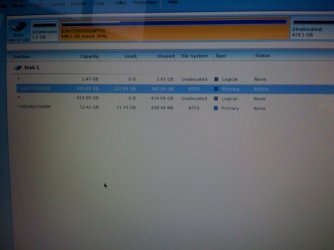
I was able to set the two drives to primary with some background knowledge and rebooting and editting the config. Errm but now I cannot rebuild the mbr because the disk drop down menu everything is locked in there and I cannot seem to get it unlocked. How should I approach this problem? Anyways this is the current layout of the drive map - below:
 

Attachments

  • IMG_0145.JPG
    IMG_0145.JPG
    134.7 KB · Views: 3

My Computer

OS
Windows 7 Ultimate, Gentoo, Archlinux, HLFS, netBSD
The instructions could not have been more clear. You were to rightclick on the large partition and choose Explore to see if your files are there and if a Windows folder is there with files in it. Instead you reply with an irrelevancy about the space used which could be incorrect.

Then the steps were spelled out clearly to follow. Why is it you have problems following clearly stated steps?

Instead you run the Partition Recovery Wizard which was never mentioned. Why?

How about movies showing you how the steps are done?

How to Explore Partition with partition manager? Partition Wizard Explore Partition Video Help.
How to Set Active/Inactive partition -Partition Wizard Video Help.
Partition Wizard Rebuild MBR - Video Help.
 
I was able to set the two drives to primary with some background knowledge and rebooting and editting the config. Errm but now I cannot rebuild the mbr because the disk drop down menu everything is locked in there and I cannot seem to get it unlocked. How should I approach this problem? Anyways this is the current layout of the drive map - below:
Click on disk instead of partition!
 

My Computer

Computer type
Laptop
Computer Manufacturer/Model Number
ACER ASPIRE 5742G
OS
Microsoft Windows 7 Home Premium 64-bits 7601 Multiprocessor Free Service Pack 1
CPU
Intel(R) Core(TM) i3 CPU M 370 @ 2.40GHz
Motherboard
Acer Aspire 5742G
Memory
4,00 GB
Graphics Card(s)
ATI Mobility Radeon HD 5400 Series
Sound Card
(1) AMD High Definition Audio Device (2) Realtek High Defi
Screen Resolution
1366 x 768 x 32 bits (4294967296 colors) @ 60 Hz
Hard Drives
WDC WD5000BEVT-22ZAT0
Wow! Thank you guys so much. It is now fixed and I rebooted and it works flawlessly. Thank you for all your great help. I am so happy right now to finally have my OS back up and running.
 

My Computer

OS
Windows 7 Ultimate, Gentoo, Archlinux, HLFS, netBSD

The instructions could not have been more clear. You were to rightclick on the large partition and choose Explore to see if your files are there and if a Windows folder is there with files in it.

Then the steps were spelled out clearly to follow. Why is it you have problems following clearly stated steps?

Instead you run the Partition Recovery Wizard which was never mentioned. Why?

How about movies showing you how the steps are done?

How to Explore Partition with partition manager? Partition Wizard Explore Partition Video Help.
How to Set Active/Inactive partition -Partition Wizard Video Help.
Partition Wizard Rebuild MBR - Video Help.
Greg, you know most of the people aren't willing to read or do what you type. And don't give information you asked for. It's the way how people act. Bothers me as well all the time.

But he had 4 partitions ... all primary. All type 82 and 83. So all linux. I didn't advise him to try recover the partitions. But if I had seen the partition layout in PW, I should suggest: delete all partitions and try a partitions recovery "quick scan".
 

My Computer

Computer type
Laptop
Computer Manufacturer/Model Number
ACER ASPIRE 5742G
OS
Microsoft Windows 7 Home Premium 64-bits 7601 Multiprocessor Free Service Pack 1
CPU
Intel(R) Core(TM) i3 CPU M 370 @ 2.40GHz
Motherboard
Acer Aspire 5742G
Memory
4,00 GB
Graphics Card(s)
ATI Mobility Radeon HD 5400 Series
Sound Card
(1) AMD High Definition Audio Device (2) Realtek High Defi
Screen Resolution
1366 x 768 x 32 bits (4294967296 colors) @ 60 Hz
Hard Drives
WDC WD5000BEVT-22ZAT0
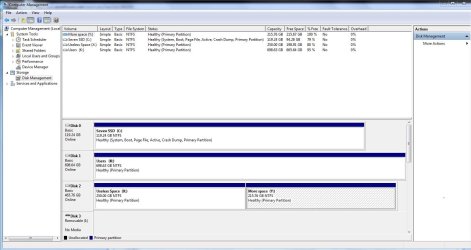
Below is an image of the disk management using the snipping tool:
 

Attachments

  • driveSettings.PNG
    driveSettings.PNG
    4.5 KB · Views: 8

My Computer

OS
Windows 7 Ultimate, Gentoo, Archlinux, HLFS, netBSD
Properly done per the link Greg posted.
Capture2.JPG
 

My Computer

Computer type
PC/Desktop
Computer Manufacturer/Model Number
Home Built Desktop By DataTech
OS
Windows 7 Ultimate X64 SP1
CPU
Intel i5-2550K, Differing ~4.4-4.8GHz No built in GPU
Motherboard
ASUS P8Z68-V PRO/GEN3
Memory
16GB G.Skill Sniper 1866MHz @ 2133MHz 2x8GB
Graphics Card(s)
ASUS GTX650TIB-DC2OC-2GD5, (650TI Boost)
Sound Card
Onboard Realtek 5-1
Monitor(s) Displays
Samsung P2570HD
Screen Resolution
1920x1080
Hard Drives
Samsung 840 Pro 256GB SSD for OS, 500GB Seagate Constellation (Enterprise drive) for Data
PSU
Corsair HX650W
Case
Inwin Dragon Rider
Cooling
Hyper 212 EVO w/two Noctua fans, push-pull, @1300 RPM
Keyboard
E-Z Eyes, bright yellow keys with large characters
Mouse
steelseries SENSEI Laser Pro Gaming
Internet Speed
48-51Mbs Mbs down, 11 Mbs up Xfinity Cable
Antivirus
Norton Internet Security 2013
Browser
IE 10, Opera, Pale Moon if needed
Other Info
4 case fans, LG BluRay-RE, ASUS DVD-RW, Mr. Fusion power supply, 1.21 gigawatts.
Below is an image of the disk management using the snipping tool:


Not even close. But it shows all we really need to see.

And he marked it solved so..... Good Job Guys !! :)
 

My Computer

Computer type
PC/Desktop
Computer Manufacturer/Model Number
Skylake Special #666
OS
Windows 10 Pro x64
CPU
Intel Core i7 6700K
Motherboard
Asus Sabertooth Z170 Mark 1
Memory
GSkill TridentZ RGB 16GB 3600 16-16-16-36
Graphics Card(s)
EVGA GTX 980 Ti SC x2
Sound Card
Realtek High Definition
Monitor(s) Displays
AOC G2460PG
Screen Resolution
1920 x 1080 144Hz
Hard Drives
Samsung 860 Pro 256GB, Seagate Barracuda 4TB x2
PSU
EVGA 1000 P2, EVGA White Custom Braided Cables
Case
Corsair Vengeance C70 Gunmetal Black
Cooling
Corsair H100i v2, Corsair ML120 x2, Thermal Grizzly Kryonaut
Keyboard
Logitech G910 Orion Spectrum
Mouse
Logitech G700s
Internet Speed
Verizon Fios Quantum Gateway 75/75
Antivirus
Windows Defender, Malwarebytes Free 3.8.3
Browser
Chrome
Other Info
Corsair SP120 x4, LG Blu-ray Drive, Durabrand HT-395 100 Watt Dolby Digital Amp, Corsair H2100 Wireless 7.1 Headset
C'est la-vie
 

My Computer

Computer type
PC/Desktop
Computer Manufacturer/Model Number
Home Built Desktop By DataTech
OS
Windows 7 Ultimate X64 SP1
CPU
Intel i5-2550K, Differing ~4.4-4.8GHz No built in GPU
Motherboard
ASUS P8Z68-V PRO/GEN3
Memory
16GB G.Skill Sniper 1866MHz @ 2133MHz 2x8GB
Graphics Card(s)
ASUS GTX650TIB-DC2OC-2GD5, (650TI Boost)
Sound Card
Onboard Realtek 5-1
Monitor(s) Displays
Samsung P2570HD
Screen Resolution
1920x1080
Hard Drives
Samsung 840 Pro 256GB SSD for OS, 500GB Seagate Constellation (Enterprise drive) for Data
PSU
Corsair HX650W
Case
Inwin Dragon Rider
Cooling
Hyper 212 EVO w/two Noctua fans, push-pull, @1300 RPM
Keyboard
E-Z Eyes, bright yellow keys with large characters
Mouse
steelseries SENSEI Laser Pro Gaming
Internet Speed
48-51Mbs Mbs down, 11 Mbs up Xfinity Cable
Antivirus
Norton Internet Security 2013
Browser
IE 10, Opera, Pale Moon if needed
Other Info
4 case fans, LG BluRay-RE, ASUS DVD-RW, Mr. Fusion power supply, 1.21 gigawatts.
Back
Top