
Computer freezing help

Hi Thedoctor44 :),
The bugcheck does appear to due to the GPU, let's shake things up.

:ar: Please follow this detailed quote and roll-back the driver to a known stable release:
Install the 314.22 WHQL only.

  • Uninstall All nvidia items in Control Panel > Programs and features
    • 3D Vision Control Driver
    • 3D Vision Driver
    • Graphics Driver
    • HD Audio Driver
    • PhysX
    • nvidia Update
    (Are you using nvidia chipset drivers? If so, dont uninstall anything other than those are listed).
  • Now follow Drivers - Clean Left over Files after Uninstalling
  • Boot normally now. Download 314.22 WHQL. While installing, Select Custom (Advanced) install. In the next page, follow this settings:


   Warning
The Following Method Should NOT Be Performed On An SSD!

:ar: Testing the HDD:

  1. Perform a Disk Check | Disk Check- Scroll down to OPTION TWO of the tutorial and use the /R switch in the CHKDSK command | chkdsk C: /R.
  2. Then Post the Disk Check results following | This Tutorial.
  3. Once back in Windows, download Crystal Disk Info and post a screenshot (multiple shots if you have more than one drive).
  4. Download SeaTools for DOS if you don't want to use a CD to test the HDD you can use YUMI – Multiboot USB Creator to create a bootable USB (instructions are found at the bottom of both pages).
  5. If SeaTools for DOS is unable to recognize your HDD:
  6. Visit HDDdiag and follow the instructions | Or follow the instructions below.
If SeaTools For DOS does not recognize the drive;
Boot into the BIOS using the *Fx key.
Look for an entry called SATA Mode (or something similar), it should be set to IDE / AHCI.
It's probably set to AHCI which is why SeaTools doesn't recognize them in the DOS environment.
Set it to IDE then save and exit usually by pressing the F10 key.
Now boot into SeaTools and it should detect the drives.
Start the Long Test and let it run.
Upon completion don't try to boot into Windows as it will only result in a BSOD, go back into the BIOS
and change the SATA setting back to what it was in the first place.


Re-seat the sata and power.

72974453_zps85c47d93.jpg

What is the make, model and age of your PSU?
Fill out this form and post back the result:


:ar:What did the Furmark test yield?


:ar: Please update the Atheros AR9285 Wireless Network Adapter:
Code:
lmvm athrx
Browse full module list
start             end                 module name
fffff880`05604000 fffff880`0575c000   athrx    T (no symbols)           
    Loaded symbol image file: athrx.sys
    Image path: athrx.sys
    Image name: athrx.sys
    Browse all global symbols  functions  data
    Timestamp:        [COLOR=Red][U]Tue Jun 09 21:06:49 2009[/U][/COLOR]

:ar: Please export and upload your system event log:

  1. :orb: Start → type eventvwr → hit Enter.
  2. Toggle open the triangle to the left of Windows Logs, right-click on System and choose Save All Events As...
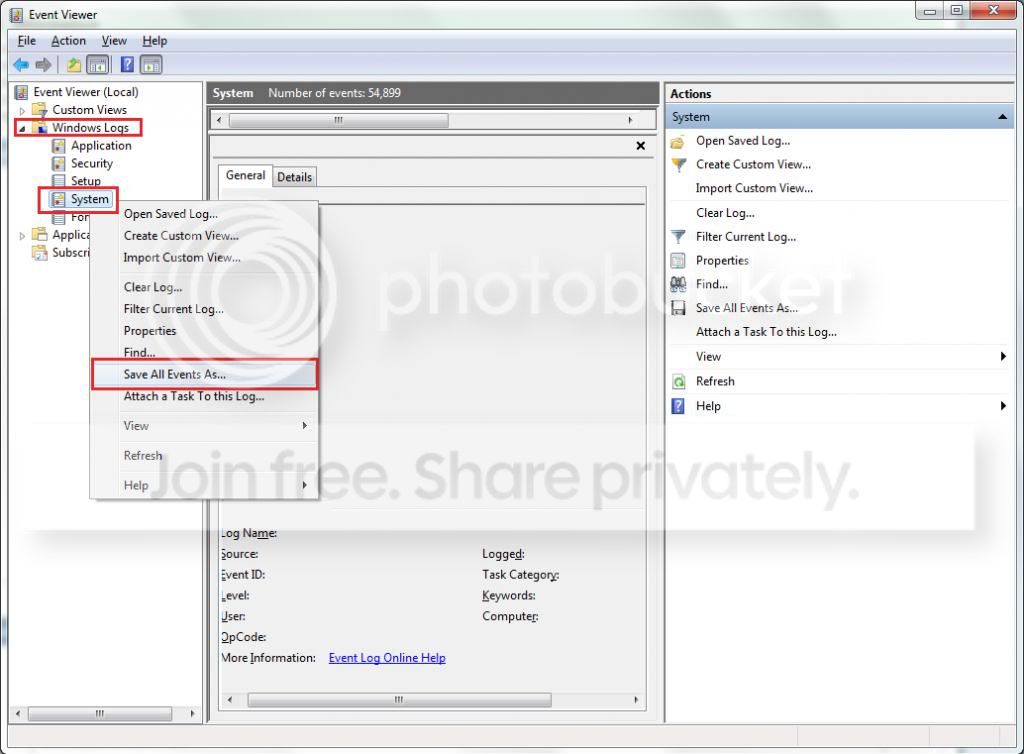
  3. syseventvwrlog1_zps5b0a5395.jpg
  4. A dialogue box will pop up asking you to name the file and select the save directory, name the file the same as your Seven Forums user-name and save it to the desktop.
  5. A second dialogue box will appear asking you to select the Display Information, select Display information for these languages and check the box next to English (if you don't have English automatically offered check the box at the bottom to display additional languages - Show all available languages and check English).
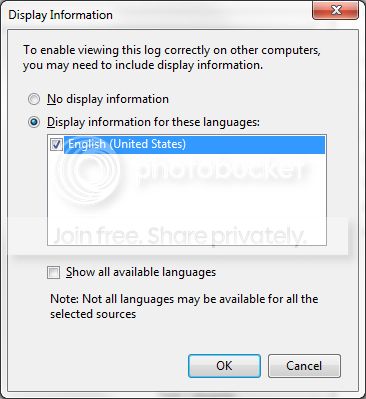
  6. syseventvwrlog2_zpsdafa4dba.jpg
  7. Wait a few moments until the cursor returns to normal. The file will now be on your desktop (given it's the directory it was saved to) UserName.evtx, next to it there will be a folder called LocaleMetaData select both the .evtx file as well as the folder and compress them using Winrar / 7zip and attach it in your next post.


Let us know the results.
 

My Computer

Computer type
PC/Desktop
OS
Windows 10
CPU
Intel Core i5 3570K
Motherboard
Asus P8Z77V-PRO
Memory
16GB 1600Mhz G.Skill
Graphics Card(s)
Gigabyte GTX 970 G1-Gaming
PSU
Seasonic 1000W Platinum
Case
Fractal Design Define R4
Cooling
Noctua NH-D14

My Computer

Computer type
Laptop
Computer Manufacturer/Model Number
Asus K52F or Lenovo B51-80
OS
Win 7 x64 Home Premium (and x86 VirtualBox VM)/Win10
CPU
i3 370M/i7 6500U
Motherboard
Asus/Lenovo
Memory
8GB - finally :)/8GB
Graphics Card(s)
it's an i3, dude!/dual Intel&nVidia
Sound Card
onboard
Monitor(s) Displays
15.6" built-in
Screen Resolution
1366x768/1920x1080
Hard Drives
750GB Seagate internal
Sundry external drives attached to other computers on the local network
1TB SSD on the Lenovo
PSU
n/a
Internet Speed
as much as I can get - usually on a dongle/phone, so <1MB/s
Antivirus
MSE/Defender
Browser
IE11/12/Edge/Chrome/FF(if I must)
Thanks a lot. That's a lot of information. I might not reply straight away as it doesn't always blue screen straight away.
 

My Computer

Computer type
PC/Desktop
YoYo155, I'm getting a wired connection for my computer soon. hopefully within the next week. Will I need to update my network drivers if I don't use a wireless connection any more?

I can't install the Nvidia drivers. When I try to install them I get an error message that says "The requested operation cannot be performed on a file with a user-mapped section open." What do I do?

I've checked the disk check and it found no errors at all.

My PSU is brand new few weeks old. It's a 700 watt power supply. 552 watts is the recommended wattage.

Here are the system events with the folder:
 
Last edited:

My Computer

Computer type
PC/Desktop
Anybody? Please help. I have no more ideas.
 

My Computer

Computer type
PC/Desktop
Sorry - been busy :(

You have a large number of filters installed by anti-malware apps - I wouldn't be at all surprised if there are conflicts between them

NovaShield
BdSpy
BdAgent
Trufos
luafv - leave alone, it's part of Windows
FileInfo - part of Windows


Please uninstall all anti-malware apps apart from your normal AV, and MalwareBytes Anti-Malware.

test the system for a while.
 

My Computer

Computer type
Laptop
Computer Manufacturer/Model Number
Asus K52F or Lenovo B51-80
OS
Win 7 x64 Home Premium (and x86 VirtualBox VM)/Win10
CPU
i3 370M/i7 6500U
Motherboard
Asus/Lenovo
Memory
8GB - finally :)/8GB
Graphics Card(s)
it's an i3, dude!/dual Intel&nVidia
Sound Card
onboard
Monitor(s) Displays
15.6" built-in
Screen Resolution
1366x768/1920x1080
Hard Drives
750GB Seagate internal
Sundry external drives attached to other computers on the local network
1TB SSD on the Lenovo
PSU
n/a
Internet Speed
as much as I can get - usually on a dongle/phone, so <1MB/s
Antivirus
MSE/Defender
Browser
IE11/12/Edge/Chrome/FF(if I must)
thanks for the reply. How do I uninstall them? They aren't on the Programs and features in the control panel. And can that cause conflicts only when playing games? It never freezes when doing anything else. Thanks.
 

My Computer

Computer type
PC/Desktop
Hmmm - at some time they must have been installed?

Please run the following commands and post the results.

REG QUERY HKLM\SYSTEM\CurrentControlSet\Enum\Root\LEGACY_BdSpy
REG QUERY HKLM\SYSTEM\CurrentControlSet\Enum\Root\LEGACY_BdAgent
REG QUERY HKLM\SYSTEM\CurrentControlSet\Enum\Root\LEGACY_Trufos
REG QUERY HKLM\SYSTEM\CurrentControlSet\Enum\Root\LEGACY_NovaShieldFilterDriver
REG QUERY HKLM\SYSTEM\CurrentControlSet\Services\NovaShieldFilterDriver
REG QUERY HKLM\SYSTEM\CurrentControlSet\Services\Trufos
REG QUERY HKLM\SYSTEM\CurrentControlSet\Services\BdAgent
REG QUERY HKLM\SYSTEM\CurrentControlSet\Services\BdSpy


Here are some instructions to make life easier :)
1) To open an Elevated Command Prompt Window (the ECP window), click on Start, All Programs, Accessories – then right-click on Command Prompt, and select Run as Administrator. Accept the UAC prompt.
2) To run the commands easier, highlight the block of commands, and right-click on the highlight – select Copy. In the CP Window, click on the black/white icon at top left – select Paste. The commands will run but may not complete the last command, so hit the Enter Key once.
3) To copy the results... click on the Black/White icon in the top left, and select Edit... 'Select All', and hit the Enter key - then use Ctrl+V or r-click+Paste to paste it into your response.
 

My Computer

Computer type
Laptop
Computer Manufacturer/Model Number
Asus K52F or Lenovo B51-80
OS
Win 7 x64 Home Premium (and x86 VirtualBox VM)/Win10
CPU
i3 370M/i7 6500U
Motherboard
Asus/Lenovo
Memory
8GB - finally :)/8GB
Graphics Card(s)
it's an i3, dude!/dual Intel&nVidia
Sound Card
onboard
Monitor(s) Displays
15.6" built-in
Screen Resolution
1366x768/1920x1080
Hard Drives
750GB Seagate internal
Sundry external drives attached to other computers on the local network
1TB SSD on the Lenovo
PSU
n/a
Internet Speed
as much as I can get - usually on a dongle/phone, so <1MB/s
Antivirus
MSE/Defender
Browser
IE11/12/Edge/Chrome/FF(if I must)
I've formatted my HDD but I got another BSOD. I forgot to change the crash settings so it's a kernel dump. I've changed it to a minidump now. The upload doesn't work as the file is too big.
I formatted it because the freezing didn't help at all. It doesn't tell you what causes it.
 
Last edited:

My Computer

Computer type
PC/Desktop

My Computer

Computer type
PC/Desktop
Computer Manufacturer/Model Number
Home Built Desktop By DataTech
OS
Windows 7 Ultimate X64 SP1
CPU
Intel i5-2550K, Differing ~4.4-4.8GHz No built in GPU
Motherboard
ASUS P8Z68-V PRO/GEN3
Memory
16GB G.Skill Sniper 1866MHz @ 2133MHz 2x8GB
Graphics Card(s)
ASUS GTX650TIB-DC2OC-2GD5, (650TI Boost)
Sound Card
Onboard Realtek 5-1
Monitor(s) Displays
Samsung P2570HD
Screen Resolution
1920x1080
Hard Drives
Samsung 840 Pro 256GB SSD for OS, 500GB Seagate Constellation (Enterprise drive) for Data
PSU
Corsair HX650W
Case
Inwin Dragon Rider
Cooling
Hyper 212 EVO w/two Noctua fans, push-pull, @1300 RPM
Keyboard
E-Z Eyes, bright yellow keys with large characters
Mouse
steelseries SENSEI Laser Pro Gaming
Internet Speed
48-51Mbs Mbs down, 11 Mbs up Xfinity Cable
Antivirus
Norton Internet Security 2013
Browser
IE 10, Opera, Pale Moon if needed
Other Info
4 case fans, LG BluRay-RE, ASUS DVD-RW, Mr. Fusion power supply, 1.21 gigawatts.
Hmm I mean I have sent the computer off to the manufacturer about a month ago and they found nothing wrong with the computer at all. I left Fallout New Vegas running yesterday for around 5-6 hours and nothing crashed. I left it running again for around 4 hours then it crashed once. I then left it running for another 4 hours and nothing came up. It doesn't seem too frequent but I've never been fully able to find the source of the problem. Are you still convinced it's hardware? I've monitored my temperatures before and they've never seemed to get hotter than 65 degrees Celsius. If you still really think it's hardware then I suppose I can do the hardware tests but I'm not convinced it is.
 

My Computer

Computer type
PC/Desktop
You won't know until you do some testing, we can't see or work on the machine. Since you did a clean install, (right?) and the issues remains it points more to hardware.

I have found manufacturers are a bit dishonest or just lazy about checking returns. I have returned a motherboard 4 times, each time I was told it was fully tested. The thing still would not boot.
 

My Computer

Computer type
PC/Desktop
Computer Manufacturer/Model Number
Home Built Desktop By DataTech
OS
Windows 7 Ultimate X64 SP1
CPU
Intel i5-2550K, Differing ~4.4-4.8GHz No built in GPU
Motherboard
ASUS P8Z68-V PRO/GEN3
Memory
16GB G.Skill Sniper 1866MHz @ 2133MHz 2x8GB
Graphics Card(s)
ASUS GTX650TIB-DC2OC-2GD5, (650TI Boost)
Sound Card
Onboard Realtek 5-1
Monitor(s) Displays
Samsung P2570HD
Screen Resolution
1920x1080
Hard Drives
Samsung 840 Pro 256GB SSD for OS, 500GB Seagate Constellation (Enterprise drive) for Data
PSU
Corsair HX650W
Case
Inwin Dragon Rider
Cooling
Hyper 212 EVO w/two Noctua fans, push-pull, @1300 RPM
Keyboard
E-Z Eyes, bright yellow keys with large characters
Mouse
steelseries SENSEI Laser Pro Gaming
Internet Speed
48-51Mbs Mbs down, 11 Mbs up Xfinity Cable
Antivirus
Norton Internet Security 2013
Browser
IE 10, Opera, Pale Moon if needed
Other Info
4 case fans, LG BluRay-RE, ASUS DVD-RW, Mr. Fusion power supply, 1.21 gigawatts.
I'm not too sure when to stop the test with furmark. When do I stop it? Also, I get 10FPS when running it. Is it supposed to be that low? How long does it run for? Can you set a timer?
 

My Computer

Computer type
PC/Desktop
Am I selecting any options in particular with the SeaTools hard drive test? There are a lot of options.
I'm a bit worried that if it isn't hardware these tests could damage something which won't be covered by the warranty.
 

My Computer

Computer type
PC/Desktop
If a test damages something, the hardware is faulty.

Furmark will run till you stop it, as I previously said you have to watch the animation for and defects, artifacts, or tearing, it's FPS doesn't mean anything. With your GPU 8-10 minimum FPS is normal.

In Seatools all you would run in the Long DST test. What options are you seeing?
 

My Computer

Computer type
PC/Desktop
Computer Manufacturer/Model Number
Home Built Desktop By DataTech
OS
Windows 7 Ultimate X64 SP1
CPU
Intel i5-2550K, Differing ~4.4-4.8GHz No built in GPU
Motherboard
ASUS P8Z68-V PRO/GEN3
Memory
16GB G.Skill Sniper 1866MHz @ 2133MHz 2x8GB
Graphics Card(s)
ASUS GTX650TIB-DC2OC-2GD5, (650TI Boost)
Sound Card
Onboard Realtek 5-1
Monitor(s) Displays
Samsung P2570HD
Screen Resolution
1920x1080
Hard Drives
Samsung 840 Pro 256GB SSD for OS, 500GB Seagate Constellation (Enterprise drive) for Data
PSU
Corsair HX650W
Case
Inwin Dragon Rider
Cooling
Hyper 212 EVO w/two Noctua fans, push-pull, @1300 RPM
Keyboard
E-Z Eyes, bright yellow keys with large characters
Mouse
steelseries SENSEI Laser Pro Gaming
Internet Speed
48-51Mbs Mbs down, 11 Mbs up Xfinity Cable
Antivirus
Norton Internet Security 2013
Browser
IE 10, Opera, Pale Moon if needed
Other Info
4 case fans, LG BluRay-RE, ASUS DVD-RW, Mr. Fusion power supply, 1.21 gigawatts.
ok thanks. I'm seeing: Fix all, S.M.A.R.T check, short drive self test, drive information , short generic, long generic and advanced tests.
 

My Computer

Computer type
PC/Desktop
Just do the long generic test, SMART isn't useful.
 

My Computer

Computer type
PC/Desktop
Computer Manufacturer/Model Number
Home Built Desktop By DataTech
OS
Windows 7 Ultimate X64 SP1
CPU
Intel i5-2550K, Differing ~4.4-4.8GHz No built in GPU
Motherboard
ASUS P8Z68-V PRO/GEN3
Memory
16GB G.Skill Sniper 1866MHz @ 2133MHz 2x8GB
Graphics Card(s)
ASUS GTX650TIB-DC2OC-2GD5, (650TI Boost)
Sound Card
Onboard Realtek 5-1
Monitor(s) Displays
Samsung P2570HD
Screen Resolution
1920x1080
Hard Drives
Samsung 840 Pro 256GB SSD for OS, 500GB Seagate Constellation (Enterprise drive) for Data
PSU
Corsair HX650W
Case
Inwin Dragon Rider
Cooling
Hyper 212 EVO w/two Noctua fans, push-pull, @1300 RPM
Keyboard
E-Z Eyes, bright yellow keys with large characters
Mouse
steelseries SENSEI Laser Pro Gaming
Internet Speed
48-51Mbs Mbs down, 11 Mbs up Xfinity Cable
Antivirus
Norton Internet Security 2013
Browser
IE 10, Opera, Pale Moon if needed
Other Info
4 case fans, LG BluRay-RE, ASUS DVD-RW, Mr. Fusion power supply, 1.21 gigawatts.
My HDD passed the Long Generic Test.
I've ran Furmark for around 10 minutes. There were some flickering writing on the screen when it was running, not sure if it's really bad or not but the hottest temperature was 78 degrees Celsius.
 
Last edited:

My Computer

Computer type
PC/Desktop
Because the small kernel dump is too large to upload you couldn't analyze it but I remember it did have a bugcheck of 0x116. I don't know if this points to hardware or not.
 

My Computer

Computer type
PC/Desktop
My HDD passed the Long Generic Test.
I've ran Furmark for around 10 minutes. There were some flickering writing on the screen when it was running, not sure if it's really bad or not but the hottest temperature was 78 degrees Celsius.
There shouldn't be any flickering but the animation may seen a bit jerky with a 650Ti, I also have one with 5-9FPS as well, I don't game so I don't know how it acts.
The 0x116 points to a videos driver. Bug Check 0x116: VIDEO_TDR_ERROR (Windows Debuggers)

I use the 327.23 driver, you can try going back to that one. Sometimes newer isn't better.
Because the small kernel dump is too large to upload you couldn't analyze it but I remember it did have a bugcheck of 0x116. I don't know if this points to hardware or not.
Did you reset your dumps to collect a mini-dump, a.k.a Small Memory dump?

http://www.sevenforums.com/tutorials/174459-dump-files-configure-windows-create-bsod.html
 

My Computer

Computer type
PC/Desktop
Computer Manufacturer/Model Number
Home Built Desktop By DataTech
OS
Windows 7 Ultimate X64 SP1
CPU
Intel i5-2550K, Differing ~4.4-4.8GHz No built in GPU
Motherboard
ASUS P8Z68-V PRO/GEN3
Memory
16GB G.Skill Sniper 1866MHz @ 2133MHz 2x8GB
Graphics Card(s)
ASUS GTX650TIB-DC2OC-2GD5, (650TI Boost)
Sound Card
Onboard Realtek 5-1
Monitor(s) Displays
Samsung P2570HD
Screen Resolution
1920x1080
Hard Drives
Samsung 840 Pro 256GB SSD for OS, 500GB Seagate Constellation (Enterprise drive) for Data
PSU
Corsair HX650W
Case
Inwin Dragon Rider
Cooling
Hyper 212 EVO w/two Noctua fans, push-pull, @1300 RPM
Keyboard
E-Z Eyes, bright yellow keys with large characters
Mouse
steelseries SENSEI Laser Pro Gaming
Internet Speed
48-51Mbs Mbs down, 11 Mbs up Xfinity Cable
Antivirus
Norton Internet Security 2013
Browser
IE 10, Opera, Pale Moon if needed
Other Info
4 case fans, LG BluRay-RE, ASUS DVD-RW, Mr. Fusion power supply, 1.21 gigawatts.
Back
Top