Solved Computer is going out??

idahjo

New member
Member
VIP
Local time
3:21 PM
Messages
165
Desktop computer had broken pixels pop up over it at first then went away. Came back more frequently then now it is all over it and visibly unusable. Seems maybe to be a video problem only.


Trying to decide if it is 1)Monitor 2)Video Card or 3)Motherboard. It is an older computer that has been very reliable but maybe it has reached the end of it's life. As usual hoping for a 'quick fix' or something from someone else who has had the same experience.


Thanks and have a GREAT day!
 

My Computer

Computer type
PC/Desktop
Computer Manufacturer/Model Number
Custom Build
OS
Microsoft Windows 7 Ultimate 64-bit 7601 Multiprocessor Free Service Pack 1
CPU
AMD Phenom(tm) II X3 720 Processor
Motherboard
Gigabyte Technology Co., Ltd. GA-MA785GPMT-UD2H
Memory
4.00 GB
Graphics Card(s)
ATI Radeon HD 4800 Series
Sound Card
(1) AMD High Definition Audio Device (2) Realtech H/D Audio
Screen Resolution
DELL 2405FPW (1920 x 1200 ) @ 75 Hz
Hard Drives
(1) Samsung SSD 840 Series ATA Device (2) WDC WD400BD-75MRA1 ATA Device
PSU
700w Kingwin Mach-1
Antivirus
Avast
Browser
Firefox
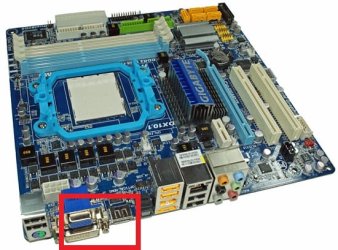
I'm assuming your specs are correct. If so, in addition to your radeon 4800 video card you have integrated radeon 4200 motherboard graphics with vga, dvi, and hdmi ports. Just try your monitor on one of the motherboard ports. You may have to indicate in bios to use the integrated graphics to do this, or you could just uninstall your video card temporarily. If the problem persists the monitor is the problem. If not, the problem is the video card. One caveat, be sure that your motherboard graphics is loading a radeon driver, because if it just loads the windows svga driver your symptoms may go away only because you are using such a basic driver.
 

Attachments

  • giga785fs.jpg
    giga785fs.jpg
    47.6 KB · Views: 43

My Computer

Computer type
PC/Desktop
Computer Manufacturer/Model Number
diy
OS
Win7 pro x64
CPU
stock i7 7700k
Motherboard
Gigabyte Z270N-WIFI mini-ITX
Memory
Corsair Vengeance LPX 16GB (2x8GB) DDR4 @ 3200MHz
Graphics Card(s)
integrated Intel HD 630
Sound Card
onboard Realtek ALC1220
Monitor(s) Displays
two vertically mounted samsung 55" 4k un55mu8000
Screen Resolution
1920x1280
Hard Drives
256GB Samsung EVO 960 M.2 pci-e NVMe SSD
PSU
SilverStone Nightjar ST45NF 450Watt Fanless
Case
No case. Motherboard is mounted directly onto power supply
Cooling
Evercool low profile 815EP with Panaflow 12L fan at 7v
Keyboard
Ortek MCK-86 mini
Mouse
Belkin 5-button USB
Internet Speed
spectrum 400mbps
Thanks a million. I'm in the process of moving and wife has packed the manuals. Everything is in a jumble. I will follow your instructions at first opportunity and get back to you. My best 'guess' would have been the video card :-)
 

My Computer

Computer type
PC/Desktop
Computer Manufacturer/Model Number
Custom Build
OS
Microsoft Windows 7 Ultimate 64-bit 7601 Multiprocessor Free Service Pack 1
CPU
AMD Phenom(tm) II X3 720 Processor
Motherboard
Gigabyte Technology Co., Ltd. GA-MA785GPMT-UD2H
Memory
4.00 GB
Graphics Card(s)
ATI Radeon HD 4800 Series
Sound Card
(1) AMD High Definition Audio Device (2) Realtech H/D Audio
Screen Resolution
DELL 2405FPW (1920 x 1200 ) @ 75 Hz
Hard Drives
(1) Samsung SSD 840 Series ATA Device (2) WDC WD400BD-75MRA1 ATA Device
PSU
700w Kingwin Mach-1
Antivirus
Avast
Browser
Firefox
Sounds like a monitor issue. Do you have a separate known working computer to test your monitor on or a known working monitor to test on that computer? The best way to test components is to swap out questionable ones with known good ones on other computers or use known good components on your questionable computer. Preferably both. Don't forget to test the cable as well.
 

My Computers

System One System Two

Thanks much guys. I had a chance to look at it further and the bios screen was partially hacked-up with the stirred pixels. I ruled out the monitor then. Started to switch over to the onboard video and noted the video card had two output connectors (dual monitors). Running process of elimination decided to reconnect the monitor cable to the OTHER connector on the video card. ..WORKS..

It is currently working normally, so would deduce the first output leg went kaput in a manner that left the second leg functional. At least until I get finished with this long-term move I'll watch it, then change the card IF it does a repeat. :party:
 

My Computer

Computer type
PC/Desktop
Computer Manufacturer/Model Number
Custom Build
OS
Microsoft Windows 7 Ultimate 64-bit 7601 Multiprocessor Free Service Pack 1
CPU
AMD Phenom(tm) II X3 720 Processor
Motherboard
Gigabyte Technology Co., Ltd. GA-MA785GPMT-UD2H
Memory
4.00 GB
Graphics Card(s)
ATI Radeon HD 4800 Series
Sound Card
(1) AMD High Definition Audio Device (2) Realtech H/D Audio
Screen Resolution
DELL 2405FPW (1920 x 1200 ) @ 75 Hz
Hard Drives
(1) Samsung SSD 840 Series ATA Device (2) WDC WD400BD-75MRA1 ATA Device
PSU
700w Kingwin Mach-1
Antivirus
Avast
Browser
Firefox
It sounds like your card is going bad.
 

My Computers

System One System Two

Indeed- Thanks
 

My Computer

Computer type
PC/Desktop
Computer Manufacturer/Model Number
Custom Build
OS
Microsoft Windows 7 Ultimate 64-bit 7601 Multiprocessor Free Service Pack 1
CPU
AMD Phenom(tm) II X3 720 Processor
Motherboard
Gigabyte Technology Co., Ltd. GA-MA785GPMT-UD2H
Memory
4.00 GB
Graphics Card(s)
ATI Radeon HD 4800 Series
Sound Card
(1) AMD High Definition Audio Device (2) Realtech H/D Audio
Screen Resolution
DELL 2405FPW (1920 x 1200 ) @ 75 Hz
Hard Drives
(1) Samsung SSD 840 Series ATA Device (2) WDC WD400BD-75MRA1 ATA Device
PSU
700w Kingwin Mach-1
Antivirus
Avast
Browser
Firefox
Back
Top