
Computer Problems

xoulu

New member
Local time
5:35 AM
Messages
10
Hey All

Just built a new system

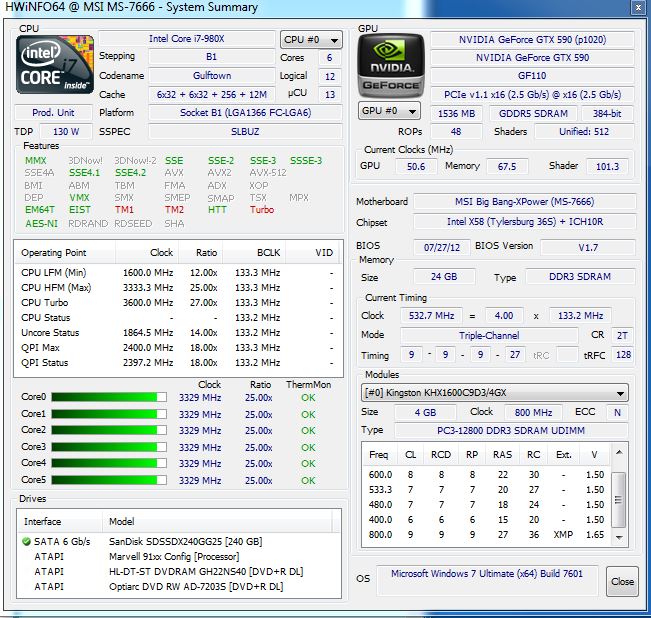
i7 980X
MSI Big Bang
24GB Kingston Hyper X (Bios only show 16GB)
Sandisk 256 SSD

Anyways I am running Prime 95 and threads 5,6,9 and 10 failed but the rest are running perfect. Those failed within 5min of the test while the rest ran perfect for 30 min.

I am running on Corsair H100i

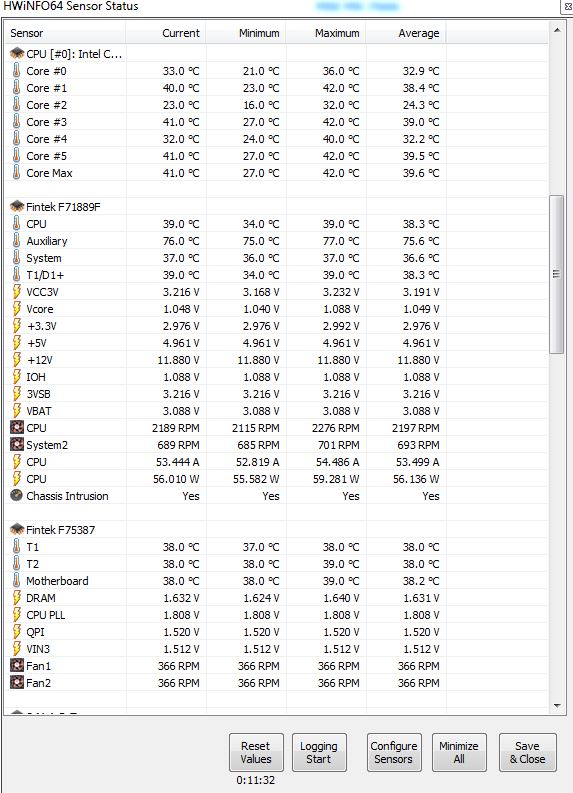
Temperature on all core at max is 41 and idle is 21.

Should I be worry that threads 5 6 9 and 10 are failing?

Bios I set it to 200 x 25 and everything on auto.
Ram was set to XMP and auto
I turned Spread Spectrum off

Please advise if I should be worry or care about the threads failing....
Also anyone knows how ot make bios show all 24GB ram? CPUID and HWiNFO64 shows 24GB but windows and bios shows 16GB
uoNBNws.jpg


4VET38X.jpg


NVi6KKE.jpg


Thank You!
 
Last edited:

My Computer

Computer type
PC/Desktop
OS
Windows 7 Ultimate x64
CPU
i7 980X
Motherboard
MSI Big Bang
Memory
Kingston Hyper X
Graphics Card(s)
Nvidia 590 GTX
Hard Drives
256GB Sandisk SSD
Browser
Chrome
I would reset all the overclocks back to default, then run Prime95 again.
 

My Computer

Computer type
PC/Desktop
Computer Manufacturer/Model Number
Golden Mk. I.4
OS
Windows 10 Pro x64 ; Xubuntu x64
CPU
Intel i7 860 @ 2.80 GHz O/C'ed to 4.0GHz
Motherboard
Gigabyte P55A-UD3R Rev.1. Award BIOS F13
Memory
16GB Corsair Vengance DDR3 @ 661 MHz Dual Channel (9-9-9-24)
Graphics Card(s)
EVGA NVidia GTX 560 1024MB
Sound Card
Realtek Integrated
Monitor(s) Displays
Dual Samsung SyncMaster 2494HS
Screen Resolution
1920*1080 and 1920*1080
Hard Drives
1*Samsung 840 EVO 120GB SSD;
1*OCZ Vertex 2 60GB SSD;
2*Samsung F3 SpinPoint 1TB in RAID0;
1*Samsung F1 SpinPoint 1TB;
2*Western Digital 1TB External USB 3.0
1*Western Digital 500GB External USB 3.0
1*Seagate 500GB External USB 2.0
PSU
Thermaltake ToughPower QFan 750W
Case
Thermaltake Element S VK60001W2Z
Cooling
Corsair H60 Water Cooling, 2*230mm and 2*80mm case fans
Keyboard
Logitech G110
Mouse
Logitech MX518
Running everything on default
Even the ram timing is set to default at 1066 (Ram is rated at 1600mhz with xmp)
I hate C1 stepping but it's on default

Could the threads be a problem with the ram timing and C1 stepping?

Test is running now and I will report back if any of them fail
 

My Computer

Computer type
PC/Desktop
OS
Windows 7 Ultimate x64
CPU
i7 980X
Motherboard
MSI Big Bang
Memory
Kingston Hyper X
Graphics Card(s)
Nvidia 590 GTX
Hard Drives
256GB Sandisk SSD
Browser
Chrome
Test runs fail and no fails at all with default.
I will mess with some settings and see what happens.

Anyone know in the mean time why BIOS and Windows shows 16GB of ram while the software shows 24GB?
Any way I can get the bios to register 24GB ram?
Just updated latest bios and still showing 16GB
 

My Computer

Computer type
PC/Desktop
OS
Windows 7 Ultimate x64
CPU
i7 980X
Motherboard
MSI Big Bang
Memory
Kingston Hyper X
Graphics Card(s)
Nvidia 590 GTX
Hard Drives
256GB Sandisk SSD
Browser
Chrome
You want to run your cpu at 5Ghz? (200x25) every cpu got a limit regardless of how much voltage your pumping into them, and with that ammount of ram your using you need to pretty much set your IMC/VTT at max, the more RAM the higher IMC/VTT you need, what exactly are going to do with this computer?1 of your ram sticks can be ruined, so you can try remove all sticks and try them on their own to see if all sticks worksAlso using auto is a bad thing when your cranking up the BLCK as that is increasing the stress on Everything else (ram lanes included)Dont use auto settings, set Everything to default boot up the computer then restart it and set every setting to manual (cpu to offset/adaptive if you want it to Clock down at idle)
 

My Computer

Computer type
PC/Desktop
OS
Windows 7 Home Premium x64
CPU
Intel Core i7 860 (Lynnfield)
Motherboard
Asus P7P55D (LGA1156)
Memory
Corsair Vengeance 9,9,9,24 1600Mhz 1.50v 2x4G
Graphics Card(s)
Asus nVidia 560 GTX
Sound Card
Asus Xonar DG
Monitor(s) Displays
Acer P235H & NEC E201W
Screen Resolution
1920x1080 & 900x1600
Hard Drives
2
PSU
Corsair 650 Modular
Case
Corsair 800D
Cooling
Corsair H80 with Noctua fans
Keyboard
Ducky Shine
Mouse
tT Theron
Internet Speed
100/100
Browser
IE10
Does your 12 volt lane always read that low (11.88)
 

My Computer

Computer type
PC/Desktop
Computer Manufacturer/Model Number
Custom, Dell and Lenono LT's
OS
Win8/8.1,Win7-U64, Vista U64, uncounted Linux distor's
CPU
AMD and Intell, 9590, 8350, i5 3570k
Motherboard
CFVFZ, GA990FXA, Z77e-itx
Memory
Corsair G Skill
Graphics Card(s)
Crossfired Sapphire HD 7950 Vapor-X, ASUS R9 280X TOP
Sound Card
Realtek ALC889
Monitor(s) Displays
ViewSonic VX2770SMH 27" / ViewSonic VX2433 LCD 24"
Screen Resolution
1080i HD
Hard Drives
Samsung SSD 840 Pro
OCZ Agility 3's
OCZ Vector's
WD's Blue, red, green, Velociraptors
Seagate USB3 & Hybrid's
ASUS Blu-Ray
ASUS DVD
PSU
Corsair AX1200i, Seasonice 850 Gold
Case
Cooler Master HAF 922 & HAF 932, Lian Li Train case.
Cooling
Air, Glacer 240L expanded, custom EK loop with duel D5's
Keyboard
Microsoft SideWinder X4 USB Keyboard / Logitech 250 PS2
Mouse
Logitech G500 / MS wireless 5000
Internet Speed
Best of 5ms / 75+ dn / 12+ up More or less.
Antivirus
MS esentials-MalwareBytes
Browser
Firefox Chromebook
Sorry

The settings for CPU was at 133x25 not 200 x 25

Every voltage settings is at stock.
So test ran run with just default settings.

Ran for 30 min and everything is fine.
I benchmark the system and everything is fine until the 3D graphics portion starts then I get the blue screen and it would restart. The error is 0x00000124

It indicates either software or hardware.
I have a 590 GTX.
I updated the latest software and it still blue screens.

I cant play any games as it would blue screen. If I'm just running regular as browsing and etc it will not blue screen. Anything related to the Graphics means blue screen. I am currently going to test with another video card.

Now messing with the settings. I tried to set the ram to just 1600mhz XMP as what Kingston suggest, the treads fail again. So could it really be a hardware issue or just a OC issue?

Anyone has a i7 980x with 24GB ram and with a MSI Big Bang that can share their settings?

Thanks!
 

My Computer

Computer type
PC/Desktop
OS
Windows 7 Ultimate x64
CPU
i7 980X
Motherboard
MSI Big Bang
Memory
Kingston Hyper X
Graphics Card(s)
Nvidia 590 GTX
Hard Drives
256GB Sandisk SSD
Browser
Chrome
xoulu, Welcome to SF. Overclocking is an art and different with each mobo and chip/chipset. Start at stock settings and then read and learn about overclocking then start small and test, go little more and test till you fail and then back down to the last stable setting. Only overclock what you can afford to replace, it's like high risk stocks in the stock market only invest what you can afford to lose.
 

My Computer

Computer type
PC/Desktop
Computer Manufacturer/Model Number
A blend of brains, brawn and dumb luck.
OS
Windows 7 Ultimate 64
CPU
i7 3770k OC'd 4.6 @ 1.17v, also FX 8120 & i5 miniITX
Motherboard
MSI P67A-GD80 b3
Memory
32 gb G.Skill Sniper DDR3 10-12-12-31 @ 2133
Graphics Card(s)
XFX Radeon 7870 2GB DDR5
Sound Card
Sound Blaster Z Series Card
Monitor(s) Displays
(2) LG LED 23" 1920 x 1080 2ms Monitors via mini d-port
Screen Resolution
1680 X 1050 p
Hard Drives
Samsung 256 gb 830 SSD sata III
(1) 1 tb WD Black
(2) 1 tb Hitachi deskmates/sata II
(2) 1 tb WD green/sata II
(2) 3 tb Seagate Barracuda
(1) 120 gb OCZ Vertex SS
(1) Drobo 5N w/5 Seagate 3tb
PSU
EVGA modular 1000G2 80% gold rating & APC 1200 RS
Case
CoolerMaster Storm Styker
Cooling
7 case fans 140mm & 120mm, NZXT Kraken X60
Keyboard
(2) Logitech Illuminated Keyboards (1) usb (1) wireless
Mouse
Logitech G700 & T-BC21 - nano nx for the laptop
Internet Speed
Basic 120mbps down
Antivirus
Trend Micro Titanium Max Security & Malwarebytes Premium
Browser
Chrome and IE 10
Other Info
5 Noctua case fans + 3 Noctua in p/p on NZXT cooler
Integrated hot swap drive bays for 2.5" Drives
(2) Lite-on dvd/cd/Blu Ray optical 22X
Integrated fan controller and led on/off
HP Officejet Pro 8630 all-n-one
Hot-swappable 3.5" hard drive bay
Netgear Nighthawk router
Asus USB 3 & sata 6 PCIe card
Vantec IDE to sata adptr./Ultra sata adptr
Lenovo L420 i5 lappy with m sata
Drobo 5N advanced NAS
I fixed the issue
Guess it was a OC issue that was causing BSOD
I guess my ports on my MB is toasted as it can only read 3 of the 6 ports. It's fine as long as its stable

Got my settings to be stable with lowering the PLL, Vcore, and VTT
 

My Computer

Computer type
PC/Desktop
OS
Windows 7 Ultimate x64
CPU
i7 980X
Motherboard
MSI Big Bang
Memory
Kingston Hyper X
Graphics Card(s)
Nvidia 590 GTX
Hard Drives
256GB Sandisk SSD
Browser
Chrome
Back
Top