computer restarts when i try to load windows

jll138girl

New member
Local time
11:44 PM
Messages
18
Location
apo
i custom biult this computer i started from scratch i have tried everything i try to get windows to install on 2 differnt hard drives and it gives me a difernt error for each hard drive and i took the solid state out of my husbands computer that already has windows on it and it wont load it gets the little balls spinning for a few seconds than restarts i have tried every sata hard drive in my house and they are ones that i know work because i took them out of other computers can some one please help i have been fighting with this computer for over a year trying to get it going and running well

EDIT: i got windows to install on my old laptop hard drive but i still cant get it to install on the terabite it was saying that its the wrong format and when i tried to run windows off the solid state drive it would crash not just restart it was just showing the bluescreen way to fast for me to see it
 
Last edited:

My Computer My Computer

At a glance

windows 7 ultimate x64intel I78 gb
Computer type
PC/Desktop
Computer Manufacturer/Model Number
samsung series 7 chronos
OS
windows 7 ultimate x64
CPU
intel I7
Memory
8 gb
Hard Drives
1 tb
What is the make and model number of the motherboard? Is it UEFI or BIOS?
 

My Computer My Computer

At a glance

Windows 10 Pro X64Intel Quad Core i7-4770 @ 3.4Ghz16.0GB PC3-12800 DDR3 SDRAM 1600 MHzIntel Integrated HD Graphics
Computer type
PC/Desktop
Computer Manufacturer/Model Number
Lenovo IdeaCenter 450
OS
Windows 10 Pro X64
CPU
Intel Quad Core i7-4770 @ 3.4Ghz
Memory
16.0GB PC3-12800 DDR3 SDRAM 1600 MHz
Graphics Card(s)
Intel Integrated HD Graphics
Sound Card
Realtek HD Audio
Monitor(s) Displays
HP 22" LCD
Screen Resolution
1680 x 1050
Hard Drives
250GB Samsung EVO SATA-3 SSD
2TB Seagate ST2000DM001 SATA-2
1.5TB Seagate ST3150041AS SATA
Keyboard
Dell USB
Mouse
Lenovo USB
Internet Speed
Cable via Road Runner 3MB Upload, 30MB Download
Antivirus
Windows Defender, MBAM Pro, MBAE
Browser
Seamonkey
Other Info
UEFI/GPT
PLDS DVD-RW DH16AERSH
Got the motherboard info from your Specs, didn't see them last time, sorry. That board uses BIOS, not UEFI.

What do you have Raid Mode set to? What are the choices. Try IDE or AHCI.
 

My Computer My Computer

At a glance

Windows 10 Pro X64Intel Quad Core i7-4770 @ 3.4Ghz16.0GB PC3-12800 DDR3 SDRAM 1600 MHzIntel Integrated HD Graphics
Computer type
PC/Desktop
Computer Manufacturer/Model Number
Lenovo IdeaCenter 450
OS
Windows 10 Pro X64
CPU
Intel Quad Core i7-4770 @ 3.4Ghz
Memory
16.0GB PC3-12800 DDR3 SDRAM 1600 MHz
Graphics Card(s)
Intel Integrated HD Graphics
Sound Card
Realtek HD Audio
Monitor(s) Displays
HP 22" LCD
Screen Resolution
1680 x 1050
Hard Drives
250GB Samsung EVO SATA-3 SSD
2TB Seagate ST2000DM001 SATA-2
1.5TB Seagate ST3150041AS SATA
Keyboard
Dell USB
Mouse
Lenovo USB
Internet Speed
Cable via Road Runner 3MB Upload, 30MB Download
Antivirus
Windows Defender, MBAM Pro, MBAE
Browser
Seamonkey
Other Info
UEFI/GPT
PLDS DVD-RW DH16AERSH
i havent messed with any of the settings in the bios really i dont wanna mess any thing up im cool with hardware not so much software i have no idea what raid mode is let alone the choises of what i can set it to ... sorry if you can tell me where to find the info i will be more than happy to find it for you
 

My Computer My Computer

At a glance

windows 7 ultimate x64intel I78 gb
Computer type
PC/Desktop
Computer Manufacturer/Model Number
samsung series 7 chronos
OS
windows 7 ultimate x64
CPU
intel I7
Memory
8 gb
Hard Drives
1 tb
Page 3-10 of the manual for your motherboard shows you where it is.

You can get the manual here: MSI USA ? Download Center
 

My Computer My Computer

At a glance

Windows 10 Pro X64Intel Quad Core i7-4770 @ 3.4Ghz16.0GB PC3-12800 DDR3 SDRAM 1600 MHzIntel Integrated HD Graphics
Computer type
PC/Desktop
Computer Manufacturer/Model Number
Lenovo IdeaCenter 450
OS
Windows 10 Pro X64
CPU
Intel Quad Core i7-4770 @ 3.4Ghz
Memory
16.0GB PC3-12800 DDR3 SDRAM 1600 MHz
Graphics Card(s)
Intel Integrated HD Graphics
Sound Card
Realtek HD Audio
Monitor(s) Displays
HP 22" LCD
Screen Resolution
1680 x 1050
Hard Drives
250GB Samsung EVO SATA-3 SSD
2TB Seagate ST2000DM001 SATA-2
1.5TB Seagate ST3150041AS SATA
Keyboard
Dell USB
Mouse
Lenovo USB
Internet Speed
Cable via Road Runner 3MB Upload, 30MB Download
Antivirus
Windows Defender, MBAM Pro, MBAE
Browser
Seamonkey
Other Info
UEFI/GPT
PLDS DVD-RW DH16AERSH
Make sure you have the latest BIOS version from MSI USA ? Motherboard - 890FXA-GD70. Follow the steps carefully to flash BIOS.

If you have the latest BIOS then boot into BIOS setup using the key shown on BIOS splash screen, look for the SATA controller setting, set to AHCI to try install. If that fails try IDE mode.

Unplug all other HD's during install.
 
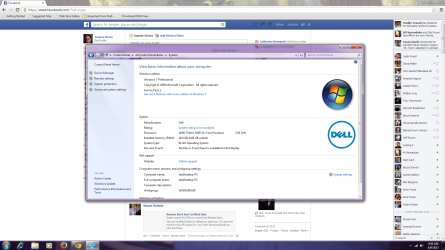
the bois should be UTD i just got the thing back from msi i have it running now but it says only 8 gb of my 16 gb of ram are useble but it recignises all 16 gb
 

Attachments

  • pc screen shot.png
    pc screen shot.png
    155.4 KB · Views: 6
Last edited:

My Computer My Computer

At a glance

windows 7 ultimate x64intel I78 gb
Computer type
PC/Desktop
Computer Manufacturer/Model Number
samsung series 7 chronos
OS
windows 7 ultimate x64
CPU
intel I7
Memory
8 gb
Hard Drives
1 tb
1) If your computer ends up with a BSOD (blue screen of death), then there might be two different error messages that keep repeating if an overclock attempt does not work as planned (too little voltage for vcore or something else).

2) In the motherboard manual, there might be a table showing how far a mainboard has gone in the POST (power on self test) process. Failure to boot properly might perhaps have the computer booting and restarting in a continuous loop. Such diagnostic lights might not be present on your mainboard.
 

My Computer My Computer

At a glance

Windows 7 Pro, 64 bitQ6600 @ 3.5 GHzMushkin, DDR2, 8 GBSapphire Radeon 5850, OC'ed, bios edited
OS
Windows 7 Pro, 64 bit
CPU
Q6600 @ 3.5 GHz
Motherboard
MSI P35 Platinum
Memory
Mushkin, DDR2, 8 GB
Graphics Card(s)
Sapphire Radeon 5850, OC'ed, bios edited
Monitor(s) Displays
Eizo S2431W, 24"
Screen Resolution
1920x1200
PSU
Corsair HX650
Case
Antec P280
Cooling
Noctua fans
Keyboard
Logitech Illuminated
Other Info
HS80M studio monitors, Abrahamsen A-DAC
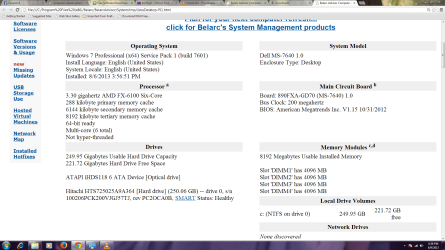
What is the BIOS version number? It should say when you boot into BIOS setup, or run Belarc Advisor.

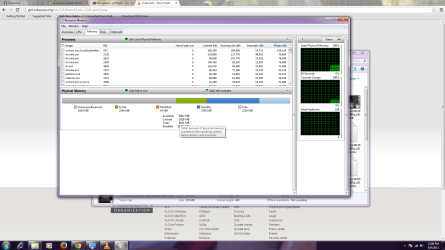
Type Resource Monitor into Start Search box. On Memory Tab how much RAM is apportioned to hardware?
 
tthis should be the stuff you were looking for
 

Attachments

  • bios.png
    bios.png
    101.6 KB · Views: 9
  • Untitled.png
    Untitled.png
    117.1 KB · Views: 11

My Computer My Computer

At a glance

windows 7 ultimate x64intel I78 gb
Computer type
PC/Desktop
Computer Manufacturer/Model Number
samsung series 7 chronos
OS
windows 7 ultimate x64
CPU
intel I7
Memory
8 gb
Hard Drives
1 tb
You have the latest BIOS version.

Your hardware is reserving more than 8gb of your RAM so that explains the disparity reported on System page. I would confirm that your Video card uses this much RAM because its seems high. A hardware expert will know for sure.

Have you tried to set SATA controller to AHCI in BIOS setup yet to retry install?

Another suggestion from BlueRobot:

Ask if they have placed the RAM sticks in the specified slots by their motherboard manual, some motherboards require RAM to be in certain slots if using a certain amount of RAM or certain slots are being used.

Do they have a matched set of RAM? Have they checked compatibility with their motherboard?
 
Last edited:
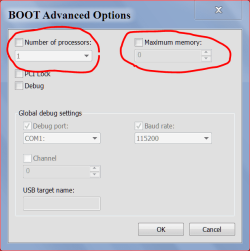
Could you post one of these.

ADVANCE OPTIONS 8 9 2013.PNG
 

My Computer My Computer

At a glance

Windows 10 Pro. 64/ version 1709 Windows 7 Pr...Intel i7-6800K @ 4.3Corsair Platinum 16 gig @2400EVGA GTX 1070 OC
Computer type
PC/Desktop
Computer Manufacturer/Model Number
Home made Desktop
OS
Windows 10 Pro. 64/ version 1709 Windows 7 Pro/64
CPU
Intel i7-6800K @ 4.3
Motherboard
ASUS X-99 Deluxe II
Memory
Corsair Platinum 16 gig @2400
Graphics Card(s)
EVGA GTX 1070 OC
Monitor(s) Displays
Asus 27" LED LCD/VE278Q
Screen Resolution
1920-1080 or 1280-720 HDMI
Hard Drives
INTEL SSD 730-240 Gb Sata 3.0/
PSU
EVGA Platium 1200W
Case
Phanteks Luxe Tempered Glass 8 fans/ one radiator
Cooling
XSPC/ Water Cooled CPU
Keyboard
Das 4 Professional
Mouse
Logitech M705/MX Anywhere 2-S
Internet Speed
100 mbits
Antivirus
Microsoft Security Essentials/ Malwarebytes Premium 3.0/ SAS
Browser
I.E. 11 default/Firefox/ ISP Time Warner Cable/Spectrum
Other Info
LG BluRay Burner/
Sound system-KLipsch-THX/
Icy Dock ssd Hot Swap bays.

My Computer My Computer

At a glance

Windows 7 Ultimate X64 SP1Intel i5-2550K, Differing ~4.4-4.8GHz No buil...16GB G.Skill Sniper 1866MHz @ 2133MHz 2x8GBASUS GTX650TIB-DC2OC-2GD5, (650TI Boost)
Computer type
PC/Desktop
Computer Manufacturer/Model Number
Home Built Desktop By DataTech
OS
Windows 7 Ultimate X64 SP1
CPU
Intel i5-2550K, Differing ~4.4-4.8GHz No built in GPU
Motherboard
ASUS P8Z68-V PRO/GEN3
Memory
16GB G.Skill Sniper 1866MHz @ 2133MHz 2x8GB
Graphics Card(s)
ASUS GTX650TIB-DC2OC-2GD5, (650TI Boost)
Sound Card
Onboard Realtek 5-1
Monitor(s) Displays
Samsung P2570HD
Screen Resolution
1920x1080
Hard Drives
Samsung 840 Pro 256GB SSD for OS, 500GB Seagate Constellation (Enterprise drive) for Data
PSU
Corsair HX650W
Case
Inwin Dragon Rider
Cooling
Hyper 212 EVO w/two Noctua fans, push-pull, @1300 RPM
Keyboard
E-Z Eyes, bright yellow keys with large characters
Mouse
steelseries SENSEI Laser Pro Gaming
Internet Speed
48-51Mbs Mbs down, 11 Mbs up Xfinity Cable
Antivirus
Norton Internet Security 2013
Browser
IE 10, Opera, Pale Moon if needed
Other Info
4 case fans, LG BluRay-RE, ASUS DVD-RW, Mr. Fusion power supply, 1.21 gigawatts.
Back
Top