Solved Computer Slows then Freezes, Have to Restart

That's not an SSD, its an SSHD - which is a combination of a tiny SSD plus a normal spinning drive. I have no experience with them but the theory sounds good. Hopefully someone else can comment on how they compare in the real world to an SSD.

The i7-7700 will be a million times faster than your current core 2 duo.

Since that system comes with win10 you would need to transfer over your existing win7 license, clone your existing drive onto the new drive, then install win7 drivers to support all the new hardware. I am pretty sure win7 drivers exist for everything except maybe the wireless card. Intel 9xxx wireless cards will not run on win7. For $15 you can always just stick a new pci-e wireless card in there if you need to, like this one. Hopefully you can figure out exactly what wireless card is in there before you buy it.

Amazon.com: TP-Link TL-WN881ND N300 PCI-E Wireless WiFi network Adapter card for pc: Gateway

Because the new system comes with win10, you have a not-trivial amount of effort to go through to get your cloned win7 running on it. The steps to do so are: on your old machine change the disk controller driver to the standard ahci driver, then shut down, then physically move its boot drive over to the new machine, boot from it on the new machine (telling bios to boot from it), use macrium (or whatever) to clone it onto the new SSHD, shut down, physically remove the old drive, boot from the newly cloned new drive, then install all the relevant win7 drivers. That CPU does not officially have a win7 support but it does work fine if you download the right driver version (I've got that cpu on my machine). Windows update won't work because you'll be using a 7700 on win7 but you can fix that by installing the wufuc utility written by zeffy.

To do this job requires that you have a fair amount of technical aptitude or at least patience and persistence.


the above process is given in detail in this thread....
Create a "Generic" Win7 Boot Drive?
 

My Computer My Computer

At a glance

Win7 pro x64stock i7 7700kCorsair Vengeance LPX 16GB (2x8GB) DDR4 @ 320...integrated Intel HD 630
Computer type
PC/Desktop
Computer Manufacturer/Model Number
diy
OS
Win7 pro x64
CPU
stock i7 7700k
Motherboard
Gigabyte Z270N-WIFI mini-ITX
Memory
Corsair Vengeance LPX 16GB (2x8GB) DDR4 @ 3200MHz
Graphics Card(s)
integrated Intel HD 630
Sound Card
onboard Realtek ALC1220
Monitor(s) Displays
two vertically mounted samsung 55" 4k un55mu8000
Screen Resolution
1920x1280
Hard Drives
256GB Samsung EVO 960 M.2 pci-e NVMe SSD
PSU
SilverStone Nightjar ST45NF 450Watt Fanless
Case
No case. Motherboard is mounted directly onto power supply
Cooling
Evercool low profile 815EP with Panaflow 12L fan at 7v
Keyboard
Ortek MCK-86 mini
Mouse
Belkin 5-button USB
Internet Speed
spectrum 400mbps
Thanks for answering.

Glad I asked for advice (-:

It sounds pretty complicated but I guess I am going to have to upgrade at some point??

I will read up on that Hybrid drive.

It does sound like it will blow this system away!

My system is so old that I have all of the original installation disks, so probably have the driver?

My technical experience is pretty limited, but I do have patience and persistence!
I can always get a tech in here but it will no longer be a deal??

It may just pay to go ahead with the upgrade to what I am using now which will
buy me some more time, then upgrade the right way instead of spontaneous??

I will wait to make a decision until after seeing some more comments.

Thank you again!!
 

My Computer My Computer

At a glance

Microsoft Windows 7 Home Premium 64-bitIntel(R) Core(TM)2 Duo CPU E7600 @ 3.06GHz8.00 GB(1) Intel(R) G45/G43 Express Chipset (2) Inte...
Computer type
PC/Desktop
Computer Manufacturer/Model Number
Dell Inspiron
OS
Microsoft Windows 7 Home Premium 64-bit
CPU
Intel(R) Core(TM)2 Duo CPU E7600 @ 3.06GHz
Motherboard
Dell Inc. 0K83V0
Memory
8.00 GB
Graphics Card(s)
(1) Intel(R) G45/G43 Express Chipset (2) Intel(R) G45/G43
Sound Card
(1) Realtek High Definition Audio (2) Intel(R) High Defini
Monitor(s) Displays
Phillips BDM4065UC
Hard Drives
Samsung SSD 860 EVO 500G
Browser
IE 10
You are right on about the SSHD, did some reading up on it and found an interesting article
that spells it all out here if anyone's interested?
 

My Computer My Computer

At a glance

Microsoft Windows 7 Home Premium 64-bitIntel(R) Core(TM)2 Duo CPU E7600 @ 3.06GHz8.00 GB(1) Intel(R) G45/G43 Express Chipset (2) Inte...
Computer type
PC/Desktop
Computer Manufacturer/Model Number
Dell Inspiron
OS
Microsoft Windows 7 Home Premium 64-bit
CPU
Intel(R) Core(TM)2 Duo CPU E7600 @ 3.06GHz
Motherboard
Dell Inc. 0K83V0
Memory
8.00 GB
Graphics Card(s)
(1) Intel(R) G45/G43 Express Chipset (2) Intel(R) G45/G43
Sound Card
(1) Realtek High Definition Audio (2) Intel(R) High Defini
Monitor(s) Displays
Phillips BDM4065UC
Hard Drives
Samsung SSD 860 EVO 500G
Browser
IE 10
Unless you purchased and have a Win 7 Retail license you can't install win 7 on the HP.
You can't transfer your Win 7 license that came with a Dell to a HP with Win 10.

Even if you have a Win 7 Retail license, to install Win 7 on a Kaby Lake computer isn't as easy as John suggested.

My opinion is that a old desktop with Win 7, 8G of memory and a SSD is much better than a new with win 10. And I'm quite sure you will never use all the power of a i7 and 16G of memory.
 
Last edited:

My Computers My Computers

  • At a glance

    Windows 7 HP 64i5 6600K - 800MHz to 4200MHz4+4G GSkill DDR4 3000IG - Intel 530
    Computer type
    PC/Desktop
    Computer Manufacturer/Model Number
    custom build
    OS
    Windows 7 HP 64
    CPU
    i5 6600K - 800MHz to 4200MHz
    Motherboard
    GA-Z170-HD3P
    Memory
    4+4G GSkill DDR4 3000
    Graphics Card(s)
    IG - Intel 530
    Monitor(s) Displays
    Samsung 226BW
    Screen Resolution
    1680x1050
    Hard Drives
    (1) -1 SM951 – 128GB M.2 AHCI PCIe SSD drive for Windows 7 and Lubuntu
    (2) -1 WD SATA 3 - 1T for Data
    (3) -1 WD SATA 3 - 1T for backup
    PSU
    Thermaltake 450W TR2 gold
    Keyboard
    Old and good Chicony mechanical keyboard
    Mouse
    Logitech mX performance - 9 buttons (had to disable some)
    Internet Speed
    500Mb/s
    Browser
    Firefox 64
    Other Info
    TinyWall firewall
  • At a glance

    Windows 7 Proi7-4500U 800MHz to 3.0GHz(4+4)G DDR3 1600IG intel 4400 + NVIDIA GeForce GT 745M
    Computer type
    Laptop
    System Manufacturer/Model Number
    Asus Q550LF
    OS
    Windows 7 Pro
    CPU
    i7-4500U 800MHz to 3.0GHz
    Motherboard
    Asus Q550LF
    Memory
    (4+4)G DDR3 1600
    Graphics Card(s)
    IG intel 4400 + NVIDIA GeForce GT 745M
    Sound Card
    Realtek
    Monitor(s) Displays
    LG Display LP156WF4-SPH1
    Screen Resolution
    1920 x 1080
    Hard Drives
    BX500 120G SSD for Windows and programs +
    1T HDD for data
    Internet Speed
    500 Mb/s
    Browser
    Firefox
    Other Info
    TinyWall firewall
Thank you both again! Glad I asked for advice, I am just waiting on the memory sticks to arrive and will do the repairs as discussed.
 

My Computer My Computer

At a glance

Microsoft Windows 7 Home Premium 64-bitIntel(R) Core(TM)2 Duo CPU E7600 @ 3.06GHz8.00 GB(1) Intel(R) G45/G43 Express Chipset (2) Inte...
Computer type
PC/Desktop
Computer Manufacturer/Model Number
Dell Inspiron
OS
Microsoft Windows 7 Home Premium 64-bit
CPU
Intel(R) Core(TM)2 Duo CPU E7600 @ 3.06GHz
Motherboard
Dell Inc. 0K83V0
Memory
8.00 GB
Graphics Card(s)
(1) Intel(R) G45/G43 Express Chipset (2) Intel(R) G45/G43
Sound Card
(1) Realtek High Definition Audio (2) Intel(R) High Defini
Monitor(s) Displays
Phillips BDM4065UC
Hard Drives
Samsung SSD 860 EVO 500G
Browser
IE 10
licensing aside, installing win7 on a kaby lake cpu is precisely as easy as I described. I've done it a dozen times and this issue was solved two years ago.

So to clarify for the record, here's the deal on getting kaby and coffee lake cpus running under win7.

coffee lake - the cpu itself works fine in win7 and does not even need a separate driver. But the onboard graphics portion of the cpu does (of course) require a driver and no one to date (afaik) has successfully modified a driver to work correctly. But if you have a pci-e graphics card in your system and do not want to use the on-chip graphics that are a part of the cpu, you will be fine, no driver needed. Note that your motherboard needs the intel 2xx chipset, as 3xx chipsets will not work on win7. So-o-o, coffee lake should be avoided if you want to run win7, UNLESS you are willing to forego the onboard graphics, AND you have a 2xx chipset.

kaby lake - works fine on win7, both the cpu and the graphics. BUT, you must be sure to use one of the driver versions released by intel for kaby lake support on win7, as fairly early on in kaby lake's life they made the decision to NOT officially support kaby lake on win7, so more recent versions of the intel graphics drivers specifically exclude kaby lake from installing them. But the earlier versions still work out of the box with no effort, and the later versions work if you modify the inf file that is part of the installation package. Knowing that the OP is looking for the straightforward approach, I recommended the easy route of simply downloading an early driver which works without modification. Here's a link for version 4508, which supports kaby lake on win7, no modification or effort needed other than unpacking and running it..

http://download.gigabyte.us/FileList/Driver/mb_driver_vga_intel_21.20.16.4508_w7.zip

if the above link dies, you can also google mb_driver_vga_intel_21.20.16.4508_w7
 

My Computer My Computer

At a glance

Win7 pro x64stock i7 7700kCorsair Vengeance LPX 16GB (2x8GB) DDR4 @ 320...integrated Intel HD 630
Computer type
PC/Desktop
Computer Manufacturer/Model Number
diy
OS
Win7 pro x64
CPU
stock i7 7700k
Motherboard
Gigabyte Z270N-WIFI mini-ITX
Memory
Corsair Vengeance LPX 16GB (2x8GB) DDR4 @ 3200MHz
Graphics Card(s)
integrated Intel HD 630
Sound Card
onboard Realtek ALC1220
Monitor(s) Displays
two vertically mounted samsung 55" 4k un55mu8000
Screen Resolution
1920x1280
Hard Drives
256GB Samsung EVO 960 M.2 pci-e NVMe SSD
PSU
SilverStone Nightjar ST45NF 450Watt Fanless
Case
No case. Motherboard is mounted directly onto power supply
Cooling
Evercool low profile 815EP with Panaflow 12L fan at 7v
Keyboard
Ortek MCK-86 mini
Mouse
Belkin 5-button USB
Internet Speed
spectrum 400mbps
I have all the parts, hoping to get to it in the next day or two.

Thanks for all the directions and recommendations!!
 

My Computer My Computer

At a glance

Microsoft Windows 7 Home Premium 64-bitIntel(R) Core(TM)2 Duo CPU E7600 @ 3.06GHz8.00 GB(1) Intel(R) G45/G43 Express Chipset (2) Inte...
Computer type
PC/Desktop
Computer Manufacturer/Model Number
Dell Inspiron
OS
Microsoft Windows 7 Home Premium 64-bit
CPU
Intel(R) Core(TM)2 Duo CPU E7600 @ 3.06GHz
Motherboard
Dell Inc. 0K83V0
Memory
8.00 GB
Graphics Card(s)
(1) Intel(R) G45/G43 Express Chipset (2) Intel(R) G45/G43
Sound Card
(1) Realtek High Definition Audio (2) Intel(R) High Defini
Monitor(s) Displays
Phillips BDM4065UC
Hard Drives
Samsung SSD 860 EVO 500G
Browser
IE 10
Didn't get too far:confused:

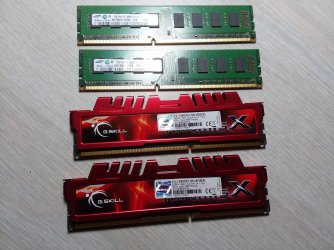
Watched all the videos, took it apart, replaced the memory and I got a beeping sound,
beeping in sets of 2, and it wouldn't boot??

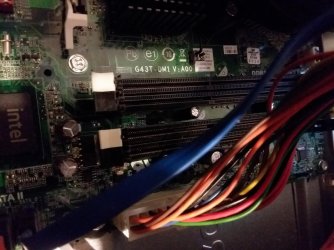
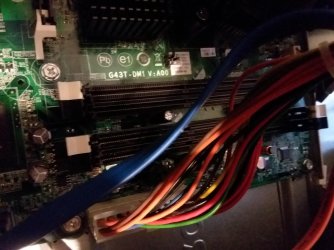
I tried both sets of memory slots, the slots that the original memory were in (white),
then I tried the black slots, same thing, beeping and the power light was blinking
a darker color than usual. Nothing came up on the monitor.

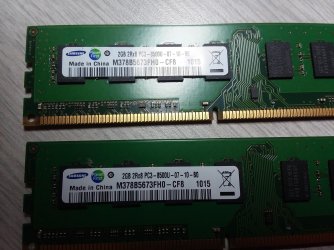
I took some pictures (attached), maybe they will help??

So, the PC is apart, I suppose I can go ahead with the SSD part but am not going to
do anything until I hear from someone.

It is working fine with the original memory put back into the original slots.

Thank you!
 

Attachments

  • 20190220_201248.jpg
    20190220_201248.jpg
    767.6 KB · Views: 2
  • 20190220_201300.jpg
    20190220_201300.jpg
    724.7 KB · Views: 0
  • 20190220_201350.jpg
    20190220_201350.jpg
    560.6 KB · Views: 0
  • 20190220_201355.jpg
    20190220_201355.jpg
    577 KB · Views: 0

My Computer My Computer

At a glance

Microsoft Windows 7 Home Premium 64-bitIntel(R) Core(TM)2 Duo CPU E7600 @ 3.06GHz8.00 GB(1) Intel(R) G45/G43 Express Chipset (2) Inte...
Computer type
PC/Desktop
Computer Manufacturer/Model Number
Dell Inspiron
OS
Microsoft Windows 7 Home Premium 64-bit
CPU
Intel(R) Core(TM)2 Duo CPU E7600 @ 3.06GHz
Motherboard
Dell Inc. 0K83V0
Memory
8.00 GB
Graphics Card(s)
(1) Intel(R) G45/G43 Express Chipset (2) Intel(R) G45/G43
Sound Card
(1) Realtek High Definition Audio (2) Intel(R) High Defini
Monitor(s) Displays
Phillips BDM4065UC
Hard Drives
Samsung SSD 860 EVO 500G
Browser
IE 10
Batting 1000!!

Well, I did say I had patience and persistence, so here goes...

I decided to go ahead with the SSD installation.

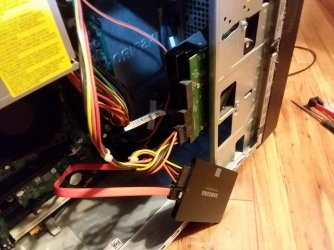
I hooked it up with a separate cable to a sata2 plug on the board and there was a
plug coming out of the main HD that I used as well. I did not mount it yet.
Figured I would get it cloned, then install it becaust the original HD is in the way
of where I want to mount it.

The computer booted, I started Macrium and followed the steps to clone my HD onto the SSD.
I tried twice, each time there was a video display error which turned the screen black then recovered.

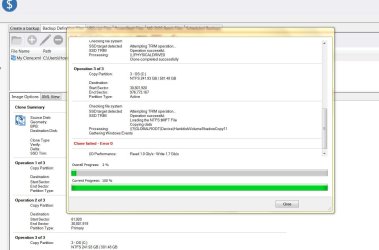
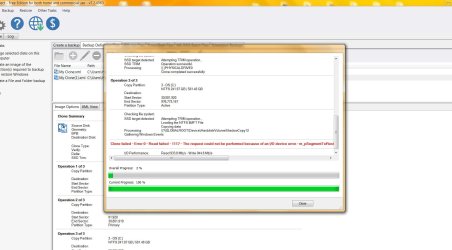
I thought it was going well?? but then got ... clone failed.

I took some screen shots, clone1 and clone2 respectively below.

Also took a picture so you can see how it is hooked up.
Is it hooked up incorrectly or will it work like this until I can remove the original HD?

When trying to clone it again do I start all over or is there a way to leave what is already copied on the ssd and keep going from there? It got up to 2% each time then failed.

Please help (-: Thank you!!
 

Attachments

  • clone1.JPG
    clone1.JPG
    103 KB · Views: 1
  • clone2.JPG
    clone2.JPG
    135.3 KB · Views: 2
  • 20190220_222713.jpg
    20190220_222713.jpg
    616.4 KB · Views: 0

My Computer My Computer

At a glance

Microsoft Windows 7 Home Premium 64-bitIntel(R) Core(TM)2 Duo CPU E7600 @ 3.06GHz8.00 GB(1) Intel(R) G45/G43 Express Chipset (2) Inte...
Computer type
PC/Desktop
Computer Manufacturer/Model Number
Dell Inspiron
OS
Microsoft Windows 7 Home Premium 64-bit
CPU
Intel(R) Core(TM)2 Duo CPU E7600 @ 3.06GHz
Motherboard
Dell Inc. 0K83V0
Memory
8.00 GB
Graphics Card(s)
(1) Intel(R) G45/G43 Express Chipset (2) Intel(R) G45/G43
Sound Card
(1) Realtek High Definition Audio (2) Intel(R) High Defini
Monitor(s) Displays
Phillips BDM4065UC
Hard Drives
Samsung SSD 860 EVO 500G
Browser
IE 10
Here is the log from the last try, it says something about an I/O Device Error:


Clone ID - 9ECBF2F4FF391AF2

--------------------------------------------------------------------------------
Dismounting drives


--------------------------------------------------------------------------------
Starting Clone - 20 February 2019 22:12


--------------------------------------------------------------------------------
Creating volume snapshots
Volume Snapshots Created
C:\ \\?\GLOBALROOT\Device\HarddiskVolumeShadowCopy12


--------------------------------------------------------------------------------
Source Disk: MBR Disk 1 [78033E78] - WDC WD64 00AAKS-75A7B 01.0 <596.17 GB>
Geometry: 77825\63\512
BPB: 255\63\512
Destination Disk: MBR Disk 2 [0008B653] - Samsung SSD 860 EVO RVT0 <465.76 GB>

Clone Type: Intelligent sector copy
Verify: Y
Delta: N
SSD Trim: Y


--------------------------------------------------------------------------------
Operation 1 of 3
Copy Partition: 1 - DellUtility
16-bit FAT 8.9 MB / 39.2 MB
Destination:
Start Sector: 63
End Sector: 80,324
Partition Type: Primary


--------------------------------------------------------------------------------
SSD target detected Attempting TRIM operation...
SSD TRIM Operation successful.
Processing: \\.\PHYSICALDRIVE0
Clone completed successfully


--------------------------------------------------------------------------------
Operation 2 of 3
Copy Partition: 2 - RECOVERY
NTFS 4.58 GB / 14.65 GB
Destination:
Start Sector: 81,920
End Sector: 30,801,919
Partition Type: Primary


--------------------------------------------------------------------------------
Checking file system
SSD target detected Attempting TRIM operation...
SSD TRIM Operation successful.
Processing: \\.\PHYSICALDRIVE0
Clone completed successfully


--------------------------------------------------------------------------------
Operation 3 of 3
Copy Partition: 3 - OS (C:)
NTFS 241.97 GB / 581.48 GB
Destination:
Start Sector: 30,801,920
End Sector: 976,773,167
Partition Type: Active


--------------------------------------------------------------------------------
Checking file system
SSD target detected Attempting TRIM operation...
Loading the NTFS $MFT File
Copying data
Processing: \\?\GLOBALROOT\Device\HarddiskVolumeShadowCopy12
Gathering Windows Events


--------------------------------------------------------------------------------
Clone failed - Error 0 - Read failed - 1117 - The request could not be performed because of an I/O device error. m_pSegmentToRestore->m_FileSystem.ReadFile failed WriteFilemSystemData failed pDataRun == NULL RemapMFTRecord failed


--------------------------------------------------------------------------------
I/O Performance: Read 933.8 Mb/s - Write 944.8 Mb/s

Macrium Reflect v7.2.4063 - 55-YQC8-FE7Q-MQZS-BVQ9-4BG6-AEDG8XH
 

My Computer My Computer

At a glance

Microsoft Windows 7 Home Premium 64-bitIntel(R) Core(TM)2 Duo CPU E7600 @ 3.06GHz8.00 GB(1) Intel(R) G45/G43 Express Chipset (2) Inte...
Computer type
PC/Desktop
Computer Manufacturer/Model Number
Dell Inspiron
OS
Microsoft Windows 7 Home Premium 64-bit
CPU
Intel(R) Core(TM)2 Duo CPU E7600 @ 3.06GHz
Motherboard
Dell Inc. 0K83V0
Memory
8.00 GB
Graphics Card(s)
(1) Intel(R) G45/G43 Express Chipset (2) Intel(R) G45/G43
Sound Card
(1) Realtek High Definition Audio (2) Intel(R) High Defini
Monitor(s) Displays
Phillips BDM4065UC
Hard Drives
Samsung SSD 860 EVO 500G
Browser
IE 10
Lets do the clone fist as it was partially successful.

I think that the clone failed because C: partition on the HDD is bigger than the size available on the SSD. That can be fixed by changing the partition size on the target disk (SSD)
Download the Macrium Reflect user guide. Macrium Reflect v7 User Guide

On page 176 - 177 it shows how to resize the C: partition. Select Maximum size.
 

My Computers My Computers

  • At a glance

    Windows 7 HP 64i5 6600K - 800MHz to 4200MHz4+4G GSkill DDR4 3000IG - Intel 530
    Computer type
    PC/Desktop
    Computer Manufacturer/Model Number
    custom build
    OS
    Windows 7 HP 64
    CPU
    i5 6600K - 800MHz to 4200MHz
    Motherboard
    GA-Z170-HD3P
    Memory
    4+4G GSkill DDR4 3000
    Graphics Card(s)
    IG - Intel 530
    Monitor(s) Displays
    Samsung 226BW
    Screen Resolution
    1680x1050
    Hard Drives
    (1) -1 SM951 – 128GB M.2 AHCI PCIe SSD drive for Windows 7 and Lubuntu
    (2) -1 WD SATA 3 - 1T for Data
    (3) -1 WD SATA 3 - 1T for backup
    PSU
    Thermaltake 450W TR2 gold
    Keyboard
    Old and good Chicony mechanical keyboard
    Mouse
    Logitech mX performance - 9 buttons (had to disable some)
    Internet Speed
    500Mb/s
    Browser
    Firefox 64
    Other Info
    TinyWall firewall
  • At a glance

    Windows 7 Proi7-4500U 800MHz to 3.0GHz(4+4)G DDR3 1600IG intel 4400 + NVIDIA GeForce GT 745M
    Computer type
    Laptop
    System Manufacturer/Model Number
    Asus Q550LF
    OS
    Windows 7 Pro
    CPU
    i7-4500U 800MHz to 3.0GHz
    Motherboard
    Asus Q550LF
    Memory
    (4+4)G DDR3 1600
    Graphics Card(s)
    IG intel 4400 + NVIDIA GeForce GT 745M
    Sound Card
    Realtek
    Monitor(s) Displays
    LG Display LP156WF4-SPH1
    Screen Resolution
    1920 x 1080
    Hard Drives
    BX500 120G SSD for Windows and programs +
    1T HDD for data
    Internet Speed
    500 Mb/s
    Browser
    Firefox
    Other Info
    TinyWall firewall
I'm checking the RAM.
Dell computers are fussy about ram. The issue is LOW Density INTEL compatible Ram.

Is your Dell a Optiplex 780?
Desktop, mini tower, Small Form Factor or Ultra Small Form Factor?
 

My Computers My Computers

  • At a glance

    Windows 7 HP 64i5 6600K - 800MHz to 4200MHz4+4G GSkill DDR4 3000IG - Intel 530
    Computer type
    PC/Desktop
    Computer Manufacturer/Model Number
    custom build
    OS
    Windows 7 HP 64
    CPU
    i5 6600K - 800MHz to 4200MHz
    Motherboard
    GA-Z170-HD3P
    Memory
    4+4G GSkill DDR4 3000
    Graphics Card(s)
    IG - Intel 530
    Monitor(s) Displays
    Samsung 226BW
    Screen Resolution
    1680x1050
    Hard Drives
    (1) -1 SM951 – 128GB M.2 AHCI PCIe SSD drive for Windows 7 and Lubuntu
    (2) -1 WD SATA 3 - 1T for Data
    (3) -1 WD SATA 3 - 1T for backup
    PSU
    Thermaltake 450W TR2 gold
    Keyboard
    Old and good Chicony mechanical keyboard
    Mouse
    Logitech mX performance - 9 buttons (had to disable some)
    Internet Speed
    500Mb/s
    Browser
    Firefox 64
    Other Info
    TinyWall firewall
  • At a glance

    Windows 7 Proi7-4500U 800MHz to 3.0GHz(4+4)G DDR3 1600IG intel 4400 + NVIDIA GeForce GT 745M
    Computer type
    Laptop
    System Manufacturer/Model Number
    Asus Q550LF
    OS
    Windows 7 Pro
    CPU
    i7-4500U 800MHz to 3.0GHz
    Motherboard
    Asus Q550LF
    Memory
    (4+4)G DDR3 1600
    Graphics Card(s)
    IG intel 4400 + NVIDIA GeForce GT 745M
    Sound Card
    Realtek
    Monitor(s) Displays
    LG Display LP156WF4-SPH1
    Screen Resolution
    1920 x 1080
    Hard Drives
    BX500 120G SSD for Windows and programs +
    1T HDD for data
    Internet Speed
    500 Mb/s
    Browser
    Firefox
    Other Info
    TinyWall firewall
Hi, It is a Dell Inspiron 560

Downloading the Macrium User Guide Now.

Thanks!
 

My Computer My Computer

At a glance

Microsoft Windows 7 Home Premium 64-bitIntel(R) Core(TM)2 Duo CPU E7600 @ 3.06GHz8.00 GB(1) Intel(R) G45/G43 Express Chipset (2) Inte...
Computer type
PC/Desktop
Computer Manufacturer/Model Number
Dell Inspiron
OS
Microsoft Windows 7 Home Premium 64-bit
CPU
Intel(R) Core(TM)2 Duo CPU E7600 @ 3.06GHz
Motherboard
Dell Inc. 0K83V0
Memory
8.00 GB
Graphics Card(s)
(1) Intel(R) G45/G43 Express Chipset (2) Intel(R) G45/G43
Sound Card
(1) Realtek High Definition Audio (2) Intel(R) High Defini
Monitor(s) Displays
Phillips BDM4065UC
Hard Drives
Samsung SSD 860 EVO 500G
Browser
IE 10
The problem is on Dell MB / BIOS. Each memory stick is limited to 2G, so you can't use 2x4G.
Memory compatibility with Inspiron 560

What you can do before you return the 2x4G is to fist update your BIOS and then try again the 2x4G.
Your BIOS is A02 and last is A06.
It's an executable file. Disable your Antivirus. Don't shutdown the computer till is asked to.
I560-A06 BIOS
 

My Computers My Computers

  • At a glance

    Windows 7 HP 64i5 6600K - 800MHz to 4200MHz4+4G GSkill DDR4 3000IG - Intel 530
    Computer type
    PC/Desktop
    Computer Manufacturer/Model Number
    custom build
    OS
    Windows 7 HP 64
    CPU
    i5 6600K - 800MHz to 4200MHz
    Motherboard
    GA-Z170-HD3P
    Memory
    4+4G GSkill DDR4 3000
    Graphics Card(s)
    IG - Intel 530
    Monitor(s) Displays
    Samsung 226BW
    Screen Resolution
    1680x1050
    Hard Drives
    (1) -1 SM951 – 128GB M.2 AHCI PCIe SSD drive for Windows 7 and Lubuntu
    (2) -1 WD SATA 3 - 1T for Data
    (3) -1 WD SATA 3 - 1T for backup
    PSU
    Thermaltake 450W TR2 gold
    Keyboard
    Old and good Chicony mechanical keyboard
    Mouse
    Logitech mX performance - 9 buttons (had to disable some)
    Internet Speed
    500Mb/s
    Browser
    Firefox 64
    Other Info
    TinyWall firewall
  • At a glance

    Windows 7 Proi7-4500U 800MHz to 3.0GHz(4+4)G DDR3 1600IG intel 4400 + NVIDIA GeForce GT 745M
    Computer type
    Laptop
    System Manufacturer/Model Number
    Asus Q550LF
    OS
    Windows 7 Pro
    CPU
    i7-4500U 800MHz to 3.0GHz
    Motherboard
    Asus Q550LF
    Memory
    (4+4)G DDR3 1600
    Graphics Card(s)
    IG intel 4400 + NVIDIA GeForce GT 745M
    Sound Card
    Realtek
    Monitor(s) Displays
    LG Display LP156WF4-SPH1
    Screen Resolution
    1920 x 1080
    Hard Drives
    BX500 120G SSD for Windows and programs +
    1T HDD for data
    Internet Speed
    500 Mb/s
    Browser
    Firefox
    Other Info
    TinyWall firewall
Thank you. I am still having issues with Macruim which I will figure out.

I am clicking on Maximum Size but I am not seeing the numbers change.
Not sure what is going on... I've tried to clone the disk several times today and keep getting the same error.

I need to leave for some appointments, will get back to it in a few hours.

If the bios cannot be changed to use 4G memory sticks, can I add 2 additional 2g's? There are
2 more empty slots.

Thanks again!
 

My Computer My Computer

At a glance

Microsoft Windows 7 Home Premium 64-bitIntel(R) Core(TM)2 Duo CPU E7600 @ 3.06GHz8.00 GB(1) Intel(R) G45/G43 Express Chipset (2) Inte...
Computer type
PC/Desktop
Computer Manufacturer/Model Number
Dell Inspiron
OS
Microsoft Windows 7 Home Premium 64-bit
CPU
Intel(R) Core(TM)2 Duo CPU E7600 @ 3.06GHz
Motherboard
Dell Inc. 0K83V0
Memory
8.00 GB
Graphics Card(s)
(1) Intel(R) G45/G43 Express Chipset (2) Intel(R) G45/G43
Sound Card
(1) Realtek High Definition Audio (2) Intel(R) High Defini
Monitor(s) Displays
Phillips BDM4065UC
Hard Drives
Samsung SSD 860 EVO 500G
Browser
IE 10

My Computers My Computers

  • At a glance

    Windows 7 HP 64i5 6600K - 800MHz to 4200MHz4+4G GSkill DDR4 3000IG - Intel 530
    Computer type
    PC/Desktop
    Computer Manufacturer/Model Number
    custom build
    OS
    Windows 7 HP 64
    CPU
    i5 6600K - 800MHz to 4200MHz
    Motherboard
    GA-Z170-HD3P
    Memory
    4+4G GSkill DDR4 3000
    Graphics Card(s)
    IG - Intel 530
    Monitor(s) Displays
    Samsung 226BW
    Screen Resolution
    1680x1050
    Hard Drives
    (1) -1 SM951 – 128GB M.2 AHCI PCIe SSD drive for Windows 7 and Lubuntu
    (2) -1 WD SATA 3 - 1T for Data
    (3) -1 WD SATA 3 - 1T for backup
    PSU
    Thermaltake 450W TR2 gold
    Keyboard
    Old and good Chicony mechanical keyboard
    Mouse
    Logitech mX performance - 9 buttons (had to disable some)
    Internet Speed
    500Mb/s
    Browser
    Firefox 64
    Other Info
    TinyWall firewall
  • At a glance

    Windows 7 Proi7-4500U 800MHz to 3.0GHz(4+4)G DDR3 1600IG intel 4400 + NVIDIA GeForce GT 745M
    Computer type
    Laptop
    System Manufacturer/Model Number
    Asus Q550LF
    OS
    Windows 7 Pro
    CPU
    i7-4500U 800MHz to 3.0GHz
    Motherboard
    Asus Q550LF
    Memory
    (4+4)G DDR3 1600
    Graphics Card(s)
    IG intel 4400 + NVIDIA GeForce GT 745M
    Sound Card
    Realtek
    Monitor(s) Displays
    LG Display LP156WF4-SPH1
    Screen Resolution
    1920 x 1080
    Hard Drives
    BX500 120G SSD for Windows and programs +
    1T HDD for data
    Internet Speed
    500 Mb/s
    Browser
    Firefox
    Other Info
    TinyWall firewall
Thank you soooo much!!

I have the SSD in, cloned and mounted, took out the old HD.

I have never seen this computer run so fast!!
It starts up in no time!!

I did some speed tests and am amazed by the results:

TEST_DATE DOWNLOAD_MEGABITS UPLOAD_MEGABITS SERVER_NAME
2/22/2019 554.35 37.4 Phoenix, AZ
2/22/2019 509.48 37.7 Phoenix, AZ
2/22/2019 508.9 36.81 Phoenix, AZ

My speeds weren't even close to this before the SSD!

I couldn't figure out Macrium, tried several times, then used the Samsung software they
recommended with the SSD, Samsung Magician I think?

I did update the BIOS but couldn't get the new memory to work.
I ordered 2 of the 2MB sticks you recommended, will return the other ones.

Should I try and do a windows update? It is working so well, I don't want to mess anything up!! (-:

I also need to figure out what to do with the H Drive for backup, I will delete all the images and make a new one, then set it to overwrite so it doesn't fill up again.

Thank you again Megahertz07 and also thanks to Johnhoh!
I really appreciate your help!!


Please leave this thread open for a few more days while I wait for the new memory,
then I will mark it as solved.
 

My Computer My Computer

At a glance

Microsoft Windows 7 Home Premium 64-bitIntel(R) Core(TM)2 Duo CPU E7600 @ 3.06GHz8.00 GB(1) Intel(R) G45/G43 Express Chipset (2) Inte...
Computer type
PC/Desktop
Computer Manufacturer/Model Number
Dell Inspiron
OS
Microsoft Windows 7 Home Premium 64-bit
CPU
Intel(R) Core(TM)2 Duo CPU E7600 @ 3.06GHz
Motherboard
Dell Inc. 0K83V0
Memory
8.00 GB
Graphics Card(s)
(1) Intel(R) G45/G43 Express Chipset (2) Intel(R) G45/G43
Sound Card
(1) Realtek High Definition Audio (2) Intel(R) High Defini
Monitor(s) Displays
Phillips BDM4065UC
Hard Drives
Samsung SSD 860 EVO 500G
Browser
IE 10
Good. Now that you have a fast computer (and it will be faster with more memory) it's time to do some ajustments.
Did you find out if you have Win 7 SP1? Open Control Panel\All Control Panel Items\System and you find it on the top under Windows edition.
Did you install IE 11?
You should install the important updates (97) that was on your post #9. Don't install the optional updates.

SSD uses a feature call Trim but as you cloned from a HDD it may be off.
Type this cmd
fsutil behavior query DisableDeleteNotify

It will give you one of two results, either a 0 or a 1. A zero indicates that TRIM is enabled correctly, a one means that it is not. If you have a TRIM-compatible SSD, but find that Windows 7 hasn't enabled the command, you can easily do so by running this command:

fsutil behavior set DisableDeleteNotify 0

After installing the updates, clean the H: disk and with Macrium generate a disk image from your SSD and store it on H:
This way you will have a backup from all your files, including the System files.
 

My Computers My Computers

  • At a glance

    Windows 7 HP 64i5 6600K - 800MHz to 4200MHz4+4G GSkill DDR4 3000IG - Intel 530
    Computer type
    PC/Desktop
    Computer Manufacturer/Model Number
    custom build
    OS
    Windows 7 HP 64
    CPU
    i5 6600K - 800MHz to 4200MHz
    Motherboard
    GA-Z170-HD3P
    Memory
    4+4G GSkill DDR4 3000
    Graphics Card(s)
    IG - Intel 530
    Monitor(s) Displays
    Samsung 226BW
    Screen Resolution
    1680x1050
    Hard Drives
    (1) -1 SM951 – 128GB M.2 AHCI PCIe SSD drive for Windows 7 and Lubuntu
    (2) -1 WD SATA 3 - 1T for Data
    (3) -1 WD SATA 3 - 1T for backup
    PSU
    Thermaltake 450W TR2 gold
    Keyboard
    Old and good Chicony mechanical keyboard
    Mouse
    Logitech mX performance - 9 buttons (had to disable some)
    Internet Speed
    500Mb/s
    Browser
    Firefox 64
    Other Info
    TinyWall firewall
  • At a glance

    Windows 7 Proi7-4500U 800MHz to 3.0GHz(4+4)G DDR3 1600IG intel 4400 + NVIDIA GeForce GT 745M
    Computer type
    Laptop
    System Manufacturer/Model Number
    Asus Q550LF
    OS
    Windows 7 Pro
    CPU
    i7-4500U 800MHz to 3.0GHz
    Motherboard
    Asus Q550LF
    Memory
    (4+4)G DDR3 1600
    Graphics Card(s)
    IG intel 4400 + NVIDIA GeForce GT 745M
    Sound Card
    Realtek
    Monitor(s) Displays
    LG Display LP156WF4-SPH1
    Screen Resolution
    1920 x 1080
    Hard Drives
    BX500 120G SSD for Windows and programs +
    1T HDD for data
    Internet Speed
    500 Mb/s
    Browser
    Firefox
    Other Info
    TinyWall firewall
It does say Service Pack 1 under system and I did install IE 11
although I have been using chrome still.

Is there a way to get my bookmarks and passwords from chrome into IE11?

Ran the CMD Command, got DisableDeteteNotify = 0

Did the windows update and installed the important ones.

I will take care of the H Disk next.

Should I run a Disk Check again to make sure everything is good or does that not apply to a ssd?
I read that I will no longer have to defragment, that's a great thing!

This computer is working better than ever!!


Thanks again!!
 

My Computer My Computer

At a glance

Microsoft Windows 7 Home Premium 64-bitIntel(R) Core(TM)2 Duo CPU E7600 @ 3.06GHz8.00 GB(1) Intel(R) G45/G43 Express Chipset (2) Inte...
Computer type
PC/Desktop
Computer Manufacturer/Model Number
Dell Inspiron
OS
Microsoft Windows 7 Home Premium 64-bit
CPU
Intel(R) Core(TM)2 Duo CPU E7600 @ 3.06GHz
Motherboard
Dell Inc. 0K83V0
Memory
8.00 GB
Graphics Card(s)
(1) Intel(R) G45/G43 Express Chipset (2) Intel(R) G45/G43
Sound Card
(1) Realtek High Definition Audio (2) Intel(R) High Defini
Monitor(s) Displays
Phillips BDM4065UC
Hard Drives
Samsung SSD 860 EVO 500G
Browser
IE 10
In my opinion, SSDs has been the biggest improvement since multi core CPUs.
As a SSD doesn't have moving parts, don't manually defrag it as it can decrease the SSD life.

Run chkdsk c: /f just to make sure everything is good.

After the check disk reboot, run System File Check. Open a CMD window as admin and type:
sfc /scannow
 

My Computers My Computers

  • At a glance

    Windows 7 HP 64i5 6600K - 800MHz to 4200MHz4+4G GSkill DDR4 3000IG - Intel 530
    Computer type
    PC/Desktop
    Computer Manufacturer/Model Number
    custom build
    OS
    Windows 7 HP 64
    CPU
    i5 6600K - 800MHz to 4200MHz
    Motherboard
    GA-Z170-HD3P
    Memory
    4+4G GSkill DDR4 3000
    Graphics Card(s)
    IG - Intel 530
    Monitor(s) Displays
    Samsung 226BW
    Screen Resolution
    1680x1050
    Hard Drives
    (1) -1 SM951 – 128GB M.2 AHCI PCIe SSD drive for Windows 7 and Lubuntu
    (2) -1 WD SATA 3 - 1T for Data
    (3) -1 WD SATA 3 - 1T for backup
    PSU
    Thermaltake 450W TR2 gold
    Keyboard
    Old and good Chicony mechanical keyboard
    Mouse
    Logitech mX performance - 9 buttons (had to disable some)
    Internet Speed
    500Mb/s
    Browser
    Firefox 64
    Other Info
    TinyWall firewall
  • At a glance

    Windows 7 Proi7-4500U 800MHz to 3.0GHz(4+4)G DDR3 1600IG intel 4400 + NVIDIA GeForce GT 745M
    Computer type
    Laptop
    System Manufacturer/Model Number
    Asus Q550LF
    OS
    Windows 7 Pro
    CPU
    i7-4500U 800MHz to 3.0GHz
    Motherboard
    Asus Q550LF
    Memory
    (4+4)G DDR3 1600
    Graphics Card(s)
    IG intel 4400 + NVIDIA GeForce GT 745M
    Sound Card
    Realtek
    Monitor(s) Displays
    LG Display LP156WF4-SPH1
    Screen Resolution
    1920 x 1080
    Hard Drives
    BX500 120G SSD for Windows and programs +
    1T HDD for data
    Internet Speed
    500 Mb/s
    Browser
    Firefox
    Other Info
    TinyWall firewall
Back
Top